Įvadas
This manual provides detailed instructions for the installation, operation, and maintenance of your DeLOCK USB Type-C to 2.5 Gigabit LAN Adapter (Model 66645). Please read this manual thoroughly before using the device to ensure proper functionality and to prevent damage.
Produktas baigtasview
The DeLOCK USB Type-C to 2.5 Gigabit LAN Adapter expands your PC or notebook with a network interface via a USB Type-C port. It is also compatible with Thunderbolt 3 interfaces. This adapter supports NBASE-T technology, allowing data transfer speeds of 1 Gbps and 2.5 Gbps over standard network cables, automatically negotiating the best possible transfer rate.

Image: DeLOCK 2.5 Gigabit LAN Adapter in its retail packaging.
The adapter features a SuperSpeed USB (USB 3.2 Gen 1) Type-C male connector for connecting to your host device and a 2.5 Gigabit LAN RJ45 female port for network cable connection. The compact design ensures portability and ease of use.
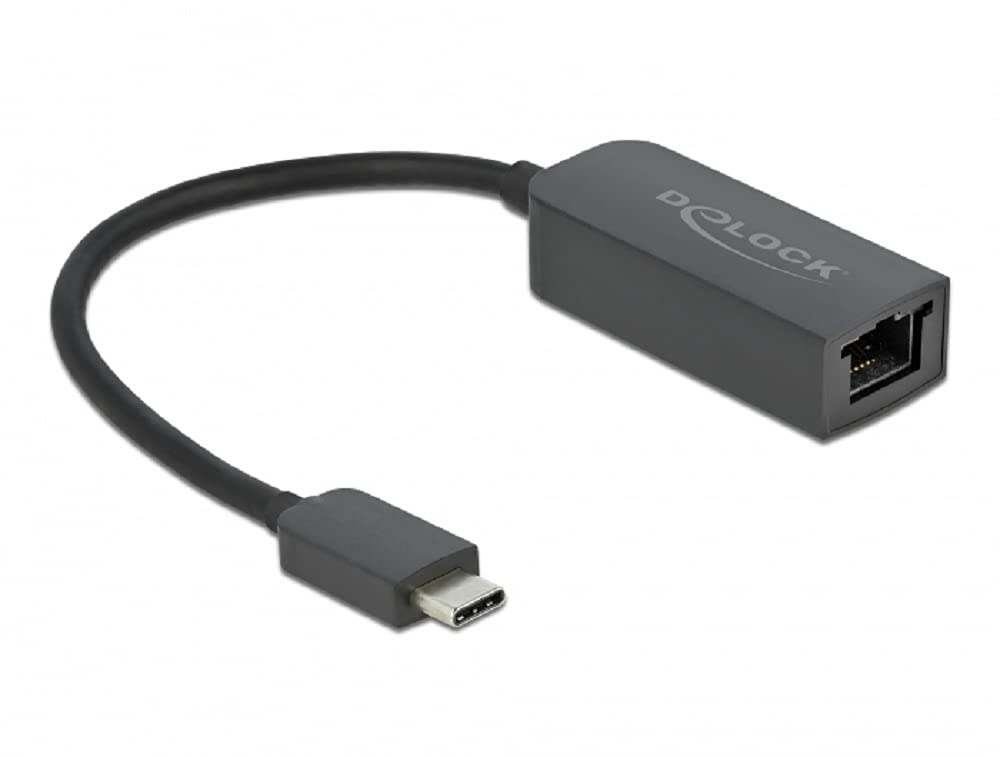
Image: Diagram illustrating the USB Type-C male connector, the 16 cm cable, and the 2.5 Gigabit LAN RJ45 female jack of the DeLOCK adapter.
Sąrankos instrukcijos
- Prijungti prie pagrindinio įrenginio: Plug the USB Type-C male connector of the DeLOCK adapter into an available USB Type-C port on your PC or notebook. Ensure the port supports USB 3.2 Gen 1 or Thunderbolt 3 for optimal performance.
- Prisijunkite prie tinklo: Connect a standard RJ45 Ethernet network cable from your router, modem, or network switch to the 2.5 Gigabit LAN RJ45 female port on the DeLOCK adapter.
- Tvarkyklės diegimas: In most modern operating systems (Windows 10/11, macOS, Linux), the adapter is plug-and-play and drivers will install automatically. If prompted, allow the system to install necessary drivers. If automatic installation fails, visit the official Delock website for driver downloads specific to model 66645.
- Patikrinkite ryšį: Once connected, check your operating system's network settings to confirm that the new network adapter is recognized and has established a connection.
Adapterio valdymas
After successful setup, the DeLOCK adapter functions as a standard wired network interface. Your operating system will automatically detect and utilize it for internet and local network access. The NBASE-T technology will automatically negotiate the highest possible speed (up to 2.5 Gbps) supported by your network infrastructure and cable quality.
- Ensure your network cable is securely connected to both the adapter and your network device.
- For optimal performance, use Cat5e or higher-rated Ethernet cables.
- Monitor your system's network activity indicators to confirm data transmission.
Priežiūra
The DeLOCK USB Type-C to 2.5 Gigabit LAN Adapter requires minimal maintenance.
- Valymas: Adapterio išorę valykite minkštu, sausu skudurėliu. Venkite naudoti skystus valiklius ar tirpiklius.
- Saugykla: Kai nenaudojate, laikykite adapterį vėsioje, sausoje vietoje, apsaugotoje nuo tiesioginių saulės spindulių ir ekstremalių temperatūrų.
- Tvarkymas: Avoid bending or twisting the cable excessively, and do not apply undue force when connecting or disconnecting the adapter.
Trikčių šalinimas
- Nėra tinklo ryšio:
- Ensure the adapter is firmly plugged into the USB Type-C port.
- Verify the Ethernet cable is securely connected to both the adapter and the network device.
- Paleiskite kompiuterį ir tinklo įrangą (maršrutizatorių / modemą) iš naujo.
- Check your operating system's network settings to ensure the adapter is enabled.
- Try a different USB Type-C port on your device.
- Išbandykite su kitu Ethernet kabeliu.
- Lėtas ryšio greitis:
- Ensure your network infrastructure (router, switch, cables) supports 2.5 Gigabit Ethernet.
- Use Cat5e or Cat6 Ethernet cables for optimal performance.
- Update the adapter's drivers from the official Delock websvetainę, jei yra.
- Check for other network activity or bandwidth-intensive applications running on your device.
- Adapteris neatpažintas:
- Ensure your USB Type-C port is functional.
- Try connecting the adapter to another computer to rule out a device-specific issue.
- Manually install drivers from the Delock websvetainėje, jei automatinis diegimas nepavyko.
- Check your device manager (Windows) or system information (macOS/Linux) for any unrecognized devices or driver conflicts.
Specifikacijos
| Modelio numeris: | 66645 |
| Jungtys: | 1 x SuperSpeed USB (USB 3.2 Gen 1) USB Type-C male 1 x 2.5 Gigabit LAN RJ45 female |
| Lustų rinkinys: | Realtek RTL8156 |
| Duomenų perdavimo spartos: | Ethernet up to 10 Mbps (half/full duplex) Fast Ethernet up to 100 Mbps (half/full duplex) Gigabit Ethernet up to 1000 Mbps (half/full duplex) NBASE-T up to 2.5 Gbps (half/full duplex) |
| USB specifikacija: | SuperSpeed USB - 5Gbps |
| Savybės: | Palaiko automatinį MDI-X (standartinio arba kryžminio tinklo kabelio automatinį aptikimą) NBASE-T technology for 1Gbps and 2.5Gbps speeds |
| Aparatinės įrangos sąsaja: | Ethernet, Thunderbolt, USB, C tipo USB |
| Suderinami įrenginiai: | Stalinis kompiuteris, nešiojamas kompiuteris |
| Spalva: | Juoda |
| Gaminio matmenys: | 5.51 x 4.72 x 1.18 colio |
| Prekės svoris: | 1.76 uncijos (50 gramų) |
Garantija ir palaikymas
For warranty information and technical support, please refer to the documentation included with your purchase or visit the official Delock website. You can typically find support resources, FAQs, and contact information for customer service there.


