Produktas baigtasview
The Sena Spider ST1 is a Mesh-equipped communication headset designed for motorcycle riders. It features a glove-friendly jog-dial control and operates exclusively on Sena's Mesh intercom platform. This system enhances rider-to-rider communication with robust reliability, offering both Multi-Channel Open Mesh and Group Mesh modes. It includes upgraded HD Speakers for improved audio quality and is compatible with the Sena Motorcycle App.

Vaizdas: priekis view of the Sena Spider ST1 communication system, showing the main unit with the jog dial and LED indicator.
Pakuotės turinys
The Sena Spider ST1 package typically includes the following components:
- Communication Device (Sena Spider ST1 unit)
- USB įkrovimo laidas
- Speaker Set (HD Speakers)
- Microphone (Boom or Wired, depending on kit)
- Mounting Hardware (Clamp Kit, Glued Surface Mounting Plate)
- Garsiakalbių ir mikrofonų pagalvėlės su lipdukais
Sąranka ir diegimas
1. Įrenginio įkrovimas
Before first use, fully charge the Sena Spider ST1. Connect the provided USB charging cable to the device's charging port and a USB power source. The LED indicator will show charging status.
- Įkrovimo laikas: Apytiksliai 2.5 valandos pilnai įkrauti.
- Baterijos veikimo laikas: Iki 12 valandų pokalbio.
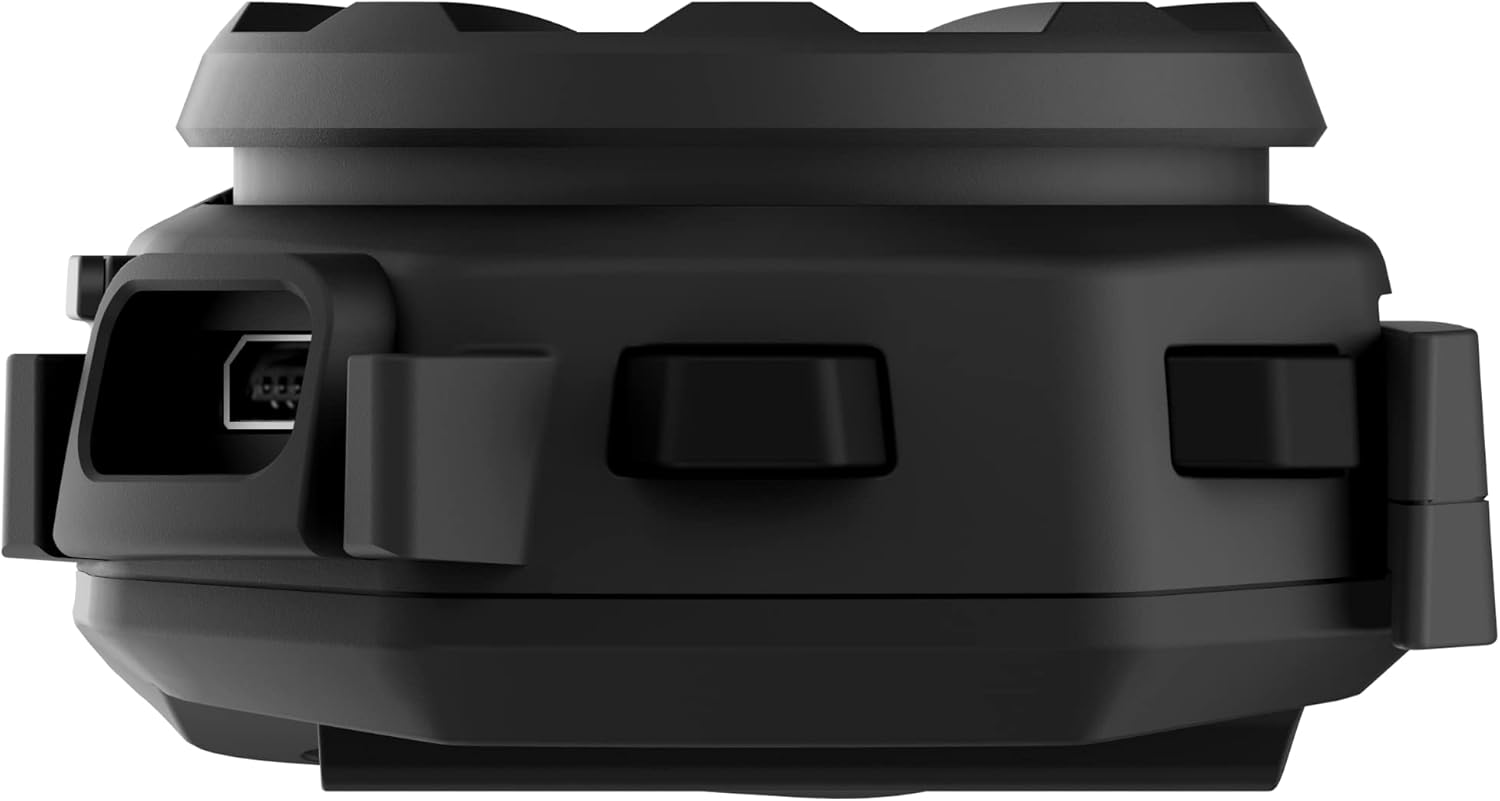
Vaizdas: Šoninė view of the Sena Spider ST1 unit, highlighting the USB charging port for power connection.
2. Mounting on Helmet
The Spider ST1 can be mounted using either the clamp kit or the glued surface mounting plate. Ensure the mounting location allows for easy access to the jog dial and does not obstruct helmet functionality.
- Pasirinkite vietą: Select a flat surface on the left side of your helmet.
- Pritvirtinkite laikiklį: Securely attach the chosen mounting accessory (clamp or adhesive plate) to the helmet.
- Įdiekite garsiakalbius: Place the HD Speakers inside the helmet's ear pockets using the Velcro pads. Ensure they are positioned directly over your ears for optimal audio quality.
- Mikrofono įrengimas: Attach the microphone to the helmet, positioning it close to your mouth but not directly in front of it to avoid wind noise.
- Prijunkite pagrindinį įrenginį: Slide the Spider ST1 main unit onto the mounted accessory until it clicks securely into place.

Image: The Sena Spider ST1 communication system securely mounted on the side of a motorcycle helmet, with its LED indicator illuminated.
Naudojimo instrukcijos
Maitinimo įjungimas/išjungimas
- Maitinimas: Paspauskite ir 1 sekundę palaikykite Jog Dial.
- Išjungti: Paspauskite ir palaikykite Jog Dial 5 sekundes.
Garsumo valdymas
- Padidinti garsumą: Pasukite valdymo ratuką pagal laikrodžio rodyklę.
- Sumažinti garsumą: Pasukite valdymo ratuką prieš laikrodžio rodyklę.
Tinklo domofonas
The Spider ST1 utilizes Sena's Mesh Intercom technology for seamless group communication.
- Tinklinio domofono įjungimas / išjungimas: Press the Mesh Intercom Button (located on the side of the unit).
- Daugiakanalis atviras tinklas: Allows communication with a near-limitless number of riders. Switch between 9 channels using the Sena Motorcycle App.
- Grupės tinklelis: Supports up to 24 participants in a private group. Create and manage groups via the Sena Motorcycle App.

Image: A screenshot displaying the user interface of the Sena Motorcycle App, showing options for Mesh Grouping and Channel selection.
Smartphone Connectivity (Bluetooth 5.1)
Connect your Spider ST1 to your smartphone for music, phone calls, and GPS navigation.
- Susiejimo režimas: With the unit off, press and hold the Jog Dial for 5 seconds until the LED flashes red and blue.
- Prisijunkite: On your smartphone, go to Bluetooth settings and select "Sena Spider ST1" from the list of available devices.
- Funkcijos:
- Muzikos grojimas/pristabdymas: Paspauskite Jog Dial.
- Kitas takelis: Rotate Jog Dial clockwise and hold for 1 second.
- Ankstesnis takelis: Rotate Jog Dial counter-clockwise and hold for 1 second.
- Atsiliepti / Baigti skambutį: Paspauskite Jog Dial.
- Balso asistentas („Siri“ / „Google“ asistentas): Paspauskite Jog Dial 3 sekundžių.
Priežiūra ir priežiūra
- Valymas: Nuvalykite įrenginį minkštu, damp audinys. Nenaudokite stiprių cheminių medžiagų ar abrazyvinių valiklių.
- Saugykla: Nenaudojamą prietaisą laikykite vėsioje, sausoje vietoje.
- Akumuliatoriaus priežiūra: For optimal battery life, avoid storing the device in extremely hot or cold conditions. Charge the battery at least once every six months if not used regularly.
- Atsparumas vandeniui: The device is water resistant, but not fully waterproof. Avoid submerging it in water.
Trikčių šalinimas
| Problema | Galima priežastis | Sprendimas |
|---|---|---|
| Įrenginys neįsijungia. | Senka baterija. | Visiškai įkraukite įrenginį. |
| Iš garsiakalbių nesklinda garsas. | Speakers not connected properly or volume too low. | Check speaker connections. Increase volume using the Jog Dial. |
| Cannot connect to Mesh Intercom. | Mesh Intercom is off or out of range. | Ensure Mesh Intercom is enabled. Move closer to other Mesh users. |
| „Bluetooth“ susiejimo problemos. | Device not in pairing mode or smartphone Bluetooth is off. | Put the Spider ST1 in pairing mode. Ensure smartphone Bluetooth is on and visible. Try restarting both devices. |
| Prasta mikrofono kokybė. | Microphone not positioned correctly or obstructed. | Adjust microphone position closer to your mouth. Ensure it is not blocked by helmet padding. |
Specifikacijos
| Funkcija | Detalė |
|---|---|
| Modelio pavadinimas | VORAS |
| Prekės modelio numeris | SPIDER-ST1-01 |
| Medžiaga | Guma |
| Spalva | Juoda |
| Prekės svoris | 60 gramų (2.12 uncijos) |
| Gaminio matmenys | 1.8 "D x 3.8" P x 1" A |
| Baterijos veikimo laikas | 12 valandos (pokalbių laikas) |
| Įkrovimo laikas | 2.5 valandų |
| Bluetooth versija | 5.1 |
| Belaidžio ryšio technologija | „Bluetooth“, tinklinis domofonas |
| Maximum Mesh Range | Iki 8 km (5 mylios) |
| Didžiausia garsiakalbio išėjimo galia | 100 vatų |
| Dažnio atsakas | 10000 Hz |
| Atsparumo vandeniui lygis | Atsparus vandeniui |
| Įtraukti komponentai | Communication Device, Cable |
Garantija ir palaikymas
Informacija apie garantiją
The Sena Spider ST1 comes with a 2 metų garantija nuo įsigijimo datos. Ši garantija taikoma medžiagų ir gamybos defektams įprasto naudojimo sąlygomis. Išsaugokite pirkimo įrodymą, jei norėtumėte pateikti pretenzijas dėl garantijos.
Pagalba klientams
For further assistance, technical support, or warranty inquiries, please refer to the official Sena resources:
- Oficialus naudotojo vadovas (PDF): Atsisiųskite PDF vadovą
- Sena Official Store: Visit Sena Store on Amazon
- For the most up-to-date support information, visit the official Sena websvetainę.


