1. Įvadas
The Blaupunkt BP 4.0 FHD Dash Cam is a compact and robust in-car video recorder designed to capture your journeys in Full HD. Featuring a 140-degree wide-angle lens, an integrated microphone, and an interior camera, it provides comprehensive coverage for your vehicle. This manual provides essential information for the proper installation, operation, and maintenance of your device.
2. Pakuotės turinys
Patikrinkite pakuotės turinį, kad įsitikintumėte, jog yra visi reikalingi daiktai:
- Blaupunkt BP 4.0 FHD Dash Cam (Video Recorder)
- Vidinis objektyvas
- Mount (Suction Cup Type)
- Maitinimo laidas (automobilinis įkroviklis)
- Vartotojo vadovas

Image 2.1: Contents of the Blaupunkt BP 4.0 FHD Dash Cam package.

Image 2.2: The retail packaging for the Blaupunkt BP 4.0 FHD Dash Cam.
3. Produktas baigtasview
The BP 4.0 FHD Dash Cam features a main unit with a 2-inch display and a separate interior camera. It is designed for easy installation and discreet operation within your vehicle.
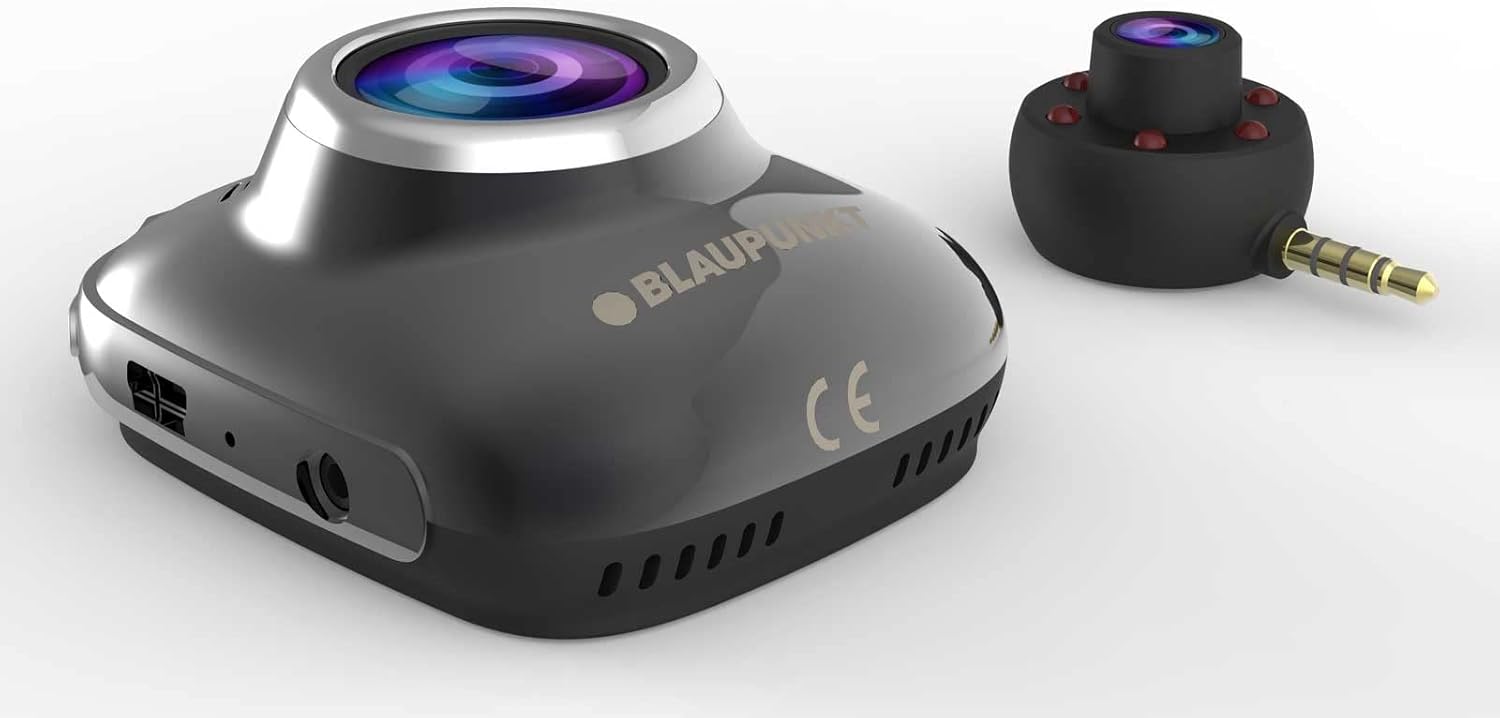
Image 3.1: Main unit and interior camera of the Blaupunkt BP 4.0 FHD Dash Cam.
Pagrindinės funkcijos:
- Dvigubas objektyvas: Records both front and interior views vienu metu.
- Platus kampas View: 140 laipsnių horizontalus laukas view for comprehensive road coverage.
- Integruotas mikrofonas: Captures in-cabin audio.
- 2 colių ekranas: Tiesioginiam naudojimui view, atkūrimas ir naršymas meniu.
- G jutiklis: Automatically locks video files upon impact.
- Ciklo įrašymas: Nuolat įrašinėja, perrašydamas seniausius files kai atminties kortelė pilna.
- Patvarus dizainas: Constructed with zinc alloy for robustness.

Image 3.2: Dimensions of the Blaupunkt BP 4.0 FHD Dash Cam.
4. Montavimas
Follow these steps for proper installation of your dash cam:
- Paruoškite montavimo vietą: Pasirinkite vietą ant priekinio stiklo, kuri neužstotų jūsų view of the road. Clean the area thoroughly to ensure good adhesion for the suction cup mount.
- Pritvirtinkite laikiklį: Secure the suction cup mount to the chosen spot on the windshield. Ensure it is firmly attached.
- Sumontuokite „Dash Cam“: Slide the main dash cam unit onto the mount until it clicks into place. Adjust the angle of the camera to ensure the front lens captures the road ahead clearly.
- Įdėkite „MicroSD“ kortelę: Insert a high-speed MicroSD card (not included) into the designated slot on the dash cam. Ensure it is inserted correctly until it locks.
- Connect Interior Camera: Plug the interior camera's 3.5mm jack into the auxiliary port on the main dash cam unit. Position the interior camera to capture the vehicle's cabin as desired.
- Prijunkite maitinimą: Plug the car charger cable into the dash cam's power input port and then into your vehicle's 12V power outlet (cigarette lighter socket). Route the cable neatly along the windshield and dashboard to avoid interference with driving.
- Įjunkite ir patikrinkite: Start your vehicle. The dash cam should power on automatically and begin recording. Check the display to confirm both front and interior camera views are visible and recording correctly.
5. Pagrindinė operacija
Understanding the basic functions of your dash cam will ensure optimal performance.
Maitinimo įjungimas/išjungimas:
- Automatinis: Vaizdo registratorius automatiškai įsijungs ir pradės įrašinėti, kai įjungsite automobilio degimą (ir į 12 V lizdą bus tiekiama energija).
- Rankinis: Press and hold the power button (usually marked with a power symbol) to manually turn the device on or off.
Įrašymo režimai:
- Ciklo įrašymas: Kamera vaizdo įrašą įrašo nepertraukiamai (pvz., 1, 3 arba 5 minučių segmentais). Kai atminties kortelė pilna, atrakinamas seniausias atrakintas vaizdo įrašas. files yra automatiškai perrašomi.
- G jutiklis (avarinis įrašymas): Staigaus smūgio ar susidūrimo atveju įmontuotas G jutiklis aptiks įvykį ir automatiškai užrakins dabartinį vaizdo įrašą. file, neleidžiant jo perrašyti ciklinio įrašymo metu.
Meniu naršymas:
Use the buttons located around the 2-inch display to navigate through the menu options. Common settings include video resolution, loop recording duration, G-Sensor sensitivity, date/time stamp, and format MicroSD card.
6. Priežiūra
Reguliarus valymas užtikrina jūsų vaizdo registratoriaus ilgaamžiškumą ir optimalų veikimą.
- Cleaning Lenses and Screen: Use a soft, lint-free cloth to gently wipe the camera lenses and the display screen. Avoid abrasive materials or chemical cleaners that could scratch or damage the surfaces.
- „MicroSD“ kortelės valdymas: Periodically format your MicroSD card (at least once a month) to prevent data corruption and ensure smooth recording. Back up any important video files prieš formatavimą.
- Temperatūros valdymas: Avoid exposing the dash cam to extreme temperatures for extended periods. If your car is parked in direct sunlight on a hot day, consider removing the dash cam to prevent overheating.
- Firmware atnaujinimai: Patikrinkite oficialią „Blaupunkt“ website for any available firmware updates. Keeping your dash cam's firmware up-to-date can improve performance and add new features.
7. Problemų sprendimas
If you encounter issues with your Blaupunkt BP 4.0 FHD Dash Cam, refer to the following common problems and solutions:
| Problema | Galima priežastis | Sprendimas |
|---|---|---|
| Vaizdo registratorius neįsijungia. | Nėra maitinimo šaltinio; sugedęs laidas; išsikrovusi baterija. | Check car charger connection and vehicle's 12V outlet. Try a different power source or cable. Ensure the internal battery is charged. |
| Įrašymas sustoja arba užstringa. | Lėta „MicroSD“ kortelė; pilna „MicroSD“ kortelė; kortelės klaida. | Use a high-speed (Class 10 or U1/U3) MicroSD card. Format the MicroSD card. Replace the MicroSD card if errors persist. |
| Poor video quality (especially at night). | Dirty lens; low light conditions; windshield glare. | Clean the camera lenses and windshield. Ensure no obstructions. Adjust exposure settings if available. Note that night vision performance can be limited. |
| Interior camera not working. | Loose connection; faulty interior camera. | Ensure the interior camera is securely plugged into the main unit's auxiliary port. If the issue persists, contact support. |
| Mygtukai nereaguoja. | Device frozen; software glitch. | Perform a soft reset by pressing the reset button (if available) or by holding the power button for 10-15 seconds. |
8. Specifikacijos
Detailed technical specifications for the Blaupunkt BP 4.0 FHD Dash Cam:
- Prekinis ženklas: BLAUPUNKT
- Modelio pavadinimas: BP 4.0 FHD
- Prekės modelio numeris: BP 4.0 FHD
- Spalva: Zinc Alloy / Black
- Ekrano dydis: 2 colių
- Laukas View: 140 laipsnių
- Vaizdo įrašymo skiriamoji geba: 1080p, 720p
- Ryšio technologija: Pagalbinis
- Montavimo tipas: Siurbimo taurelės kalnas
- Suderinami įrenginiai: Automobilis, Sunkvežimis
- Įtraukti komponentai: Cable, Video Recorder, User Manual, Interior Lens, Mount
- Gamintojas: BLAUPUNKT
- Data, kai pirmą kartą pasirodė Amazon.com.be: 6 m. birželio 2022 d
- Atsarginių dalių prieinamumas: Informacijos nėra
- Programinės įrangos atnaujinimai garantuojami iki: Informacijos nėra
9. Garantija ir palaikymas
For warranty information and customer support, please refer to the warranty card included in your product package or visit the official Blaupunkt websvetainėje. Konkrečios garantijos sąlygos gali skirtis priklausomai nuo regiono ir mažmenininko.