Įvadas
Thank you for choosing the Sony WF-1000XM4 Truly Wireless Noise Canceling Earbud Headphones. This manual provides essential information for setting up, operating, maintaining, and troubleshooting your device to ensure optimal performance and longevity. These earbuds feature industry-leading noise canceling, exceptional sound quality with the Integrated Processor V1, crystal-clear call quality, IPX4 water resistance, and extended battery life with wireless charging.
Kas yra dėžutėje
- Sony WF-1000XM4 ausinės
- Belaidžio įkrovimo dėklas
- Ausų antgaliai (įvairių dydžių)
- USB-C įkrovimo laidas
- Vartotojo vadovas (šis dokumentas)

Image: Sony WF-1000XM4 earbuds shown inside their charging case.
Produktas baigtasview
The WF-1000XM4 earbuds are designed for a comfortable and secure fit, featuring an ergonomic surface design. The compact charging case provides additional battery life and supports convenient wireless charging.

Vaizdas: Stambus planas view of the Sony WF-1000XM4 earbuds, highlighting their design and ear tips.
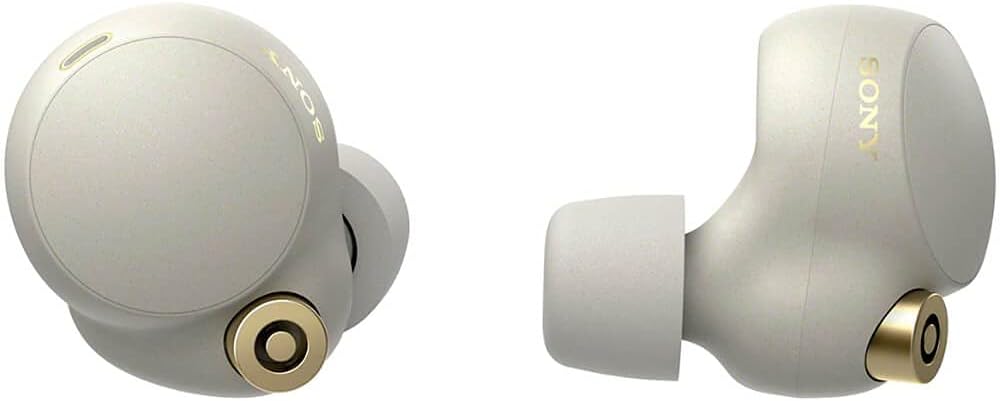
Paveikslėlis: Šoninis profesionalasfile of the Sony WF-1000XM4 earbuds, showing their angled design.
Sąranka
1. Ausinių ir dėklo įkrovimas
Before first use, fully charge the earbuds and the charging case. The charging case can be charged via the supplied USB-C cable or wirelessly using a Qi-compatible wireless charger.
- Įkrovimas laidiniu būdu: Connect the USB-C cable to the charging case and a USB power adapter. The indicator light on the case will show charging status.
- Belaidis įkrovimas: Padėkite įkrovimo dėklą ant su „Qi“ suderinamo belaidžio įkrovimo padėklo. Optimaliam įkrovimui įsitikinkite, kad dėklas yra padėklo centre.

Image: The Sony WF-1000XM4 charging case placed on a white wireless charging pad, indicating wireless charging capability.
2. „Bluetooth“ poravimas
To pair your WF-1000XM4 earbuds with a new device:
- Įkiškite abi ausines į ausis.
- Touch and hold the touch sensors on both earbuds for at least 5 seconds. You will hear a notification sound and the voice guidance saying "Bluetooth pairing" from both units.
- On your device (smartphone, tablet, etc.), go to Bluetooth settings and select "WF-1000XM4" from the list of available devices.
- Confirm pairing on your device if prompted.
Video: Instructions on how to connect Sony WF-1000XM4 headphones to a device.
3. „Sony Headphones Connect“ programėlė
Download the "Sony Headphones Connect" app from your device's app store. This app allows you to customize sound settings, manage noise canceling, and access additional features.

Image: A person smiling while using Sony WF-1000XM4 earbuds and interacting with a smartphone app, likely the Sony Headphones Connect app.
Naudojimo instrukcijos
1. Palieskite Valdikliai
The WF-1000XM4 earbuds feature customizable touch controls. You can assign different functions (e.g., playback control, volume control, ambient sound control) to single, double, or triple taps on each earbud via the Sony Headphones Connect app.
2. Noise Canceling and Ambient Sound
The earbuds offer industry-leading noise canceling to block out distractions and an Ambient Sound mode to let in surrounding sounds. You can switch between these modes or turn them off using the touch controls or the app. The app also allows for adaptive sound control, which automatically adjusts settings based on your activity or location.

Image: A graphic depicting a person wearing headphones with sound waves being blocked, illustrating noise canceling.
3. Speak-to-Chat
With Speak-to-Chat technology, the earbuds automatically reduce music volume and activate Ambient Sound mode when they detect your voice, allowing for quick conversations without removing the earbuds.
4. In-ear Detection
The earbuds feature in-ear detection. Music playback will automatically pause when you remove an earbud and resume when you put it back in.
5. Balso asistentas
The WF-1000XM4 has Alexa built-in and supports Google Assistant. You can activate your preferred voice assistant hands-free or via touch controls for various functions like playing music, making calls, or getting information.
Garso kokybė
Experience exceptional sound quality with the new Integrated Processor V1 and support for the LDAC codec, enabling High-Resolution Audio Wireless. The Sony Headphones Connect app provides a customizable equalizer to fine-tune your audio preferences.
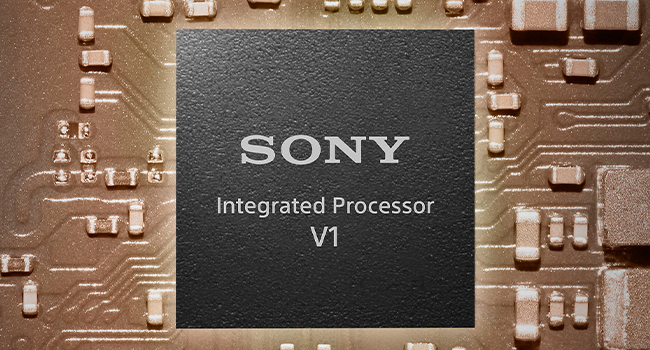
Image: A graphic showing the Sony Integrated Processor V1 chip, highlighting its role in sound quality.
Tinkamas ir patogus
The earbuds feature an ergonomic surface design for a stable and comfortable fit. They come with different sizes of noise-isolating ear tips to ensure a proper seal for optimal sound and noise canceling performance. The Sony Headphones Connect app can help you determine the best ear tip size for your ears.

Image: A close-up of the ergonomic surface design of the earbud, emphasizing comfort and fit.
Atsparumas vandeniui
The WF-1000XM4 earbuds have an IPX4 water resistance rating, protecting them from sweat and splashes. This makes them suitable for everyday use and light workouts, but they are not designed for swimming or submersion in water.

Image: A person running outdoors in the rain while wearing Sony WF-1000XM4 earbuds, illustrating their water resistance.
Baterijos veikimo laikas
Enjoy up to 8 hours of continuous music playback with noise canceling activated, or up to 12 hours with noise canceling off. The charging case provides additional charges, extending the total battery life to up to 24 hours. A quick 5-minute charge can provide up to 60 minutes of playback.

Image: A graphic illustrating 24 hours of battery life with a quick charge feature.
Priežiūra
Siekiant palaikyti optimalų našumą ir higieną:
- Regularly clean the ear tips and the mesh filters of the earbuds with a dry, soft cloth.
- Wipe the charging case with a soft, dry cloth.
- Avoid exposing the earbuds and case to extreme temperatures, humidity, or direct sunlight.
- Kai nenaudojate, laikykite ausines jų įkrovimo dėkle.
Trikčių šalinimas
- Nėra garso / prasta garso kokybė: Ensure earbuds are properly seated in your ears with the correct ear tip size. Check Bluetooth connection and device volume.
- Ryšio problemos: Turn off and on your device's Bluetooth. Re-pair the earbuds. Ensure earbuds are charged.
- Noise Canceling Not Effective: Ensure ear tips provide a good seal. Check noise canceling settings in the app.
- Neįkraunamos ausinės: Ensure the charging cable is securely connected or the wireless charging pad is properly aligned. Clean charging contacts on earbuds and case.
Specifikacijos
| Funkcija | Detalė |
|---|---|
| Modelio pavadinimas | WF-1000XM4 |
| Ryšio technologija | Belaidis ryšys („Bluetooth 5.2“) |
| Triukšmo valdymas | Aktyvus triukšmo slopinimas |
| Garso kodekai | LDAC, AAC, SBC |
| Battery Life (Earbuds ANC On) | Iki 8 valandų |
| Battery Life (Earbuds ANC Off) | Iki 12 valandų |
| Bendras baterijos veikimo laikas (su dėklu) | Iki 24 valandų |
| Greitas įkrovimas | 5 min. įkrovimas 60 min. atkūrimui |
| Įkrovimo laikas | apytiksliai 1.5 valandas |
| Atsparumas vandeniui | IPX4 |
| Svoris (ausinės) | Approx. 7.3g x 2 |
| Svoris (įkrovimo dėklas) | apytiksliai 41 g |
| Vairuotojo blokas | 6 mm dinaminė tvarkyklė |
| Mikrofonas | Beamforming microphone, Bone-conduction sensor |
| Balso asistento palaikymas | Integruota „Alexa“, „Google Assistant“ |
Garantija ir palaikymas
Your Sony WF-1000XM4 earbuds come with a standard manufacturer's warranty. Please refer to the warranty card included in your package for specific terms and conditions. For technical support, troubleshooting assistance, or to register your product, visit the official Sony support websvetainėje arba susisiekite su jų klientų aptarnavimo tarnyba.


