Įvadas
This manual provides detailed instructions for the safe and efficient operation of your DIGITNOW M513 Record Player. Please read this manual thoroughly before using the product and retain it for future reference. This record player features a belt-drive turntable, external stereo speakers, Bluetooth connectivity, and Vinyl-to-MP3 recording capabilities.
Produktas baigtasview
Susipažinkite su savo patefono komponentais ir valdikliais.
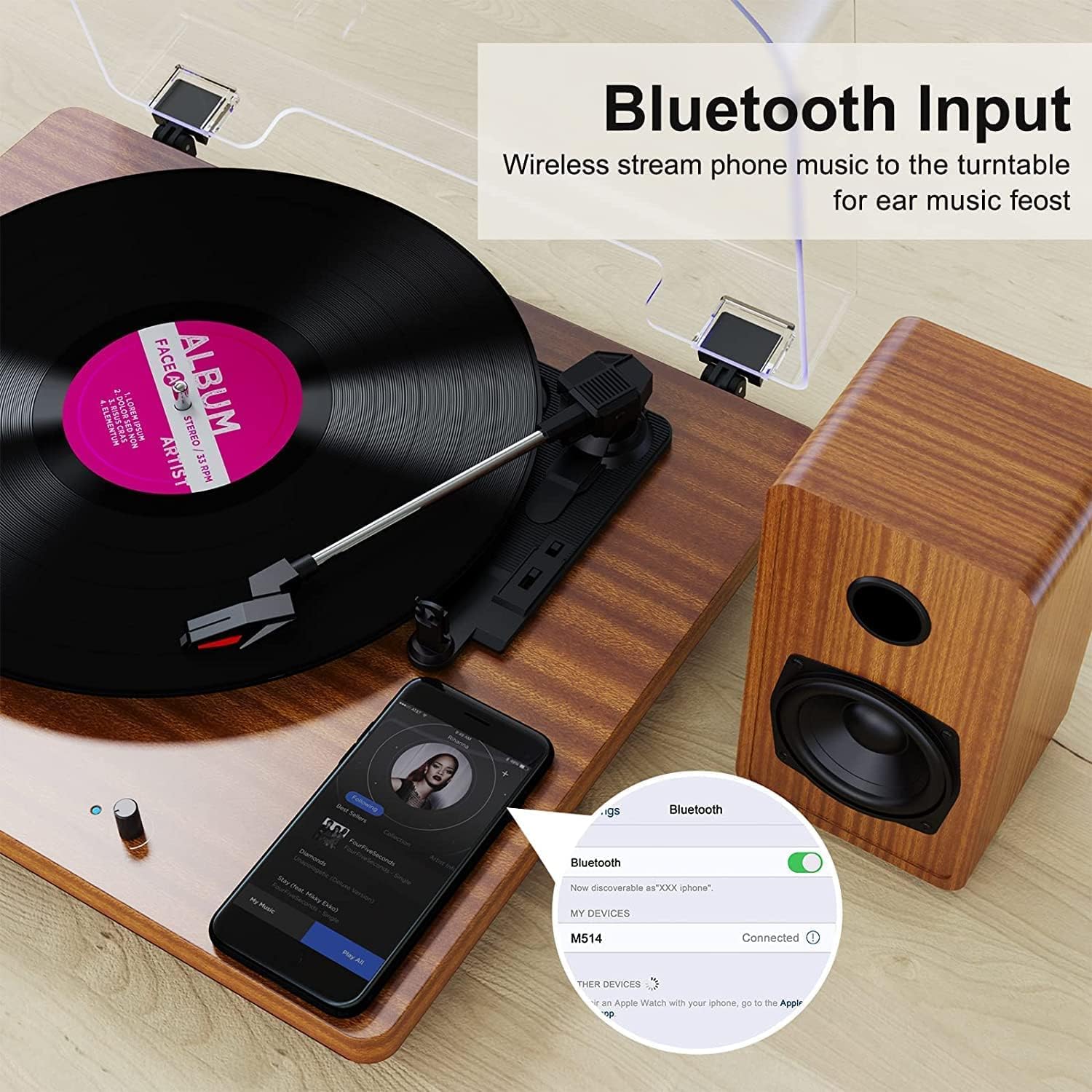
Figure 1: DIGITNOW M513 Record Player with external speakers and Bluetooth connectivity.
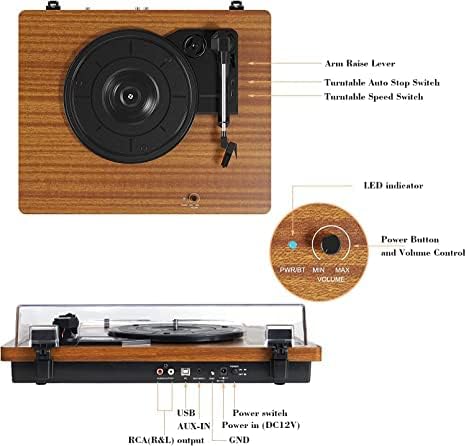
Figure 2: Top and rear panel controls including arm raise lever, auto stop switch, speed switch, power button, volume control, USB, AUX-IN, RCA(R&L) output, power input, and ground.
Pagrindiniai komponentai:
- Sukamojo stalo padėklas: Where vinyl records are placed.
- Tonearmas: Laiko rašiklį ir seka plokštelės griovelius.
- Plunksna (adata): Reads the audio information from the record.
- External Stereo Speakers: Pateikite garso išvestį.
- Apsauga nuo dulkių: Apsaugo patefoną nuo dulkių.
- Valdymo skydelis: Includes power, volume, speed selection, and input/output ports.
Sąranka
- Išpakavimas: Carefully remove all components from the packaging. Ensure all accessories (dust cover, 45 RPM adapter, RCA output cables, ground wire, USB cable, user manual) are present.
- Vieta: Place the record player on a stable, level surface away from direct sunlight, heat sources, and excessive vibration. Position the external speakers for optimal sound distribution.
- Prijunkite garsiakalbius: Connect the provided external stereo speakers to the RCA output ports on the rear of the record player using the RCA cables. Ensure correct left (L) and right (R) connections.
- Maitinimo jungtis: Connect the DC 12V power adapter to the power input port on the rear of the unit, then plug the adapter into a wall outlet.
- Dulkių dangtelio montavimas: Attach the dust cover to the hinges at the back of the turntable.
Naudojimo instrukcijos
Groja įrašus
- Maitinimas: Turn the Power/Volume knob clockwise to power on the unit. The LED indicator will illuminate.
- Pasirinkite greitį: Choose the appropriate speed (33, 45, or 78 RPM) using the speed switch located on the top panel. Use the 45 RPM adapter for 7-inch records with large center holes.
- Vietos įrašas: Carefully place your vinyl record on the turntable platter.
- Pakeliamas tonarmas: Use the arm raise lever to gently lift the tonearm.
- Tonarmo padėtis: Perkelkite tonarmą virš norimo pradinio įrašo takelio.
- Apatinis tonarmas: Slowly lower the tonearm using the arm raise lever. The stylus will make contact with the record, and playback will begin.
- Reguliuoti garsumą: Garsumą reguliuokite naudodami maitinimo / garsumo rankenėlę.
- Automatinis sustabdymas: The record player features an auto-stop function. When enabled via the Auto Stop switch, the platter will stop spinning automatically when the record finishes. If disabled, the platter will continue to spin.
- Baigti atkūrimą: At the end of the record, or when you wish to stop, use the arm raise lever to lift the tonearm, return it to the tonearm rest, and then lower the lever. Turn the Power/Volume knob counter-clockwise to power off the unit.

3 pav. Išsamus view of the stylus, belt-driven design for smooth music, and 33/45/78 RPM speed options for various record sizes.
Bluetooth ryšys
The record player can receive audio wirelessly from your Bluetooth-enabled devices.
- Įjungti „Bluetooth“ režimą: Ensure the record player is powered on. The unit will automatically enter Bluetooth receiving mode if no record is playing or AUX input is not connected. The LED indicator may change color or blink to indicate Bluetooth mode.
- Įjunkite „Bluetooth“ įrenginyje: Išmaniajame telefone ar kitame „Bluetooth“ įrenginyje įjunkite „Bluetooth“ ir ieškokite galimų įrenginių.
- Suporuoti įrenginį: Select "DIGITNOW" or a similar name from the list of available devices to pair. Once connected, you will hear a confirmation sound.
- Groti garso įrašą: Play music from your device, and it will stream through the record player's speakers.
Video 1: Demonstrates the setup and Bluetooth connection process for the DIGITNOW M513 Record Player, including placing a record and pairing with a smartphone.
Įrašymas iš vinilo į MP3
Convert your vinyl records to digital MP3 files via a USB connection to your computer.
- Prisijunkite prie kompiuterio: Use the provided USB cable to connect the record player's USB port (PC OUT) to a USB port on your Mac or PC.
- Įdiegti programinę įrangą: Refer to the detailed instructions in the included user manual for information on compatible recording software and installation.
- Pradėti įrašymą: Follow the software's instructions to begin recording audio from your vinyl record to your computer.

Figure 4: Connection diagram illustrating USB for PC recording, AUX-IN for external audio sources like CD players, and RCA OUT for external speakers.
External Audio Connections
- AUX įvestis: Connect external audio sources (e.g., CD player, smartphone, digital media player) to the AUX-IN port on the rear panel using a 3.5mm audio cable. The record player will play audio from the connected device through its speakers.
- RCA išvestis: For enhanced or louder sound, connect the RCA(R&L) output ports to an external amplifier arba maitinami garsiakalbiai naudojant RCA kabelius.
Priežiūra
- Rašiklio valymas: Reguliariai švelniai valykite rašiklį minkštu šepetėliu, skirtu rašiklių valymui, braukdami iš galo į priekį. Nelieskite rašiklio pirštais.
- Įrenginio valymas: Wipe the record player and dust cover with a soft, dry cloth. Do not use abrasive cleaners or solvents.
- Diržo priežiūra: The belt-drive system is designed for durability. If the platter does not spin or spins inconsistently, the drive belt may have slipped during shipping or use. Refer to the full user manual for instructions on how to re-seat or replace the drive belt.
- Įrašų priežiūra: Keep your records clean and free of dust to ensure optimal sound quality and prolong stylus life. Store records vertically in their sleeves.
Trikčių šalinimas
| Problema | Galima priežastis | Sprendimas |
|---|---|---|
| Nėra galios | Neprijungtas maitinimo adapteris arba neveikia maitinimo lizdas. | Ensure power adapter is securely plugged into the unit and a working wall outlet. Check the power switch. |
| Nėra garso | Volume too low; speakers not connected; incorrect input mode. | Increase volume. Verify speaker connections. Ensure correct input mode (Phono, Bluetooth, AUX). |
| Praleidžiantis arba iškraipytas garsas | Nešvari arba pažeista plokštelė; susidėvėjęs arba nešvarus adatos rašiklis; įrenginys nelygus. | Clean record. Clean or replace stylus. Place unit on a level surface. |
| Įrašas grojamas per greitai / lėtai | Neteisingas greičio nustatymas. | Adjust the speed switch to 33, 45, or 78 RPM as appropriate for the record. |
| Dumbimo triukšmas | Ground wire not connected; interference from other electronics. | Ensure the ground wire is properly connected (if applicable). Move the unit away from other electronic devices. |
Specifikacijos
- Modelis: M513
- Prekinis ženklas: SKAITMENINĖ DABAR
- Gaminio matmenys: 15 x 12.87 x 6.22 colio
- Prekės svoris: 11.77 svaro
- Greičiai: 33 1/3, 45, 78 aps./min
- Pavaros tipas: Diržinė pavara
- Variklio tipas: DC variklis
- Ryšys: Bluetooth, AUX-IN, RCA Output, USB (for Vinyl-to-MP3 recording)
- Įtraukti komponentai: Dust cover, 45 RPM adapter, RCA output cables, ground wire, USB cable, user manual
- Medžiaga: Plastikiniai, mediniai
- Ypatingos savybės: Bluetooth Function, RCA Output, Vinyl-to-MP3 Recording, Auto Stop
Garantija ir palaikymas
For warranty information, technical support, or service inquiries, please refer to the contact details provided in the original product packaging or visit the official DIGITNOW websvetainėje. Išsaugokite pirkimo kvitą kaip pirkimo įrodymą garantiniams reikalavimams.


