1. Svarbios saugos gairės
Before operating the Yasola M9 GPS Drone, please read and understand all safety instructions. Failure to follow these guidelines may result in injury, damage to the drone, or property damage.
- Skrydžio aplinka: Droną naudokite atvirose vietose, atokiau nuo žmonių, gyvūnų, pastatų ir elektros linijų. Venkite skraidyti pučiant stipriam vėjui arba esant nepalankioms oro sąlygoms.
- Baterijos sauga: Use only approved batteries and chargers. Do not overcharge or puncture batteries. Discontinue use if batteries show signs of swelling or damage.
- Propelerio sauga: Keep hands, face, and loose clothing away from rotating propellers. Ensure propellers are correctly installed and free from damage before each flight.
- Operatoriaus atsakomybė: The operator is responsible for safe operation and compliance with local regulations. Maintain visual line of sight with the drone at all times.
- Kliūčių vengimas: While the drone features obstacle avoidance, it is not foolproof. Always exercise caution and maintain awareness of surroundings.
2. Pakuotės turinys
Patikrinkite, ar pakuotėje yra visi toliau išvardyti daiktai. Jei kurių nors daiktų trūksta arba jie pažeisti, susisiekite su klientų aptarnavimo tarnyba.

Image: Complete package contents of the Yasola M9 GPS Drone.
- Yasola M9 GPS Drone
- Nuotolinio valdymo pultelis
- Intelligent Flight Batteries (2x 3000mAh)
- Atsarginiai sraigtai
- USB įkrovimo laidas
- Atsuktuvas
- Vartotojo vadovas (šis dokumentas)
- Maišelis
- Kliūčių vengimo modulis
3. Komponento identifikavimas
Familiarize yourself with the main components of your Yasola M9 GPS Drone.

Image: Key components of the Yasola M9 GPS Drone.
- 360° Laser Obstacle Avoider: Detects obstacles in all directions.
- GPS modulis: Provides precise positioning and navigation.
- EIS Anti-Shake Chip: Enhances image and video stability.
- 4K HD kamera: Captures high-resolution photos and videos.
- 3 ašių mechaninis stabilizatorius: Stabilizes the camera for smooth footage and allows remote control of camera angle.
- Bešepetėliniai varikliai: Provide efficient and quiet flight.

Vaizdas: priekis view of the Yasola M9 GPS Drone.
4. Sąrankos vadovas
4.1 Baterijos įkrovimas ir įdėjimas
Charge the intelligent flight batteries using the provided USB charging cable. The battery indicator lights will show charging status. Once fully charged, slide the battery into the drone's battery compartment until it clicks securely into place.

Image: Modular battery design and capacity.
4.2 Propelerio montavimas
Attach the propellers to the corresponding motor shafts. Ensure that propellers marked 'A' are installed on 'A' motors and 'B' on 'B' motors. Use the provided screwdriver to secure them firmly. Incorrect installation can affect flight stability.
4.3 Obstacle Avoidance Module Attachment
The obstacle avoidance module can be attached to the top of the drone. Align the module with the designated slot and press down until it is securely fastened. This module enhances flight safety by detecting obstacles.

Image: 360-degree obstacle avoidance system.
4.4 Nuotolinio valdymo pulto sąranka
Insert batteries into the remote controller. Power on the remote controller, then power on the drone. The remote and drone should automatically pair. Refer to the remote controller's specific instructions for detailed button functions.
4.5 Mobiliosios programėlės prijungimas
Download the official Yasola drone application from your device's app store. Connect your smartphone to the drone's Wi-Fi network (usually named "Yasola-M9-XXXX"). Open the app to view the live camera feed and access advanced flight features.
5. Naudojimo instrukcijos
5.1 Kontrolinis sąrašas prieš skrydį
- Įsitikinkite, kad baterijos yra visiškai įkrautos (drono ir nuotolinio valdymo pulto).
- Patikrinkite, ar sraigtai nepažeisti ir ar jie tvirtai pritvirtinti.
- Verify obstacle avoidance module is correctly installed.
- Confirm GPS signal acquisition before outdoor flight.
- Patikrinkite, ar skrydžio trajektorija laisva, o darbo aplinka saugi.
5.2 Pakilimas ir nusileidimas
After powering on and pairing, place the drone on a flat, open surface. Use the one-key take-off button on the remote or the mobile app to initiate flight. To land, use the one-key landing button or manually descend the drone slowly.
5.3 Skrydžio valdymo įtaisai
The remote controller uses standard drone control schemes. The left joystick typically controls altitude and yaw (rotation), while the right joystick controls forward/backward and left/right movement. Refer to the remote's diagram in the app for specific functions.
5.4 Camera Operation and Gimbal Control
The 4K HD camera captures high-quality aerial footage. The 3-axis mechanical gimbal provides stabilization and allows for remote adjustment of the camera's vertical angle (up to 90 degrees). Use the dedicated buttons on the remote or controls within the app to take photos or record videos.

Image: 4K HD Camera and 3-Axis Gimbal details.
5.5 GPS Positioning Features
The Yasola M9 drone utilizes GPS for stable flight and advanced features:
- Auto Return Home: The drone can automatically return to its take-off point in case of low battery, loss of signal, or manual activation.
- Sekite mane režimas: The drone can track and follow the remote controller or a designated subject.
- Kelio taško skrydis: Plan a flight path on the app, and the drone will follow it autonomously.

Image: Remote control and image transmission range.
5.6 Kliūčių vengimo sistema
The 360° laser obstacle avoidance system scans for obstacles within approximately 20 meters (60 feet). If an obstacle is detected, the remote control will alert you, and the drone will attempt to avoid it. For advanced users, the obstacle avoidance module can be removed.
5.7 Gestų valdymas
The drone supports gesture recognition for taking photos or recording videos. Face the aircraft camera and perform the specified gestures (e.g., V-sign for photo, open palm for video) for approximately 3 seconds to activate the function.
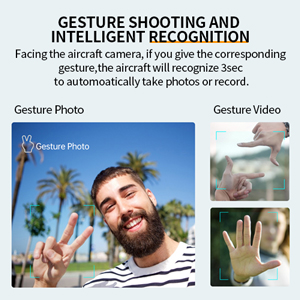
Image: Gesture shooting and intelligent recognition.
5.8 Optional Accessories (Thrower & Megaphone)
The Yasola M9 drone supports modular accessories such as a thrower and a megaphone. These can be attached to the top of the drone for specialized tasks. Refer to the accessory's individual manual for installation and operation details.
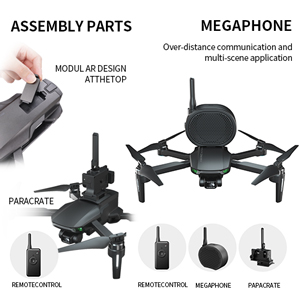
Image: Drone with optional thrower and megaphone attachments.
Video: Demonstration of Yasola GPS Drone features including 3-axis gimbal, obstacle avoidance, and optional accessories like the thrower and megaphone.
6. Priežiūra
- Valymas: Regularly clean the drone body, camera lens, and sensors with a soft, dry cloth. Avoid using harsh chemicals.
- Propelerio apžiūra: Inspect propellers for cracks, bends, or chips before each flight. Replace damaged propellers immediately.
- Akumuliatoriaus priežiūra: Baterijas laikykite vėsioje, sausoje vietoje. Nelaikykite visiškai įkrautų arba visiškai iškrautų ilgą laiką. Ilgalaikiam laikymui įkraukite jas maždaug iki 50–60 %.
- Firmware atnaujinimai: Check the official Yasola website or app for available firmware updates to ensure optimal performance and access to new features.
7. Problemų sprendimas
| Problema | Galima priežastis | Sprendimas |
|---|---|---|
| Dronas neįsijungia. | Išsikrovusi arba netinkamai įdėta baterija. | Charge battery fully. Reinstall battery securely. |
| No video feed in app. | Wi-Fi not connected or app not open. | Ensure phone is connected to drone's Wi-Fi. Restart app. |
| Dronas dreifuoja skrydžio metu. | Netinkamas kalibravimas arba stiprus vėjas. | Perform IMU and compass calibration. Fly in calm conditions. |
| Kliūčių vengimas neveikia. | Module not installed or sensor obstructed. | Ensure module is correctly attached. Clean sensors. |
| Remote controller not pairing. | Remote or drone not powered on, or out of range. | Power cycle both devices. Ensure they are close during pairing. |
8. Specifikacijos
| Funkcija | Detalė |
|---|---|
| Prekės ženklas | Yasola |
| Modelio pavadinimas | M9 |
| Gamintojo dalies numeris | M9-MAX |
| Vaizdo įrašymo raiška | 4K (Video Capture Format) / 1080p (Live Feed) |
| Ryšio technologija | Wi-Fi (5G FPV) |
| Įgūdžių lygis | Novice, Intermediate |
| Prekės svoris | 450 gramų (apie 15.9 uncijos) |
| Baterijos talpa | 3000 mAh (11.1 vatvalandžių) |
| Skrydžio laikas | Up to 23 minutes per battery (46 minutes with 2 batteries) |
| Valdymo tipas | Nuotolinio valdymo pultas |
| Didžiausias diapazonas | 1200 Meters (Control), 1000 Meters (Image Transmission) |
| Medžiaga | Plastikiniai |
| Gimbalas | 3-Axis Mechanical Self-stabilizing Gimbal |
| Kliūčių išvengimas | 360° Laser Obstacle Avoider (detects within 20 meters) |
| Variklio tipas | Variklis be šepetėlių |
| Gaminio matmenys | 6.89 x 4.53 x 2.95 colio (sulankstytas) |
| UPC | 613706182347 |
9. Garantija ir palaikymas
The Yasola M9 GPS Drone comes with a standard manufacturer's warranty. For detailed warranty information, technical support, or to purchase replacement parts, please visit the official Yasola websvetainėje arba susisiekite su jų klientų aptarnavimo skyriumi. Išsaugokite pirkimo kvitą kaip pirkimo įrodymą.
Palaikymas internetu: Visit the Yasola Store on Amazon


