1. Įvadas
The eKids Fisher-Price Karaoke Machine (Model FP-550) is a portable Bluetooth speaker designed for children, featuring a wired microphone, built-in Mother Goose Club songs, and a USB audio player. This manual provides detailed instructions for safe and optimal use of the device.
2. Produktas baigtasview
Pakuotės turinys:
- eKids Fisher-Price Karaoke Machine
- Laidinis mikrofonas
- Įkrovimo laidas (USB)
Įrenginio ypatybės:
- Nešiojamas Bluetooth garsiakalbis
- Real Working Wired Microphone
- 24 Built-in Mother Goose Club Songs
- USB Audio Player for expanded content
- Ausinių lizdas
- Integruota įkraunama baterija
Priekyje View
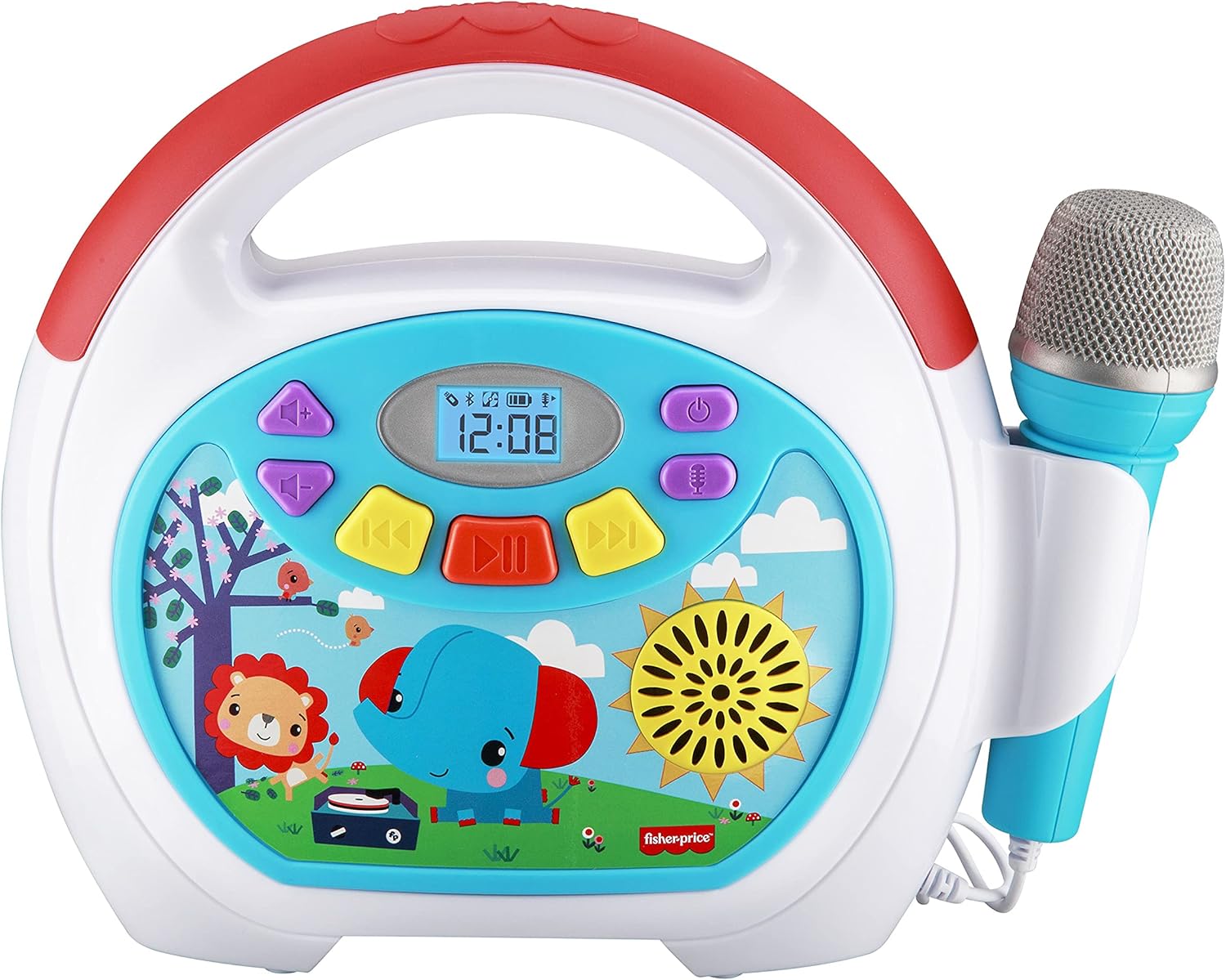
Image 2.1: The front panel displays the power button, volume controls, track navigation, play/pause button, and a digital display. The wired microphone is attached to the side.
Galinis View ir Ryšiai

Image 2.2: The back of the unit features the volume knob, reset button, DC 5V charging port, headphone jack, and a USB-In port for playing audio from a USB drive. A compartment for cord storage is also visible.
3. Sąranka
3.1 Įrenginio įkrovimas
- Locate the DC 5V charging port on the rear of the karaoke machine.
- Connect the provided charging cable to the port and the other end to a standard USB power adapter (not included) or a computer USB port.
- The charging indicator will illuminate. Allow approximately 2-3 hours for a full charge. The indicator will change or turn off once charging is complete.
Pastaba: The device contains a built-in rechargeable Lithium Ion battery. Ensure the device is fully charged before first use for optimal battery life.
3.2 Mikrofono prijungimas
- The wired microphone is permanently attached to the unit.
- Ensure the microphone cable is untangled and positioned comfortably for use.
4. Naudojimo instrukcijos
4.1 Maitinimo įjungimas/išjungimas
- Norėdami įjungti įrenginį, paspauskite ir palaikykite Maitinimo mygtukas () located on the front panel.
- Norėdami išjungti, paspauskite ir palaikykite Maitinimo mygtukas vėl.
4.2 Garsumo reguliavimas
- Naudokite Garsumo rankenėlė on the rear of the unit to adjust the overall sound output.
- For microphone volume, use the dedicated microphone volume control if available, or adjust the main volume.
4.3 Playing Built-in Songs
- Upon powering on, the device may default to playing built-in songs.
- Naudokite Ankstesnis takelis () ir Kitas takelis () buttons to navigate through the 24 Mother Goose Club songs.
- Paspauskite Atkūrimo/pauzės mygtukas (), kad pradėtumėte arba pristabdytumėte atkūrimą.
4.4 Bluetooth poravimas

Image 4.1: The karaoke machine supports wireless audio streaming via Bluetooth from compatible devices.
- Įsitikinkite, kad karaoke aparatas įjungtas.
- Įjunkite „Bluetooth“ savo išoriniame įrenginyje (pvz., išmaniajame telefone, planšetiniame kompiuteryje).
- Ieškokite available Bluetooth devices. The karaoke machine will appear as 'eKids FP-550' or similar.
- Select the device name to pair. A confirmation sound may indicate successful pairing.
- Once paired, you can stream audio wirelessly from your device to the karaoke machine.
4.5 USB garso atkūrimas

Image 4.2: The USB expansion slot allows playback of songs from a USB drive.
- Įdėkite USB atmintinę su MP3 garso įrašais files into the USB-In port on the rear of the unit.
- The device should automatically detect the USB drive and begin playing the audio files.
- Naudokite Ankstesnis takelis ir Kitas takelis mygtukai naršymui.
- Paspauskite Atkūrimo/pauzės mygtukas , kad pradėtumėte arba pristabdytumėte atkūrimą.
4.6 Mikrofono naudojimas

Image 4.3: The wired microphone allows users to sing along to music.
- The microphone is active when the unit is powered on.
- Sing into the microphone while playing built-in songs, Bluetooth audio, or USB audio.
- Adjust the main volume knob to control the microphone's output level.
4.7 Ausinių naudojimas
- To listen privately, plug standard 3.5mm headphones (not included) into the headphone jack on the rear of the unit.
- Audio will be redirected to the headphones, muting the main speaker.
5. Priežiūra
5.1 Valymas
- Prieš valydami visada išjunkite įrenginį.
- Išoriniams paviršiams valyti naudokite minkštą, sausą šluostę.
- Nenaudokite skystų valiklių, abrazyvinių kempinių ar cheminių tirpiklių, nes jie gali pažeisti apdailą.
5.2 Saugykla
- Laikykite prietaisą vėsioje, sausoje vietoje, apsaugotoje nuo tiesioginių saulės spindulių ir ekstremalių temperatūrų.
- Ensure the microphone cable is neatly wrapped and stored in the designated compartment on the back to prevent damage.
6. Problemų sprendimas
| Problema | Galima priežastis | Sprendimas |
|---|---|---|
| Įrenginys neįsijungia. | Baterija išsikrovusi. | Įkraukite įrenginį naudodami pateiktą USB laidą. |
| Iš garsiakalbio nėra garso. | Garsumas per mažas arba nutildytas. Prijungtos ausinės. | Increase the volume using the knob. Disconnect headphones if plugged in. |
| Mikrofonas neveikia. | Microphone volume is too low. | Ensure the main volume is adequately adjusted. |
| „Bluetooth“ įrenginys nesusijungia. | Įrenginys yra už diapazono ribų. Išoriniame įrenginyje neįgalintas „Bluetooth“. | Move devices closer. Ensure Bluetooth is active on your external device and search again. |
| USB audio not playing. | USB drive not properly inserted or contains unsupported file tipai. | Ensure USB drive is fully inserted. Verify audio fileyra MP3 formatu. |
7. Specifikacijos
- Modelio numeris: FP-550
- Prekės svoris: 2.35 svaro
- Gaminio matmenys: 10.72 x 3.64 x 8.67 colio
- Baterija: 1 ličio jonų baterija (pridedama)
- Ryšys: Bluetooth, USB
- Įtraukti komponentai: Mikrofonas
- Maitinimo šaltinis: Maitinamas baterijomis
- Spalva: Daugiaspalvis
8. Garantija ir palaikymas
This product is covered by a limited warranty. For specific warranty details, please refer to the documentation included with your purchase or contact eKids customer support. For technical assistance or further inquiries, please visit the official eKids websvetainėje arba susisiekite su klientų aptarnavimo skyriumi.
Daugiau informacijos galite rasti adresu eKids Store on Amazon.


