1. Įvadas
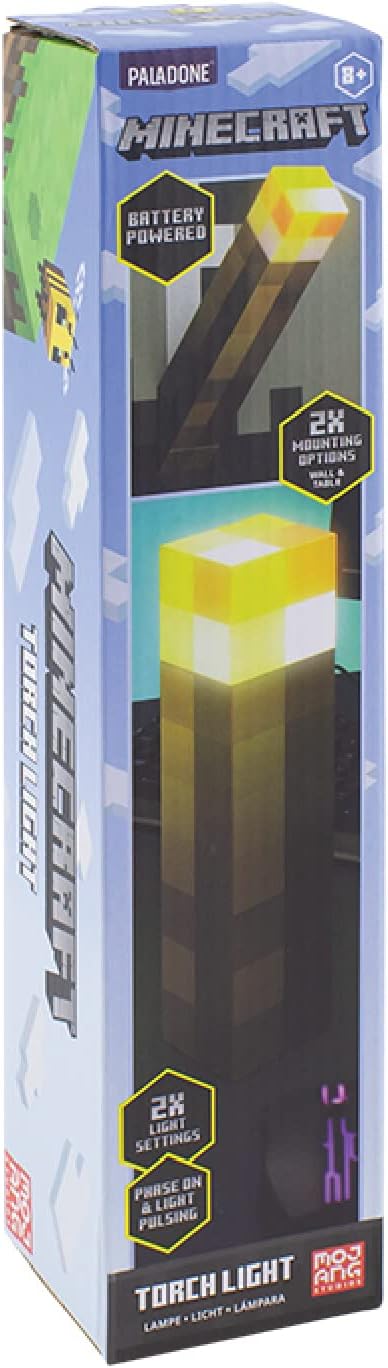
Ačiū, kad pirkoteasing the Paladone Minecraft Torch Light. This officially licensed product brings the iconic Minecraft torch to life, offering two distinct light modes and versatile placement options. This manual provides essential information for the safe and effective use of your new torch light.
2. Savybės
- Du šviesos režimai: Choose between a steady light or a pulsating effect, mimicking a real torch.
- Universalus išdėstymas: Designed for both tabletop display and wall mounting.
- Maitinamas su baterijomis: Operates on 3x AAA batteries (not included) for portability.
- Automatinis išsijungimas: Features a 20-minute auto shut-off function, ideal for use as a bedside light.
- Oficialiai licencijuota: Authentic Minecraft merchandise.
3. Pakuotės turinys
Prieš tęsdami sąranką, įsitikinkite, kad yra visi reikalingi daiktai:
- 1 x Paladone Minecraft Torch Light
- Instrukcijų vadovas
4. Sąranka
4.1. Akumuliatoriaus įdėjimas
- Locate the battery compartment cover on the bottom of the torch light.
- Using a small Phillips head screwdriver, unscrew the retaining screw on the battery compartment cover.
- Nuimkite dangtelį.
- Insert 3x AAA batteries (not included), ensuring correct polarity (+/-) as indicated inside the compartment.
- Uždėkite akumuliatoriaus skyriaus dangtelį ir pritvirtinkite jį varžtu.

4.2. Montavimo parinktys
The Minecraft Torch Light offers two ways to display it:
- Naudojimas ant stalo: Simply place the torch light on any flat, stable surface.
- Montavimas ant sienos: The torch light features keyhole slots on its base for wall mounting. Flip the bottom section to reveal the wall mount option. Use appropriate screws (not included) for your wall type to securely hang the torch light.


5. Operacija
5.1. Turning On/Off and Changing Light Modes
The torch light has a button on its side to control power and light modes.
- Įjungti: Press the button once. The light will illuminate in its steady mode.
- Norėdami pakeisti režimą: Press the button a second time to switch to the pulsating light mode.
- Išjungti: Paspauskite mygtuką trečią kartą, kad išjungtumėte šviesą.

5.2. Auto Shut-Off Function
The torch light is equipped with a 20-minute auto shut-off feature. This conserves battery life and makes it suitable for use as a night light. After 20 minutes of continuous operation, the light will automatically turn off.
5.3. Produktų vaizdo įrašai
1 vaizdo įrašas: 360 laipsnių view of the Minecraft Torch Light, showcasing its design and appearance from all angles.
Video 2: Demonstrates the two light modes (steady and pulsating) and the wall mounting feature of the Minecraft Torch Light.
6. Priežiūra
- Valymas: Wipe the torch light with a soft, dry cloth. Do not use abrasive cleaners or solvents.
- Baterijos keitimas: Replace batteries when the light dims or stops functioning. Always replace all three batteries at the same time with new ones.
- Saugykla: Jei ilgesnį laiką sandėliuosite, išimkite baterijas, kad išvengtumėte jų ištekėjimo.
7. Problemų sprendimas
| Problema | Galima priežastis | Sprendimas |
|---|---|---|
| Šviesa neįsijungia. | Baterijos išsikrovusios arba neteisingai įdėtos. | Patikrinkite baterijų poliškumą ir pakeiskite jas naujomis AAA baterijomis. |
| Šviesa blanki arba mirga. | Maža akumuliatoriaus energija. | Replace all three AAA batteries with new ones. |
| Auto shut-off activates too soon or not at all. | Internal sensor issue or defect. | Ensure the light is not obstructed. If the issue persists, contact customer support. |
8. Specifikacijos
| Atributas | Detalė |
|---|---|
| Modelio pavadinimas | RS561006 |
| Dalies numeris | PP9202MCF |
| Prekės ženklas | Paladone |
| Gaminio matmenys | 1.01 colio gylis x 2.17 colio plotis x 11.02 colio aukštis (2.57 cm gylis x 5.51 cm plotis x 28 cm aukštis) |
| Prekės svoris | 9.5 uncijos (270 gramų) |
| Maitinimo šaltinis | Battery Powered (3x AAA batteries required, not included) |
| Baterijos veikimo laikas | Maždaug 8 valandos |
| Šviesos šaltinio tipas | LED |
| Ryškumas | 125 liumenų |
| Kontrolės metodas | Palieskite mygtuką |
| Medžiaga | Plastikiniai |
| Naudojimas viduje / lauke | Vidinis |
| Atsparumo vandeniui lygis | Neatsparus vandeniui |
9. Saugos informacija
- Šis gaminys nėra žaislas. Laikyti mažiems vaikams nepasiekiamoje vietoje.
- Nemaišykite senų ir naujų baterijų arba skirtingų tipų baterijų.
- Naudotas baterijas išmeskite atsakingai pagal vietines taisykles.
- Saugokite gaminį nuo vandens ar ekstremalių temperatūrų.
- Nebandykite ardyti ar modifikuoti gaminio.
10. Garantija ir palaikymas
For warranty information or technical support, please refer to the contact details provided on the product packaging or visit the official Paladone websvetainėje. Išsaugokite pirkimo įrodymą, jei prireiktų pateikti garantinį ieškinį.


