1. Produktas baigtasview
The TECHTONICS Solar Charge Controller 10A is an intelligent battery charger designed for solar power systems. It supports both 12V and 24V battery systems, automatically detecting the battery voltage. This controller efficiently regulates current from solar panels to prevent overcharging and extend battery life. It is equipped with a USB port for charging external devices and an LCD display for monitoring system parameters.
Key features include built-in protections against short circuits, open circuits, reverse voltage, and overload, making it a reliable component for various solar applications.

1 pav.: priekis view of the TECHTONICS Solar Charge Controller 10A, showing the LCD screen, control buttons, and dual USB charging ports.
2. Savybės
- Dvigubas tomastage Suderinamumas: Automatically detects and works with 12V or 24V battery systems.
- 10A Charging Capacity: Capable of handling up to 10 Amperes of charging current, suitable for moderate-sized solar installations.
- Universalus baterijų suderinamumas: Supports various battery types including Lead-Acid (B1), Li-ion (B2), and LiFePO4 (B3). Ensure correct battery type selection for optimal charging.
- Išmanusis įkrovimas: Optimizes power conversion, monitors voltage, and adjusts charging parameters to safeguard against overcharging and extend battery lifespan.
- Visapusiška apsauga: Features built-in short circuit protection, open-circuit protection, reverse voltage protection, and overload protection.
- Dvigubos USB prievados: Integrated 5V USB ports for convenient charging of external devices.
- LCD ekranas: Provides real-time monitoring of charging status, battery voltage, and other system parameters.
- Pritaikomi nustatymai: Allows adjustment of work mode, float voltage, discharge reconnect, and discharge stop parameters.

2 pav. Baigtaview of the six intelligent security protection features: Short-circuit protection, Overload protection, Over Current protection, Overcharge protection, Under-voltage protection, and Over-voltage apsauga.
3. Sąranka ir diegimas
Proper connection order is crucial for the correct functioning and safety of the solar charge controller. Follow these steps carefully:
- Prijunkite akumuliatorių: First, connect the battery to the charge controller. Ensure correct polarity (positive to positive, negative to negative). The controller will automatically detect the battery voltage (12V arba 24V).
- Prijunkite saulės baterijas: Next, connect the solar panels to the charge controller. Again, observe correct polarity.
- Prijunkite nuolatinės srovės apkrovą (neprivaloma): Finally, connect any DC loads (e.g., lights, fans) to the load terminals of the controller.
Svarbi pastaba: The controller will not function if connections are made in an incorrect order. Only 12V batteries will power a 12V panel, and a 24V panel requires a 24V battery for proper operation.

Figure 3: Connection diagram illustrating the proper sequence for connecting the battery, solar panels, and optional loads to the solar charge controller.
4. Naudojimo instrukcijos
The LCD display provides essential information about your solar power system. Use the control buttons to navigate through the display modes and adjust settings.
4.1. LCD ekrano informacija
The LCD screen cycles through various parameters, providing real-time data. The image below illustrates the typical display sequence and what each reading represents:

Figure 4: Explanation of the LCD display sequence, including Main Display (current voltage), Float Voltage, Discharge Reconnect voltage, Discharge Stop voltage, Work Mode, and Battery Type.
- Pagrindinis ekranas: Rodo dabartinį akumuliatoriaus įkrovos lygįtage.
- Float Voltage: Ttage at which the battery is maintained after being fully charged.
- Išmetimo pakartotinis prisijungimas: Ttage at which the load will be reconnected after being disconnected due to low battery.
- Iškrovos sustabdymas: Ttage at which the load will be disconnected to protect the battery from over-discharge.
- Darbo režimas: Configures the load output mode (e.g., 24 hours, dusk to dawn, timed).
- Baterijos tipas: Indicates the selected battery chemistry.
4.2. Baterijos tipo pasirinkimas
It is essential to select the correct battery type for optimal charging and battery longevity. The controller supports the following types:
- B1: For Lead-Acid batteries.
- B2: For Li-ion batteries.
- B3: Skirta LiFePO4 akumuliatoriams.
Refer to your battery's specifications to determine the correct type and set it accordingly on the controller.
4.3. Customizing Parameters
The controller allows customization of various parameters to suit your specific needs. These include:
- Darbo režimas
- Float Voltage
- Iškrovimo pakartotinio prijungimo tūristage
- Išleidimo sustabdymo tūristage
Consult the detailed instructions provided with the controller for specific steps on how to enter programming mode and adjust these settings.
5. Priežiūra
To ensure optimal performance and longevity of your TECHTONICS Solar Charge Controller, follow these maintenance guidelines:
- Reguliarus valymas: Keep the controller clean and free from dust and debris. Use a soft, dry cloth for cleaning. Do not use liquid cleaners.
- Patikrinkite jungtis: Periodiškai tikrinkite visas laidų jungtis, kad įsitikintumėte, jog jos tvirtai pritvirtintos ir nėra korozijos. Atsilaisvinusios jungtys gali pabloginti veikimą arba sukelti gedimus.
- Vėdinimas: Ensure the controller is installed in a well-ventilated area to prevent overheating. Do not block ventilation openings.
- Aplinkos sąlygos: Avoid exposing the controller to extreme temperatures, direct sunlight, or excessive moisture.
6. Problemų sprendimas
Šiame skyriuje aptariamos dažniausiai pasitaikančios saulės baterijų įkrovimo valdiklio problemos.
| problema | Galima priežastis | Sprendimas |
|---|---|---|
| Controller not powering on / LCD off | Incorrect battery connection polarity; Battery voltagPer žema įtampa; Atsilaisvinęs akumuliatoriaus kontaktas. | Verify battery polarity (+ to +, - to -); Check battery voltage (must be above minimum operating voltage); Secure battery connections. |
| Neįkraunama iš saulės baterijų | Incorrect solar panel connection polarity; Solar panel voltage too low; Shading on panels; Faulty panel. | Verify solar panel polarity; Ensure sufficient sunlight; Check panel voltage; Inspect panels for damage. |
| Įkrova neveikia | Baterijos tūristage too low (discharge stop activated); Overload protection activated; Incorrect load connection. | Charge battery; Reduce load; Check load connections and ensure load current is within controller's limits. |
| Apsauga nuo perkrovos aktyvi | Battery is fully charged; Incorrect float voltage nustatymas. | This is normal operation when battery is full; Verify float voltage setting is appropriate for your battery type. |
| Short circuit or reverse polarity error | Wiring error (short circuit or reversed connections). | Immediately disconnect all power sources. Carefully re-check all wiring for shorts and correct polarity before reconnecting. |
7. Specifikacijos
| Parametras | Vertė |
|---|---|
| Prekės ženklas | TECHTONICS |
| Modelio numeris | tech1101-000 |
| Nominali įkrovimo srovė | 10A |
| Sistemos ttage | 12 V / 24 V automatinis aptikimas |
| Ekrano tipas | LCD |
| USB išvestis | Dual 5V USB ports |
| Prekės svoris | 100 g |
| Pakuotės matmenys | 12 x 8 x 4 cm |
| Kilmės šalis | Kinija |
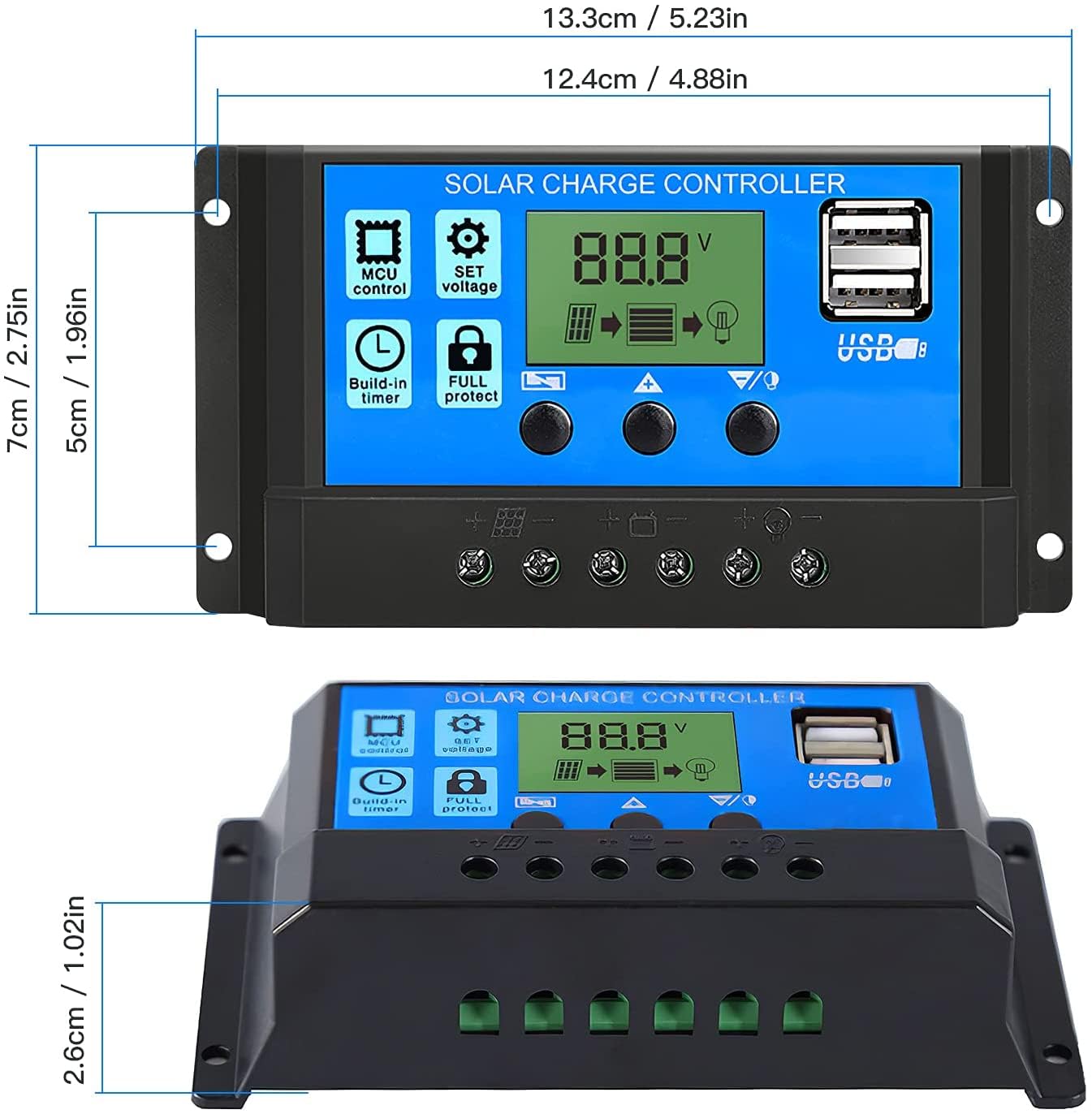
Figure 5: Physical dimensions of the solar charge controller, approximately 13.3 cm (5.23 in) wide, 7 cm (2.75 in) high, and 2.6 cm (1.02 in) deep.
8. Garantija ir palaikymas
TECHTONICS offers a risk-free replacement policy for this product. If you encounter any issues related to the product, you can raise a 7-day replacement request to ensure a direct replacement.
For further assistance or technical support, please refer to the contact information provided with your purchase or visit the official TECHTONICS websvetainę.


