1. Įvadas
This manual provides detailed instructions for the installation, operation, and maintenance of your DALY Smart BMS LiFePo4 4S 12V 200A with Programmable Bluetooth Module. This Battery Management System (BMS) is designed to protect and manage LiFePo4 battery packs, ensuring their safe and efficient operation. Please read this manual thoroughly before installation and use.
2. Saugos informacija
Always observe the following safety precautions to prevent injury or damage to the BMS and battery pack:
- Profesionalus montavimas rekomenduojamas: Installation should be performed by qualified personnel with experience in battery systems and electronics.
- Teisingas poliškumas: Ensure all connections are made with correct polarity. Incorrect wiring can cause severe damage to the BMS and battery.
- Izoliacija: Properly insulate all exposed wires and terminals to prevent short circuits.
- ttage Suderinamumas: Verify that the BMS voltage and cell count match your battery pack configuration (4S 12V LiFePo4).
- Venkite vandens ir drėgmės: Do not expose the BMS to water, moisture, or corrosive environments.
- Temperatūra: Operate the BMS within its specified temperature range.
- Avarinis išjungimas: Familiarize yourself with emergency shutdown procedures for your battery system.
3. Pakuotės turinys
Patikrinkite, ar pakuotėje yra visi reikalingi daiktai:
- DALY Smart BMS (200A FAN LiFePo4 4S 12V BT)
- Balance Wires
- Bluetooth Module (for Mobile APP IOS & Android)
- UART Cable (for PC screen connection)
- English Version Wiring Manual (this document)

Image: Contents of the DALY Smart BMS package.
4. Produkto ypatybės
The DALY Smart BMS offers comprehensive protection and monitoring for your LiFePo4 battery pack:
- Didelės srovės pajėgumas: Supports up to 200A continuous discharge and 100A charge current.
- Programmable Temperature Protection: Automatically stops current flow if battery temperature limits are exceeded.
- Programmable Over-charge/Over-discharge Protection: Prevents damage by stopping charging or discharging when voltage limits are reached.
- Programmable Over-current Protection: Safeguards against excessive current during charging and discharging.
- ttage Balansavimas: High detection precision for voltage balancing across cells.
- SOC Calculation: Precise State of Charge (SOC) calculation with automatic learning function.
- Bluetooth ryšys: Wireless monitoring and parameter setting via Android or iPhone mobile application.
- Common Port Design: Utilizes a single port for both charging and discharging.
- Integruotas aušinimo ventiliatorius: Ensures optimal operating temperature for high current applications.

Vaizdas: Viršview of the 12 protection functions provided by the DALY Smart BMS.

Image: Internal component breakdown of the DALY Smart BMS.
5. Diegimo vadovas
Careful wiring is critical for the correct and safe operation of the BMS. Follow these steps precisely:
5.1 Sujungimo schema

Image: Wiring diagram for the DALY Smart BMS.
5.2 Step-by-Step Wiring
- Paruoškite įrankius: Ensure you have necessary tools such as a soldering machine (if needed, suggest using 662°F/350°C), scissors, double-sided tape, tin wire, and a multimeter.
- Connect Balance Wires: First, connect the balance wires to your battery pack. Ensure the balance wires are welded correctly.
- Connect BMS to Battery: Connect the main negative terminal (B-) of the battery pack to the B- terminal on the BMS. Connect the main positive terminal (B+) of the battery pack to the P+ terminal (if applicable, or ensure the charger/load positive connects directly to battery B+).
- Connect Balance Wire Harness: Plug the balance wire harness into the BMS connection port. Ensure the red balance wire is connected to the highest positive cell.
- Connect Load/Charger: Connect the negative terminal of your motor/load and charger to the P- terminal on the BMS. The positive terminals of the motor/load and charger connect directly to the battery pack's positive terminal (B+).
- Install Cooling Fan: Keep the red cooling surface of the BMS uncovered to allow for proper fan operation.
- Patikrinkite laidus: Before proceeding, use a multimeter to measure the voltage between adjacent balance cables. This voltage should approximate the nominal voltage of a single cell string, confirming correct wiring.
- Activate BMS: Plug in the NTC (temperature sensor) and Bluetooth module. Press the activation button on the BMS to power it on.
Svarbi pastaba: Disconnect balance wires and the BMS connection port before welding black and red balance wires on the battery pack.
Video: This video demonstrates the connection process for the DALY Smart BMS, including measuring cell voltages, connecting the balance wires, activating the BMS, and connecting to the mobile application.
6. Naudojimo vadovas
The DALY Smart BMS can be monitored and configured using a mobile application via Bluetooth or a PC software via UART.
6.1 Mobile App Installation and Connection
- Atsisiųsti programą: Ieškokite "Smart BMS" in the Huawei App Gallery or Apple App Store and download the application.
- Atidarykite programėlę ir prisijunkite: Open the Smart BMS app on your mobile device. Ensure Bluetooth is enabled. The app will display available BMS devices. Select the corresponding device number to connect.
- View Parametrai: Prisijungę galite view real-time battery parameters such as total voltage, current, State of Charge (SOC), individual cell voltages, and temperature.
- Nustatyti parametrus: Navigate to the "Parameter Settings" section. For initial power-on, the battery capacity must be set to the actual capacity of your battery pack. The initial password for parameter modification is 123456. You can also adjust protection thresholds for over-charge, over-discharge, over-current, and temperature.

Image: DALY Smart BMS connected to a mobile application for monitoring and control.
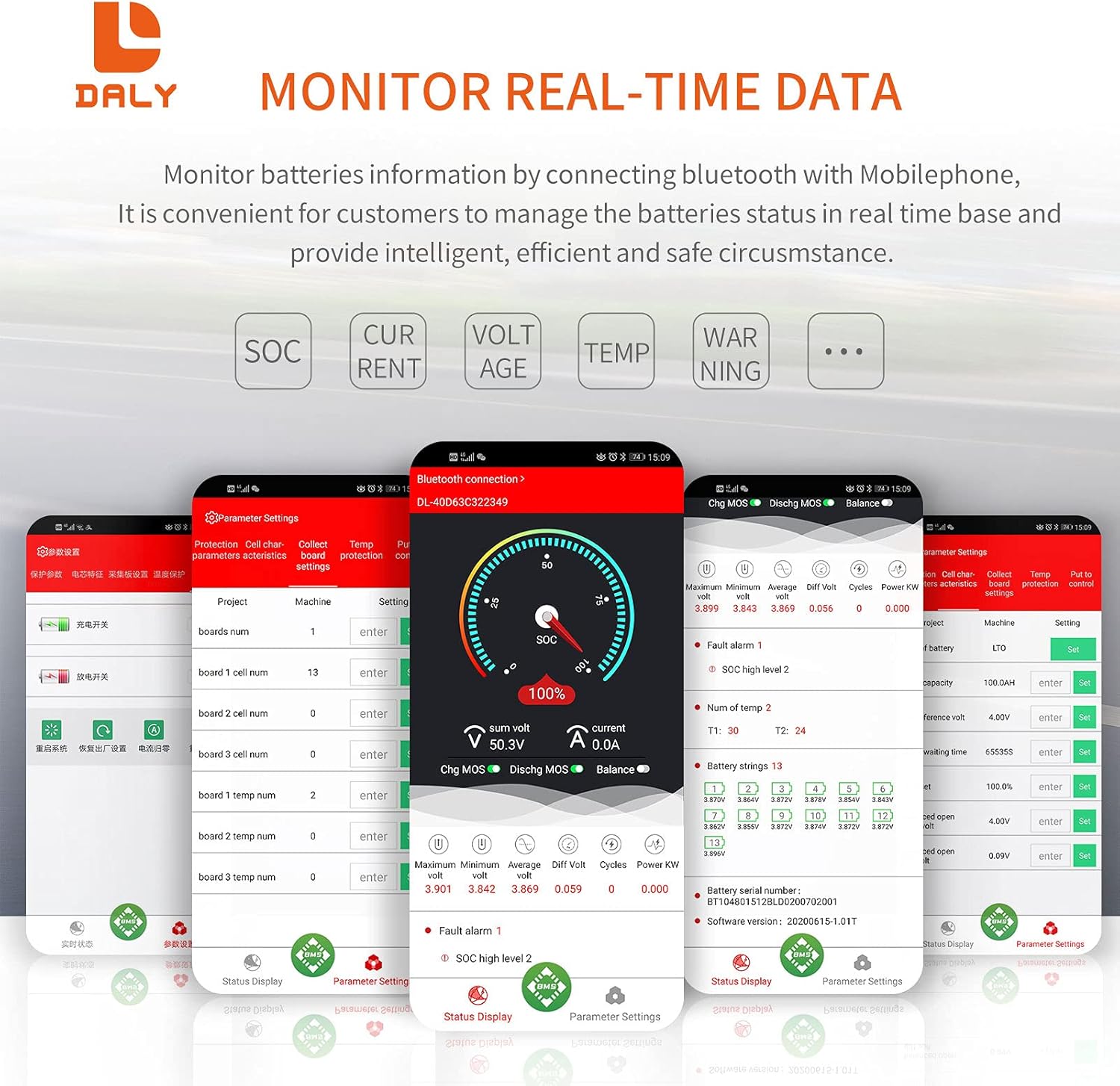
Image: Real-time data monitoring interface of the Smart BMS app.
6.2 Kompiuterio programinės įrangos prijungimas
Connect the UART cable from the BMS to your computer. Open the host computer software to view detailed battery information and adjust parameters. The PC software provides a comprehensive display of battery status and settings.
7. Priežiūra
To ensure the longevity and optimal performance of your DALY Smart BMS and battery pack:
- Reguliarus patikrinimas: Periodiškai patikrinkite visas laidų jungtis, ar nėra sandarumo ir korozijos ar pažeidimų požymių.
- Švara: Keep the BMS free from dust and debris, especially around the cooling fan.
- Programinės įrangos atnaujinimai: Check for available firmware updates for the BMS and app to ensure you have the latest features and bug fixes.
- Baterijos būklė: Stebėkite akumuliatoriaus elementų tūrįtages and temperatures regularly through the app to detect any anomalies early.
8. Problemų sprendimas
If you encounter issues with your DALY Smart BMS, consider the following common problems and solutions:
| Problema | Galima priežastis | Sprendimas |
|---|---|---|
| BMS not activating/no power | Incorrect wiring, low battery voltage, activation button not pressed. | Verify all wiring according to the diagram. Ensure battery voltage is above the minimum threshold. Press the activation button on the BMS. |
| Bluetooth ryšio problemos | Bluetooth module not plugged in, module faulty, app issues, out of range. | Ensure Bluetooth module is securely connected. Restart the app and phone's Bluetooth. Move closer to the BMS. |
| Over-charge/Over-discharge protection triggered | Baterijos tūristage exceeded/fell below set limits. | Check charger output voltage or load. Allow battery to return to safe voltage. Review and adjust protection parameters in the app if necessary (with caution). |
| Suveikė apsauga nuo viršsrovės | Load drawing too much current, short circuit. | Reduce load or check for short circuits. Review and adjust over-current parameters in the app if necessary (with caution). |
| Ląstelės ttage disbalansas | Natural cell variation, prolonged disuse. | The BMS has an active balancing function. Ensure the battery is charged to full capacity to allow balancing to occur. If severe, manual balancing may be required by a professional. |
9. Specifikacijos
Key technical specifications for the DALY Smart BMS LiFePo4 4S 12V 200A:
| Funkcija | Specifikacija |
|---|---|
| Produkto tipas | Smart BMS for LiFePo4 Battery |
| Ląstelės konfigūracija | 4S (4 Series) |
| Nominalus ttage | 12 V |
| Nuolatinė išleidimo srovė | 200A |
| Nuolatinio įkrovimo srovė | 100A |
| Apsauga nuo perkrovos srovės | 300A ± 30A (Configurable) |
| Overcharge Current Protection | 300A ± 30A (Configurable) |
| Permokestis ttage (per string) | 3.75V ± 0.05V (Configurable) |
| Per didelis iškrovimas ttage (per string) | 2.2V ± 0.1V (Configurable) |
| Įkrovimo ttage | 14.6V (Configurable) |
| Bendravimas | UART (Single Communication), Bluetooth |
| Output Wire Gauge | 6AWG |
| Balance Wires Gauge/Length | 24AWG / 350mm |
| Gaminio matmenys | 235 mm x 130 mm x 52 mm (apytiksliai 9.21 x 4.72 x 2.09 colio) |
| Prekės svoris | ~1844g (approx. 4.07 pounds) |
| Medžiaga | Varis |

Image: Fan specifications and physical dimensions of the BMS.
10. Garantija ir palaikymas
For warranty information, technical support, or service inquiries, please refer to the official DALY websvetainėje arba susisiekite su pirkimo vieta. Išsaugokite pirkimo kvitą kaip pirkimo įrodymą garantijos pretenzijoms.


