Įvadas
Ačiū, kad pirkoteasing the AZATOM A2 Portable DAB/DAB+ Digital Radio. This compact and versatile device is designed to provide high-quality digital and FM radio reception, offering a superior listening experience on the go. Please read this manual carefully to understand the features and operation of your new radio.

The AZATOM A2 radio, showcasing its stylish and compact design, perfect for portability.
Kas yra dėžutėje
- AZATOM A2 Portable DAB/DAB+ Digital Radio
- USB-C kabelis
- Sportinės ausinės
- Vartotojo vadovas (šis dokumentas)
- Garantijos kortelė
Produktas baigtasview
Familiarize yourself with the buttons and ports on your AZATOM A2 radio:

Priekyje view of the AZATOM A2 radio, highlighting the display and control buttons.
- Įjungimo mygtukas: Įjungia/išjungia radiją.
- MENIU mygtukas: Pasiekia meniu parinktis.
- VOL+ / VOL- mygtukai: Reguliuoja garsumo lygį.
- ENTER/SCAN Button: Confirms selections or initiates station scanning.
- PRESET Buttons (1/2, 3/4): Recalls stored preset stations.
- MODE mygtukas: Perjungia DAB/DAB+ ir FM režimus.
- Ausinių lizdas: Connects the included earphones, which also function as the antenna.
- USB-C prievadas: Prietaiso įkrovimui.
Sąranka
1. Akumuliatoriaus įkrovimas
Before first use, fully charge the radio. Connect the supplied USB-C cable to the radio's USB-C port and the other end to a USB power adapter (not included) or a computer's USB port. The display will indicate charging status. A full charge provides up to 24 hours of playtime.

The AZATOM A2 features a long-lasting rechargeable battery for extended use.
2. Connecting Earphones (Antenna)
The included earphones serve as the radio's antenna for both DAB/DAB+ and FM reception. It is essential to connect the earphones to the 3.5mm jack before operating the radio to ensure proper signal reception.
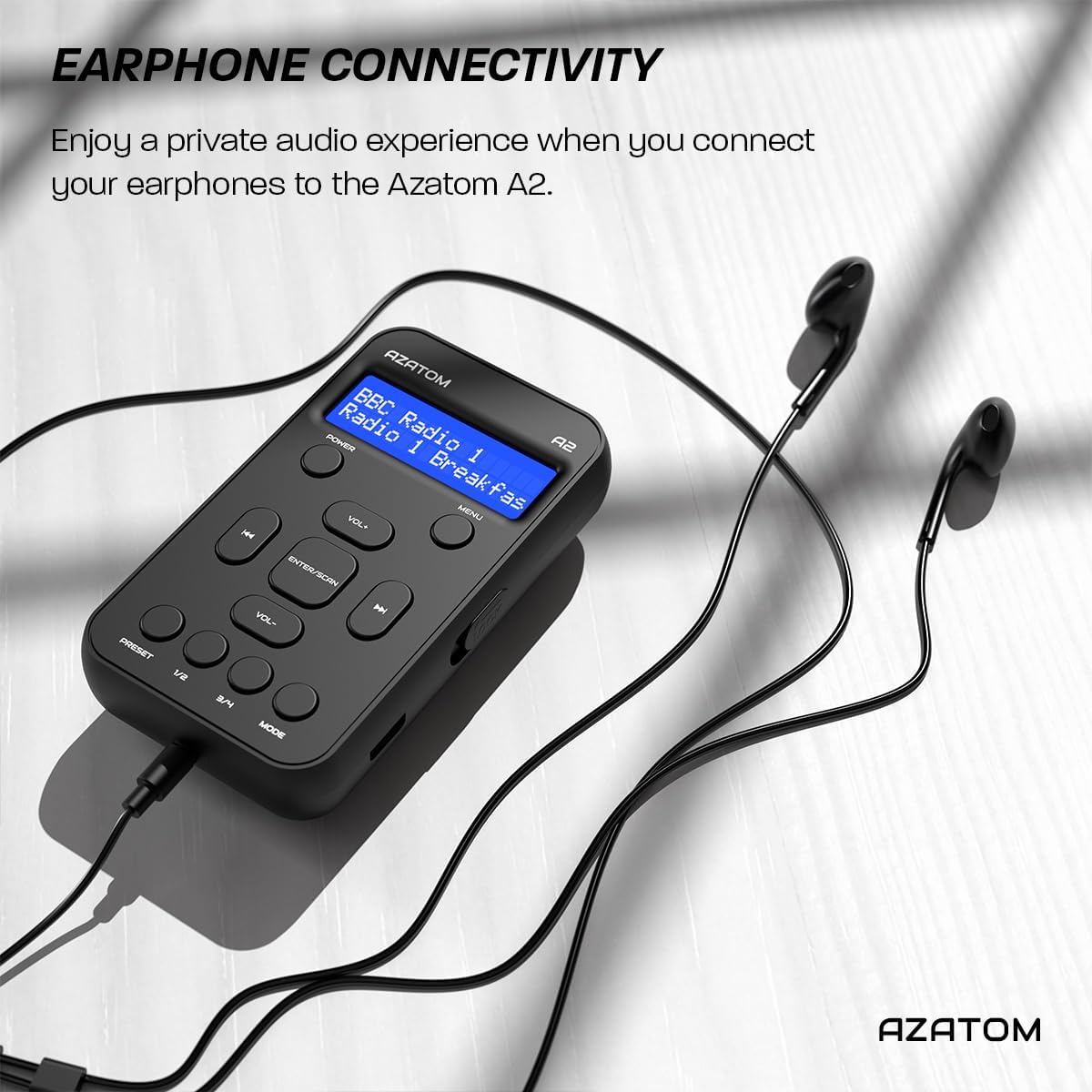
Connect the supplied earphones to the radio for optimal reception and a private listening experience.
Naudojimo instrukcijos
Maitinimo įjungimas/išjungimas
- Paspauskite ir palaikykite GALIA mygtuką, kad įjungtumėte arba išjungtumėte radiją.
DAB/DAB+ radijo veikimas

The AZATOM A2 supports both DAB/DAB+ and FM radio technologies.
- Ensure the earphones are connected.
- Paspauskite REŽIMAS button until 'DAB' or 'DAB+' is displayed.
- The radio will automatically perform a full scan for available DAB/DAB+ stations upon first use or if no stations are found. To manually scan, press and hold the ENTER/SCAN mygtuką.
- Naudokite VOL+ or VOL- buttons to navigate through the list of found stations.
- Paspauskite ENTER/SCAN norėdami pasirinkti stotį.
FM radijo veikimas
- Ensure the earphones are connected.
- Paspauskite REŽIMAS mygtuką, kol pasirodys „FM“.
- Norėdami automatiškai ieškoti FM stočių, paspauskite ir palaikykite ENTER/SCAN mygtuką. Radijas nuskaitys ir išsaugos galimas stotis.
- Norėdami rankiniu būdu derinti, trumpai paspauskite VOL+ or VOL- buttons to adjust the frequency in small increments.
Išankstinių nustatymų nustatymas ir atkūrimas
The AZATOM A2 allows you to store up to 40 DAB+ and 40 FM favorite stations.

The AZATOM A2 allows for easy recall of your favorite preset stations.
Norėdami išsaugoti išankstinį nustatymą:
- Nustatykite norimą stotį.
- Paspauskite ir palaikykite vieną iš NUSTATYMAS buttons (1/2 or 3/4) until the display shows 'Preset Store'.
- Naudokite VOL+ or VOL- mygtukais pasirinkite norimą iš anksto nustatytos stoties numerį (1–40).
- Paspauskite ENTER/SCAN , kad patvirtintumėte ir išsaugotumėte stotį.
Norėdami priminti išankstinį nustatymą:
- Trumpai paspauskite vieną iš NUSTATYMAS buttons (1/2 or 3/4).
- Naudokite VOL+ or VOL- buttons to navigate through your stored presets.
- Paspauskite ENTER/SCAN to select and play the desired preset station.
Garsumo valdymas
- Paspauskite VOL+ garsumui padidinti.
- Paspauskite VOL- norėdami sumažinti garsumą.
Ekrano ryškumas
The XL digital display's brightness can be adjusted to your preference. Access this setting through the MENU options.

Iš arti view of the AZATOM A2's clear digital display.
Priežiūra
- Valymas: Radijo paviršių valykite minkštu, sausu skudurėliu. Nenaudokite abrazyvinių valiklių ar tirpiklių.
- Akumuliatoriaus priežiūra: Norėdami pailginti baterijos veikimo laiką, venkite jos dažnai visiškai iškrauti. Reguliariai įkraukite radijo stotelę, net jei jos ilgą laiką nenaudojate.
- Saugykla: Radijo imtuvą laikykite vėsioje, sausoje vietoje, toliau nuo tiesioginių saulės spindulių ir ekstremalių temperatūrų.
Trikčių šalinimas
| Problema | Galima priežastis | Sprendimas |
|---|---|---|
| No power/Radio won't turn on. | Baterija išsikrovusi. | Charge the radio using the supplied USB-C cable. |
| Prastas radijo signalo priėmimas (DAB/FM). | Earphones not connected or not fully inserted. Weak signal area. | Ensure earphones are securely connected. Try moving to an open area or near a window. Perform a new scan. |
| Nėra garso. | Volume is too low or muted. Earphones not connected. | Increase the volume using VOL+. Ensure earphones are connected. |
| Radijas užstringa arba nereaguoja. | Laikinas programinės įrangos triktis. | Press and hold the POWER button to force a restart. If issue persists, allow battery to fully discharge then recharge. |
Specifikacijos

Dimensions of the AZATOM A2 radio.
| Funkcija | Detalė |
|---|---|
| Modelis | A2 |
| Matmenys (I x P x A) | 9 x 4 x 11 cm (approx. 90mm x 50mm x 24mm) |
| Svoris | 90 g |
| Palaikomos radijo juostos | DAB, DAB+, FM |
| Išankstiniai nustatymai | 40 DAB+, 40 FM |
| Baterijos tipas | Įkraunamas ličio jonų akumuliatorius (1800 mAh) |
| Žaidimo laikas | Iki 24 valandų |
| Ekrano tipas | LCD |
| Ryšys | USB-C (for charging), 3.5mm Earphone Jack |
| Medžiaga | Plastikiniai |
Garantija ir palaikymas
AZATOM products are designed and engineered in the UK. The AZATOM A2 comes with a premium 3-year warranty (registration required). For any questions or support, please contact our dedicated customer service team. Lifetime customer support is provided to assist you with any queries.
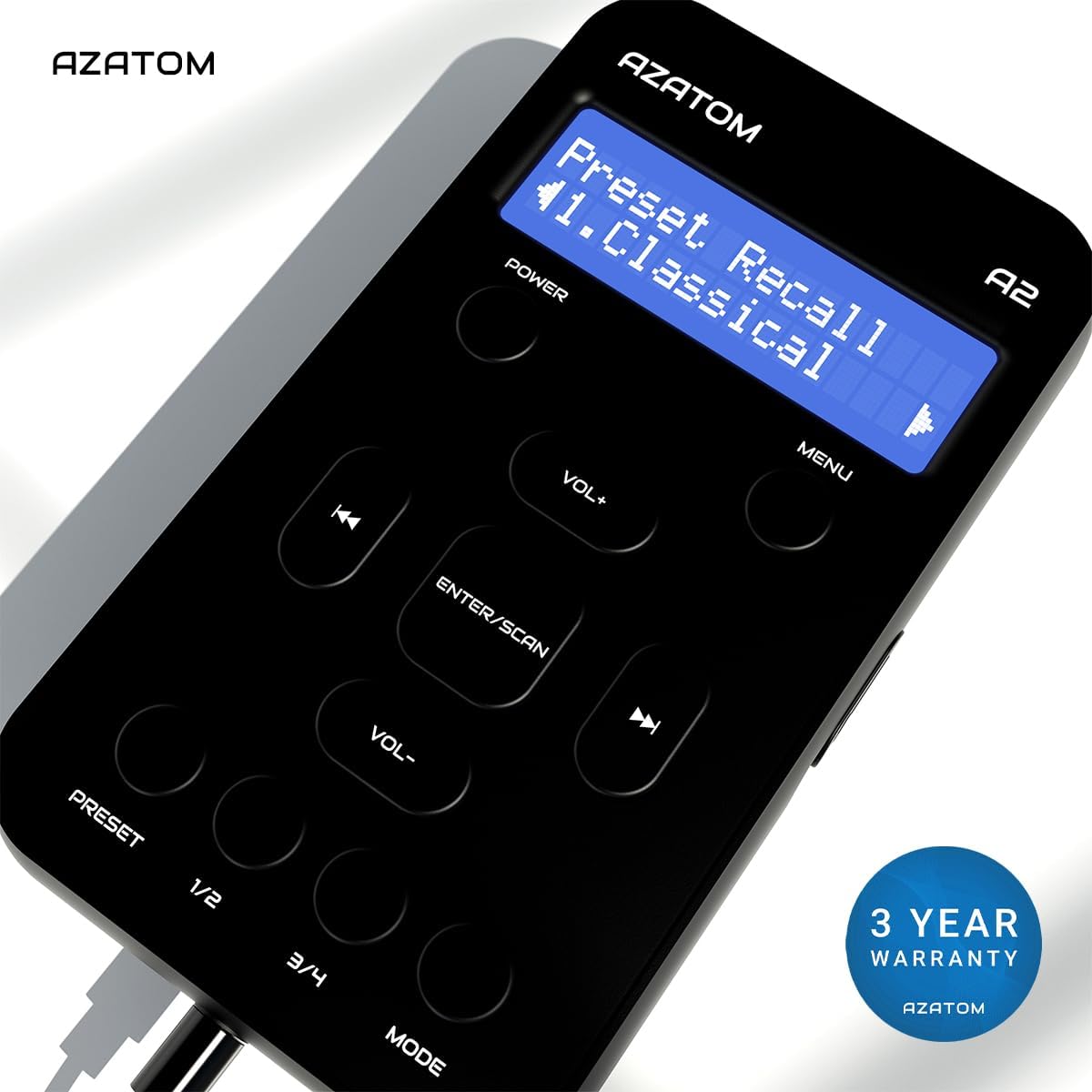
The AZATOM A2 is backed by a 3-year warranty.


