1. Įvadas
This user manual provides essential information for the safe and efficient operation of your Qoltec 51758 Mains & Inverter Adapter. This power adapter is designed to provide reliable power to compatible HP notebooks, featuring advanced protection mechanisms against overvoltage, overload, short circuit, and overheating. Please read this manual thoroughly before using the product to ensure proper functionality and longevity.
2. Saugos instrukcijos
To prevent injury or damage to your device, always follow these safety precautions:
- Saugokite adapterį nuo vandens, drėgmės ar didelės drėgmės.
- Neardykite, nemodifikuokite ir nebandykite taisyti adapterio. Visus techninės priežiūros darbus patikėkite kvalifikuotiems darbuotojams.
- Įsitikinkite, kad maitinimo lizdo garsumastage is compatible with the adapter's specifications.
- Nelaikykite adapterio tiesioginiuose saulės spinduliuose arba šalia šilumos šaltinių.
- Do not use the adapter if the cable or connector is damaged.
- Laikyti vaikams nepasiekiamoje vietoje.
- Atjunkite adapterį nuo maitinimo lizdo, kai ilgesnį laiką jo nenaudojate.
3. Produktas baigtasview
The Qoltec 51758 adapter is a compact and efficient power solution. It includes the main adapter unit and various interchangeable tips to ensure compatibility with a range of HP notebooks.
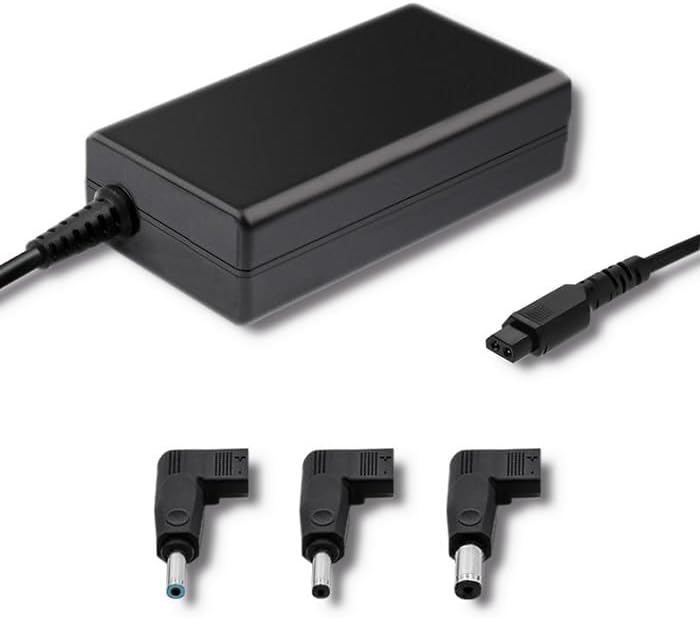
3.1 pav.: priekis view of the Qoltec 51758 power adapter showing the main unit and three common interchangeable tips.

3.2 pav.: galinis view of the Qoltec 51758 power adapter, highlighting the AC input port and the three interchangeable tips.
The adapter features a robust design with a standard AC input port and a DC output cable that connects to the interchangeable tips. These tips ensure a secure and correct fit for various HP notebook models.
4. Sąranka
- Nustatykite tinkamą patarimą: Select the interchangeable tip that matches the power input port of your HP notebook. Ensure it fits snugly and securely.
- Connect the Tip: Attach the selected tip to the DC output cable of the Qoltec 51758 adapter.
- Prisijungti prie nešiojamojo kompiuterio: Insert the connected tip into the power input port of your HP notebook.
- Prijunkite prie maitinimo lizdo: Plug the AC input cable of the adapter into a standard wall power outlet.
- Patikrinkite ryšį: Confirm that the power indicator light (if present on your notebook or adapter) illuminates, indicating a successful power connection.
5. Operacinis
Once properly set up, the Qoltec 51758 adapter operates automatically to provide power to your connected HP notebook. It will charge the notebook's battery and/or power the notebook directly.
- Įkrovimas: When connected, the adapter will charge your notebook's battery until it reaches full capacity.
- Tiesioginė galia: The adapter can also power your notebook directly, even if the battery is fully charged or removed (if supported by the notebook).
- Apsaugos savybės: The adapter is equipped with built-in protections against overvoltage, overload, short circuit, and overheating. In case of an anomaly, the adapter may temporarily cease operation to protect itself and the connected device. Disconnect and reconnect to reset if this occurs.
6. Priežiūra
Tinkama priežiūra užtikrina jūsų adapterio ilgaamžiškumą ir optimalų veikimą.
- Valymas: Prieš valydami atjunkite adapterį nuo visų maitinimo šaltinių ir įrenginių. Paviršiui nuvalyti naudokite minkštą, sausą šluostę. Nenaudokite skystų valiklių ar aerozolių.
- Saugykla: When not in use, store the adapter in a cool, dry place away from direct sunlight and extreme temperatures. Avoid tightly winding the cables to prevent damage.
- Kabelio priežiūra: Regularly inspect the power cables and connectors for any signs of wear, cuts, or damage. Replace if necessary.
7. Problemų sprendimas
| Problema | Galima priežastis | Sprendimas |
|---|---|---|
| Adapteris netiekia maitinimo. | No power from outlet; loose connection; damaged cable/adapter. | Check outlet with another device. Ensure all connections are secure. Inspect cables for damage. |
| Notebook not charging. | Incorrect tip used; notebook power port issue; adapter fault. | Verify the correct tip is used and fully inserted. Test with another compatible adapter if possible. |
| Adapteris karštas. | Normal operation under load; poor ventilation; overload. | Ensure adequate ventilation around the adapter. If excessively hot, disconnect and allow to cool. Reduce load if possible. |
If the problem persists after attempting these solutions, please contact Qoltec customer support.
8. Specifikacijos
| Funkcija | Detalė |
|---|---|
| Prekės ženklas | Qoltec |
| Modelis | 51758 |
| Vattage | 65 vatų |
| Gaminio matmenys | 2.79 x 24.64 x 16.51 cm |
| Prekės svoris | 214 gramų |
| Suderinami įrenginiai | HP Notebooks |
| Apsaugos ypatybės | Overvoltage, Overload, Short Circuit, Overheat Protection |
| Jungties tipas | Interchangeable DC Power Tips |
| Ryšio technologija | Wired Power Adapter |
| Pasiekiama pirmoji data | 29 m. balandžio 2022 d |
Pastaba: Specifikacijos gali būti keičiamos be išankstinio įspėjimo.
9. Garantija ir palaikymas
Qoltec products are manufactured to high quality standards. For information regarding warranty coverage, terms, and conditions, please refer to the warranty card included with your product or visit the official Qoltec websvetainę.
For technical support, troubleshooting assistance, or inquiries about replacement parts, please contact Qoltec customer service through their official channels. Have your product model number (51758) and purchase details ready when contacting support.
Qoltec Official Websvetainė: www.qoltec.com (Pastaba: tai yra vietos žymeklis URL, please refer to actual Qoltec webpalaikymo svetainė.)