1. Įvadas
This manual provides essential information for the safe and efficient operation of your GIGABYTE AORUS FO48U 48" 4K OLED Gaming Monitor. Please read this manual thoroughly before using the product and retain it for future reference. The AORUS FO48U is designed to deliver a high-performance visual experience with its 4K OLED display, fast refresh rate, and advanced features.
2. Saugos informacija
Kad nepažeistumėte monitoriaus ir užtikrintumėte naudotojo saugumą, laikykitės šių saugos priemonių:
- Saugokite monitorių nuo lietaus ar drėgmės, kad išvengtumėte gaisro ar elektros smūgio pavojaus.
- Neatidarykite monitoriaus c.asing. Viduje nėra dalių, kurias galėtų aptarnauti vartotojas. Visus techninės priežiūros darbus patikėkite kvalifikuotiems darbuotojams.
- Padėkite monitorių ant stabilaus, lygaus paviršiaus, kad jis nenukristų.
- Užtikrinkite tinkamą vėdinimą aplink monitorių. Neužblokuokite ventiliacijos angų.
- Naudokite tik gamintojo pateiktą arba nurodytą maitinimo adapterį ir laidus.
- Atjunkite monitorių nuo maitinimo lizdo žaibuojant arba kai jis ilgą laiką nenaudojamas.
- Nelieskite ekrano aštriais daiktais, kad nesugadintumėte.
3. Pakuotės turinys
Patikrinkite, ar pakuotėje yra visi toliau išvardyti daiktai:
- GIGABYTE AORUS FO48U 48" 4K OLED Gaming Monitor
- Maitinimo kabelis
- HDMI 2.1 kabelis
- DP 1.4 laidas
- USB 3.0 B to A cable
- Greitos pradžios vadovas (QSG)
- Garantinis talonas
- AORUS Remote Control
4. Sąranka
4.1 Fizinė konfigūracija
The monitor can be set up using its included stand or a VESA-compatible wall mount.
Stovo surinkimas:
Follow the instructions in the Quick Start Guide to securely attach the stand to the monitor base. Ensure all screws are tightened.
VESA sieninio laikiklio montavimas:
The AORUS FO48U supports VESA wall mounts with a 300 x 300mm pattern. Remove the stand if already attached. Use appropriate screws and a VESA-compatible bracket (not included) to mount the monitor. Refer to your wall mount's instructions for specific installation steps.

Vaizdas: Galinis view of the AORUS FO48U monitor, highlighting the VESA 300x300mm mounting points for wall installation.
4.2 Jungiamieji kabeliai
Connect the necessary cables to the monitor's I/O ports. Ensure the monitor is powered off before connecting or disconnecting cables.

Paveikslėlis: Detalus šonas view of the monitor's I/O ports, including USB 3.0, USB Upstream, USB Type-C (KVM), DisplayPort 1.4, HDMI 2.1, Headphone Jack, and Audio Line-Out.
- Maitinimo jungtis: Prijunkite maitinimo laidą prie monitoriaus maitinimo įvesties, o tada – prie maitinimo lizdo.
- Vaizdo įvestis: Connect your PC or gaming console using either the provided HDMI 2.1 cable or DisplayPort 1.4 cable. The monitor features two HDMI 2.1 ports and one DisplayPort 1.4.
- USB jungtys: Connect the USB 3.0 B to A cable from your PC to the monitor's USB Upstream port to enable the monitor's USB 3.0 ports and KVM functionality.
- USB Type-C (KVM): For KVM functionality, connect a USB Type-C cable (10Gbps Type-C cable required, not always included) from your device to the monitor's USB Type-C port. This allows control of multiple devices with a single keyboard and mouse connected to the monitor.
- Garso išvestis: Use the Headphone Jack or Audio Line-Out for external audio devices.
4.3 Pradinis įjungimas
After connecting all necessary cables, press the power button on the monitor to turn it on. The monitor will automatically detect the active input source. If no signal is detected, ensure your source device is powered on and correctly connected.
5. Naudojimo instrukcijos
5.1 Ekrano meniu (OSD) navigacija
The monitor's settings can be adjusted using the OSD menu, typically accessed via a joystick or buttons on the monitor's rear or bottom edge, or with the included AORUS Remote Control.
- Use the joystick/buttons or remote to navigate through menu options.
- Press to select an option or enter a sub-menu.
- Move left/right or up/down to adjust values or select different settings.
- Press the back button or move the joystick in a specific direction (as indicated on-screen) to exit menus.
5.2 Pagrindinės savybės
The AORUS FO48U offers several features for an enhanced viewžaidimo ir žaidimo patirtis:
- 4K UHD raiška (3840 x 2160): Provides crisp, detailed visuals.
- 120Hz atnaujinimo dažnis: Ensures smooth motion for gaming and fast-paced content.
- 1 ms (GTG) atsako laikas: Minimizes ghosting and motion blur.
- FreeSync Premium Support: Sinchronizuoja monitoriaus atnaujinimo dažnį su jūsų GPU, kad žaidimai būtų be plyšimo.
- 10-bit Color / 98% DCI-P3 / 130% sRGB: Delivers accurate and vibrant color reproduction.

Image: Visual comparison demonstrating the difference between 1ms response time at 120Hz refresh rate and 5ms response time at 60Hz, illustrating smoother motion with higher specifications.
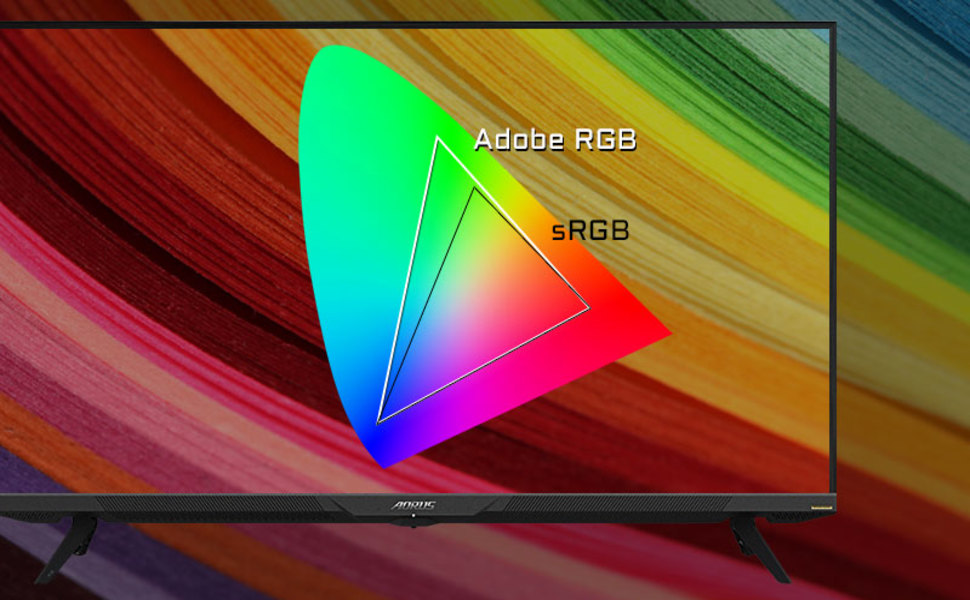
Image: A visual representation of color gamut, comparing Adobe RGB and sRGB color spaces, indicating the monitor's wide color coverage.
5.3 Ypatingos savybės
The monitor includes several advanced features accessible via the OSD or OSD Sidekick software:
- OSD Sidekick: A software utility that allows you to control OSD settings directly from your desktop.
- Vaizdas vaizde (PiP) / Vaizdas prie vaizdo (PbP): Display content from multiple sources simultaneously on the screen.
- Prietaisų skydelis: Real-time hardware information display (e.g., CPU/GPU temperature, fan speed).
- Juodas ekvalaizeris: Enhances visibility in dark areas without overexposing bright areas.
- Žaidimo asistentas: Provides in-game enhancements like crosshairs, timers, and refresh rate counters.
- Space Audio: Offers 5 modes of audio experiences for immersive sound.
- KVM Feature: Allows you to control multiple devices (e.g., two PCs) connected to the monitor using a single keyboard and mouse. Connect devices via USB Type-C and USB 3.0 Upstream ports.

Image: A diagram showing how the Type-C KVM feature allows switching between a desktop PC and a laptop connected to the monitor using one keyboard and mouse.
6. Priežiūra
6.1 Monitoriaus valymas
To clean the monitor, first unplug the power cord. Use a soft, lint-free cloth lightly dampened with water or a mild, non-abrasive screen cleaner. Do not spray cleaner directly onto the screen. Avoid using alcohol, ammonia, or abrasive cleaners, as they can damage the screen surface.
6.2 OLED Care and Burn-in Prevention
OLED displays are susceptible to image retention (burn-in) if static images are displayed for extended periods. To prolong the life of your OLED panel:
- Avoid displaying static images (e.g., desktop icons, taskbars, logos) for long durations.
- Utilize screen savers or dynamic wallpapers.
- Enable the monitor's built-in OLED care features (e.g., pixel shift, pixel refresh, logo luminance adjustment) through the OSD menu.
- Sumažinkite ekrano ryškumą, kai to nereikia.
- Power off the monitor when not in use.
7. Problemų sprendimas
Jei kyla problemų dėl monitoriaus, žr. šias dažniausiai pasitaikančias problemas ir sprendimus:
| Problema | Galima priežastis | Sprendimas |
|---|---|---|
| Ekrane nėra vaizdo | Power cable disconnected; Video cable disconnected or loose; Incorrect input source selected; Source device off. | Check power and video cable connections; Ensure source device is on; Select correct input source via OSD. |
| Vaizdas neryškus arba iškraipytas | Incorrect resolution; Video cable quality; Graphics card driver issues. | Set display resolution to 3840x2160; Use high-quality HDMI 2.1 or DP 1.4 cables; Update graphics drivers. |
| Screen randomly turns off/on | Loose video cable; Power supply issue; Monitor firmware issue; Source device instability. | Ensure video cables are securely connected; Try a different power outlet; Check for and install the latest monitor firmware updates from GIGABYTE's website; Test with a different source device. |
| Nėra garso | Volume too low or muted; Incorrect audio output selected; Audio cable disconnected. | Adjust monitor volume; Select correct audio output in PC settings; Ensure external speakers/headphones are connected. |
| KVM feature not working | Incorrect USB cable; USB Upstream cable not connected; Devices not properly configured. | Ensure a 10Gbps USB Type-C cable is used for Type-C connection; Connect the USB 3.0 B to A cable to your primary PC; Refer to the OSD Sidekick software for KVM setup. |
8. Specifikacijos
Key technical specifications for the GIGABYTE AORUS FO48U monitor:
| Funkcija | Detalė |
|---|---|
| Ekrano dydis | 48 colių |
| Skydelio tipas | OLED |
| Rezoliucija | 3840 x 2160 (4K UHD) |
| Atnaujinimo dažnis | 120 Hz |
| Reagavimo laikas | 1 ms (GTG) |
| Spalvų gama | 98 % DCI-P3 / 130 % sRGB |
| Spalvos gylis | 10 bitų |
| Viewing kampas | 178° (H) / 178° (V) |
| Ryšys | 2x HDMI 2.1, 1x DisplayPort 1.4, 1x USB Type-C (KVM), 2x USB 3.0, 1x USB 3.0 Upstream, Earphone Jack, Audio Line-Out |
| Garsiakalbiai | 2x 15W, 1x 20W (Space Audio) |
| VESA kalnas | 300x300mm |
| Matmenys (PxAxG) | 26.58 x 42.07 x 9.89 colio (su stovu) |
| Svoris | 39.8 svaro (su stovu) |
9. Garantija ir palaikymas
For detailed warranty information, please refer to the warranty card included in your product package or visit the official GIGABYTE website. For technical support, driver downloads, and further assistance, please visit the GIGABYTE support page or contact their customer service.
Oficialus GIGABYTE atstovas Websvetainė: www.gigabyte.com