Įvadas
Thank you for choosing the Lepro 5m RGB LED Strip Light. This product is designed to provide versatile and vibrant lighting for various indoor applications. Featuring high-brightness SMD5050 LEDs, a wide range of colors, and easy installation, it enhances the ambiance of any space. Please read this manual carefully before installation and use to ensure proper operation and safety.
Kas yra dėžutėje
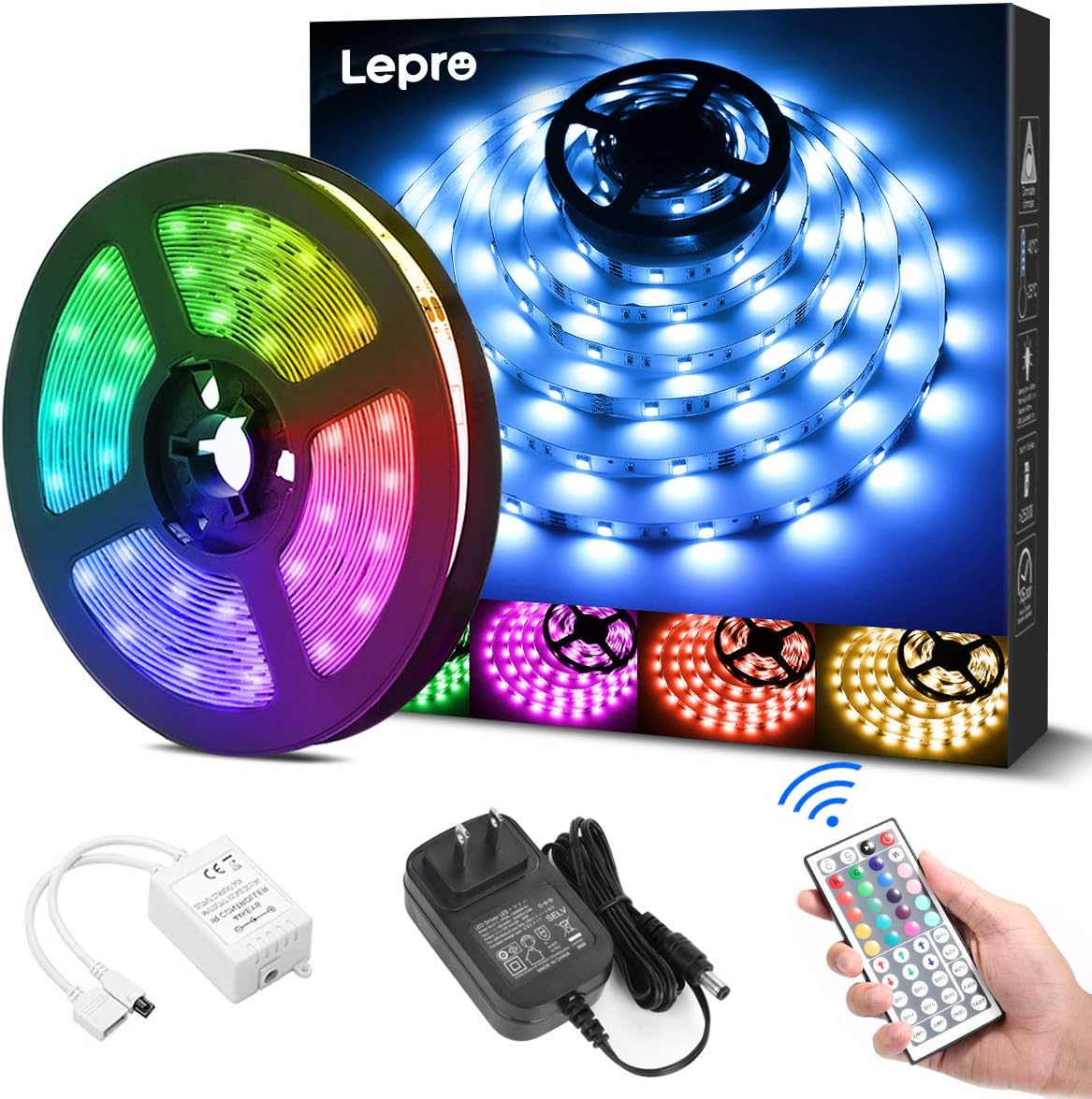
Prieš pradėdami diegti, patikrinkite, ar yra visi komponentai:
- LED Strip Light (5 meters) x 1
- DC12V Power Adapter x 1
- Connection Receiver x 1
- Nuotolinio valdymo pultas x 1
- Instruction Manual (Japanese) x 1
Saugos informacija
- Šis gaminys skirtas naudoti tik patalposeSaugoti nuo vandens ar didelės drėgmės.
- Prieš montuodami arba atlikdami techninę priežiūrą įsitikinkite, kad maitinimas yra atjungtas.
- Use only the provided DC12V power adapter. Using an incompatible power supply may damage the product or pose a fire hazard.
- Nelenkite LED juostelės staigiai ir nenaudokite per didelės jėgos, nes tai gali pažeisti grandinę.
- Laikyti vaikams nepasiekiamoje vietoje.
- If any part of the product is damaged, discontinue use immediately and contact support.
Sąranka
Norėdami tinkamai sumontuoti LED juostelę, atlikite šiuos veiksmus:
- Paruoškite paviršių: Clean the desired installation surface thoroughly. Ensure it is dry, smooth, and free of dust or oil for optimal adhesive performance.
- Išmatuokite ir iškirpkite (nebūtina): If a shorter length is required, cut the LED strip along the designated cut marks (indicated by a scissor icon) using scissors. Pastaba: Only cut at these specific marks. Cutting elsewhere will damage the strip. Cut sections cannot be reconnected without additional connectors (sold separately).
- Užtepkite juostelę: Peel off the backing from the 3M adhesive tape on the back of the LED strip. Carefully press the strip onto the cleaned surface, ensuring firm contact along its entire length.
- Prijunkite komponentus: Connect the LED strip to the connection receiver, ensuring the arrows on both components align. Then, connect the DC12V power adapter to the receiver.
- Maitinimas: Plug the power adapter into a suitable power outlet. Remove the insulation sheet from the remote control before first use. Point the remote control towards the receiver and press the power button to turn on the lights.


Naudojimo instrukcijos
The LED strip light is controlled using the included 44-key remote control. Ensure the remote is pointed towards the receiver for effective operation.
Nuotolinio valdymo pulto funkcijos:
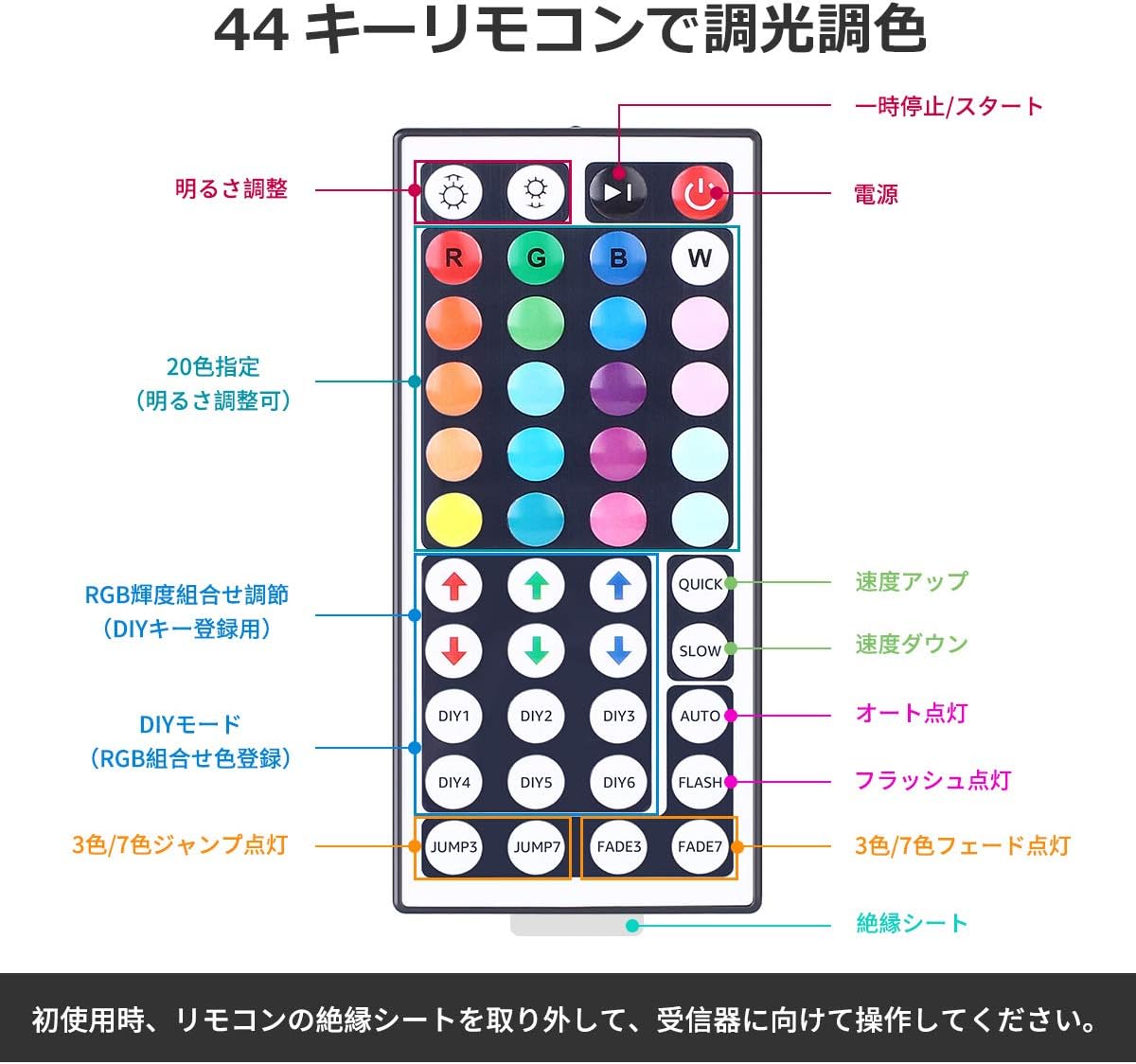
- Maitinimo įjungimas/išjungimas: Paspauskite raudonas maitinimo mygtukas norėdami įjungti arba išjungti šviesas.
- Ryškumo reguliavimas: Naudokite rodyklių aukštyn ir žemyn mygtukai (labeled 'Brightness Adjust') to increase or decrease the light intensity.
- Spalvos pasirinkimas: Pasirinkite iš 20 iš anksto nustatytos spalvos by pressing the corresponding color buttons.
- „Pasidaryk pats“ režimai: The DIY1-DIY6 buttons allow you to create and save custom colors by adjusting the Red, Green, and Blue intensity using the RGB arrow buttons.
- Dinaminiai režimai:
- GREITAS / LĖTAS: Reguliuokite dinaminių režimų greitį.
- AUTOMATINIS: Cycles through all dynamic modes automatically.
- BLYKSTĖ: Flashes through colors.
- JUMP3 / JUMP7: Jumps between 3 or 7 colors.
- FADE3 / FADE7: Fades between 3 or 7 colors.
Priežiūra
- Valymas: Ensure the power is off and unplugged before cleaning. Gently wipe the LED strip with a dry, soft cloth. Do not use harsh chemicals or abrasive cleaners.
- Saugykla: If storing the strip for an extended period, ensure it is clean and dry. Roll it loosely to prevent damage to the LEDs or circuit. Store in a cool, dry place away from direct sunlight.
- Klijų priežiūra: The 3M adhesive is strong, but repeated removal and reapplication may reduce its effectiveness.
Trikčių šalinimas
| Problema | Galima priežastis | Sprendimas |
|---|---|---|
| LED juostelė nešviečia. | 1. Power adapter not plugged in. 2. Remote control insulation sheet not removed. 3. Connections are loose or incorrect. 4. Remote control battery is dead. | 1. Ensure power adapter is securely plugged into an outlet. 2. Remove the clear plastic insulation sheet from the remote control battery compartment. 3. Check all connections, ensuring arrows align between the strip and receiver. 4. Replace the remote control battery (CR2025 or equivalent). |
| Nuotolinio valdymo pultas nereaguoja. | 1. Remote not pointed at receiver. 2. Obstruction between remote and receiver. 3. Remote control battery is dead. | 1. Point the remote directly at the receiver. 2. Remove any objects blocking the line of sight. 3. Pakeiskite nuotolinio valdymo pulto bateriją. |
| Some sections of the strip are not lighting up. | 1. Damage to the LED strip. 2. Incorrect cutting. | 1. Inspect the strip for physical damage. If damaged, contact support. 2. Ensure cuts were made only at designated marks. |
Specifikacijos
- Modelio numeris: PR410082-RGB-JP
- Prekinis ženklas: Lepro
- Šviesos šaltinio tipas: LED (SMD5050)
- LED kiekis: 150 LEDs (30 LEDs per meter)
- Juostos ilgis: 5 metrų
- Energijos suvartojimas: 18W
- Įvesties tomastage: DC12V 1.5A
- Spalvų parinktys: RGB (20 preset colors + DIY modes)
- Kontrolės metodas: 44 klavišų IR nuotolinio valdymo pultas
- Vidaus / lauko naudojimas: Vidinis
- Ypatingos savybės: Dimmable, Cuttable, 3M Adhesive, PSE Certified
- Pakuotės dydis: 13.1 x 10.7 x 6.7 cm; 230 g

Garantija ir palaikymas
This Lepro LED Strip Light comes with a 2 metų garantija. If you encounter any issues or have questions regarding the product, please contact Lepro JP customer support through the retailer's platform. Provide your order details and a description of the issue for prompt assistance.
For further assistance, you can visit the official Lepro store on Amazon: „Lepro“ „Amazon“ parduotuvė


