1. Įvadas
The HUUM UKU WiFi Control System provides a convenient and modern way to manage your sauna experience. This system allows you to operate all features of your sauna control, including lighting, ventilation, timer, and temperature, directly from a wall-mounted unit or remotely via the HUUM Wi-Fi smartphone application. This manual provides essential information for the safe and effective use of your HUUM UKU WiFi Control.

Image 1.1: The HUUM UKU WiFi Control unit, featuring a sleek black design with the HUUM logo.
2. Saugos informacija
Your safety is paramount. The HUUM UKU WiFi Control system incorporates several safety features to ensure secure operation. Always adhere to the following guidelines and consult the full installation and safety instructions provided with your sauna heater and control unit.
- Saugos užraktas vaikams: The system includes a child safety lock feature to prevent unauthorized use. Refer to the operating instructions for activation and deactivation.
- Apsauga nuo perkaitimo: Integrated overheating protection automatically shuts down the heater if temperatures exceed safe limits.
- Durų jutiklis: A door sensor is included to ensure the sauna door is closed before heating can commence, enhancing safety.
- Įsitikinkite, kad visus elektros prijungimus atlieka kvalifikuotas elektrikas pagal vietinius kodeksus ir reglamentus.
- Do not operate the sauna control if it appears damaged or is not functioning correctly.
3. Pakuotės turinys
Įsitikinkite, kad pakuotėje yra visi komponentai:
- HUUM UKU WiFi Control Unit (Black)
- Sienos laikiklis
- Wi-Fi Connectivity Cables
- Įrengimo ir naudotojo vadovas (šis dokumentas)
4. Sąranka
4.1. Montavimas
The HUUM UKU WiFi Control unit is designed for wall mounting. Ensure the installation location is dry, easily accessible, and within reach of necessary electrical and Wi-Fi connections. Refer to the detailed installation guide for wiring diagrams and mounting instructions. For heaters exceeding 9kW, an extension box is required.
4.2. „Wi-Fi“ ryšys
The UKU WiFi Control requires a stable Wi-Fi network connection for remote operation. During initial setup, follow the on-screen prompts on the control unit or the instructions within the HUUM app to connect to your home Wi-Fi network.
4.3. Programėlės atsisiuntimas ir susiejimas
Download the official HUUM Wi-Fi application from your smartphone's app store (available for Android and iOS devices). Once installed, open the app and follow the instructions to pair it with your UKU WiFi Control unit. This will enable remote control functionality.

Image 4.1: A smartphone displaying the HUUM app interface alongside a HUUM control unit, illustrating the integration of app and physical control.
Image 4.2: A smartphone screen displaying the HUUM application's main logo, indicating the app is ready for use.
5. Naudojimo instrukcijos
The HUUM UKU WiFi Control offers flexible operation through its wall-mounted display or the dedicated smartphone application.
5.1. Basic Operation (Wall-Mounted Control)
The sleek black control display panel allows for direct adjustment of sauna settings. Use the integrated buttons or dial to navigate menus and set parameters such as:
- Įjungta/Išjungta: Power the sauna heater.
- Temperatūra: Adjust the desired sauna temperature within the range of 122-230°F (50-110°C).
- Laikas: Set the duration of the sauna session.
- Vėlavimas: Program a delayed start for your sauna session, up to 48 hours in advance.
5.2. App Control (Smartphone Application)
The HUUM Wi-Fi app provides comprehensive control over your sauna from anywhere with an internet connection. This allows you to preheat your sauna to the perfect temperature before you arrive. The app mirrors the functionalities of the wall-mounted control and may offer additional features such as:
- Remote activation and deactivation of the sauna.
- Precise temperature setting and monitoring.
- Scheduling of sauna sessions with advanced delay options.
- Control of integrated lighting and ventilation systems (if connected).
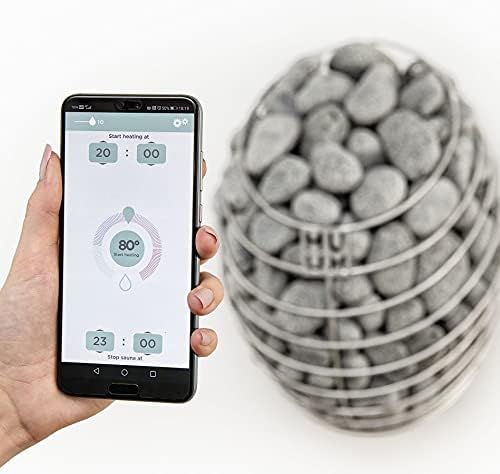
Image 5.1: A hand holding a smartphone displaying the HUUM app, which shows temperature and timer settings, with a sauna heater visible in the background.
6. Priežiūra
To ensure the longevity and optimal performance of your HUUM UKU WiFi Control, follow these general maintenance guidelines:
- Valymas: Wipe the control unit's display panel with a soft, dry cloth. Avoid abrasive cleaners or solvents that could damage the finish.
- Aplinka: Ensure the control unit is kept in a dry environment, away from direct water splashes or excessive humidity.
- Programinės įrangos atnaujinimai: Periodically check the HUUM app for any available software or firmware updates for your control unit to ensure you have the latest features and security enhancements.
7. Problemų sprendimas
If you encounter issues with your HUUM UKU WiFi Control, consider the following troubleshooting steps:
- Nėra galios: Check the main power supply to the control unit and the sauna heater. Ensure all circuit breakers are in the ON position.
- „Wi-Fi“ ryšio problemos: Verify that your home Wi-Fi network is active and the signal strength at the control unit's location is adequate. Restart your Wi-Fi router if necessary. Re-pair the control unit with the app if connection is lost.
- Programėlė neatsako: Close and reopen the HUUM app. Ensure your smartphone has a stable internet connection. Check for app updates in your app store.
- Sauna Not Heating: Confirm that the door sensor indicates the sauna door is closed. Check the set temperature and timer settings. Ensure the sauna heater itself is functioning correctly.
- Klaidos pranešimai: If an error message appears on the control unit's display or in the app, consult the detailed troubleshooting section of the full product manual or contact HUUM customer support.
8. Specifikacijos
| Funkcija | Specifikacija |
|---|---|
| Prekės ženklas | HUUM |
| Modelio numeris | 44180017774749 |
| UPC | 810041112392 |
| Valdiklio tipas | WI-FI APP |
| Spalva | Juoda |
| Specifinis produkto naudojimas | Pirtis |
| Temperatūros valdymo tipas | Nuotolinis |
| Ryšio technologija | Wi-Fi |
| Įtraukti komponentai | Wall mount, Wi-Fi connectivity cables |
| Maitinimo šaltinis | Kietasis laidas |
| ttage | 24 voltai (kintamoji srovė) |
| Forma | Stačiakampis |
| Ekrano tipas | LCD |
| Apdailos tipas | Blizgus |
| Valdymo tipas | Programų valdymas |
| Kontrolės metodas | Programėlė |
| Ryšio protokolas | Wi-Fi |
| Montavimo tipas | Sieninis laikiklis |
| Stilius | Modernus |
| Foninis apšvietimas | Taip |
| Suderinamumas su šildytuvu | Up to 18kW (extension box required for over 9kW) |
| Temperatūros diapazonas | 122–230 °F (50–110 °C) |
| Atidėtas startas | Iki 48 valandų |
| Ypatinga funkcija | Vaikų saugos užraktas |
9. Garantija ir palaikymas
For information regarding product warranty, please refer to the warranty card included with your purchase or visit the official HUUM website. For technical support, troubleshooting assistance beyond this manual, or to inquire about replacement parts, please contact HUUM customer service through their official channels.
You can often find additional resources, FAQs, and contact information on the HUUM Store on Amazon arba gamintojo oficialus atstovas websvetainę.


