Įvadas
The Altec Lansing HydraBlast is a robust and versatile wireless portable Bluetooth speaker designed for various environments, from outdoor parties to everyday use. It features IP67 Everything Proof protection, ensuring it is waterproof, shockproof, snowproof, and dustproof. With a long-lasting battery, built-in phone charging capabilities, and dynamic LED lights, the HydraBlast delivers powerful audio and convenience wherever you go.

1 pav.: priekis view of the Altec Lansing HydraBlast speaker in Royal Blue.
Kas yra dėžutėje
- Altec Lansing HydraBlast Bluetooth Speaker
- USB-C įkrovimo laidas
- Karabino spaustukas
- Vartotojo vadovas (šis dokumentas)
Produkto savybės
- Ryškus bosas ir aiškus garsas: Experience HD audio with immersive bass for a rich listening experience.
- IP67, viskas patikrinta: Designed to be waterproof, shockproof, snowproof, and dustproof, making it suitable for any environment.

Figure 2: The HydraBlast speaker demonstrating its water resistance.
- 20 valandų žaidimo laiko: Enjoy extended music playback on a single charge.
- Įmontuotas telefono įkroviklis: Features both wireless (Qi) charging and wired USB-C output to charge your devices.

Figure 3: Wireless charging a smartphone on the speaker's top surface.
- LED apšvietimo režimai: Multiple LED light modes to enhance your listening experience and create a party atmosphere.

Figure 4: The speaker features 11 distinct LED light modes, including strobe effects.
- Nešiojamas dizainas: Lightweight and includes a built-in carabiner hook for easy transport and attachment.

Figure 5: The included carabiner clip allows for easy portability, attaching to bags or gear.
- "Bluetooth 5.0": Užtikrina stabilų belaidį ryšį iki 100 pėdų atstumu.
- Tikras belaidis susiejimas: Connect two HydraBlast speakers for a stereo sound experience.
Kontroliuojaview

Figure 6: Top panel controls of the HydraBlast speaker.
- Įjungimo / išjungimo mygtukas: Paspauskite ir palaikykite, kad įjungtumėte arba išjungtumėte garsiakalbį.
- Nuorodos mygtukas: Used for True Wireless Pairing with another HydraBlast speaker.
- Spalvos keitimo mygtukas: Cycles through different LED light modes.
- Wireless Qi Charger: Integruotas įkrovimo kilimėlis suderinamiems įrenginiams.
- Garsumo mažinimo / ankstesnio takelio mygtukas (-): Trumpas paspaudimas – garsumui sumažinti, ilgas – ankstesniam takeliui.
- Voice Assistant / Answer Calls Button: Activates voice assistant or answers/ends calls.
- Garsumo didinimo / kito takelio mygtukas (+): Trumpai paspauskite, kad padidintumėte garsumą, ilgai paspauskite kitą takelį.
Sąranka
1. Pradinis įkrovimas
Before first use, fully charge your HydraBlast speaker. Locate the USB-C charging port on the side of the speaker (protected by a waterproof flap). Connect the provided USB-C cable to the speaker and the other end to a USB power adapter (not included) or a computer's USB port. The charging indicator light will show charging status.
2. „Bluetooth“ poravimas
- Įsitikinkite, kad garsiakalbis išjungtas.
- Paspauskite ir palaikykite Maitinimo įjungimas/išjungimas button until you hear an audible prompt and the Bluetooth indicator light begins to flash, indicating pairing mode.
- Išmaniajame telefone arba „Bluetooth“ įrenginyje eikite į „Bluetooth“ nustatymus.
- Iš galimų įrenginių sąrašo pasirinkite „Altec Lansing HydraBlast“.
- Once connected, you will hear a confirmation tone, and the Bluetooth indicator light will become solid.
3. True Wireless Pairing (Pairing Two Speakers)
To achieve a stereo sound experience, you can pair two HydraBlast speakers together:
- Ensure both HydraBlast speakers are powered on and not connected to any other Bluetooth devices.
- On one speaker (this will be your primary speaker), press the Nuoroda button. The speaker will enter True Wireless Pairing mode.
- On the second speaker, also press the Nuoroda mygtuką.
- Du garsiakalbiai automatiškai susijungs. Prisijungus išgirsite patvirtinimo toną.
- Now, connect your Bluetooth device to the primary speaker as described in the "Bluetooth Pairing" section above. Audio will play through both speakers in stereo.
Naudojimo instrukcijos
Groja garso įrašą
- After successful Bluetooth pairing, open your preferred music application on your device and begin playback.
- Naudokite Garsumo padidinimas (+) ir Patildyti (-) buttons on the speaker to adjust the volume.
- Ilgai paspauskite mygtuką Garsumo padidinimas (+) mygtuką kitam takeliui ir ilgai paspauskite Patildyti (-) ankstesnio takelio mygtukas.
Skambučių valdymas
- Kai skambina, paspauskite Voice Assistant / Answer Calls mygtuką atsakyti.
- Norėdami baigti pokalbį, dar kartą paspauskite tą patį mygtuką.
- Norėdami atmesti gaunamą skambutį, paspauskite ir palaikykite Voice Assistant / Answer Calls mygtuką.
LED šviesos režimų naudojimas
Paspauskite Spalvos keitimas button to cycle through the available LED light modes. Continue pressing until you find your desired light pattern or turn the lights off.
Išorinių įrenginių įkrovimas
- Belaidis įkrovimas: Place your Qi-compatible smartphone or device on the designated wireless charging area on top of the speaker. Ensure proper alignment for charging to begin.
- Įkrovimas laidiniu būdu: Open the waterproof flap on the side of the speaker to access the USB-A output port. Connect your device's charging cable to this port to charge it.
Priežiūra
- Valymas: Naudokite minkštą, damp garsiakalbio išorę valykite šluoste. Venkite naudoti stiprias chemines medžiagas ar abrazyvinius valiklius.
- Atsparumas vandeniui: While the speaker is IP67 rated, ensure the charging port flap is securely closed before exposing it to water or dust. Do not submerge the speaker for extended periods or at depths greater than 1 meter.
- Saugykla: Kai nenaudojate, laikykite garsiakalbį vėsioje, sausoje vietoje. Venkite ekstremalių temperatūrų.
- Akumuliatoriaus priežiūra: For optimal battery life, avoid fully discharging the speaker frequently. Charge it regularly, even if not in constant use.
Trikčių šalinimas
| Problema | Galima priežastis / sprendimas |
|---|---|
| Garsiakalbis neįsijungia. | Battery may be depleted. Connect to a power source using the USB-C cable and charge for at least 30 minutes before attempting to power on again. |
| Nepavyksta susieti per „Bluetooth“. |
|
| Nėra garso arba garsas per mažas. |
|
| Belaidis įkrovimas neveikia. |
|
| Garso iškraipymas. |
|
Specifikacijos
| Funkcija | Detalė |
|---|---|
| Prekės ženklas | Altec Lansing |
| Modelio pavadinimas | HydraBlast (IMW1300-RYB-STK-2) |
| Ryšio technologija | Bluetooth, USB |
| Belaidžio ryšio technologija | Bluetooth 5.0 |
| Bluetooth diapazonas | 100 pėdų |
| Garsiakalbio tipas | Lauke |
| Ypatinga funkcija | Portable, Waterproof, Built-in Phone Charger, LED Lights |
| Atsparumo vandeniui lygis | IP67 (atsparus vandeniui, smūgiams, sniegui, dulkėms) |
| Baterijos veikimo laikas | Iki 20 valandų |
| Maitinimo šaltinis | Maitinamas baterijomis |
| Įkrovimo prievadas | USB-C |
| Garso išvesties režimas | Stereo |
| Didžiausia garsiakalbio išėjimo galia | 6 vatų |
| Gaminio matmenys | 8.7 "D x 4.4" P x 5.5" A |
| Prekės svoris | 1.9 svaro |
| Medžiaga | Durable Plastic / Rubberized Plastic |
| Įtraukti komponentai | Bluetooth garsiakalbis |
| UPC | 021331023704 |
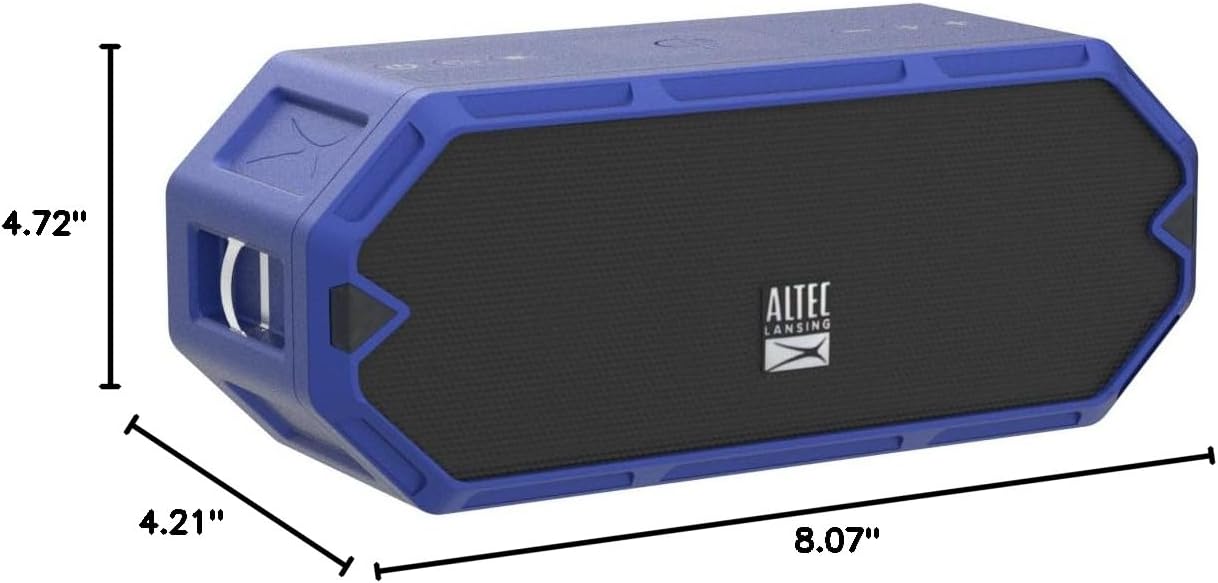
Figure 7: Dimensions of the HydraBlast speaker.
Garantija ir palaikymas
The Altec Lansing HydraBlast speaker comes with a Limited Warranty. For specific warranty terms, conditions, and duration, please refer to the warranty card included with your product or visit the official Altec Lansing websvetainę.
For technical support, troubleshooting assistance, or warranty claims, please contact Altec Lansing Customer Service:
- Websvetainė: alteclansing.com/support
- Telefonas: Refer to the product packaging or webregioninių kontaktinių numerių svetainė.
Please have your product model number (IMW1300-RYB-STK-2) and proof of purchase ready when contacting support.


