Įvadas
The TELE System UP T2 4K is an advanced digital terrestrial decoder that integrates Android TV functionality, transforming your television into a smart entertainment hub. This device supports DVB-T2 HEVC standards, offering high-quality 4K ULTRA HD resolution with HDR10+HLG support. It provides access to a vast array of streaming services via Google Play Store, including Prime Video, YouTube, Netflix, DAZN, Disney Plus, RaiPlay, Apple TV+, and Mediaset Infinity. Equipped with Google Assistant and Chromecast built-in, it offers intuitive voice control and seamless content casting from your smart devices. This manual provides essential information for setting up, operating, maintaining, and troubleshooting your UP T2 4K decoder.

Image: The TELE System UP T2 4K decoder positioned in front of a television displaying the Android TV home screen with various streaming app icons.
Kas yra dėžutėje
Upon unboxing your TELE System UP T2 4K, please ensure all the following components are present:
- TELE System UP T2 4K Decoder
- Nuotolinio valdymo pultas
- SCART adapteris
- 2x AAA baterijos
- Instrukcijų vadovas
Sąrankos vadovas
Follow these steps for the initial setup of your TELE System UP T2 4K decoder.
1. Dekoderio prijungimas
- Maitinimo jungtis: Connect the power adapter to the DC IN port on the back of the decoder and plug it into a power outlet.
- Vaizdo jungtis:
- For modern TVs, connect an HDMI cable from the HDMI port on the decoder to an available HDMI input on your television.
- For older TVs, use the provided SCART adapter. Connect the adapter to the AV port on the decoder, then connect a SCART cable from the adapter to the SCART input on your television.
- Antenos jungtis: Connect your terrestrial antenna cable to the RF IN port on the back of the decoder.
- Tinklo ryšys (nebūtinas, bet rekomenduojamas):
- „Wi-Fi“: The decoder supports Wi-Fi for wireless internet access. You will configure this during the on-screen setup.
- Ethernet: For a more stable connection, connect an Ethernet cable from the Ethernet port on the decoder to your router.
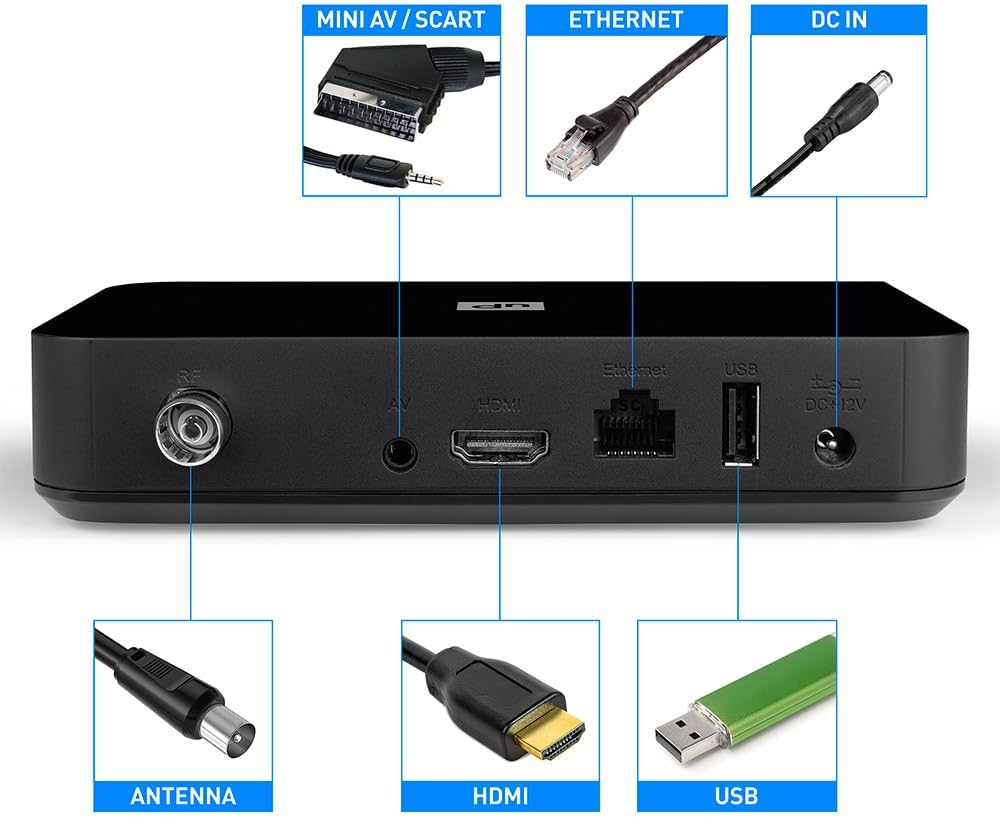
Vaizdas: Galinis view of the TELE System UP T2 4K decoder, highlighting its various connection ports including RF IN (Antenna), AV (Mini AV/SCART), HDMI, Ethernet, USB, and DC IN.
2. Initial Power-On and On-Screen Setup
- Turn on your television and select the correct HDMI or SCART input source connected to the decoder.
- The decoder will power on automatically. Follow the on-screen instructions to complete the initial setup, which typically includes:
- Kalbos pasirinkimas.
- Tinklo konfigūracija („Wi-Fi“ arba eternetas).
- Google account sign-in (required for Android TV features and app downloads).
- Channel scanning for digital terrestrial TV.
- Nuotolinio valdymo pulto poravimas: The remote control uses both Bluetooth and IR. For full functionality, especially voice commands, ensure it is paired via Bluetooth during the setup process.
- Programinės įrangos atnaujinimai: Ensure your decoder is running the latest software version. Updates for the decoder and Google Play Store apps are managed directly through Google's servers. A stable network connection is crucial for successful updates.
- Suderinamumas su televizoriumi: Ensure your TV is HDCP compatible for proper image display. If you experience issues, try changing the HDMI/SCART cable or adjusting the "color-space" option to RGB in the decoder's settings. For image fluidity problems, change the resolution in AV SET > Screen > Screen Options > Resolution and select a 50Hz format.
Naudojimo instrukcijos
This section covers the basic operation of your TELE System UP T2 4K decoder.
Nuotolinio valdymo pulto funkcijos
The included remote control allows you to navigate the Android TV interface and control TV functions. It features both Bluetooth and infrared (IR) capabilities.

Image: A hand holding the TELE System remote control, with a focus on the Google Assistant button and direct access buttons for YouTube and Prime Video.
- Maitinimo mygtukas: Turns the decoder on/off.
- Naršymo skydelis (mygtukas „Gerai“): Naudojamas naršyti meniu ir patvirtinti pasirinkimus.
- Atgal mygtukas: Grįžta į ankstesnį ekraną.
- Namų mygtukas: Grąžina į „Android TV“ pagrindinį ekraną.
- „Google“ asistento mygtukas: Paspauskite, kad suaktyvintumėte balso komandas.
- Tūris +/-: Reguliuoja garsumą.
- Channel +/- (DTV): Changes channels in Digital Terrestrial TV mode.
- Direct App Buttons: Quick access to YouTube and Prime Video.
- DTV Button: Switches between Android TV mode and Digital Terrestrial TV mode.
- TV valdymo mygtukai: The remote can be programmed to control basic functions of your TV (e.g., power, volume). Refer to the remote control's specific instructions for programming.
Prieiga prie srautinio perdavimo paslaugų
From the Android TV home screen, you can access various streaming applications:
- Navigate to the 'Apps' section or select an app icon directly from the home screen (e.g., Netflix, Prime Video, YouTube).
- If an app is not installed, you can download it from the Google Play Store.
- Sign in with your respective service accounts to access content.
Using Digital Terrestrial TV (DVB-T2)
To watch digital terrestrial channels:
- Paspauskite DTV button on the remote control to switch to TV mode.
- Norėdami perjungti kanalus, naudokite mygtukus „Kanalas +/-“.
- Access the Electronic Program Guide (EPG) for program information.
Google Assistant and Chromecast
- „Google“ padėjėjas: Press the Google Assistant button on the remote and speak your commands. You can ask it to find content, control playback, check weather, and more.
- Integruotas „Chromecast“: Cast photos, videos, and music from your compatible smartphone, tablet, or computer directly to your TV via the decoder. Look for the Cast icon within supported apps on your smart device.
Energijos taupymo funkcija
The decoder has an automatic standby feature that turns off the device after 3 hours of inactivity. To disable this function, navigate to Settings > Device Preferences > Automatic Standby and set it to "NEVER".
Priežiūra
To ensure the longevity and optimal performance of your TELE System UP T2 4K decoder, follow these simple maintenance guidelines:
- Valymas: Use a soft, dry cloth to clean the exterior of the decoder. Do not use liquid cleaners, aerosols, or abrasive materials, as they may damage the surface or internal components.
- Vėdinimas: Ensure the decoder is placed in a well-ventilated area. Do not block any ventilation openings on the device. Overheating can affect performance and lifespan.
- Išjunkite, kai nenaudojate: If you plan not to use the decoder for an extended period, it is advisable to unplug it from the power outlet.
- Venkite skysčių: Keep the decoder away from water and other liquids. Do not place objects filled with liquids (e.g., vases) on or near the device.
Trikčių šalinimas
If you encounter issues with your TELE System UP T2 4K decoder, refer to the following common problems and their solutions:
| Problema | Galima priežastis / sprendimas |
|---|---|
| Software Update Fails | An inadequate network connection can cause update failures. Ensure a stable internet connection. If the operation still fails, reset the decoder to factory settings. |
| No Image / Green Screen / Image Issues | Ensure your TV is HDCP compatible. Try changing the HDMI or SCART cable. Go to AV SET > Screen > Screen Options > Color Space and try setting it to "RGB 8 bit" to resolve color display issues, especially on older TVs. |
| Image Fluidity Problems | Change the resolution in AV SET > Screen > Screen Options > Resolution and select a 50Hz format. |
| Unstable Wi-Fi Connection | While the decoder has Wi-Fi, its sensitivity might vary. If you experience frequent disconnections, consider using a wired Ethernet connection or a Wi-Fi repeater to boost the signal in the decoder's vicinity. |
| Decoder Shuts Off Automatically | The energy-saving feature may be active. Disable it by going to Settings > Device Preferences > Automatic Standby and setting it to "NEVER". |
Specifikacijos
Key technical specifications for the TELE System UP T2 4K decoder:
| Funkcija | Detalė |
|---|---|
| Modelio numeris | TS UP T2 A10 |
| Gaminio matmenys | 10 x 14.8 x 3.15 cm; 471 gramų |
| Ryšio technologija | HDMI, USB, Wi-Fi, SCART |
| Valdiklio tipas | Android |
| Ypatinga funkcija | Automatinis kalibravimas |
| Suderinami įrenginiai | Smartphone, Television, PC |
| Iš viso HDMI prievadų | 1 |
| Vaizdo kodekai | MPEG2 L1-L2-L3, MPEG1 L2, H.264, H.265 / H.265 Main 10 Profile 5.1. HDR10, HLG |
| Garso kodekai | Dolby Digital, Dolby Digital Plus, AAC, LC-AAC, HE-AAC, MP3 |
| Garso išvesties režimas | Stereo |
| Erdvinio garso kanalo konfigūracija | 5.1 |
| Reikalingos baterijos | 2 AAA |

Image: Product label indicating the model UP T2 4K, Smartbox DVB-T2, power rating (12V= 1.5A, Max 18W, Min <0.5W), CE mark, HDMI logo, and Dolby Audio licensing information.
Garantija ir palaikymas
For information regarding warranty, returns, or specific product support, please refer to the official TELE System website or contact their customer service. Standard warranty terms apply as per local consumer protection laws. If you received a defective or damaged product, please consult the retailer's return policy.

Image: EU Declaration of Conformity document for the TELE System Smartbox DVB-T2, model UP T2 4K, detailing compliance with various European standards for health, safety, EMC, and radio spectrum.


