1. Įvadas
This manual provides comprehensive instructions for the safe installation, configuration, operation, and maintenance of your Smart WiFi Touch Switch. Please read this manual thoroughly before installation and keep it for future reference.
The Smart WiFi Touch Switch is an advanced wall switch designed for modern smart homes. It allows you to control your lighting or other household appliances remotely via a mobile application, voice commands, or directly through its high-sensitivity touch panel.
2. Produkto ypatybės
- Belaidis ryšys: Connects to your local 2.4G WiFi router without the need for a central control host.
- High-Sensitivity Touch Panel: Features a tempered glass panel with high-sensitivity touch keys, resistant to water and shock.
- Patvari konstrukcija: Apatinė c dalisasing is made of ABS V0 flame-retardant material for enhanced safety.
- Platus ttage Įvestis: Supports an ultra-wide voltage diapazonas 90V-250V.
- Balso valdymo suderinamumas: Works seamlessly with Amazon Alexa, Google Home, and SIRI for convenient voice commands.
- Programų mobiliesiems valdymas: Control your lights and appliances remotely from anywhere, anytime, with real-time status updates.
- LED foninis apšvietimas: The remote wall switch features an LED backlight for easy visibility and operation at night.
- Laikmačio funkcija: Set schedules and countdown timers for automated control of your devices.
- Kelių kalbų palaikymas: The accompanying mobile application supports 22 languages globally.

2.1 pav.: priekis view of the Smart WiFi Touch Switch, showcasing its sleek black tempered glass panel with a blue WiFi indicator and a central blue circular touch button.
3. Saugos informacija
Kad išvengtumėte sužalojimų ar įrenginio sugadinimo, laikykitės šių saugos priemonių:
- Elektros sauga: Always disconnect power at the circuit breaker before installing, removing, or servicing the switch. Failure to do so may result in electric shock or death.
- Kvalifikuotas elektrikas: Montavimą turėtų atlikti kvalifikuotas elektrikas arba asmuo, puikiai išmanantis elektros instaliaciją.
- Naudoti tik patalpose: This device is designed for indoor use in dry locations only.
- ttage Suderinamumas: Įsitikinkite, kad jūsų elektros sistemos įtampatage matches the switch's supported range (90V-250V).
- Tinkamas laidas: Ensure correct connection of live (L) and neutral (N) wires, as well as load wires (L1, L2, L3) as per the wiring diagram. Connecting the live wire and zero wire is crucial for safer operation.
- Sertifikatai: The product is FCC, CE, and RoHS certified, ensuring compliance with safety and environmental standards.
4. Pakuotės turinys
Patikrinkite, ar pakuotėje yra visi reikalingi daiktai:
- Smart WiFi Touch Switch (1 unit)
- Tvirtinimo varžtai (2 vnt.)
- Vartotojo vadovas (1 kopija)
5. Montavimas
5.1 Prieš pradėdami
- Išjunkite maitinimą jungiklio vietoje esančiame grandinės pertraukiklyje.
- Ensure you have identified the Live (L), Neutral (N), and Load (L1, L2, L3) wires from your existing wiring.
5.2 Sujungimo schema

5.1 pav.: galinis view of the Smart WiFi Touch Switch with wiring terminals. N for Neutral, L for Live, and L1, L2, L3 for load connections.
5.3 diegimo žingsniai
- Atjunkite maitinimą: At your home's main circuit breaker, turn off the power to the switch you are replacing.
- Seno jungiklio pašalinimas: Carefully remove the faceplate and unscrew the old switch from the wall box. Disconnect the wires, noting which wire was connected to which terminal.
- Prijunkite laidus: Connect the wires from your wall box to the corresponding terminals on the Smart WiFi Touch Switch as shown in Figure 5.1. Ensure secure connections.
- Prijunkite neutralų laidą prie „N“ gnybto.
- Prijunkite gyvą laidą prie „L“ gnybto.
- Connect the Load wires (to your lights/appliances) to the 'L1', 'L2', 'L3' terminals as needed.
- Jungiklio tvirtinimas: Švelniai įstumkite laidinį jungiklį į sieninę dėžutę ir pritvirtinkite jį pridėtais tvirtinimo varžtais.
- Pritvirtinkite priekinę plokštę: Snap or screw the new faceplate onto the switch.
- Atkurti maitinimą: Turn the power back on at the circuit breaker. The switch's LED backlight should illuminate.
6. Setup (App & Network)
6.1 Atsisiųskite programą
Ieškokite the recommended smart home application (e.g., Smart Life, Tuya Smart) on your smartphone's app store (iOS or Android) and install it.
6.2 Susiejimo procesas
- Ensure your smartphone is connected to a 2.4GHz WiFi network. The switch does not support 5GHz networks.
- Open the installed smart home app and register or log in to your account.
- Follow the in-app instructions to add a new device. This typically involves selecting 'Electrical Switch' or 'Wall Switch'.
- The app will guide you through putting the switch into pairing mode (often by pressing and holding the touch button until the WiFi indicator blinks rapidly).
- Confirm the WiFi network and enter your WiFi password in the app.
- Wait for the app to discover and connect to the switch. Once connected, you can rename the switch and assign it to a room.

6.1 pav. Baigtaview of smart switch functionalities including app control, voice control, and scheduling.
7. Naudojimo instrukcijos
7.1 Palieskite Valdymas
Simply touch the central circular button on the switch panel to manually turn the connected lights or appliances ON or OFF. The LED backlight will indicate the current status.
7.2 Programų valdymas
Use the installed smart home application on your smartphone to control the switch remotely. The app allows you to:
- Turn lights/appliances ON/OFF from anywhere with an internet connection.
- View the real-time ON/OFF status of your devices.
- Set schedules and countdown timers for automated operation.
- Kurkite išmaniąsias scenas ir automatizacijas su kitais išmaniaisiais įrenginiais.
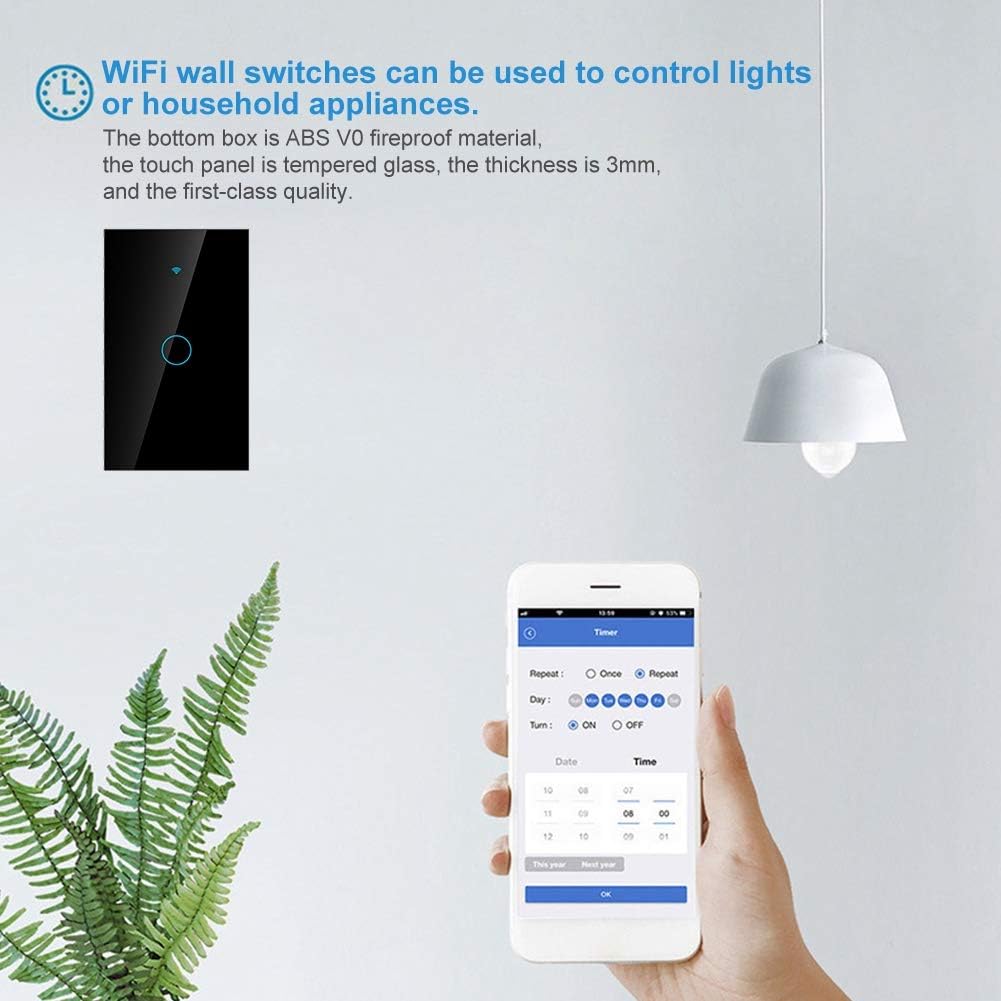
Figure 7.1: Setting a timer for the smart switch using the mobile application.
7.3 Valdymas balsu
After linking your smart home app account with Amazon Alexa, Google Home, or SIRI (via Apple HomeKit if supported by the app), you can control the switch using voice commands. Exampmažiau:
- „Alexa, įjunk šviesą svetainėje.“
- "Hey Google, turn off the kitchen switch."
- "SIRI, turn on the bedroom lamp."

Figure 7.2: Smart switch integration with voice assistant devices like Amazon Echo.
8. Priežiūra
- Valymas: To clean the switch panel, gently wipe it with a soft, dry, lint-free cloth. Do not use abrasive cleaners, solvents, or harsh chemicals.
- Nėra naudotojo aptarnaujamų dalių: The Smart WiFi Touch Switch contains no user-serviceable parts. Do not attempt to disassemble or repair the device yourself. Refer all servicing to qualified personnel.
- Aplinkos sąlygos: Saugokite jungiklį nuo ekstremalių temperatūrų, drėgmės ar tiesioginių saulės spindulių.
9. Problemų sprendimas
| Problema | Galima priežastis | Sprendimas |
|---|---|---|
| Jungiklis nereaguoja į prisilietimą. | No power; incorrect wiring; internal fault. | Check circuit breaker. Verify wiring connections (Live, Neutral, Load). If problem persists, contact support. |
| Nepavyksta prisijungti prie „Wi-Fi“. | Incorrect WiFi password; 5GHz network used; switch not in pairing mode; weak signal. | Ensure correct 2.4GHz WiFi network and password. Put switch into pairing mode (refer to app instructions). Move router closer or use a WiFi extender. |
| Programos valdymas neveikia. | No internet connection; app not linked to switch; app outdated. | Check your home internet connection. Ensure the switch is successfully paired in the app. Update the app to the latest version. |
| Balso valdymas neveikia. | Voice assistant not linked to app; incorrect device name; poor voice command. | Ensure your smart home app account is linked to Alexa/Google Home/SIRI. Use the exact device name configured in the app. Speak clearly. |
| LED foninis apšvietimas išjungtas. | Backlight feature disabled in app; power issue. | Check app settings to ensure backlight is enabled. Verify power supply to the switch. |
10. Specifikacijos
| Parametras | Vertė |
|---|---|
| Modelio numeris | 01rhx5gwk0zf5881-01 |
| Įvesties tomastage | 90V-250V kintamoji srovė |
| Maksimali srovė | 10A |
| WiFi dažnis | 2.4 GHz b / g / n |
| Medžiaga | ABS V0 Flame-retardant, Tempered Glass |
| Spalva | Juoda |
| Matmenys (I x P x A) | 126 mm x 78 mm x 45 mm (apytiksliai 5 col. x 3.1 col. x 1.8 col.) |
| Svoris | 185 gramų |
| Sertifikatai | FCC, CE, RoHS |

Figure 10.1: Dimensions of the Smart WiFi Touch Switch.
11. Garantija ir palaikymas
Warranty information for this product is not explicitly provided in the available product details. For specific warranty terms and conditions, please refer to the documentation included with your purchase or contact your retailer.
For technical support, troubleshooting assistance, or inquiries regarding spare parts, please contact the retailer from whom you purchased the product or the manufacturer directly. Please have your product model number (01rhx5gwk0zf5881-01) and purchase details ready when contacting support.