1. Įvadas
The Wellue DUOEK-S Bluetooth Heart Monitoring Device is designed for personal heart health tracking at home. This portable device allows users to record electrocardiogram (ECG) data and view heart rate information. It connects wirelessly to a smartphone or tablet application for data management and analysis. This manual provides essential instructions for proper setup, operation, and maintenance of your DUOEK-S device.

Image 1.1: The Wellue DUOEK-S Heart Monitoring Device.
Svarbi pastaba:
- This device is for informational purposes only and should not be used to diagnose or treat any medical condition.
- It is not applicable to individuals with pacemakers or defibrillators.
- Always consult a healthcare professional for medical advice.
2. Pakuotės turinys
Atidarius pakuotę, patikrinkite, ar yra visi komponentai:
- Wellue DUOEK-S Heart Monitoring Device
- Įkrovimo kabelis
- Vartotojo vadovas (šis dokumentas)
Video 2.1: Unboxing and initial setup of the Wellue DUOEK-S device. This video demonstrates the contents of the package and the first steps of preparing the device for use, including charging.
3. Įrenginys baigtasview
Familiarize yourself with the main components of your DUOEK-S device:

Image 3.1: Labeled diagram of the Wellue DUOEK-S device showing the display screen, LED indicator, charge port, left electrode, right electrode, left base, and right base.
- Ekranas: Shows real-time ECG waveform, heart rate, and device status.
- LED indikatorius: Provides visual feedback on device status (e.g., charging, connected).
- Įkrovimo prievadas: Naudojamas įkrovimo kabeliui prijungti.
- Left Electrode (L): Contact point for ECG measurement.
- Right Electrode (R): Contact point for ECG measurement.
4. Sąranka
4.1 Pradinis įkrovimas
Before first use, fully charge the DUOEK-S device. Connect the charging cable to the device's charge port and a USB power source. The LED indicator will show charging status.
4.2 Programėlės diegimas ir prijungimas
- Download the "Vihealth" app from your device's app store (compatible with iOS and Android).
- Įsitikinkite, kad jūsų išmaniajame telefone arba planšetiniame kompiuteryje įjungtas „Bluetooth“ ryšys.
- Open the Vihealth app and follow the on-screen instructions to pair your DUOEK-S device. You may need to grant location and file access permissions for Bluetooth connection and data storage.
- To initiate pairing, touch both electrodes on the device for a few seconds.

Image 4.1: The Vihealth app icon, used for connecting and managing data from your Wellue DUOEK-S device.
5. Prietaiso valdymas
5.1 EKG matavimas
The DUOEK-S device supports both handheld and wearable measurements (with a chest strap, if applicable). For handheld measurements:
- Įsitikinkite, kad įrenginys įkrautas ir įjungtas.
- Place your index fingers on both the Left (L) and Right (R) electrodes.
- Remain still during the measurement. The device will display the ECG waveform and heart rate.
- Measurements typically last between 30 seconds and 5 minutes.

Image 5.1: Proper hand placement on the Wellue DUOEK-S electrodes for an ECG measurement.
5.2 Viewing and Saving Data
After a measurement, the data is automatically saved to the device. To view and manage your history:
- Open the Vihealth app on your connected smartphone or tablet.
- The device will sync its history with the app.
- Jūs galite iš naujoview detailed ECG waveforms, heart rate trends, and other relevant data within the app.
- The app allows for exporting reports, such as PDF files, which can be shared with healthcare providers.
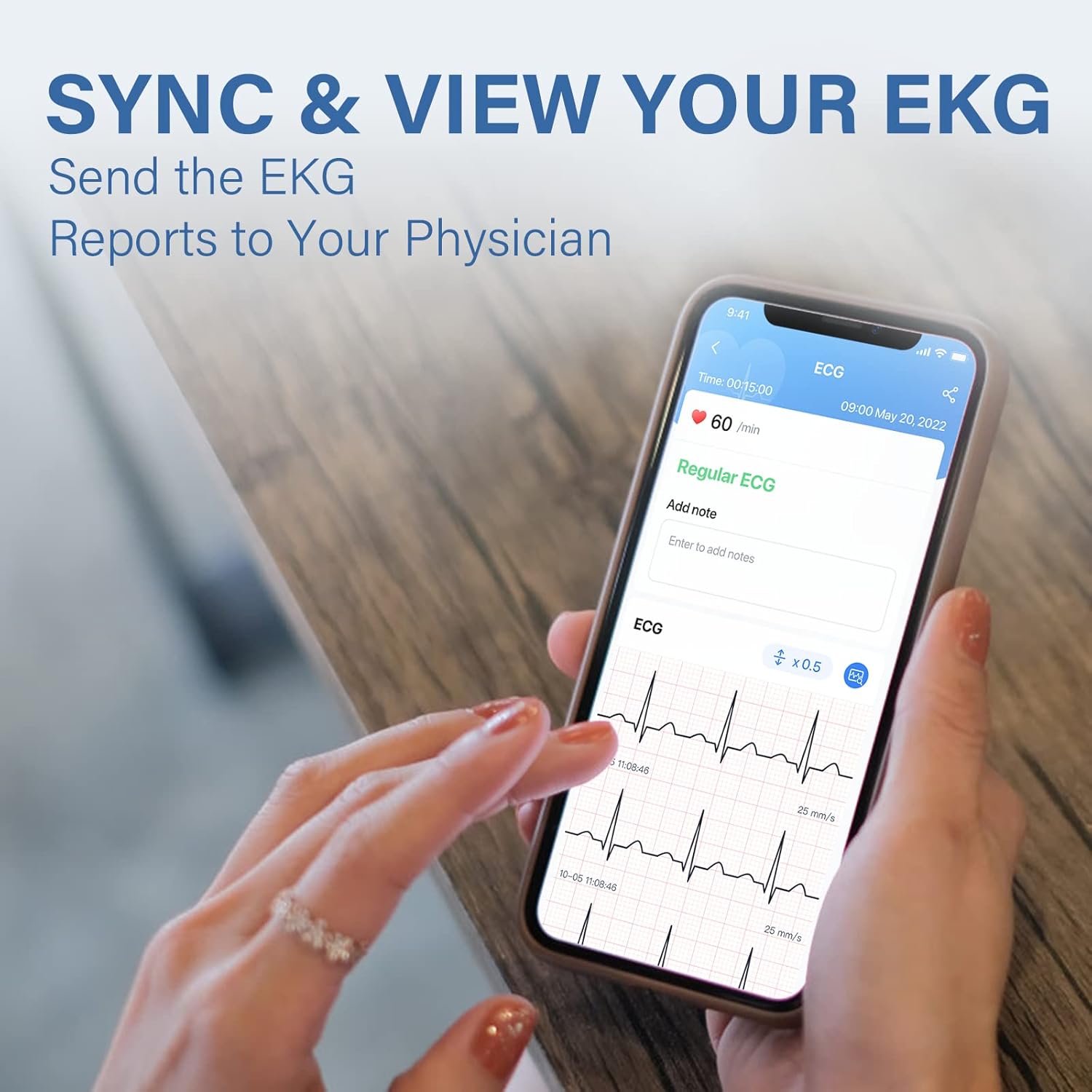
Image 5.2: The Vihealth app interface showing a detailed EKG report on a smartphone.

Image 5.3: Screenshot of the Vihealth app demonstrating the option to share an EKG report, likely as a PDF.
6. Priežiūra
- Keep the device clean and dry. Use a soft, dry cloth to wipe the electrodes and device body.
- Saugokite, kad prietaisas nepatektų į ekstremalią temperatūrą, drėgmę ar tiesioginius saulės spindulius.
- Nenaudojamą prietaisą laikykite saugioje vietoje, kad nesugadintumėte.
- Ensure the device is regularly charged to maintain battery health.
7. Problemų sprendimas
| Problema | Galima priežastis | Sprendimas |
|---|---|---|
| Įrenginys neįsijungia. | Senka baterija. | Charge the device using the provided cable. |
| Cannot connect to Vihealth app. | Bluetooth is off; app permissions not granted; incorrect pairing procedure. |
|
| Inaccurate or erratic ECG readings. | Movement during measurement; improper electrode contact; dry skin. |
|
8. Specifikacijos
| Funkcija | Detalė |
|---|---|
| Modelis | DUOEK-S |
| Ryšio technologija | Bluetooth |
| Belaidžio ryšio standartas | Bluetooth |
| Suderinami įrenginiai | Planšetinis kompiuteris, išmanusis telefonas („iOS“, „Android“) |
| Operacinė sistema | Android, iOS |
| Kontrolės metodas | Programėlė |
| Rekomenduojami naudojimo būdai | Naudojimas namuose |
| Ypatinga funkcija | Hand-held and wearable with the chest strap |
| Prekės svoris | 8.8 uncijos |
| Pakuotės matmenys | 6.8 x 4.6 x 2.4 colio |
9. Garantija ir palaikymas
For warranty information, technical support, or further inquiries regarding your Wellue DUOEK-S device, please visit the official Wellue websvetainėje arba susisiekite tiesiogiai su jų klientų aptarnavimo tarnyba.
Official Wellue Websvetainė: www.getwellue.com


