1. Įvadas
Ačiū, kad pirkoteasing the BYTECH BYMCLB116BK Projector Decor Light-Rainbow. This device is designed to project vibrant rainbow light effects, enhancing room ambiance and providing unique lighting for creative photography. Please read this manual thoroughly before use to ensure proper operation and maintenance.

Image 1.1: The BYTECH BYMCLB116BK Projector Decor Light-Rainbow packaging, highlighting its key features including rainbow glow, secure stabilization, 360-degree rotation and tilt, and USB connectivity.
2. Saugos informacija
- Saugokite prietaisą nuo vandens ir drėgmės.
- Nelaikykite prietaiso nuo ekstremalių temperatūrų ar tiesioginių saulės spindulių.
- Stenkitės, kad prietaisas nenumestų ar nepatirtų stipraus smūgio.
- Nebandykite patys ardyti ar taisyti įrenginio. Visus techninės priežiūros darbus patikėkite kvalifikuotiems specialistams.
- Use only the provided USB cable or a certified equivalent for power.
- Įsitikinkite, kad prietaisas pastatytas ant stabilaus, lygaus paviršiaus, kad jis neapvirstų.
- Laikyti vaikams ir naminiams gyvūnėliams nepasiekiamoje vietoje.
3. Pakuotės turinys
Atidžiai patikrinkite pakuotės turinį. Jei trūksta kokių nors daiktų arba jie pažeisti, susisiekite su pardavėju.
- 1 x BYTECH BYMCLB116BK Projector Decor Light-Rainbow
- 1 x USB Power Cable (with wired remote control)
- 1 x Vartotojo vadovas
4. Sąranka
- Išpakuoti: Carefully remove the Projector Decor Light from its packaging.
- Vieta: Place the projector on a stable, flat surface. Consider the desired projection area and distance from the wall or ceiling for optimal effect. The device features 360-degree rotation and tilt for flexible positioning.
- Prijunkite maitinimą: Insert the small end of the USB power cable into the USB port on the projector. Connect the larger end of the USB cable to a standard USB power adapter (not included) or a powered USB port (e.g., on a computer or power bank).
- Secure Stabilization: Ensure the base is firmly placed to prevent accidental movement, utilizing its secure stabilization feature.
5. Naudojimo instrukcijos
The BYTECH Projector Decor Light is designed for simple operation.
- Maitinimo įjungimas/išjungimas: Once connected to a power source, locate the wired remote control on the USB cable. Press the power button on the remote to turn the light on or off.
- Adjust Brightness/Mode: Use the other buttons on the wired remote control to cycle through different brightness levels or projection modes, if available. Refer to the remote's markings for specific functions.
- Sureguliuokite projekcijos kampą: Rankiniu būdu sureguliuokite lamp head to rotate and tilt 360 degrees to direct the rainbow light projection to your desired area.
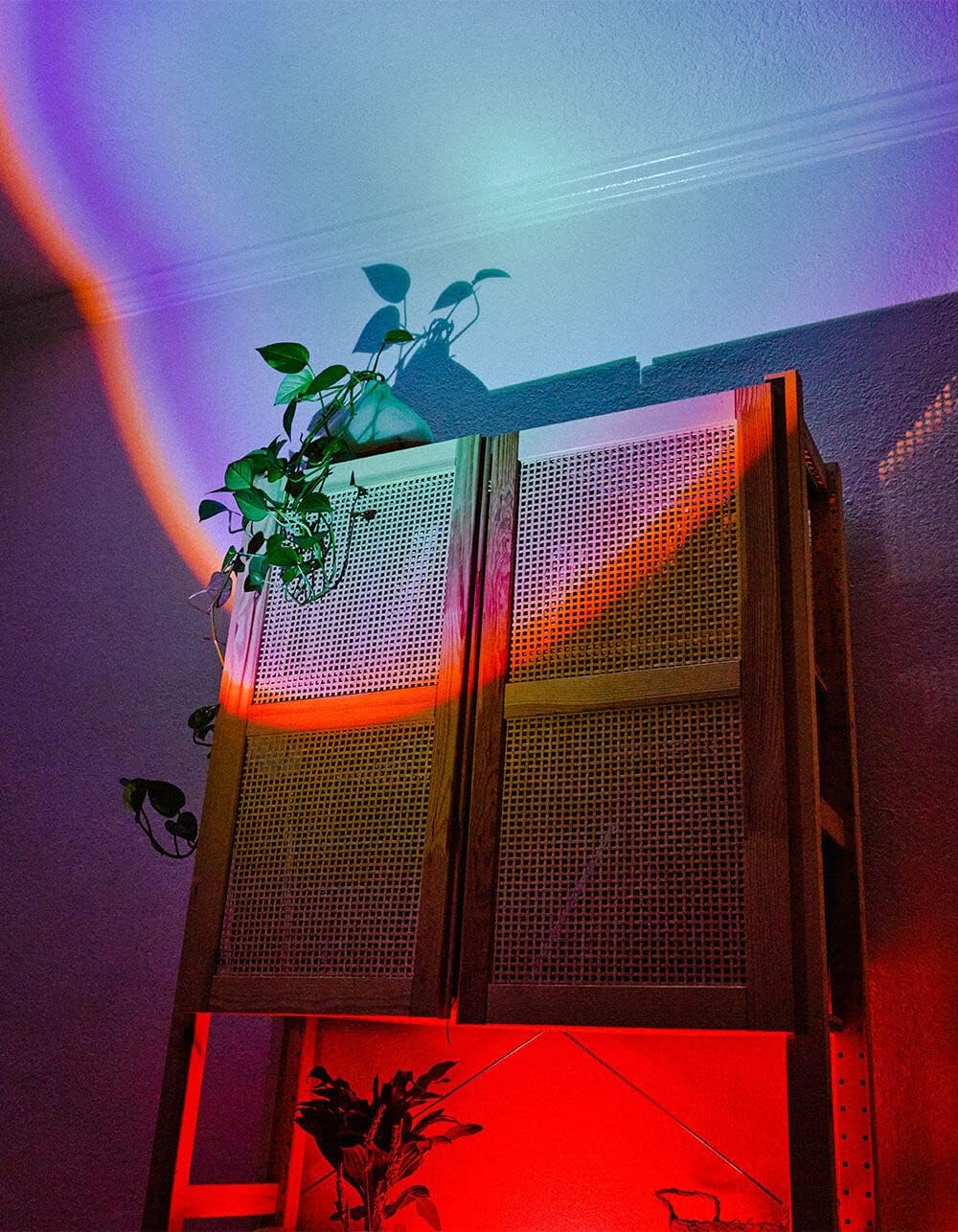
Image 5.1: The BYTECH Projector Decor Light-Rainbow in operation, casting vibrant rainbow light patterns onto a room's wall and furniture, demonstrating its ambient effect.
6. Priežiūra
- Valymas: Disconnect the power before cleaning. Use a soft, dry cloth to wipe the surface of the projector. Do not use abrasive cleaners or solvents.
- Saugykla: When not in use for extended periods, store the device in a cool, dry place, away from direct sunlight and moisture.
- Tvarkymas: Handle the device with care to avoid damage to the lens or internal components.
7. Problemų sprendimas
| Problema | Galima priežastis | Sprendimas |
|---|---|---|
| Įrenginys neįsijungia. | Nėra maitinimo jungties arba sugedęs laidas. | Ensure the USB cable is securely connected to both the projector and a powered USB port/adapter. Try a different USB port or adapter. |
| Šviesa silpna arba mirga. | Insufficient power supply or dirty lens. | Ensure the power source provides adequate power. Clean the projector lens gently with a soft, dry cloth. |
| Projekcija neryški. | Objektyvas nešvarus. | Švelniai nuvalykite projektoriaus objektyvą minkštu, sausu skudurėliu. |
8. Specifikacijos
- Modelis: BYMCLB116BK
- Prekinis ženklas: Bytech
- Maitinimo įvestis: USB Powered (5V DC, current not specified, typical for USB)
- Šviesos šaltinis: LED
- Projekcijos tipas: Rainbow Glow
- Reguliavimas: 360° Rotation & Tilt
- Pakuotės matmenys: 5 x 5 x 5 colio
- Prekės svoris: 1 svaro
- Gamintojas: BYTECH
9. Garantija ir palaikymas
This product is covered by a limited warranty provided by BYTECH. For specific warranty terms and conditions, please refer to the warranty card included with your purchase or visit the official BYTECH website. For technical support, troubleshooting assistance, or to inquire about replacement parts, please contact BYTECH customer service through their official channels.
Išsaugokite pirkimo įrodymą, kad galėtumėte kreiptis dėl garantijos.


