1. Įvadas
Thank you for choosing the SPRT SP-POS 887 E POS Receipt Printer. This manual provides essential information for setting up, operating, and maintaining your printer to ensure optimal performance and longevity. Please read this manual thoroughly before using the device.
2. Pagrindinės savybės
- High-Speed Thermal Printing: Prints at up to 220 mm per second.
- Didelė raiška: 8 dots per inch for clear and legible receipts.
- Kelios ryšio parinktys: Equipped with USB and Ethernet ports, and supports RS-232.
- Lengvas popieriaus įdėjimas: Designed for quick and effortless paper roll replacement.
- Paper End Sensor: Alerts the user when the paper roll is running low.
- Kompaktiškas dizainas: Slim and integrated design allows flexible placement.
- Platus suderinamumas: Supports Windows and Linux operating systems.
3. Sąranka
3.1 Išpakavimas
Atsargiai išimkite spausdintuvą ir visus priedus iš pakuotės. Patikrinkite, ar yra visi komponentai:
- SPRT SP-POS 887 E Printer
- Maitinimo adapteris
- USB kabelis
- Popieriaus ritinėlis (pradinis)
- Vartotojo vadovas (šis dokumentas)
3.2 Spausdintuvo prijungimas
- Connect the power adapter to the printer's power input port and then plug it into a power outlet.
- For USB connection: Connect one end of the USB cable to the printer's USB port and the other end to your computer.
- For Ethernet connection: Connect an Ethernet cable to the printer's LAN port and the other end to your network router or switch.
3.3 Popieriaus įdėjimas
The SPRT SP-POS 887 E uses standard thermal paper rolls. Follow these steps to load a new roll:
- Press the 'PRESS' button on the top cover to open the paper compartment.
- Insert the new thermal paper roll with the paper feeding from the bottom, ensuring the leading edge is straight.
- Ištraukite nedidelį kiekį popieriaus pro pjaustytuvą.
- Tvirtai uždarykite viršutinį dangtelį, kol jis spragtelėdamas užsifiksuos vietoje.
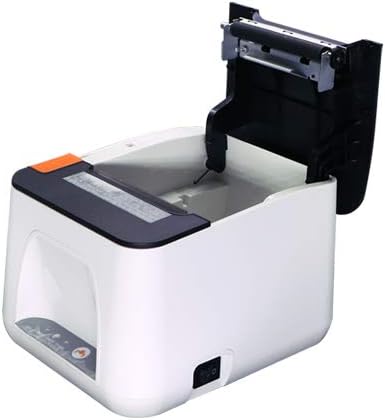
Figure 1: Paper compartment open for loading.
4. Naudojimo instrukcijos
4.1 Įjungimas / išjungimas
To power on the printer, ensure it is connected to a power source and press the power switch, usually located on the side or back of the device. To power off, press the power switch again.
4.2 Tvarkyklės diegimas
Before printing, you must install the appropriate drivers on your computer. Drivers for Windows and Linux operating systems are typically provided on a CD included with the printer or can be downloaded from the SPRT official websvebsaitą. Diegimo metu vykdykite ekrane pateikiamus nurodymus.
4.3 Kvito spausdinimas
Once the printer is connected and drivers are installed, you can print receipts from your POS software or any application that supports printing. Select the SPRT SP-POS 887 E as your default printer and initiate the print command.
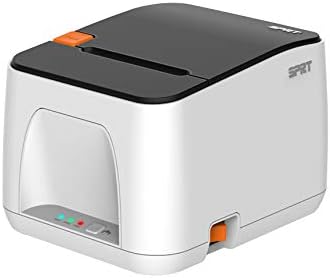
2 pav.: priekis view of the SPRT SP-POS 887 E printer.

3 pav.: šonas view of the SPRT SP-POS 887 E printer, showing paper output.
5. Priežiūra
5.1 Spausdintuvo valymas
Reguliarus valymas padeda išlaikyti spausdinimo kokybę ir pailgina spausdintuvo tarnavimo laiką.
- Spausdinimo galvutė: Švelniai nuvalykite vatos tamponuampened with isopropyl alcohol to gently wipe the thermal print head. Allow it to dry completely before use.
- Išorė: Išorę nuvalykite minkšta, damp audinys. Nenaudokite abrazyvinių valiklių ar tirpiklių.
- Popieriaus kelias: Minkštu šepečiu arba suslėgtu oru pašalinkite popieriaus dulkes ar šiukšles iš popieriaus kelio.
5.2 Popieriaus ritinio keitimas
When the paper sensor indicates low paper, or when the current roll is depleted, replace it following the steps in Section 3.3.
6. Problemų sprendimas
| Problema | Galima priežastis | Sprendimas |
|---|---|---|
| Spausdintuvas nespausdina | No power; Incorrect cable connection; Driver issue; Paper jam; Out of paper. | Check power cable and switch; Verify USB/Ethernet connection; Reinstall drivers; Clear paper jam; Load new paper roll. |
| Prasta spausdinimo kokybė | Dirty print head; Low quality paper; Incorrect driver settings. | Clean print head (Section 5.1); Use recommended thermal paper; Adjust print density settings in driver. |
| Popieriaus strigtis | Improper paper loading; Foreign object in paper path. | Open cover, remove jammed paper, reload correctly; Inspect paper path for obstructions. |
| Kompiuteris neatpažįsta spausdintuvo | Loose USB/Ethernet cable; Driver not installed or corrupted. | Ensure cables are securely connected; Reinstall printer drivers. |
7. Specifikacijos
- Prekinis ženklas: SPRT
- Modelis: SP-POS 887 E
- Spausdintuvo technologija: Terminis linijinis spausdintuvas
- Ryšio technologija: USB, Ethernet, RS-232
- Spausdintuvo išvestis: Gavimo spausdintuvas
- Spausdinimo greitis: Iki 220 mm/s
- Rezoliucija: 8 dots/inch
- Spausdinimo plotis: 72 mm
- Ypatingos savybės: Network Ready, Paper End Sensor
- Valdiklio tipas: Linux (compatible with Windows)
- Prekės svoris: 540 g
- Pakuotės matmenys: 22.2 x 10.6 x 9.8 cm
- Pirmoji prieinama data: 27 m. liepos 2021 d
8. Garantija ir palaikymas
For warranty information and technical support, please refer to the warranty card included with your product or visit the official SPRT websvetainėje. Taip pat galite kreiptis pagalbos į vietinį platintoją arba mažmenininką.


