1. Įvadas
The ION Audio Boombox Deluxe Stereo is a versatile audio system designed to provide a range of listening experiences. It combines classic audio playback options with modern connectivity, featuring an AM/FM radio, a cassette player, Bluetooth streaming, and USB/Micro SD card playback. This manual provides detailed instructions for setting up, operating, and maintaining your device.

1 pav.: priekis view of the ION Audio Boombox Deluxe Stereo, showcasing its dual speakers, cassette deck, and radio tuner display.
2. Kas yra dėžutėje
- Boombox Deluxe Unit
- Maitinimo kabelis
- Greitas pradmenų gidas
3. Sąranka
3.1 Įrenginio maitinimas
The Boombox Deluxe can be powered using the included AC power cable or by batteries for portable use. Insert the AC power cable into the AC IN port on the back of the unit and plug it into a standard wall outlet. For battery operation, open the battery compartment (typically on the bottom or back) and insert the required D-cell batteries (not included), ensuring correct polarity.
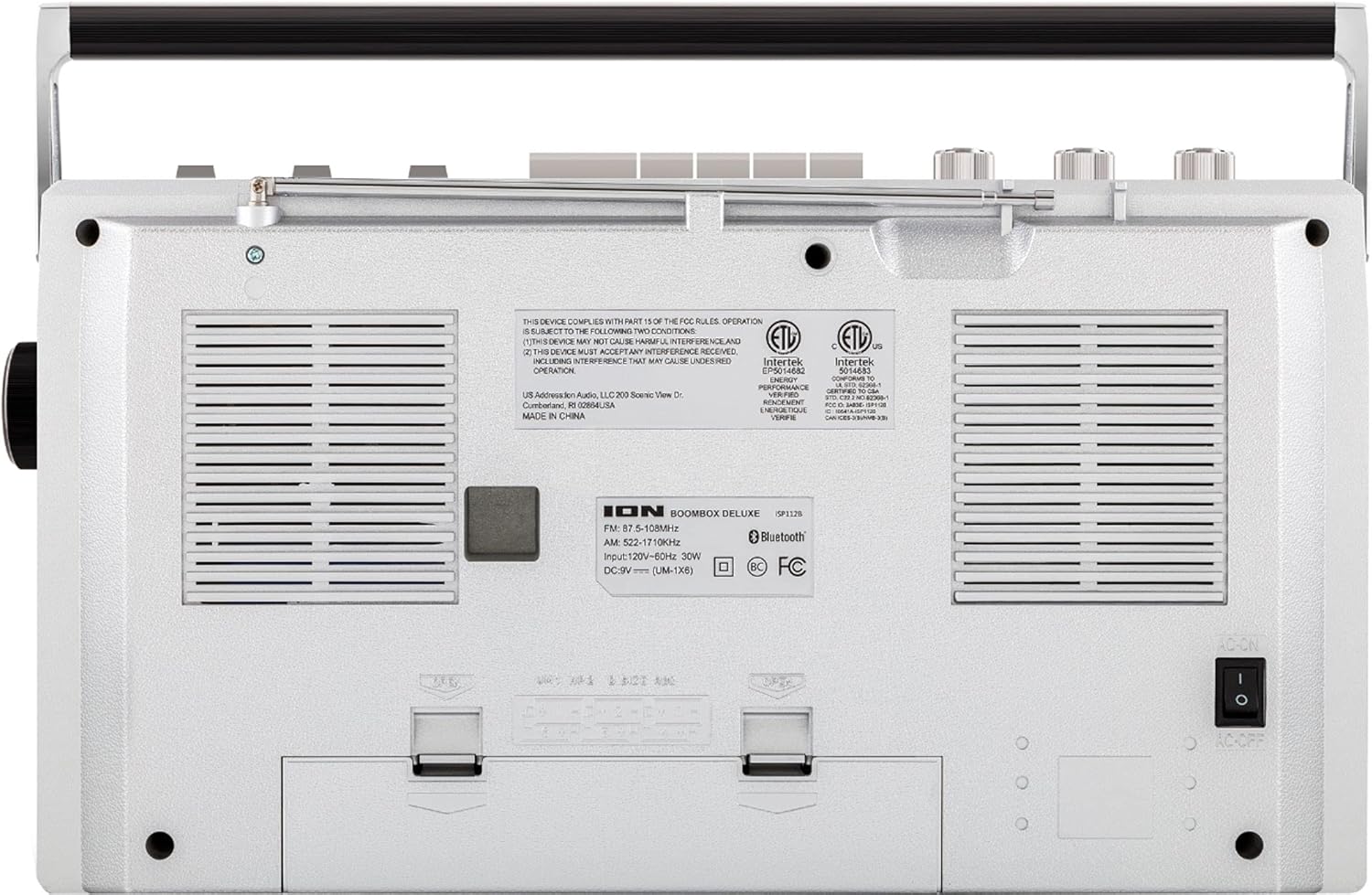
Figure 2: Rear panel of the Boombox Deluxe, highlighting the AC power input and battery compartment location.
3.2 Antenos reguliavimas
For optimal AM/FM radio reception, extend the telescopic antenna located on the top of the unit. Adjust its position for the clearest signal.
4. Naudojimo instrukcijos
4.1 Bendrieji valdikliai
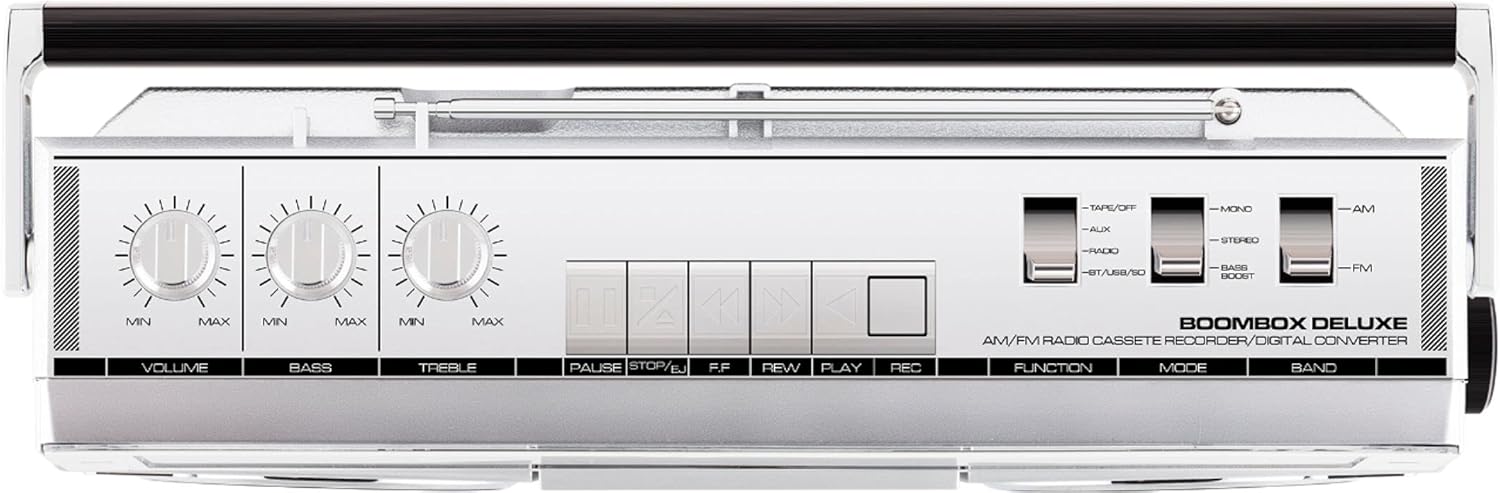
Figure 3: Top panel controls, including Volume, Bass, Treble knobs, and cassette playback buttons.
- Garsumo rankenėlė: Reguliuoja bendrą garso išvesties lygį.
- Boso rankenėlė: Reguliuoja žemo dažnio garso išvestį.
- Aukštoji rankenėlė: Reguliuoja aukšto dažnio garso išvestį.
- Funkcinis jungiklis: Selects between Tape/Off, Aux, Radio, and BT/USB/SD modes.
- Režimo jungiklis: Selects between Mono, Stereo, and Bass Boost audio modes.
- Juostos perjungimas: Selects between AM and FM radio bands.
4.2 Radijo valdymas
- Nustatykite Funkcija Jungiklis į „Radiją“.
- Nustatykite Juostos jungiklis to 'AM' or 'FM'.
- Naudokite Derinimo rankenėlė to select your desired radio station. The frequency will be displayed on the tuner scale.
4.3 Kasečių grotuvo valdymas
- Nustatykite Funkcija Jungiklis to 'Tape/Off'.
- Paspauskite Sustabdyti / išstumti mygtuką, kad atidarytumėte kasetės skyrių.
- Insert a cassette tape with the open edge facing upwards. Close the compartment.
- Paspauskite Žaisti mygtuką, kad pradėtumėte atkūrimą.
- Naudokite Rewind (REW) ir Greitas persukimas į priekį (FF) mygtukai juostai naršyti.
- Paspauskite Pauzė to temporarily stop playback. Press again to resume.
- Paspauskite Sustabdyti / išstumti , kad sustabdytumėte atkūrimą ir išstumtumėte juostą.
- To record, ensure the Funkcija Jungiklis is set to 'Tape/Off' and press the Record (REC) mygtuką vienu metu su Žaisti mygtuką.
4.4 „Bluetooth“ ryšys

Figure 4: Side panel with USB and Micro SD card slots, and playback controls for digital media.
- Nustatykite Funkcija Jungiklis to 'BT/USB/SD'. The unit will enter Bluetooth pairing mode, indicated by a flashing LED.
- On your Bluetooth-enabled device (e.g., smartphone, tablet), search for 'ION Boombox Deluxe' in the Bluetooth settings.
- Select 'ION Boombox Deluxe' to pair. Once connected, a confirmation tone will sound, and the LED will stop flashing.
- You can now stream audio from your device to the Boombox Deluxe. Use your device's controls or the boombox's playback buttons (Play/Pause, Next/Previous Track) for media control.
4.5 Atkūrimas iš USB / Micro SD kortelės
- Nustatykite Funkcija Jungiklis to 'BT/USB/SD'.
- Insert a USB flash drive or Micro SD card (with compatible audio files) into the respective slot on the side of the unit.
- Įrenginys automatiškai aptiks ir pradės groti garsą files.
- Use the playback control buttons (Play/Pause, Next/Previous Track, Delete) on the side panel to manage your music.
4.6 Pagalbinė įvestis

Figure 5: Side panel with headphone output and auxiliary input jacks.
- Nustatykite Funkcija Jungiklis to 'Aux'.
- Prijunkite išorinį garso įrenginį (pvz., MP3 grotuvą, CD grotuvą) prie Aux in lizdą naudodami 3.5 mm garso kabelį (nepridedamas).
- Audio from the connected device will play through the boombox speakers. Control playback from your external device.
5. Savybės
- Integrated Stereo System with Dual Speakers
- „Bluetooth“ belaidis srautas
- AM/FM radijo imtuvas
- Kasečių grotuvas / įrašymo įrenginys
- USB ir Micro SD kortelės atkūrimas
- Auxiliary Input for External Devices
- Adjustable Bass and Treble Controls
- Nešiojamas dizainas su nešiojimo rankena
6. Specifikacijos
| Specifikacija | Detalė |
|---|---|
| Prekės ženklas | ION garsas |
| Modelis | Boombox Deluxe |
| Ryšio technologija | Bluetooth, USB |
| Garsiakalbio tipas | Stereo |
| Maitinimo šaltinis | Battery Powered (D-cell), AC Power |
| Spalva | Juoda, sidabrinė |
| Prekės svoris | 8.93 svaro |
| Pakuotės matmenys | 18.1 x 11.1 x 7.6 colio |
7. Problemų sprendimas
- Nėra galios:
Ensure the AC power cable is securely connected to both the unit and a working power outlet. If using batteries, check that they are inserted correctly and are not depleted. - Prastas radijo ryšys:
Fully extend the telescopic antenna and adjust its position. Try relocating the unit to an area with better signal reception, away from potential interference sources like other electronic devices. - Cassette Tape Not Playing/Recording:
Ensure the tape is inserted correctly and the cassette compartment is fully closed. Check that the tape is not tangled or damaged. For recording, ensure both Play and Record buttons are pressed simultaneously. - „Bluetooth“ neprisijungia:
Make sure the Boombox Deluxe is in 'BT/USB/SD' mode and in pairing mode (flashing LED). Ensure Bluetooth is enabled on your external device and it is within range (typically 30 feet). Try unpairing and re-pairing the device. - No Sound from USB/Micro SD:
Verify that the USB drive or Micro SD card is inserted correctly and contains compatible audio files (e.g., MP3). Ensure the volume is turned up on the boombox.
8. Priežiūra
- Valymas: Įrenginio išorę valykite minkštu, sausu skudurėliu. Nenaudokite skystų valiklių ar tirpiklių.
- Kasečių grotuvo priežiūra: Reguliariai valykite juostos galvutes ir suspaudimo volelius vatos tamponėliu.ampened with isopropyl alcohol to ensure optimal playback and recording quality.
- Baterijos saugykla: Jei prietaisas nebus naudojamas ilgesnį laiką, išimkite baterijas, kad išvengtumėte ištekėjimo ir pažeidimų.
9. Garantija ir palaikymas
This product is offered as an Amazon Renewed item. Amazon Renewed products are professionally inspected and tested to work and look like new. If you are not satisfied with your purchase, renewed products are eligible for replacement or refund under the Amazon Renewed Guarantee. For specific details regarding the Amazon Renewed Guarantee, please refer to the Amazon Renewed program terms and conditions on the Amazon websvetainę.
For further assistance or technical support, please contact ION Audio customer service or refer to their official webpalaikymo išteklių svetainė.


