Įvadas
This manual provides essential information for the safe and efficient operation of your Knightsbridge OS006B Dawn to Dusk Photoelectric Cell Switch. Please read these instructions carefully before installation and use, and retain them for future reference.
Saugos informacija
WARNING: Always isolate the mains power supply before installation, maintenance, or servicing.
- Montavimą turėtų atlikti tik kvalifikuotas elektrikas, laikydamasis galiojančių laidų įrengimo taisyklių.
- Ensure the product is correctly earthed.
- Do not exceed the maximum load ratings specified in the 'Specifications' section.
- This product is designed for outdoor use with an IP55 rating, but ensure all connections are sealed appropriately.
Produktas baigtasview
The Knightsbridge OS006B is a wall-mounted photoelectric cell switch designed to automatically control outdoor lighting based on ambient light levels. It features adjustable light level settings and timed duration options.

1 pav.: priekis view of the Knightsbridge OS006B Photoelectric Cell Switch. The device is black with four visible screws on the corners and a central light sensor. The text "ISOLATE MAINS BEFORE SERVICING" is visible at the bottom.
Montavimas
- Izoliuoti galią: Before commencing any work, ensure the mains power supply to the circuit is completely isolated at the consumer unit/fuse board.
- Montavimas: Select a suitable mounting location that allows the sensor to accurately detect ambient light without obstruction from artificial light sources (e.g., streetlights, other luminaires) or shadows. Mount the unit securely to a flat surface using appropriate fixings.
- Laidai: Open the unit by unscrewing the four corner screws. Connect the wiring according to the diagram inside the unit and relevant wiring regulations. Ensure correct polarity: Live (L), Neutral (N), and Switched Live (Load). Use appropriate cable glands to maintain the IP rating.
- Uždaryti skyrių: Once wiring is complete, securely close the unit, ensuring the gasket is correctly seated to maintain the IP55 rating. Tighten the four corner screws.
- Atkurti maitinimą: Atkurkite maitinimo šaltinį.
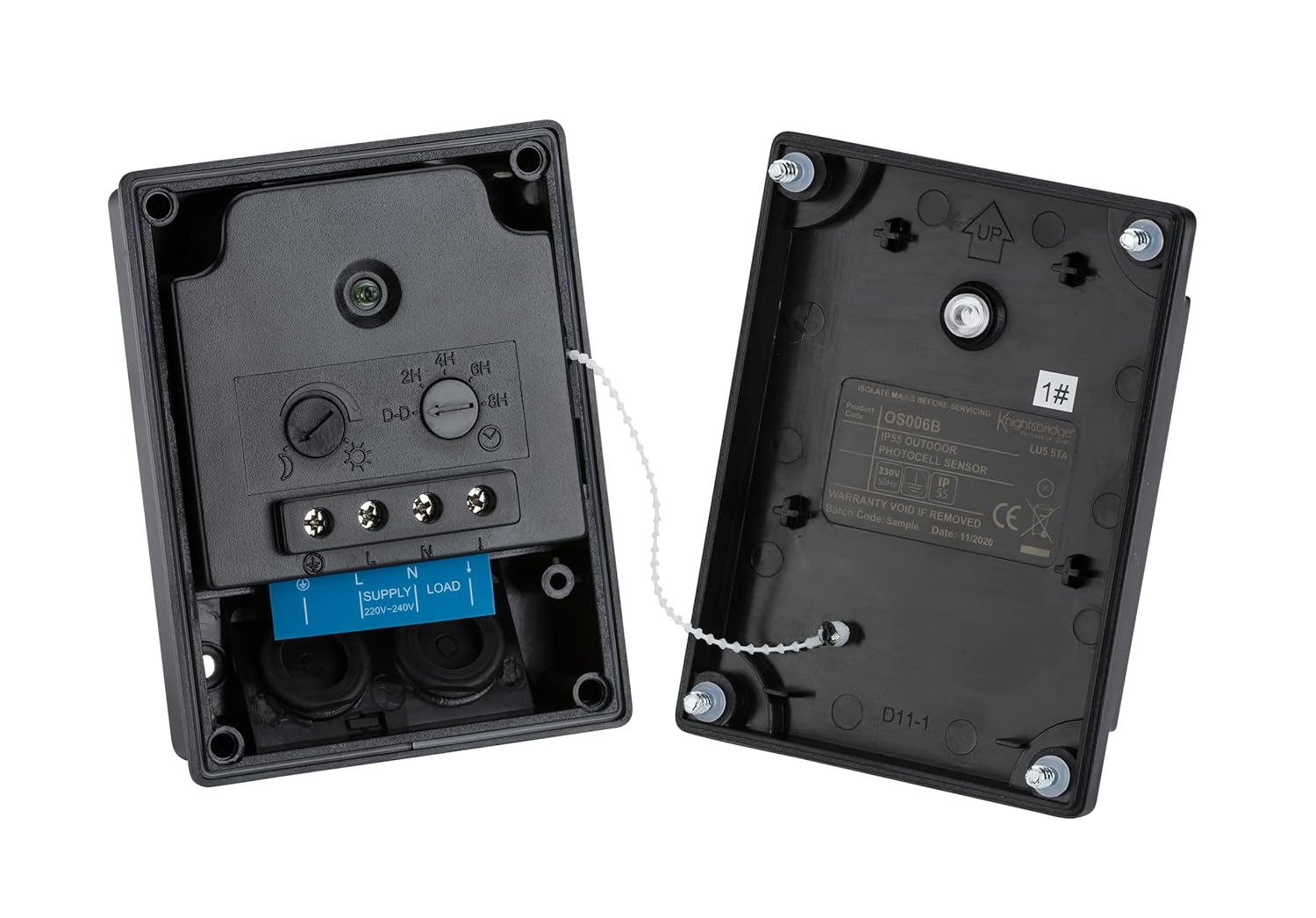
2 pav. Vidinis view of the OS006B switch. The left side shows the circuit board with terminals labeled L, N, and LOAD, along with dials for adjusting light sensitivity and timer settings (2H, 4H, 6H, 8H, D-D). The right side shows the inside of the cover with product information.
Naudojimo instrukcijos
Setting Light Sensitivity (Dusk-Dawn Threshold)
The OS006B features an ambient light memory function. To set the desired activation light level:
- At the desired ambient light level (e.g., dusk), press the 'SET' button located inside the unit (refer to Figure 2).
- The unit will now activate the connected lighting when the ambient light falls below this set level.
Setting Timer Duration
The unit can be set to switch off after a specific duration or operate from dusk till dawn.
- Dusk-to-Dawn (D-D): Rotate the timer dial (refer to Figure 2) to the 'D-D' position for continuous operation from dusk until dawn.
- Veikimas pagal laiką: Rotate the timer dial to 2H, 4H, 6H, or 8H to switch off the connected lighting after 2, 4, 6, or 8 hours respectively, from the moment of activation.
Priežiūra
The Knightsbridge OS006B requires minimal maintenance. Periodically inspect the unit for any signs of damage or wear. Ensure the sensor lens is clean and free from dirt or obstructions to maintain accurate operation. Always isolate power before cleaning or inspection.
Trikčių šalinimas
| Problema | Galima priežastis | Sprendimas |
|---|---|---|
| Light not turning on at dusk. | Incorrect light sensitivity setting; power supply issue; faulty wiring; sensor obstructed. | Re-set the light sensitivity. Check power supply and wiring. Ensure sensor is clean and unobstructed. |
| Light staying on during the day. | Incorrect light sensitivity setting; sensor receiving insufficient light (e.g., in a shaded area). | Re-set the light sensitivity. Relocate the unit to an area with adequate ambient light. |
| Light not turning off after timed duration. | Timer setting incorrect; internal fault. | Verify timer dial setting. If issue persists, consult a qualified electrician. |
Specifikacijos
- Modelis: OS006B
- Prekinis ženklas: Knightsbridge
- Matmenys (P x P x A): 10.5 x 7.9 x 3.6 cm
- Svoris: 170 gramų
- Apsaugos nuo patekimo (IP) įvertinimas: IP55
- Perjungimo talpa:
- Max. 1000W Incandescent
- Max. 500W Fluorescent/Inductive
- Maks. 200W LED
- Standartų laikymasis: EN 60669-2-1, EN 60669-1, EN 55015, EN 61547, EN 61000, CE + UKCA
Garantija ir palaikymas
This product is covered by a 1-year warranty on spare parts availability from the date of purchase. For technical support or warranty claims, please contact your retailer or the manufacturer, Knightsbridge.
For further assistance, please visit the official Knightsbridge website or consult a qualified electrician.


