Įvadas
The Studebaker Retro Edge Big Sound Bluetooth Boombox (Model SB2150B) is a versatile audio system designed for portable entertainment. It combines classic retro aesthetics with modern features, including a CD player, cassette player/recorder, AM/FM stereo radio, and Bluetooth connectivity. This manual provides detailed instructions for setup, operation, maintenance, and troubleshooting to ensure optimal performance and longevity of your device.
Svarbi saugos informacija
Please read all instructions carefully before operating this unit. Keep this manual for future reference.
- Saugokite šį įrenginį nuo lietaus ar drėgmės.
- Neužblokuokite jokių ventiliacijos angų.
- Nemontuokite šalia jokių šilumos šaltinių, pvz., radiatorių, šilumokaičių, viryklių ar kitų įrenginių (įskaitant ampkeltuvai), kurie gamina šilumą.
- Saugokite maitinimo laidą, kad ant jo neužeitų ar nesuspaustų.
- Naudokite tik gamintojo nurodytus priedus/priedus.
- Atjunkite šį įrenginį žaibuojant arba kai nenaudojate ilgą laiką.
- Visus techninės priežiūros darbus patikėkite kvalifikuotam techninės priežiūros personalui.
Pakuotės turinys
Išpakuodami patikrinkite, ar yra visi daiktai:
- Studebaker Retro Edge Big Sound Bluetooth Boombox (SB2150B)
- Kintamosios srovės maitinimo laidas
- Instrukcijų vadovas
Produkto savybės ir valdikliai
Susipažinkite su įvairiais savo „boombox“ komponentais ir valdikliais.
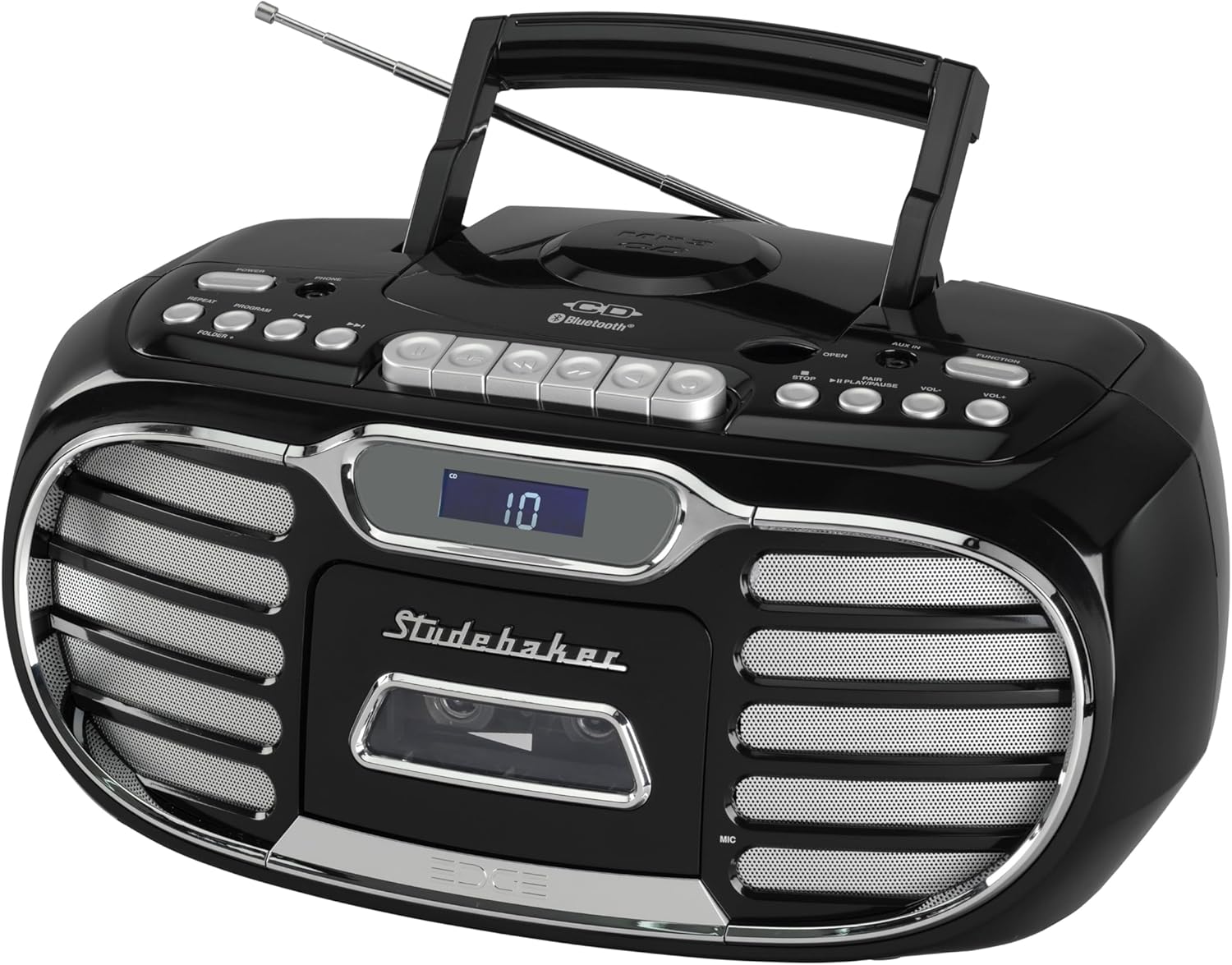
1 paveikslas: Apskritai view of the Studebaker Retro Edge Boombox, showcasing its classic design, integrated handle, and front-facing controls and speakers.

2 paveikslas: Priekyje view highlighting the central LCD display, cassette compartment, and speaker grilles on either side. Control buttons are visible above the display.

3 paveikslas: Išsamus view of the cassette player compartment, showing the tape mechanism and the transparent cover for tape visibility.

4 paveikslas: Close-up of the top-loading CD player with a disc inserted, illustrating the open compartment for disc placement.
Valdymo skydas baigtasview:
- Maitinimo mygtukas: Įjungia/išjungia įrenginį.
- Funkcijų parinkiklis: Switches between CD, Cassette, AM, FM, Bluetooth, and AUX modes.
- Garsumo valdymas: Reguliuoja garso išvesties lygį.
- CD valdikliai: Play/Pause, Stop, Skip/Search (Forward/Backward), Program, Repeat.
- Cassette Controls: Play, Record, Fast Forward, Rewind, Stop/Eject, Pause.
- Radijo valdikliai: Tuning knob/buttons, Band selector (AM/FM).
- „Bluetooth“ poravimo mygtukas: Įjungia „Bluetooth“ susiejimo režimą.
- LCD ekranas: Rodo dabartinį režimą, takelio numerį, radijo dažnį ir kt.
- AUX įvesties lizdas: Skirtas prijungti išorinius garso įrenginius.
- Ausinių lizdas: Privačiam pasiklausymui.
- Built-in Condenser Microphone: For recording audio to cassette.
- Teleskopinė antena: FM radijo priėmimui.
Sąranka
Įrenginio maitinimas:
The boombox can be powered by AC power or batteries (not included).
- AC veikimas: Connect the supplied AC power cord to the AC IN jack on the unit and then to a standard AC outlet (120V~60Hz).
- Baterijos veikimas: Open the battery compartment, insert the required number of batteries (e.g., 8 x 'C' size, not supplied) ensuring correct polarity (+/-), and close the compartment.
Pradinis naudojimas:
Extend the telescopic antenna fully for optimal FM radio reception. For AM, rotate the unit for best reception.
Naudojimo instrukcijos
CD grotuvo valdymas:
- Norėdami įjungti įrenginį, paspauskite maitinimo mygtuką.
- Press the Function button repeatedly to select "CD" mode.
- Open the CD compartment door by pressing the "OPEN" button.
- Place a CD (CD-R/RW or MP3 CD) onto the spindle with the label side facing up.
- Close the CD compartment door. The LCD display will show the total number of tracks.
- Norėdami pradėti atkūrimą, paspauskite paleidimo/pauzės mygtuką.
- Norėdami naršyti takelius, naudokite mygtukus Praleisti / Paieškos.
- Norėdami sustabdyti atkūrimą, paspauskite sustabdymo mygtuką.
- Use the Program button to program tracks for playback in a specific order.
- Use the Repeat button to repeat a single track or the entire CD.
Kasečių grotuvo / įrašymo įrenginio valdymas:
- Norėdami įjungti įrenginį, paspauskite maitinimo mygtuką.
- Press the Function button repeatedly to select "TAPE" mode.
- Press the Stop/Eject button to open the cassette compartment.
- Įdėkite kasetę atviru kraštu žemyn.
- Uždarykite kasetės skyrių.
- Norėdami pradėti atkūrimą, paspauskite paleidimo mygtuką.
- Use Fast Forward and Rewind buttons to navigate the tape.
- Press the Stop/Eject button to stop playback or eject the tape.
- Įrašas:
- Iš integruoto mikrofono: Ensure the unit is in TAPE mode. Press the Record button. The unit will start recording from the built-in microphone.
- From Radio/CD/AUX/Bluetooth: Select the desired source (Radio, CD, AUX, or Bluetooth). Press the Record button on the cassette player. The unit will record the audio playing from the selected source.
- Press the Stop/Eject button to stop recording. The cassette player features auto-stop.
AM/FM radijo veikimas:
- Norėdami įjungti įrenginį, paspauskite maitinimo mygtuką.
- Press the Function button repeatedly to select "AM" or "FM" mode.
- Ištieskite teleskopinę anteną, kad galėtumėte priimti FM bangas. AM bangoms priimti pasukite įrenginį, kad gautumėte geriausią signalą.
- Use the Tuning control to select your desired radio station. The frequency will be displayed on the LCD.
„Bluetooth“ operacija:
- Norėdami įjungti įrenginį, paspauskite maitinimo mygtuką.
- Press the Function button repeatedly to select "BT" (Bluetooth) mode. The LCD display will show "BT" and flash, indicating it's in pairing mode.
- Įjunkite „Bluetooth“ savo mobiliajame įrenginyje (išmaniajame telefone, planšetiniame kompiuteryje ir kt.) ir ieškokite galimų įrenginių.
- Select "SB2150B" from the list of devices.
- Once paired, the "BT" indicator on the LCD display will stop flashing and remain solid. You can now play audio from your device through the boombox.
- To disconnect, disable Bluetooth on your mobile device or select a different function mode on the boombox.
AUX-in Operation:
- Norėdami įjungti įrenginį, paspauskite maitinimo mygtuką.
- Press the Function button repeatedly to select "AUX" mode.
- Connect one end of a 3.5mm audio cable (not supplied) to the AUX-in jack on the boombox and the other end to the headphone jack or audio output of your external audio device (e.g., MP3 player, smartphone).
- Leiskite garsą iš išorinio įrenginio. Garsas bus išvedamas per „boombox“ garsiakalbius.
Ausinių veikimas:
For private listening, connect a pair of headphones (not supplied) to the Headphone Jack. The sound from the speakers will be muted automatically.
Priežiūra
- Valymas: Nuvalykite įrenginį minkštu, damp audinys. Nenaudokite abrazyvinių valiklių ar tirpiklių.
- CD grotuvas: Keep the CD compartment clean. Do not touch the lens.
- Kasečių grotuvas: Periodically clean the tape heads and pinch rollers with a cotton swab lightly moistened with isopropyl alcohol.
- Saugykla: If storing the unit for an extended period, remove batteries (if used) and disconnect from AC power.
Trikčių šalinimas
| Problema | Galima priežastis | Sprendimas |
|---|---|---|
| Įrenginys neįsijungia. | Neprijungtas maitinimo laidas; Baterijos išsikrovusios arba neteisingai įdėtos. | Ensure AC cord is securely plugged in. If using batteries, check polarity and replace if necessary. |
| Nėra garso iš garsiakalbių. | Per mažas garsumas; pasirinktas neteisingas funkcijos režimas; prijungtos ausinės. | Increase volume. Select the correct function mode (CD, TAPE, AM/FM, BT, AUX). Disconnect headphones. |
| Kompaktinis diskas negroja. | Kompaktinis diskas įdėtas neteisingai; kompaktinis diskas nešvarus arba subraižytas; įrenginys netinkamu režimu. | Ensure CD is inserted label-side up. Clean or replace CD. Select "CD" function mode. |
| Kasetė negroja / neįrašo. | Tape inserted incorrectly; Tape is damaged; Unit in wrong mode. | Ensure tape is inserted correctly. Try a different tape. Select "TAPE" function mode. |
| Prastas radijo priėmimas. | Antenna not extended/positioned correctly; Interference. | Fully extend and adjust the telescopic antenna for FM. Rotate the unit for best AM reception. Move away from other electronic devices. |
| „Bluetooth“ susiejimas nepavyksta. | Unit not in pairing mode; Device too far; Device already paired with another unit. | Ensure boombox is in "BT" mode and flashing. Move device closer. Disconnect from other Bluetooth devices. Try restarting both devices. |
Specifikacijos
- Modelis: SB2150B
- Gaminio matmenys (I x P x A): 9.41 x 14.57 x 7.03 colio
- Prekės svoris: 6.78 svaro
- Maitinimo šaltinis: AC 120V~60Hz or DC Battery Operation (Batteries not included)
- Garsiakalbio tipas: Stereo
- Ryšio technologija: Pagalbinis, „Bluetooth“
- Išėjimo galia: 2.2W x 2
- CD suderinamumas: CD, CD-R/RW, MP3 CD
- Kasetės savybės: Player/Recorder, Auto Stop
- Radijo grupės: AM/FM PLL Stereo
- Papildomos funkcijos: Headphone Jack, Built-in Condenser Microphone, LCD Display with Backlight, Built-in Carrying Handle
Garantija ir palaikymas
For warranty information and technical support, please refer to the warranty card included with your product or contact Studebaker customer service directly. You may also visit the official Studebaker websvetainė, kurioje rasite naujausius palaikymo išteklius.
Gamintojas: Spectra Merchandising International, Inc.


