1. Įvadas
This manual provides comprehensive instructions for the safe and effective use of your ACETECH Airsoft Tracer Unit Raider Blaster Module. This device is designed to enhance your airsoft experience by providing realistic muzzle flash and tracer effects for green/gel BBs. Please read this manual thoroughly before operation to ensure proper functionality and longevity of the product.

Figure 1: ACETECH Airsoft Tracer Unit Raider Blaster Module.
2. Produkto ypatybės
The ACETECH Raider Blaster Module offers advanced features for an immersive airsoft experience:
- Three Mode Operation: Easily switch between Tracer and Flame mode, Tracer only mode, or Flame only mode to suit your tactical needs.
- Patvari konstrukcija: Manufactured from highly durable aluminum alloy, ensuring resilience and longevity in demanding airsoft environments.
- Blaster M Module Included: Comes with the Blaster M module for enhanced performance and effects.
- Glow-in-the-Dark LED Lighting: Specifically designed for use with green/gel tracer BBs, providing a bright, visible tracer effect.
- 14mm CCW Negative Thread: Compatible with most airsoft replicas featuring a 14mm counter-clockwise threaded barrel.

Figure 2: Illustration of the tracer unit's effect on BBs.
3. Sąranka
Follow these steps to properly set up your ACETECH Raider Blaster Module:
- Išpakuokite turinį: Carefully remove the tracer unit and any included accessories from the packaging.
- Įkraukite įrenginį: Before first use, fully charge the tracer unit using the provided USB charging cable. Connect the cable to the charging port on the unit and a compatible USB power source (e.g., computer USB port, wall adapter). The charging indicator light will typically change color or turn off when fully charged.
- Attach to Airsoft Replica: The Raider Blaster Module features a 14mm CCW (Counter-Clockwise) negative thread. Align the tracer unit with the outer barrel of your airsoft replica and rotate it counter-clockwise until it is securely fastened. Do not overtighten.
- Load Tracer BBs: Ensure you are using high-quality green or gel tracer BBs for optimal glow effect. Load them into your airsoft replica's magazine as usual.
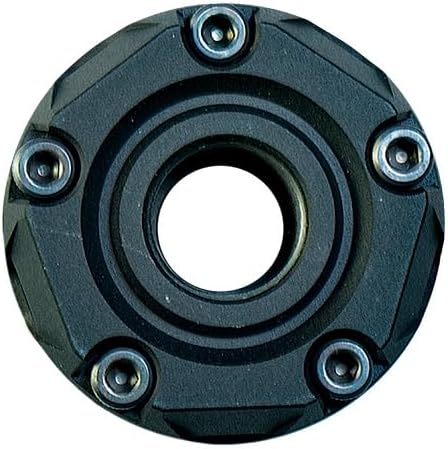
3 pav.: galinis view showing the 14mm CCW threading.

Figure 4: Components of the Raider Blaster Module.

Figure 5: Internal Blaster M module.
4. Naudojimo instrukcijos
The Raider Blaster Module offers versatile lighting effects. Refer to the following for operation:
- Maitinimo įjungimas/išjungimas: Locate the power button (refer to product diagram if available). Press and hold for a few seconds to turn the unit on or off.
- Režimo pasirinkimas: Once powered on, short press the power button to cycle through the three available modes:
- Tracer and Flame: Activates both the tracer illumination for BBs and the simulated muzzle flash effect.
- Tracer Only: Activates only the tracer illumination for BBs.
- Tik liepsna: Activates only the simulated muzzle flash effect.
- Šaudymas: With the unit attached and desired mode selected, fire your airsoft replica as normal. The tracer unit will automatically detect BBs passing through and activate the chosen lighting effects.

6 pav.: priekis view showing the LED array.
Video 1: Official demonstration of the ACETECH Raider Blaster Module's features and effects, including tracer and flame simulation.
5. Priežiūra
Proper maintenance ensures the longevity and optimal performance of your tracer unit:
- Valymas: Use a soft, dry cloth to wipe down the exterior of the unit. Avoid using abrasive cleaners or solvents that could damage the finish or internal components.
- Vidinis valymas: If dust or debris accumulates inside the BB path, gently use a cotton swab or compressed air to clear it. Ensure the unit is powered off before cleaning.
- Saugykla: When not in use, store the tracer unit in a cool, dry place away from direct sunlight and extreme temperatures. It is recommended to fully charge the unit before long-term storage and recharge it every few months to maintain battery health.
- Venkite vandens poveikio: This device is not waterproof. Avoid exposing it to rain, splashes, or submersion in water.
6. Problemų sprendimas
If you encounter issues with your ACETECH Raider Blaster Module, refer to the following common solutions:
| Problema | Galima priežastis | Sprendimas |
|---|---|---|
| Įrenginys neįsijungia. | Žemas arba išsikrovęs akumuliatorius. | Visiškai įkraukite įrenginį naudodami pridedamą USB laidą. |
| Tracer effect is weak or inconsistent. | Using non-tracer BBs or low-quality tracer BBs. Unit not fully charged. Internal sensor obstructed. | Ensure you are using high-quality green or gel tracer BBs. Fully charge the unit. Clean the internal BB path for any obstructions. |
| Liepsnos efektas neveikia. | Pasirinktas neteisingas režimas. | Cycle through modes to select "Tracer and Flame" or "Flame Only" mode. |
| Unit is loose on the airsoft replica. | Not tightened sufficiently or incorrect thread type. | Ensure the unit is securely threaded onto the 14mm CCW barrel. Verify your airsoft replica has a 14mm CCW thread. |
If the problem persists after attempting these solutions, please contact ACETECH customer support.
7. Specifikacijos
| Atributas | Detalė |
|---|---|
| Prekės ženklas | ACETECH |
| Modelio pavadinimas | AECTECH-Raider-Tracer Unit with M14 CCW Thread for Airsoft only |
| Spalva | Juoda |
| Medžiaga | Aliuminis |
| Prekės svoris | 0.3 kilogramo |
| Prekės pakuotės matmenys (I x P x A) | 5.28 x 3.86 x 2.8 colio |
| Air Gun Power Type | Elektrinis |
| Statinės medžiagos tipas | Metalas |
| Rėmo medžiaga | Metalas |
| Sporto tipas | Airsoftas |
8. Garantija ir palaikymas
For detailed warranty information and customer support, please refer to the official ACETECH websvetainėje arba susisiekite tiesiogiai su jų klientų aptarnavimo tarnyba. Išsaugokite pirkimo įrodymą, jei prireiktų garantijos.
You can visit the official ACETECH store for more information: ACETECH Store


