1. Produktas baigtasview
The OhO Smart Glasses A8 Pro combine the functionality of eyewear with advanced audio technology. These glasses feature an open-ear Bluetooth speaker system, voice control capabilities, and UV protection, making them suitable for various indoor and outdoor activities. The transitional lenses automatically adjust their tint based on light conditions, providing convenience and eye protection.
Pagrindinės funkcijos:
- Open Ear Bluetooth Headset: Listen to music and calls while remaining aware of your surroundings.
- Voice Control Smart Glasses: Hands-free phone calls, voice assistant activation (Siri, Cortana, Google Now) for music, directions, weather, and traffic updates.
- Garsumo valdymo mygtukai: Integrated buttons for volume adjustment and track navigation.
- Ultra Slim Unisex Design: Lightweight and comfortable frame made from flexible material.
- Safety Glasses with Transitional Lenses: Lenses change from light grey to dark grey outdoors and vice versa indoors. Impact-resistant, anti-eyestrain, anti-scratch, and anti-smudge properties.

Image: OhO Smart Glasses A8 Pro showcasing the transitional lens technology, changing from clear to dark grey based on light exposure.
2. Kas yra dėžutėje
Your OhO Smart Glasses A8 Pro package typically includes:
- OhO Smart Glasses A8 Pro (with transitional grey lenses)
- USB-C įkrovimo laidas
- Apsauginis kietas dėklas
- Soft Pouch/Cleaning Cloth
- Additional Interchangeable Lenses (e.g., blue light blocking, polarized black, yellow/orange - availability may vary by package)
- Instrukcijų vadovas

Image: A USB-C charging cable, included for charging your smart glasses.

Image: Various interchangeable lenses, offering different tints and functionalities for your smart glasses.
3. Sąranka
3.1 Akinių įkrovimas
- Locate the USB-C charging port on the right temple of the glasses.
- Prijunkite pridėtą USB-C laidą prie įkrovimo prievado, o kitą galą – prie suderinamo USB maitinimo šaltinio (pvz., kompiuterio, sieninio adapterio).
- The LED indicator on the glasses will illuminate during charging and change color or turn off when fully charged. A full charge typically provides up to 10 hours of battery life.
3.2 Bluetooth poravimas
- Įsitikinkite, kad akiniai yra įkrauti ir išjungti.
- Press and hold the Power/Multi-function button on the right temple until the LED indicator flashes, indicating pairing mode.
- Išmaniajame telefone arba „Bluetooth“ įrenginyje eikite į „Bluetooth“ nustatymus.
- Ieškokite available devices and select "OhO sunshine" from the list.
- Once connected, the LED indicator will stop flashing or change to a steady light.
Video: An official product video demonstrating the Bluetooth pairing process and smart features of the OhO Smart Glasses.
4. Naudojimo instrukcijos
4.1 Maitinimo įjungimas/išjungimas
- Maitinimas: Press and hold the Power/Multi-function button for approximately 3 seconds until you hear a power-on prompt or see the LED indicator light up.
- Išjungti: Press and hold the Power/Multi-function button for approximately 5 seconds until you hear a power-off prompt or see the LED indicator turn off.
4.2 Muzikos atkūrimas
- Leisti / pristabdyti: Single-press the Power/Multi-function button.
- Kitas takelis: Double-press the Volume Up button.
- Ankstesnis takelis: Double-press the Volume Down button.
4.3 Skambučių tvarkymas
- Atsiliepti į skambutį: Single-press the Power/Multi-function button when a call comes in.
- Baigti skambutį: Single-press the Power/Multi-function button during an active call.
- Atmesti skambutį: Press and hold the Power/Multi-function button for 2 seconds when a call comes in.
4.4 Balso asistento aktyvinimas
- Double-press the Power/Multi-function button to activate your device's voice assistant (Siri, Cortana, Google Now). You can then issue commands hands-free.
4.5 Garsumo valdymas
- Pagarsink: Single-press the Volume Up button.
- Patildyti: Single-press the Volume Down button.
4.6 Changing Lenses
The OhO Smart Glasses A8 Pro feature interchangeable lenses. To change lenses:
- Gently push the lens from the inside of the frame outwards until it detaches.
- Align the new lens with the frame and carefully press it into place until it clicks securely.
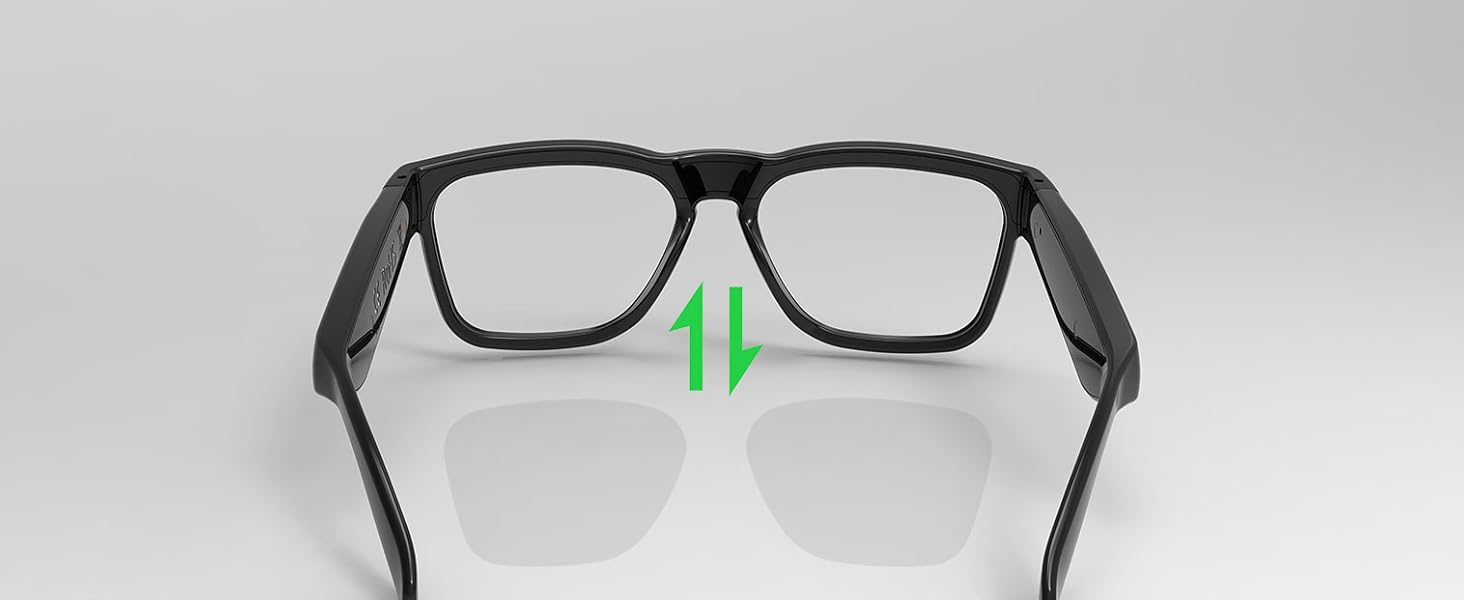
Image: A visual guide demonstrating the process of removing and inserting interchangeable lenses into the smart glasses frame.
4.7 Transitional Lens Functionality
The included transitional grey lenses automatically adapt to changing light conditions. They will darken when exposed to UV light outdoors and become lighter when indoors, providing continuous comfort and protection without needing to switch between different pairs of glasses.

Image: The smart glasses demonstrating the transitional lens feature, showing the lenses changing from clear to dark in response to light.
5. Priežiūra
5.1 Valymas
- Use the provided soft cleaning cloth to gently wipe the lenses and frame.
- Įsisenėjusioms dėmėms naudokite specialiai akiniams skirtą lęšių valymo purškiklį. Venkite stiprių cheminių medžiagų ar abrazyvinių medžiagų.
- The lenses are designed with anti-smudge and anti-scratch properties, but proper care is still recommended to maintain their quality.
5.2 Atsparumas vandeniui
The OhO Smart Glasses A8 Pro are water-resistant, suitable for light rain or sweat. They are ne designed for swimming or heavy water exposure. Avoid submerging the glasses in water.

Image: The smart glasses with water droplets on the frame, illustrating their water-resistant design.
6. Problemų sprendimas
- Nėra galios: Ensure the glasses are fully charged. Connect to the USB-C charger and check the LED indicator.
- Nepavyksta susieti „Bluetooth“: Make sure Bluetooth is enabled on your device and the glasses are in pairing mode (flashing LED). Try turning both devices off and on again. Ensure the glasses are not already connected to another device.
- Nėra garso / mažas garsumas: Check the volume levels on both the glasses and your connected device. Ensure the glasses are properly positioned on your head for optimal open-ear audio.
- Balso asistentas neatsako: Confirm that your device's voice assistant is enabled and that the glasses are properly connected via Bluetooth. Double-press the multi-function button firmly.
- Lenses Not Changing Tint: Ensure the glasses are exposed to sufficient UV light for the transitional lenses to activate. This feature works best in direct sunlight.
7. Specifikacijos
| Gaminio matmenys | 6.3 x 5.71 x 1.85 colio |
| Prekės svoris | 1.2 uncijos |
| Prekės modelio numeris | a8 pro |
| Baterijos | Reikalingos 1 ličio metalo baterijos (pridedamos) |
| Belaidis ryšys | Bluetooth |
| Ypatingos savybės | Voice Control, Open-Ear Speaker, Transitional Lenses, UV Protection |
| Gamintojas | Oi saule |
| Pirmas prieinamas | 10 m. spalio 2023 d |

Image: A technical diagram illustrating the precise dimensions of the OhO Smart Glasses A8 Pro.
8. Garantija ir palaikymas
For warranty information and customer support, please refer to the documentation included with your product or visit the official OhO sunshine websvetainę. Taip pat galite susisiekti tiesiogiai su pardavėju dėl pagalbos.


