Įvadas
The Muse M-195 BT is a 1-DIN car radio featuring a front USB port and a multi-function MCD display. This car radio includes integrated Bluetooth and an SD/MMC card reader, allowing for audio streaming from compatible devices such as laptops, tablets, or smartphones. The integrated hands-free system enables easy call management. The output power is 4 x 40 W.
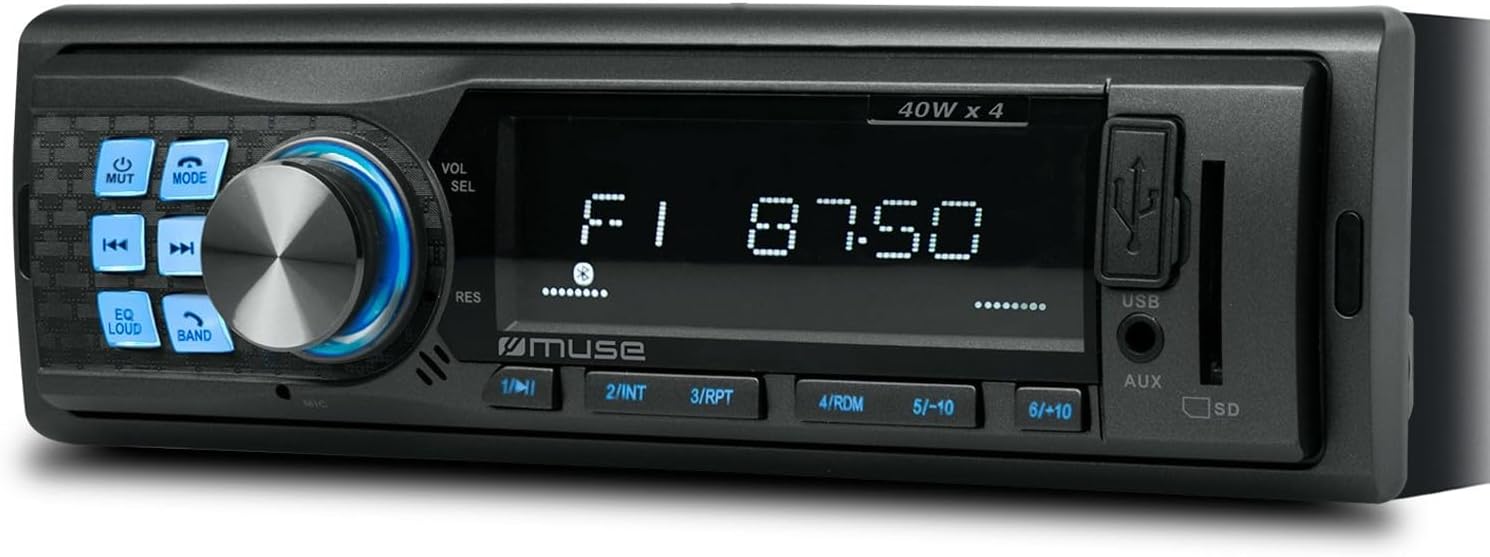
1 pav.: priekis view of the Muse M-195 BT car radio. This image displays the main unit with its central display, a large rotary knob for volume and selection, various function buttons (Mute, Mode, EQ, Loud, Band, Skip), and front-facing USB and AUX inputs, along with an SD card slot.
Saugos informacija
- Prieš montuodami ir naudodami atidžiai perskaitykite visas instrukcijas.
- Ensure proper wiring to prevent short circuits or damage. Consult a professional if unsure.
- Nenaudokite įrenginio taip, kad tai atitrauktų jūsų dėmesį nuo vairavimo.
- Saugokite įrenginį nuo ekstremalių temperatūrų, tiesioginių saulės spindulių ar drėgmės.
- Nebandykite ardyti ar modifikuoti įrenginio. Tai gali panaikinti garantiją ir sukelti gedimų.
- Garsumą palaikykite tokį, kad girdėtumėte išorinius garsus, pavyzdžiui, greitosios pagalbos automobilių skleidžiamus garsus.
Pakuotės turinys
Prašome patikrinti, ar pakuotėje yra visi reikalingi daiktai:
- Muse M-195 BT Car Radio Unit
- Montavimo rankovė
- Wiring Harness (ISO connector)
- Removal Keys (2x)
- Vartotojo vadovas (šis dokumentas)
Sąranka ir diegimas
1. Montavimas
The M-195 BT is designed for a standard 1-DIN dashboard opening (180x50mm). Ensure sufficient space behind the dashboard for wiring and ventilation.

Figure 2: Dimensions of the Muse M-195 BT car radio. The diagram illustrates the standard 1-DIN size, with a width of 185mm and a height of 58mm, crucial for proper fitment in a vehicle's dashboard.
- Prepare the Dashboard Opening: Iš 1 DIN lizdo išimkite esamą automobilio radiją arba aklinąją plokštę.
- Install the Mounting Sleeve: Insert the supplied metal mounting sleeve into the dashboard opening. Bend the tabs on the sleeve outwards with a screwdriver to secure it firmly.
- Prijunkite laidus: Connect the car's wiring harness to the supplied ISO connector. Ensure correct connections for power (constant 12V, ignition 12V, ground), speaker outputs, and antenna.
- Geltona viela: Nuolatinė 12 V įtampa (baterija)
- Raudonas laidas: Ignition 12V (ACC)
- Juodas laidas: Žemė
- Mėlyna viela: Maitinimo antena / Amplifier Remote (Output)
- Garsiakalbių laidai: Prijunkite prie atitinkamų automobilio garsiakalbių (pvz., balta/balta-juoda priekiniam kairiajam garsiakalbiui, pilka/pilka-juoda priekiniam dešiniajam garsiakalbiui, žalia/žalia-juoda galiniam kairiajam garsiakalbiui, violetinė/violetinė-juoda galiniam dešiniajam garsiakalbiui).
- Įstumkite įrenginį: Carefully slide the M-195 BT unit into the mounting sleeve until it clicks into place.
- Bandymo funkcionalumas: Turn on the car ignition and test all functions of the radio (power, radio, USB, Bluetooth, sound output).
2. Pradinis įjungimas
After successful installation, press the MAITINIMAS / REŽIMAS button to turn on the unit. The display will illuminate. The unit will typically start in the last used mode (e.g., FM radio).
Naudojimo instrukcijos
1. Pagrindiniai valdikliai
- MAITINIMO/REŽIMO mygtukas: Press to turn the unit ON/OFF. Short press to cycle through modes (FM, USB, SD, AUX, Bluetooth).
- Volume Knob (VOL/SEL): Rotate to adjust volume. Press to enter menu settings (e.g., Bass, Treble, Balance, Fader, EQ).
- MUTE mygtukas: Mutes/unmutes audio output.
- EQ mygtukas: Cycles through preset equalizer settings (e.g., Pop, Rock, Classic, Flat).
- LOUD mygtukas: Activates/deactivates loudness compensation for enhanced bass and treble at low volumes.
- Juostos mygtukas: FM režimu perjungia FM dažnius (FM1, FM2, FM3).
- PRALEIDIMO mygtukai (◀◀ / ►►): In radio mode, short press to seek previous/next station. Long press for manual tuning. In USB/SD/BT mode, short press for previous/next track.
- Skaičių mygtukai (1–6): In radio mode, short press to recall preset stations. Long press to save current station to a preset.
2. Radijo veikimas (FM)
- Paspauskite REŽIMAS until "FM" is displayed.
- Paspauskite BAND to select FM1, FM2, or FM3.
- Trumpas paspaudimas ◀◀ or ►► automatiškai ieškoti kitos stiprios stoties.
- Ilgai paspauskite ◀◀ or ►► to manually tune the frequency.
- To save a station: Tune to the desired station, then long press one of the numeric buttons (1-6) until the display confirms saving.
3. USB / SD Card Playback
- Insert a USB flash drive into the front USB port or an SD/MMC card into the SD card slot.
- The unit will automatically switch to USB/SD mode and begin playing compatible audio files (MP3). If not, press REŽIMAS pasirinkti.
- Naudokite ◀◀ or ►► praleisti takelius.
- Use numeric buttons for specific functions like 1/►►I (Play/Pause), 2/INT (Intro scan), 3/RPT (Repeat), 4/RDM (Random).
4. Bluetooth veikimas
The M-195 BT supports Bluetooth for audio streaming and hands-free calling.
- Poravimas:
- Įsitikinkite, kad jūsų mobiliajame įrenginyje įjungtas „Bluetooth“.
- Paspauskite REŽIMAS on the car radio until "BT" or "Bluetooth" is displayed. The unit will enter pairing mode.
- On your mobile device, search for available Bluetooth devices. Select "M-195 BT" from the list.
- Jei būsite paraginti įvesti PIN kodą, įveskite „0000“ (numatytasis nustatymas).
- Once paired, the display will show "CONNECTED" or similar confirmation.
- Garso transliacija (A2DP):
- After pairing, play music on your mobile device. Audio will stream through the car speakers.
- Naudokite ◀◀ or ►► on the car radio to skip tracks.
- Hands-Free Calling (HFP):
- When a call comes in, the radio display will show "CALL" or the caller ID.
- Paspauskite Atsakymas button (often the Play/Pause button or a dedicated call button if available) to answer.
- Paspauskite Baigti skambutį mygtuką, kad padėtų ragelį.
- The built-in microphone will be used for conversations.
5. AUX įvestis
Connect an external audio device (e.g., MP3 player, smartphone) to the front 3.5mm AUX input using an audio cable.
- Connect the audio cable from your device to the AUX port on the car radio.
- Paspauskite REŽIMAS kol pasirodys užrašas „AUX“.
- Valdykite atkūrimą iš išorinio įrenginio.
Priežiūra
- Valymas: Įrenginio paviršiui valyti naudokite minkštą, sausą šluostę. Jei nešvarumai sunkiai įveikiami,ampŠluostę lengvai nuplaukite vandeniu. Nenaudokite abrazyvinių valiklių ar tirpiklių.
- Venkite skysčių: Do not allow liquids to enter the unit, as this can cause damage.
- Temperatūra: Venkite įrenginio veikimo ekstremaliose temperatūrose, tiesioginiuose saulės spinduliuose ar didelėje drėgmėje.
- USB/SD Slot Care: Laikykite USB ir SD kortelių lizdus švarius nuo dulkių ir šiukšlių.
Trikčių šalinimas
| Problema | Galima priežastis | Sprendimas |
|---|---|---|
| Nėra galios | Neteisingas laidų pajungimas; Perdegęs saugiklis; Atsilaisvinusi jungtis. | Check power (yellow, red) and ground (black) wire connections. Check vehicle's fuse box and the unit's fuse. Ensure connections are secure. |
| Nėra garso | Per mažas garsumas; Įjungtas nutildymas; Neteisingas garsiakalbių sujungimas; Pažeisti garsiakalbiai. | Increase volume. Press MUTE button. Check speaker wire connections. Test with different speakers if possible. |
| Prastas radijo priėmimas | Antenna not connected; Weak signal; Damaged antenna. | Ensure antenna is properly connected. Try tuning to a stronger station. Check antenna for damage. |
| USB/SD negroja | Nesuderinamas file format; USB/SD card corrupted; Incorrect mode selected. | Užtikrinti files are MP3 format. Try a different USB/SD card. Press MODE to select USB/SD. |
| „Bluetooth“ susiejimas nepavyko | Bluetooth not enabled on device; Device too far; Incorrect PIN; Previous connection interference. | Ensure Bluetooth is ON on your device. Bring device closer. Re-enter PIN "0000". Delete previous pairings on your device and try again. |
Specifikacijos
- Modelis: M-195 BT
- Galia: 4 x 40 W
- Ekranas: MCD Multi-function
- Ryšys: Bluetooth, USB, SD/MMC, AUX (3.5mm Jack)
- Palaikomi garso formatai: MP3
- Radijo imtuvas: FM (18 iš anksto nustatytų stočių)
- Skambinimas laisvų rankų įranga: Integruotas mikrofonas
- Matmenys (P x P x A): 14 x 18.5 x 5.8 cm (approx. 1-DIN standard)
- Svoris: 550 g
- iš ankstoampsutvarkyti išėjimai: 1 pair (RCA audio rear or sub)
Garantija ir palaikymas
This product comes with a standard manufacturer's warranty. For detailed warranty terms and conditions, please refer to the warranty card included with your purchase or visit the official Muse website. For technical support, troubleshooting assistance beyond this manual, or service inquiries, please contact your retailer or the Muse customer service department.
Išsaugokite pirkimo įrodymą, kad galėtumėte kreiptis dėl garantijos.


