Įvadas
This manual provides instructions for the MageGee Typewriter Mechanical Gaming Keyboard. It covers setup, operation, maintenance, and troubleshooting to ensure optimal performance and longevity of your device. Please read this manual thoroughly before using the keyboard.
Pakuotės turinys
- MageGee Typewriter Mechanical Gaming Keyboard
- Magnetinė riešo atrama
- USB kabelis
- Vartotojo vadovas (šis dokumentas)
Sąranka
1. Klaviatūros prijungimas
- Locate the USB cable provided with your keyboard.
- Connect the USB Type-A end of the cable to an available USB port on your computer (PC, Laptop, or Mac).
- Connect the other end of the USB cable to the port on the keyboard.
- The keyboard is plug-and-play; no additional drivers or software are required for basic functionality. Your operating system should automatically detect and configure the device.
2. Riešo atramos pritvirtinimas
If your model includes a magnetic wrist rest, align it with the front edge of the keyboard. The magnets will help secure it in place, providing ergonomic support during use.
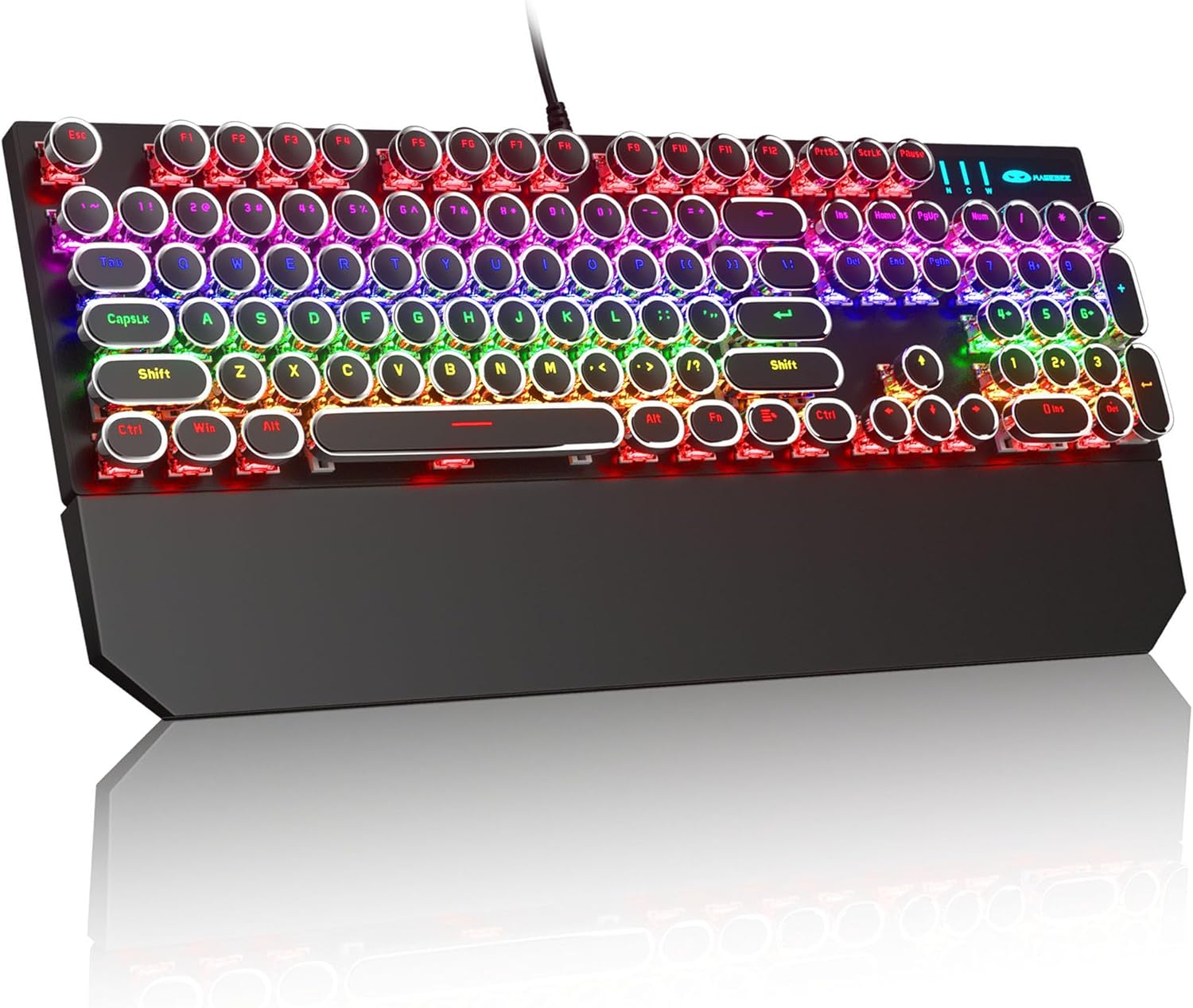
Image: The MageGee Typewriter Mechanical Gaming Keyboard connected via USB, with its magnetic wrist rest attached. The keyboard features retro round keycaps and vibrant RGB backlighting.
Naudojimo instrukcijos
Klaviatūros išdėstymas
The MageGee Typewriter Mechanical Gaming Keyboard features a full-size 104-key layout, including a numeric keypad and dedicated function keys (F1-F12).

Paveikslėlis: Viršutinė dalis view of the keyboard, highlighting the full 104-key layout and the LED backlighting effect.
Foninio apšvietimo valdymas
The keyboard features multiple RGB rainbow backlit modes. Use the following key combinations to adjust the lighting effects:
- Fn + Ins: Cycle through various backlight modes.
- Fn + Pagrindinis: reguliuoti foninio apšvietimo ryškumą.
- Fn + PgUp: Padidinti foninio apšvietimo greitį.
- Fn + PgDn: Sumažinti foninio apšvietimo greitį.
- Fn + Del: Change backlight color (if applicable to the current mode).
- Fn + pabaiga: Turn backlight on/off.

Vaizdas: Stambus planas view of the keyboard's keys, illustrating the RGB backlighting and the visible blue mechanical switches beneath the round keycaps.
Multimedijos ir funkciniai klavišai
The F1-F12 keys can be used in conjunction with the Fn key to access multimedia and system functions. Specific functions may vary slightly depending on your operating system.
| Raktų derinys | Funkcija |
|---|---|
| Fn + F1 | Media Player |
| Fn + F2 | Sumažinti garsumą |
| Fn + F3 | Padidinti garsumą |
| Fn + F4 | Nutildyti |
| Fn + F5 | Sustok |
| Fn + F6 | Ankstesnis takelis |
| Fn + F7 | Leisti / pristabdyti |
| Fn + F8 | Kitas takelis |
| Fn + F9 | El. paštas |
| Fn + F10 | Web Naršyklė |
| Fn + F11 | Mano kompiuteris |
| Fn + F12 | Skaičiuoklė |
Priežiūra
Klaviatūros valymas
- Prieš valydami atjunkite klaviatūrą nuo kompiuterio.
- Šiek tiek naudokite minkštą, be pūkelių šluostę dampKlaviatūros dangtelius ir paviršių nuvalykite vandeniu arba švelniu valymo tirpalu.
- Dulkėms ir šiukšlėms tarp klavišų pašalinti naudokite suslėgtą orą.
- Venkite naudoti stiprias chemines medžiagas, abrazyvinius valiklius ir nepurkškite skysčių tiesiai ant klaviatūros.
Bendroji priežiūra
- Venkite klaviatūros laikymo ekstremaliose temperatūrose, drėgmėje ar tiesioginiuose saulės spinduliuose.
- Do not drop the keyboard or subject it to strong impacts.
- Laikykite skysčius atokiai nuo klaviatūros, kad ji nebūtų pažeista.
Trikčių šalinimas
Klaviatūra nereaguoja
- Įsitikinkite, kad USB laidas yra tvirtai prijungtas prie klaviatūros ir kompiuterio.
- Pabandykite prijungti klaviatūrą prie kito kompiuterio USB prievado.
- Išbandykite klaviatūrą kitame kompiuteryje, kad atmestumėte su kompiuteriu susijusią problemą.
- Iš naujo paleiskite kompiuterį.
Backlight Not Working or Incorrect
- Ensure the backlight is not turned off (Fn + End).
- Adjust backlight brightness (Fn + Home).
- Cycle through different backlight modes (Fn + Ins) to see if the issue persists across all modes.
Keys Not Registering or Double Typing
- Clean the affected key(s) using compressed air to remove any debris.
- If the issue persists, it may indicate a hardware fault. Contact customer support for assistance.
Specifikacijos
| Funkcija | Detalė |
|---|---|
| Modelis | Typewriter Mechanical Gaming Keyboard |
| Ryšys | Laidinis USB 2.0 |
| Rakto tipas | Mechaninis (mėlynas jungiklis) |
| Klaviatūros | Retro Round, Double-shot injection molded |
| Foninis apšvietimas | RGB vaivorykštės foninis apšvietimas |
| Išdėstymas | 104-Key Full-Size, Anti-ghosting |
| Suderinamumas | „Windows“ (2000, XP, ME, Vista, 7, 8), „Linux“, „Mac“ |
| Matmenys (I x P x A) | 17.1 x 4.9 x 1.3 colio (434 mm x 130 mm x 37 mm) |
| Prekės svoris | 1.99 svaro |
| Medžiaga | Aluminum alloy metal panel |

Image: A diagram illustrating the physical dimensions of the keyboard and its detachable wrist rest.
Garantija ir palaikymas
Informacija apie garantiją
MageGee products are designed for quality and reliability. This product comes with a standard manufacturer's warranty against defects in materials and workmanship. Please refer to the product packaging or the official MageGee websvetainėje, kurioje pateikiamos konkrečios garantijos sąlygos ir trukmė.
Pagalba klientams
If you encounter any issues or have questions regarding your MageGee Typewriter Mechanical Gaming Keyboard, please contact our customer support team:
- El. paštas: support@magegee.com
- Websvetainė: www.magegee.com
When contacting support, please provide your product model and a detailed description of the issue.


