Įvadas
Thank you for choosing the SOMIC MS300 Over-Ear Wireless Bluetooth Headphones. This manual provides essential information for setting up, operating, and maintaining your headphones to ensure optimal performance and longevity. Please read this manual thoroughly before using the product.
Pakuotės turinys
- SOMIC MS300 Over-Ear Wireless Bluetooth Headphones
- USB įkrovimo laidas
- 3.5 mm garso laidas
- Vartotojo vadovas (šis dokumentas)
Produktas baigtasview
Familiarize yourself with the various components and controls of your SOMIC MS300 headphones.
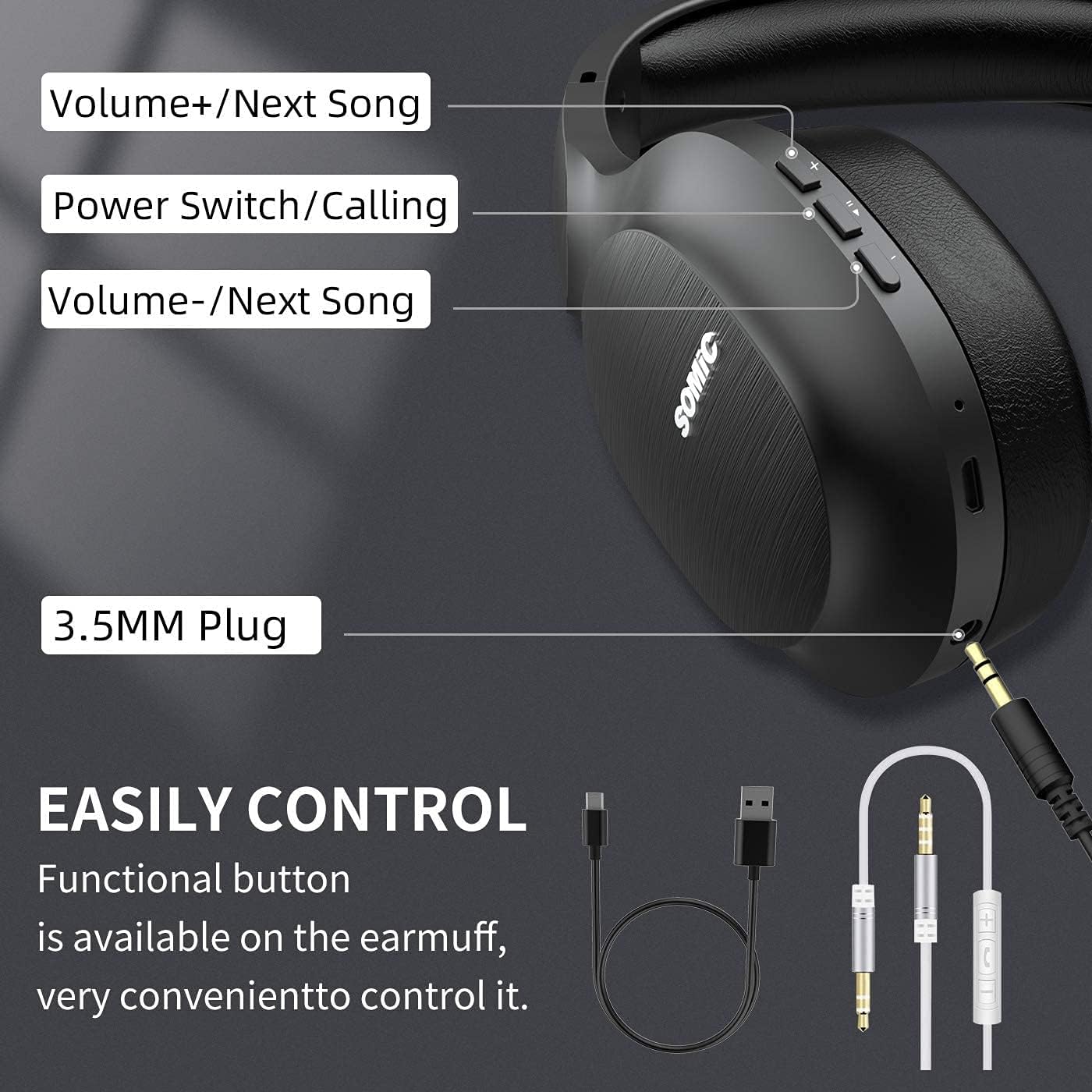
Vaizdas: Baigėsiview of the SOMIC MS300 headphone controls, including volume buttons, power switch, and 3.5mm audio jack.
Valdikliai ir prievadai
- Garsumas + / Kita daina: Press briefly to increase volume, press and hold to skip to the next song.
- Power Switch / Calling: Press and hold to power on/off. Briefly press to play/pause music. During a call, press to answer/end a call.
- Garsumas - / Ankstesnė daina: Press briefly to decrease volume, press and hold to go to the previous song.
- 3.5 mm garso lizdas: Laidiniam prijungimui naudojant pridedamą 3.5 mm garso kabelį.
- USB įkrovimo prievadas: For charging the headphones using the included USB cable.
- Mikrofonas: Integruota funkcija skambinimui laisvų rankų įranga.
Sąranka
Ausinių įkrovimas

Vaizdas: The SOMIC MS300 headphones illustrating the fast charging capability: 5 minutes of charge provides 2 hours of playback.
- Prijunkite mažąjį USB įkrovimo laido galą prie ausinių USB įkrovimo prievado.
- Prijunkite didesnį USB įkrovimo laido galą prie USB maitinimo adapterio (nepridedamas) arba kompiuterio USB prievado.
- LED indikatorius rodys įkrovimo būseną (pvz., raudona spalva reiškia, kad įrenginys kraunamas, mėlyna – kad įrenginys visiškai įkrautas).
- A full charge takes approximately 2-3 hours. For quick use, a 5-minute charge provides up to 2 hours of playtime.

Vaizdas: The SOMIC MS300 headphones highlighting their strong endurance with up to 72 hours of playtime on a single charge.
Maitinimo įjungimas/išjungimas
- Norėdami įjungti: Press and hold the Power Switch button for approximately 3 seconds until the LED indicator flashes blue.
- Norėdami išjungti: Press and hold the Power Switch button for approximately 3 seconds until the LED indicator turns off.
"Bluetooth" poravimas
- Įsitikinkite, kad ausinės yra išjungtos.
- Press and hold the Power Switch button for about 5-7 seconds until the LED indicator flashes red and blue alternately, indicating pairing mode.
- Savo įrenginyje (išmaniajame telefone, planšetiniame kompiuteryje, kompiuteryje) įjunkite „Bluetooth“ ir ieškokite galimų įrenginių.
- Select "SOMIC MS300" from the list of devices.
- Prijungus, LED indikatorius lėtai mirksės mėlyna spalva.
Laidinis ryšys (3.5 mm garso kabelis)

Vaizdas: The SOMIC MS300 headphones demonstrating their versatility with both wireless Bluetooth connectivity and a wired option via a 3.5mm audio cable.
The SOMIC MS300 headphones can also be used with a wired connection, even if the battery is depleted.
- Prijunkite vieną 3.5 mm garso kabelio galą prie ausinių 3.5 mm garso lizdo.
- Prijunkite kitą 3.5 mm garso kabelio galą prie savo įrenginio garso išvesties prievado.
- Ausinės automatiškai persijungs į laidinį režimą. „Bluetooth“ funkcija bus išjungta.
Naudojimo instrukcijos
Muzikos atkūrimas
- Leisti / pristabdyti: Briefly press the Power Switch button.
- Pagarsink: Briefly press the Volume + button.
- Patildyti: Briefly press the Volume - button.
- Kitas takelis: Paspauskite ir palaikykite nuspaudę garsumo didinimo mygtuką.
- Ankstesnis takelis: Paspauskite ir palaikykite nuspaudę garsumo mygtuką.
Telefono skambučiai
- Atsiliepti / Baigti skambutį: Briefly press the Power Switch button.
- Atmesti skambutį: Press and hold the Power Switch button for 2 seconds.
- Perrink paskutinį numerį: Double-press the Power Switch button.
Dviejų įrenginių jungtis
The SOMIC MS300 headphones support connecting to two Bluetooth devices simultaneously.
- Connect the headphones to the first device as described in the "Bluetooth Pairing" section.
- Išjunkite „Bluetooth“ pirmame įrenginyje. Ausinės vėl įsijungs susiejimo režimu.
- Prijunkite ausines prie antrojo įrenginio.
- Re-enable Bluetooth on the first device. The headphones should automatically reconnect to both devices.
- Garsas bus leidžiamas iš įrenginio, kuris aktyviai leidžia mediją arba priima skambutį.
Noise Cancellation (CVC 8.0)

Vaizdas: A person wearing SOMIC MS300 headphones in a public setting, demonstrating the effectiveness of CVC Noise Cancelling Technology in reducing ambient noise.
The SOMIC MS300 headphones feature CVC 8.0 noise cancelling technology, which helps reduce ambient noise during calls for clearer communication. This feature is automatically active when using the built-in microphone.
Priežiūra
Valymas
- Ausines nuvalykite minkštu, sausu, nepūkuotu skudurėliu.
- Nenaudokite abrazyvinių valiklių, tirpiklių ar purškiamų valiklių.
- Venkite drėgmės patekimo į bet kokias angas.
Sandėliavimas
- Ausines laikykite vėsioje, sausoje vietoje, toliau nuo ekstremalių temperatūrų ir tiesioginių saulės spindulių.
- Kai ausinių nenaudojate ilgesnį laiką, įkraukite jas bent kartą per tris mėnesius, kad pailgintumėte baterijos veikimo laiką.
Akumuliatoriaus priežiūra
- Nebandykite patys keisti baterijos. Dėl su baterija susijusių problemų kreipkitės į klientų aptarnavimo tarnybą.
- Venkite dažnai visiškai iškrauti akumuliatorių, nes tai gali sutrumpinti jo tarnavimo laiką.
Trikčių šalinimas
| Problema | Galimas sprendimas |
|---|---|
| Ausinės neįsijungia. | Įsitikinkite, kad ausinės įkrautos. Prijunkite prie maitinimo šaltinio naudodami USB laidą. |
| Nepavyksta susieti su įrenginiu. | Ensure headphones are in pairing mode (LED flashing red and blue). Turn off and on Bluetooth on your device. Move headphones closer to the device. |
| Nėra garso arba garsas per mažas. | Patikrinkite garsumo lygius abiejose ausinėse ir prijungtame įrenginyje. Įsitikinkite, kad ausinės tinkamai susietos arba 3.5 mm laidas yra iki galo įkištas. |
| Garso kokybė prasta. | Move closer to the connected device to avoid interference. Ensure there are no obstacles between the headphones and the device. |
| Mikrofonas neveikia. | Ensure the headphones are connected via Bluetooth. Check microphone settings on your device. |
Specifikacijos

Vaizdas: Sprogo view of the 40mm dynamic driver and the Qualcomm QCC Bluetooth 5.0 chip, highlighting the audio technology within the SOMIC MS300 headphones.
| Funkcija | Detalė |
|---|---|
| Modelis | MS300 |
| Prekės ženklas | SOMIC |
| Ryšys | Wireless (Bluetooth 5.0), Wired (3.5mm Audio Jack) |
| Bluetooth lustas | Qualcomm QCC Bluetooth 5.0 |
| Vairuotojo dydis | 40 mm dinaminės tvarkyklės |
| Triukšmo valdymas | CVC 8.0 triukšmo slopinimas |
| Baterijos talpa | 1000 mAh |
| Žaidimo laikas | Iki 72 valandų |
| Greitas įkrovimas | 5 minučių įkrovimas suteikia 2 valandas grojimo laiko |
| Ausinių pagalvėlės medžiaga | Memory Foam Protein |
| Svoris | 208g |
| Spalva | Juoda |
| Atsparumas vandeniui | Neatsparus vandeniui |
Garantija ir palaikymas
Informacija apie garantiją
SOMIC products are designed and manufactured to the highest quality standards. This product is covered by a limited warranty from the date of purchase. Please refer to the warranty card included in your package for specific terms and conditions. Keep your proof of purchase for warranty claims.
Pagalba klientams
If you encounter any issues or have questions regarding your SOMIC MS300 headphones, please contact our customer support team. Contact details can typically be found on the warranty card or the official SOMIC website. Please have your model number (MS300) and purchase information ready when contacting support.


