„DrayTek Vigor 2865ax“ eterneto maršrutizatoriaus naudotojo vadovas
Modelis: V2865AX-K
Įvadas
Welcome to the user manual for your DrayTek Vigor 2865ax Ethernet Router. This document provides detailed instructions for setting up, operating, maintaining, and troubleshooting your device to ensure optimal performance and connectivity. The Vigor 2865ax is a high-performance router designed for Small to Medium Businesses (SMBs) and advanced home users, offering robust features like VDSL2/ADSL2+ and Ethernet WAN load balancing, Wi-Fi 6 (AX3000), VPN capabilities, and extensive LAN port options.
Saugos informacija
Please read these safety instructions carefully before using the device.
- Place the router on a stable, flat surface away from direct sunlight, heat sources, and moisture.
- Užtikrinkite tinkamą vėdinimą aplink įrenginį, kad jis neperkaistų.
- Use only the power adapter supplied with the router.
- Neatidarykite maršrutizatoriaus korpusoasing; visus techninės priežiūros darbus patikėkite kvalifikuotiems darbuotojams.
- Prietaisą laikykite atokiau nuo vaikų ir naminių gyvūnėlių.
- Disconnect power during electrical storms or when unused for long periods.
Pakuotės turinys
Patikrinkite, ar pakuotėje yra visi toliau išvardyti daiktai:
- Vigor 2865 Series Router
- DC 12V maitinimo šaltinis su JK kištuku
- Greitos pradžios vadovas
- Screws & wall plugs for wall mounting
- 2m Cat-5e RJ-45 Network Cable
- 2 nuimamos belaidžio LAN antenos
Produktas baigtasview
Familiarize yourself with the physical components and ports of your DrayTek Vigor 2865ax router.
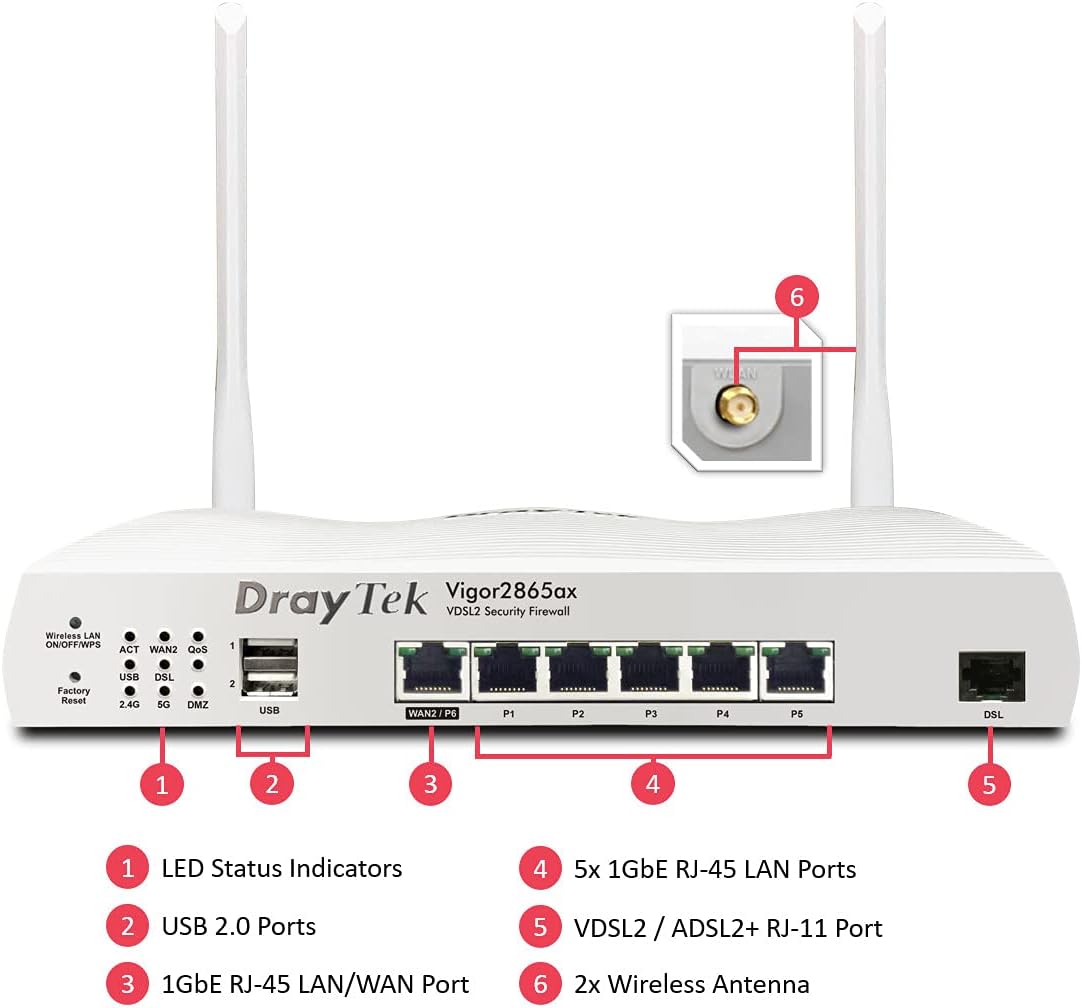
This image displays the front panel of the DrayTek Vigor 2865ax router, highlighting key components. Label 1 points to the LED Status Indicators, Label 2 to the USB 2.0 Ports, Label 3 to the 1GbE RJ-45 LAN/WAN Port (WAN2/P6), Label 4 to the 5x 1GbE RJ-45 LAN Ports (P1-P5), Label 5 to the VDSL2 / ADSL2+ RJ-11 Port (DSL), and Label 6 to the 2x Wireless Antenna connectors.
Priekinis skydelis
- LED būsenos indikatoriai: Provide visual feedback on the router's operational status, including power, internet connectivity, Wi-Fi activity, and LAN port status.
- USB 2.0 prievadai: For connecting external devices such as 3G/4G USB modems for backup WAN or USB storage for network-attached storage (NAS) functionality.
- WAN2/P6 (1GbE RJ-45 LAN/WAN Port): Configurable as either a Gigabit Ethernet WAN port for connecting to a fiber modem or another internet source, or as an additional LAN port.
- P1-P5 (5x 1GbE RJ-45 LAN Ports): Gigabit Ethernet ports for connecting wired devices such as computers, servers, and network switches.
- DSL (VDSL2 / ADSL2+ RJ-11 Port): For connecting directly to your VDSL or ADSL broadband line.
Galinis skydelis
- Maitinimo įvestis: Connects to the supplied DC 12V power adapter.
- Maitinimo mygtukas: Norėdami įjungti arba išjungti maršrutizatorių.
- Antenos jungtys: For attaching the two detachable wireless LAN antennas.
Sąranka
1 veiksmas: prijunkite aparatinę įrangą
- Prijunkite antenas: Screw the two detachable wireless LAN antennas onto the connectors at the rear of the router.
- Prisijungimas prie interneto (WAN):
- For VDSL/ADSL: Connect an RJ-11 cable from your telephone line's DSL filter/socket to the DSL port on the router.
- For Ethernet WAN (e.g., Fibre/Cable Modem): Connect an Ethernet cable from your fiber/cable modem to the WAN2/P6 port on the router.
- Prisijungimas prie vietinio tinklo (LAN): Prijunkite Ethernet kabelį prie vieno iš maršrutizatoriaus LAN prievadų (P1–P5) prie kompiuterio arba tinklo komutatoriaus.
- Prijunkite maitinimą: Connect the supplied DC 12V power adapter to the router's power input and then plug it into a power outlet. Press the power button to turn on the router.
2 veiksmas: pradinė konfigūracija
- Prieiga Web Sąsaja: Atidarykite a web browser on a connected computer and enter the default IP address: 192.168.1.1.
- Prisijungimas: Įveskite numatytąjį vartotojo vardą (admin) ir slaptažodį (admin). It is highly recommended to change the default password immediately after logging in for the first time.
- Run Quick Start Wizard: Follow the on-screen instructions of the Quick Start Wizard to configure your internet connection (WAN settings), Wi-Fi network name (SSID), and password.
- Programinės aparatinės įrangos atnaujinimas: Po pradinio nustatymo eikite į Sistemos priežiūra > Programinės įrangos atnaujinimas to check for and install the latest firmware. This ensures optimal performance and security.
Naudojimo instrukcijos
Multi-WAN Load Balancing and Failover
The Vigor 2865ax supports multiple WAN connections, allowing for load balancing to increase bandwidth or failover for connection redundancy.

This diagram shows the DrayTek Vigor 2865ax router connected to various internet sources: WiFi WAN, 1Gb Ethernet & FTTP, ADSL2+ & VDSL2 FTTC, and G.Fast FTTC. This illustrates the router's capability to utilize multiple WAN connections simultaneously for load balancing or failover.
Configure WAN settings under WAN > Bendrieji nustatymai. You can enable load balancing policies or set up failover rules to ensure continuous internet access.
Wi-Fi 6 (AX3000) Configuration
The router provides high-speed Wi-Fi 6 connectivity across dual bands (2.4GHz and 5GHz).

This image depicts the Wi-Fi coverage provided by the DrayTek Vigor 2865ax router, showing distinct coverage areas for the 2.4GHz (AX600) and 5GHz (AX2400) bands, with various devices connected within these zones.
Pasiekite „Wi-Fi“ nustatymus per Belaidis LAN menu. Here you can:
- Change SSID (Wi-Fi network name) and password.
- Configure security settings (WPA2/WPA3).
- Set up multiple SSIDs for different networks (e.g., guest network).
- Adjust channel and bandwidth settings for optimal performance.
VPN (virtualus privatus tinklas)
The Vigor 2865ax supports up to 32 VPN tunnels, including SSL VPN and OpenVPN, for secure remote access and site-to-site connectivity.
Eikite į VPN and Remote Access to configure VPN profiles. Detailed guides for various VPN types are available on the DrayTek support websvetainę.
LAN Management and VLANs
The router features 5+1 Gigabit LAN ports and supports VLANs for network segmentation.
Manage LAN settings under LAN > General Setup. Tu gali:
- Configure IP addresses and DHCP server settings.
- Create VLANs (Virtual LANs) to isolate network segments for enhanced security and management (e.g., separating guest Wi-Fi from internal network).
- Set up port mirroring or link aggregation if supported.
Priežiūra
Programinės aparatinės įrangos naujiniai
Regularly check for and install firmware updates to ensure your router has the latest features, security patches, and performance improvements.
- Apsilankykite oficialioje „DrayTek“ svetainėje website and navigate to the support section for the Vigor 2865ax.
- Atsisiųskite naujausią programinę-aparatinę įrangą file.
- Pasiekite maršrutizatoriaus web interface and go to Sistemos priežiūra > Programinės įrangos atnaujinimas.
- Follow the on-screen instructions to upload and install the firmware. Do not power off the router during this process.
Atsarginės kopijos konfigūracija
It is advisable to back up your router's configuration settings before performing major changes or firmware updates.
Eikite į Sistemos priežiūra > Konfigūracijos atsarginė kopija to save your settings to a file.
Atstatyti gamyklinius nustatymus
If you encounter persistent issues or wish to revert all settings to default, you can perform a factory reset.
Įspėjimas: A factory reset will erase all your custom configurations.
Norėdami atkurti gamyklinius nustatymus:
- Įjungę maršrutizatorių, sąvaržėle arba plonu daiktu paspauskite ir palaikykite Atstatyti gamyklinius nustatymus button (located on the front panel, often recessed) for about 5-10 seconds until the LEDs flash.
- Release the button and wait for the router to restart with default settings.
Trikčių šalinimas
Nėra interneto ryšio
- Patikrinkite kabelius: Ensure all Ethernet and DSL cables are securely connected to the correct ports.
- Check WAN LED: Verify that the WAN LED (DSL or WAN2) is lit and stable, indicating a connection to your ISP.
- Interneto paslaugų teikėjo nustatymai: Confirm that your WAN settings (e.g., PPPoE username/password, static IP, DHCP) are correctly configured in the router's web interface, matching your ISP's requirements.
- Modemo būsena: If using an external modem, check its status lights to ensure it's online.
- Perkraukite: Power cycle both your modem (if applicable) and the DrayTek router.
Wi-Fi Not Working or Slow
- Check Wireless LAN LED: Ensure the Wireless LAN LED is active.
- SSID transliacija: Verify that your Wi-Fi network (SSID) is being broadcast.
- Slaptažodis: Dar kartą patikrinkite savo „Wi-Fi“ slaptažodį.
- Kanalų trukdžiai: Pabandykite pakeisti „Wi-Fi“ kanalą maršrutizatoriaus nustatymuose, kad išvengtumėte trukdžių iš kaimyninių tinklų.
- Signalo stiprumas: Ensure the router is placed centrally and away from obstructions.
Nepavyksta pasiekti Web Sąsaja
- IP adresas: Confirm your computer's IP address is in the same subnet as the router (e.g., 192.168.1.x).
- Kabelio jungtis: Įsitikinkite, kad jūsų kompiuteris yra tiesiogiai prijungtas prie maršrutizatoriaus LAN prievado.
- Naršyklės talpykla: Išvalykite naršyklės talpyklą arba išbandykite kitą naršyklę.
- Ugniasienė / Antivirusinė programa: Laikinai išjunkite visas kompiuteryje esančias programinės įrangos užkardas ar antivirusines programas, kurios gali blokuoti prieigą.
- Gamykliniai nustatymai: As a last resort, perform a factory reset (see Maintenance section).
Specifikacijos
| Funkcija | Detalė |
|---|---|
| Gaminio matmenys | 34.5 x 28.6 x 7.5 cm; 1.6 kg |
| Prekės modelio numeris | V2865AX-K |
| Prekės ženklas | DrayTek |
| Modelio pavadinimas | Vigor 2865ax |
| Ypatinga funkcija | Nuotolinė prieiga |
| Dažnių juostos klasė | Dviejų juostų |
| Belaidžio ryšio standartas | 802.11a (Wi-Fi 6 AX3000) |
| Suderinami įrenginiai | Nešiojamasis kompiuteris, asmeninis kompiuteris, planšetinis kompiuteris, išmanusis telefonas |
| Dažnis | 2.4 GHz, 5 GHz |
| Rekomenduojami naudojimo būdai | Žaidimai, namai, verslas |
| Ryšio technologija | Wi-Fi, Ethernet, VDSL2/ADSL2+ |
Garantija ir palaikymas
DrayTek products typically come with a standard manufacturer's warranty. Please refer to the warranty card included in your product packaging or visit the official DrayTek websvetainėje, kurioje rasite išsamias garantijos sąlygas, taikomas jūsų regionui.
For technical support, firmware downloads, and additional documentation, please visit the official DrayTek support websvetainė: www.draytek.co.uk/support. You may also contact DrayTek customer service directly for assistance.
When contacting support, please have your router's model number (Vigor 2865ax) and serial number ready.


