1. Įvadas
The Milestone MPT-II is a compact and portable 58mm thermal printer designed for various business applications, including retail, restaurants, and mobile logistics. It offers high-speed, clear printing and features Bluetooth connectivity for seamless integration with Android and iOS devices. Its lightweight design and long-lasting battery make it ideal for on-the-go printing needs.

2. Pagrindinės savybės
- „Bluetooth“ spausdinimas: Supports Android and iOS devices for wireless printing.
- Perkeliamumas: Light and compact design allows for printing anywhere, anytime.
- Low Operating Cost: Direct thermal printing eliminates the need for ink ribbons or cartridges, requiring only thermal paper.
- Ilgas baterijos veikimo laikas: Built-in 7.4V/2500mAh rechargeable lithium battery provides up to 4 hours of continuous printing.
- Universali sąsaja: Equipped with both USB and Bluetooth connectivity.
- Suderinamas su ESC/POS: Supports standard ESC/POS print commands for broad software compatibility.

3. Pradinė sąranka
3.1 Išpakavimas ir turinys
Carefully unpack the printer and verify all components are present:
- 1 x Milestone MPT-II Thermal Printer
- 1x USB laidas
- 1 x USB adapteris
- 1 x popieriaus ritinėlis
- 1 x Naudotojo vadovas (šis dokumentas)
3.2 Spausdintuvo įkrovimas
- Connect the USB cable to the printer's charging port.
- Plug the USB adaptor into a standard power outlet.
- The charging indicator light will illuminate. Charge the printer fully before first use (approximately 2.5-3 hours for continuous printing).
3.3 Terminio popieriaus įdėjimas
- Open the paper compartment cover by gently pushing the latch.
- Insert the thermal paper roll with the printing side facing outwards (as shown in Figure 2). Ensure the roll is seated correctly.
- Ištraukite nedidelį popieriaus gabalėlį už pjovimo krašto.
- Tvirtai uždarykite popieriaus skyriaus dangtelį, kol jis spragtelėdamas užsifiksuos.
4. Naudojimo instrukcijos
4.1 Įjungimas / išjungimas
- Norėdami įjungti: paspauskite ir palaikykite maitinimo mygtuką, kol užsidegs indikatoriaus lemputė.
- Norėdami išjungti: paspauskite ir palaikykite maitinimo mygtuką, kol užges indikatoriaus lemputė.
4.2 Bluetooth ryšys
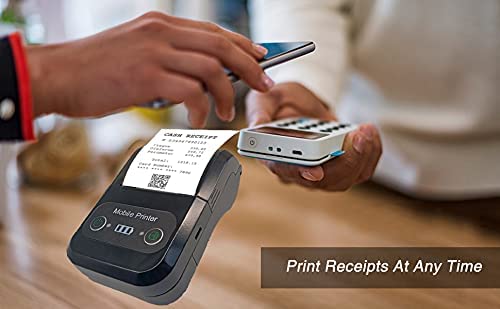
The MPT-II printer supports Bluetooth connectivity for mobile devices.
- Ensure the printer is powered on and within range of your mobile device.
- On your mobile device (Android/iOS), go to Bluetooth settings and turn Bluetooth on.
- Ieškokite available devices. The printer will appear as "MPT-II".
- Select "MPT-II" to pair. If prompted for a password, enter 1234 or 0000.
- Once paired, the printer is ready for use with compatible applications.
4.3 Naudojimas su programėlėmis
For mobile printing, you will need a compatible application. Milestone recommends downloading RAWBT Printer App or MYXPrint App from the Google Play Store. For iOS, search for compatible thermal printer apps in the App Store.
- Atidarykite pasirinktą spausdinimo programą.
- Navigate to the printer settings within the app.
- Select the "MPT-II" printer from the list of available Bluetooth devices.
- You can now send print commands from the application.

4.4 USB Connection (for PC)
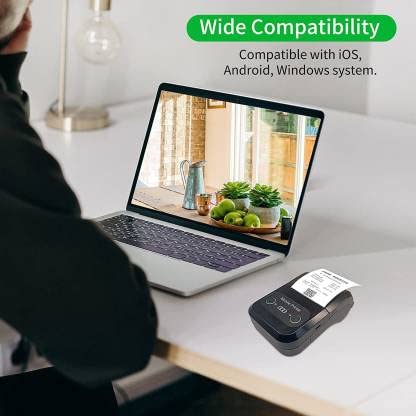
The printer can also be connected to a PC via USB. You may need to install a printer driver, which is typically available from the manufacturer's website or included on a CD with the product (if applicable).
5. Priežiūra
5.1 Spausdintuvo valymas
To ensure optimal performance and print quality, regularly clean the printer:
- Spausdinimo galvutė: Švelniai nuvalykite vatos tamponuampened with isopropyl alcohol to gently wipe the thermal print head. Allow it to dry completely before use.
- Popieriaus kelias: Popieriaus dulkes ar šiukšles nuo popieriaus kelio pašalinkite minkštu, sausu skudurėliu arba mažu šepetėliu.
- Išorė: Nuvalykite spausdintuvo išorę minkšta,amp audinys. Venkite naudoti stiprių cheminių medžiagų ar abrazyvinių valiklių.
5.2 Akumuliatoriaus priežiūra
- Prieš pradėdami naudoti akumuliatorių, visiškai jį įkraukite.
- Venkite dažnai visiškai iškrauti akumuliatorių.
- If storing the printer for an extended period, charge it to about 50% and recharge every few months to prevent battery degradation.
6. Problemų sprendimas
| Problema | Galima priežastis | Sprendimas |
|---|---|---|
| Spausdintuvas neįsijungia. | Baterija išsikrovusi arba jos įkrova maža. | Charge the printer using the provided USB cable and adaptor. |
| Nepavyksta prisijungti per „Bluetooth“. | Bluetooth is off on device; incorrect pairing password; printer not discoverable. | Ensure Bluetooth is enabled on your device. Re-attempt pairing with password 1234 or 0000. Restart both printer and device. |
| No print output or blank paper. | Paper loaded incorrectly; out of paper; print head dirty. | Check paper orientation (printing side out). Replace paper roll if empty. Clean the thermal print head (refer to Maintenance section). |
| Prasta spausdinimo kokybė (išblukę, linijos). | Print head dirty; low battery; poor quality thermal paper. | Clean the print head. Charge the printer fully. Use high-quality thermal paper. |
| Printer beeps continuously. | Paper alarm (out of paper or paper jam); low battery reminder. | Check and replace paper roll or clear jam. Charge the printer. |
7. Techninės specifikacijos
| Funkcija | Specifikacija |
|---|---|
| Spausdinimo būdas | Terminis linijinis spausdinimas |
| Spausdinimo plotis | Paper width 58mm, effective width 58mm |
| Spausdinimo tankis | 576 taškai / eilutė |
| Rezoliucija | 8 dots/mm, 203 DPI |
| Spausdinimo greitis | 70mm/s (Max Print speed Monochrome: 50 ppm) |
| Printer Core Life | 50KM (25% print density or less than 100 million pulses) |
| Printable Content | English, numbers, symbols, characters, pictures, 1D/2D barcode, multi-languages |
| Duomenų perdavimo sąsaja | USB / Bluetooth |
| Maitinimo šaltinis | Machine charging 9V-1.5A |
| Baterija | Built-in rechargeable 2600mAh lithium-ion battery (7.4V/2500mAh) |
| Continuous Printing Time | 2.5-3 valandas |
| Instrukcijų rinkinys | Suderinamas su ESC / POS |
| Popieriaus pjaustymas | Manually tear |
| Operacinės sistemos suderinamumas | Android, iOS, Windows |
| Gaminio matmenys | 15 gylio x 12 pločio x 6 aukščio centimetrų |
| Prekės svoris | 310 gramų |
| Įtraukti komponentai | 1 x Thermal Printer, 1 x USB Cable, 1 x USB Adaptor, 1 x Paper Roll, 1 x User Manual |
8. Garantija ir palaikymas
This product comes with a 10-day warranty as per the purchase terms. For any technical assistance, troubleshooting beyond this manual, or warranty claims, please contact your retailer or the manufacturer's customer support. Refer to your purchase documentation for specific contact details.
Gamintojas: Gairės
Importuotojas: SB RETAILS, SECTOR 28, PRADHIKARAN, PUNE-44, +918888881631


