1. Įvadas
The Sinotimer TM630S-2 is a versatile 7-day weekly programmable digital timer switch designed for automatic control of various electrical equipment. It features a built-in battery for memory retention during power failures, high accuracy, and strong anti-jamming capabilities. This manual provides detailed instructions for the setup, operation, and maintenance of your TM630S-2 timer switch.
This device is ideal for controlling streetlights, neon signs, water heaters, air conditioners, electric cookers, agricultural facilities, and broadcasting equipment, offering precise scheduling with up to 16 ON/OFF settings per day or week.

1 pav.: Kampinis view of the Sinotimer TM630S-2 Digital Timer Switch, showing the LCD display and control buttons.
2. Produktas baigtasview
The TM630S-2 features an LCD display for time and program settings, along with several buttons for configuration. It is designed for DIN-rail mounting, making it suitable for integration into electrical panels.

2 pav.: priekis view of the Sinotimer TM630S-2, highlighting its 220V compatibility and button layout.
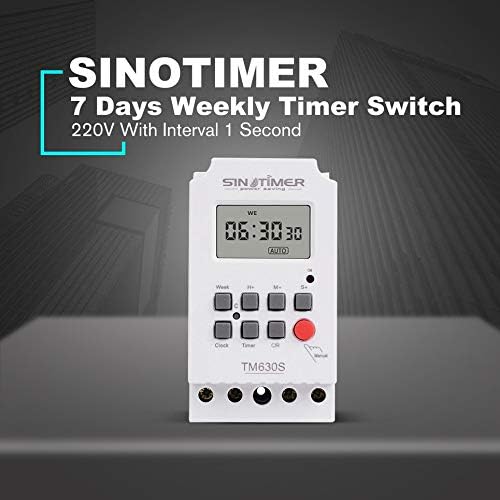
Figure 3: The Sinotimer TM630S-2, marketed as a 7-day weekly timer switch with 1-second interval capability.

Figure 4: The TM630S-2 showcasing its key features, including automatic switching, low consumption, high-accuracy CMOS chip, and compliance with IEC 60367 and CE standards.
3. Diegimas ir sąranka
3.1 Montavimas
The TM630S-2 is designed for DIN-rail mounting. Ensure the mounting location is secure, dry, and within the specified operating temperature range.

Figure 5: Technical drawing illustrating the dimensions and DIN-rail mounting mechanism of the TM630S-2.
3.2 Laidai
ĮSPĖJIMAS: All wiring should be performed by a qualified electrician and in accordance with local electrical codes. Ensure power is disconnected before wiring to prevent electric shock.
The TM630S-2 supports 220V AC power supply. Connect the input power and the load according to the wiring diagram provided on the device and below.
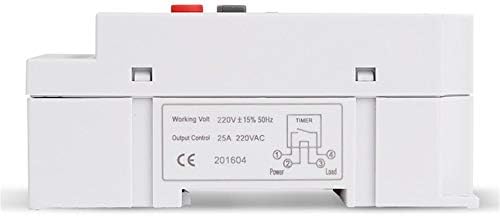
6 pav. Apačia view of the TM630S-2, displaying the wiring diagram for input power and household appliances, along with product specifications.
- Connect the Live (L) and Neutral (N) wires of the 220V AC power supply to the input terminals.
- Connect the Live (L) and Neutral (N) wires of the appliance (load) to be controlled to the output terminals.
- Įsitikinkite, kad visos jungtys yra saugios ir tinkamai izoliuotos.
4. Naudojimo instrukcijos
4.1 Mygtukų funkcijos
- Laikrodis: Naudojamas dabartiniam laikui ir dienai nustatyti.
- Savaitė: Selects the day of the week during time or program setting.
- H+: Adjusts hours (for time or program setting).
- M+: Adjusts minutes (for time or program setting).
- S+: Adjusts seconds (for time or program setting).
- Laikmatis: Įjungiamas programos nustatymo režimas.
- C/R (Cancel/Recall): Clears current program settings or recalls them.
- Rankinis: Manually switches the output ON/OFF or sets to AUTO mode.
4.2 Dabartinio laiko ir dienos nustatymas
- Paspauskite ir palaikykite Laikrodis mygtuką.
- Laikant Laikrodis, paspauskite Savaitė norėdami nustatyti dabartinę savaitės dieną.
- Laikant Laikrodis, paspauskite H+ norėdami nustatyti dabartinę valandą.
- Laikant Laikrodis, paspauskite M+ norėdami nustatyti dabartinę minutę.
- Laikant Laikrodis, paspauskite S+ to set the current second.
- Atleiskite Laikrodis mygtuką, kad išsaugotumėte nustatymus.
4.3 ĮJUNGIMO/IŠJUNGIMO ciklų programavimas
The TM630S-2 supports up to 16 ON/OFF programs. Each program can be set for specific days of the week or for all days.
- Paspauskite Laikmatis button once to enter the first ON program setting (display shows "1 ON").
- Paspauskite Savaitė to select the desired day(s) for this program (e.g., Mon-Sun, Mon-Fri, Sat-Sun, etc.).
- Paspauskite H+ ir M+ , kad nustatytumėte norimą ĮJUNGIMO laiką.
- Paspauskite Laikmatis button again to enter the first OFF program setting (display shows "1 OFF").
- Paspauskite Savaitė to select the desired day(s) for this OFF program (usually matches the ON program).
- Paspauskite H+ ir M+ to set the desired OFF time.
- Repeat steps 1-6 for additional ON/OFF programs (up to 16 pairs).
- Nustatę visas norimas programas, paspauskite Laikrodis button to exit program mode and return to the current time display.
To clear a specific program, navigate to that program using the Laikmatis mygtuką ir tada paspauskite C/R mygtuką.
4.4 Rankinis valdymas
Paspauskite vadovas button to cycle through the output modes:
- ĮJUNGTA: Išėjimas nuolat įjungtas.
- IŠJUNGTA: Išėjimas nuolat išjungtas.
- AUTOMATINIS: The timer operates according to the programmed ON/OFF settings. Ensure the timer is in AUTO mode for scheduled operations.
5. Priežiūra
The Sinotimer TM630S-2 is designed for low maintenance. The built-in battery ensures memory retention for up to 60 days during power outages, eliminating the need for frequent time resetting.
- Valymas: Įrenginio išorę valykite minkštu, sausu skudurėliu. Nenaudokite abrazyvinių valiklių ar tirpiklių.
- Baterija: The internal battery is rechargeable and designed for long-term use. If the display becomes dim or settings are lost frequently during power outages, the battery may be nearing the end of its life. Battery replacement should only be performed by qualified personnel.
- Patikra: Periodiškai patikrinkite laidų jungtis, kad įsitikintumėte, jog jos yra saugios.
6. Problemų sprendimas
- Įrenginys neįsijungia:
- Check the main power supply to the device.
- Verify that the wiring connections are correct and secure as per the wiring diagram.
- Programs not executing:
- Įsitikinkite, kad laikmatis nustatytas ties AUTO režimas naudojant vadovas mygtuką.
- Double-check the ON/OFF program settings for correct times and days.
- Verify that the current time and day are set correctly on the timer.
- Time drift/inaccuracy:
- The device has an auto time error correction of +/- 30 seconds weekly. Significant deviations may indicate an issue.
- Ensure the device is operating within its specified temperature range (-20℃ to +50℃).
- Display is blank or dim during power outage:
- The internal battery may be depleted or nearing end-of-life. The battery provides backup for up to 60 days. Allow the device to be powered for several hours to recharge the internal battery.
7. Specifikacijos
| Funkcija | Specifikacija |
|---|---|
| Prekės ženklas | Sinotimer |
| Modelis | TM630S-2 |
| Spalva | Baltas |
| Temperatūros diapazonas | -20 ℃ iki +50 ℃ |
| Maitinimo šaltinis | 220VAC (also available in 12VDC option) |
| Energijos suvartojimas | 4.5 VA (maks.) |
| Ekranas | LCD |
| Perjungimo kontaktas | 1 perjungimo jungiklis |
| Programos | 16 ON/OFF settings (daily or weekly) |
| Histerezė | 2 sec/day (at 25℃) |
| Minimalus intervalas | 1 sekundė |
| Talpa | 30A 250V kintamoji srovė |
| Black-out Memory | 60 days (via built-in rechargeable 3V battery) |
| Laikmačio diapazonas | nuo 1 sekundės iki 168 valandų |
| Average Error | 1s/24h (at 25℃) |
| Matmenys (apytiksliai) | 95 mm (A) x 98 mm (P) x 40 mm (G) |

7 pav. Pvzamples of typical applications for the TM630S-2 timer switch, including industrial settings, home automation, and agricultural use.
8. Garantija ir palaikymas
Specific warranty information for the Sinotimer TM630S-2 is not provided within this manual. Please refer to the product packaging, the seller's website (Kiminors), or your purchase receipt for details regarding warranty coverage and terms.
For technical support or further assistance, please contact the vendor or manufacturer through the contact information provided at the point of purchase.


