1. Įvadas
Thank you for choosing the PRITOM Tronpad 7-inch Android 10 Tablet PC. This manual provides essential information to help you set up, operate, and maintain your new device. Please read these instructions carefully before use to ensure optimal performance and longevity of your tablet.
2. Produktas baigtasview
The PRITOM Tronpad tablet features a 7-inch HD IPS display, a Quad-Core processor, 32GB of internal storage, and runs on Android 10. It includes dual cameras, Wi-Fi, and Bluetooth connectivity, designed for general use and entertainment.
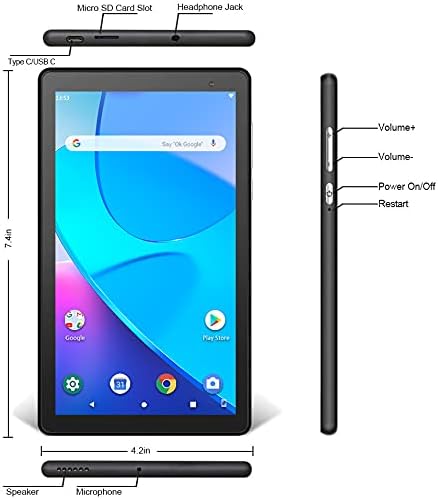
Vaizdas: Priekinė ir šoninė view of the PRITOM Tronpad tablet, highlighting the location of its ports and buttons. These include the Micro SD Card Slot, Headphone Jack, Type C/USB C port, Speaker, Microphone, Volume Up and Down buttons, Power On/Off button, and a dedicated Restart button.
Fiziniai komponentai:
- „Micro SD“ kortelės lizdas: Dėl saugojimo talpos išplėtimo.
- Ausinių lizdas: Laidinių ausinių prijungimui.
- Type C/USB C Port: Įkrovimui ir duomenų perdavimui.
- Pranešėjas: Garso išvestis.
- Mikrofonas: Dėl garso įvesties.
- Garsumo mygtukai (+/-): Garso garsumui reguliuoti.
- Įjungimo / išjungimo mygtukas: To power the device on or off, or to put it to sleep/wake it up.
- Iš naujo paleisties mygtukas: A dedicated button for restarting the tablet if it becomes unresponsive.
3. Sąranka
3.1 Pradinis įkrovimas
Before first use, fully charge your tablet. Connect the provided USB-C cable to the tablet's USB-C port and the other end to a compatible power adapter. The charging indicator will typically show the charging status on the screen.
3.2 Įjungimas / išjungimas
- Norėdami įjungti: Press and hold the Power On/Off button until the PRITOM logo appears.
- Norėdami išjungti: Press and hold the Power On/Off button until a power menu appears on the screen. Select "Power off" and confirm.
- Miegui / pabudimui: Briefly press the Power On/Off button to put the tablet to sleep or wake it up.
3.3 Pradinio nustatymo vedlys
Pirmą kartą įjungus planšetinį kompiuterį, bus atliekami pradiniai nustatymai:
- Kalbos pasirinkimas: Pasirinkite pageidaujamą kalbą.
- „Wi-Fi“ ryšys: Pasirinkite savo „Wi-Fi“ tinklą ir įveskite slaptažodį, kad prisijungtumėte prie interneto.
- Google paskyra: Sign in with your existing Google account or create a new one. This is necessary to download apps from the Google Play Store.
- Data ir laikas: Nustatykite teisingą datą ir laiką arba leiskite tinklui juos nustatyti automatiškai.
- Saugumas: Dėl saugumo nustatykite ekrano užraktą (PIN kodą, šabloną arba slaptažodį).
4. Naudojimo instrukcijos
4.1 Pagrindinė navigacija
Planšetinis kompiuteris naršymui naudoja lietimo gestus:
- Bakstelėkite: Norėdami pasirinkti elementą arba atidaryti programėlę.
- Palieskite ir palaikykite: Norėdami pasiekti kontekstinius meniu arba perkelti piktogramas.
- Perbraukimas: Norėdami slinkti per puslapius arba sąrašus.
- Žiupsnelis: Norėdami priartinti arba atitolinti vaizdus ir web puslapių.
4.2 „Wi-Fi“ ryšys
- Eikite į Nustatymai > Tinklas ir internetas > Wi-Fi.
- Perjungti „Wi-Fi“ On.
- Iš sąrašo pasirinkite norimą tinklą ir, jei būsite paraginti, įveskite slaptažodį.
4.3 Bluetooth poravimas
- Eikite į Nustatymai > Prijungti įrenginiai > Bluetooth.
- Perjungti Bluetooth On.
- Įsitikinkite, kad įrenginys, kurį norite susieti, yra susiejimo režime.
- Pasirinkite įrenginį iš galimų įrenginių sąrašo ir vykdykite visus ekrane pateikiamus nurodymus, kad užbaigtumėte susiejimą.
4.4 Kameros naudojimas
The tablet is equipped with dual cameras (front and rear).

Image: The PRITOM Tronpad tablet being used to capture a moment with its dual camera functionality.
- Atidarykite Fotoaparatas programėlė.
- Palieskite kameros piktogramą, kad perjungtumėte priekinę ir galinę kameras.
- Palieskite užrakto mygtuką, kad nufotografuotumėte arba pradėtumėte / sustabdytumėte vaizdo įrašymą.
4.5 Programėlių valdymas
- Programų diegimas: Atidarykite Google Play parduotuvė app, search for your desired app, and tap "Install".
- Programėlių pašalinimas: Tap and hold the app icon on the home screen or app drawer, then drag it to "Uninstall" or select "App info" and then "Uninstall". Alternatively, go to Nustatymai > Programos ir pranešimai, select the app, and tap "Uninstall".
4.6 Saugojimo valdymas
The tablet comes with 32GB of internal storage. You can expand this using a Micro SD card.
- To Insert Micro SD Card: Gently insert the Micro SD card into the designated slot until it clicks into place.
- To Manage Storage: Eikite į Nustatymai > Sandėliavimas į view saugyklos naudojimas ir valdymas files.
4.7 Akumuliatoriaus valdymas
Norėdami optimizuoti akumuliatoriaus veikimo laiką:
- Sureguliuokite ekrano ryškumą iki patogaus lygio.
- Išjunkite „Wi-Fi“ ir „Bluetooth“, kai jų nenaudojate.
- Uždarykite nenaudojamas programas, veikiančias fone.
- Įjunkite akumuliatoriaus taupymo režimą Nustatymai > Baterija.
5. Priežiūra
5.1 Planšetinio kompiuterio valymas
Use a soft, lint-free cloth to clean the screen and body of the tablet. Avoid using harsh chemicals or abrasive materials, which can damage the screen or finish.
5.2 Programinės įrangos naujiniai
Periodically check for software updates to ensure your tablet has the latest features and security patches. Go to Nustatymai > Sistema > Sistemos atnaujinimas.
5.3 Duomenų atsarginė kopija
Regularly back up important data to a cloud service (like Google Drive) or an external storage device to prevent data loss.
6. Problemų sprendimas
If you encounter issues with your PRITOM Tronpad tablet, try the following solutions:
- Planšetinis kompiuteris nereaguoja: Press and hold the Power On/Off button for about 10-15 seconds to force a restart. Alternatively, use the dedicated Restart button if available (refer to Product Overview diagrama).
- Lėtas veikimas: Close unused apps, clear cache (Settings > Storage > Cached data), or restart the tablet. Consider uninstalling rarely used apps to free up storage.
- „Wi-Fi“ ryšio problemos: Ensure Wi-Fi is enabled. Restart your Wi-Fi router and the tablet. Forget the network and reconnect.
- Baterija nekraunama: Ensure the USB-C cable and power adapter are securely connected and functional. Try a different cable or adapter.
- Programėlės stringa: Išvalykite programėlės talpyklą ir duomenis (Nustatymai > Programėlės ir pranešimai > [Programėlės pavadinimas] > Atmintis ir talpykla). Jei problema išlieka, pašalinkite programėlę ir įdiekite ją iš naujo.
If these steps do not resolve the issue, please contact PRITOM customer support for further assistance.
7. Specifikacijos
| Funkcija | Specifikacija |
|---|---|
| Prekės ženklas | PRITOM |
| Modelio pavadinimas | Tronpad Tablet |
| Ekrano dydis | 7 colių |
| Ekrano raiška | 1024x600 |
| Operacinė sistema | Android 10 |
| Procesorius | Keturių branduolių |
| RAM | 1 GB |
| Kietojo disko / „flash“ atminties dydis | 32 GB |
| Belaidis tipas | 802.11bgn (Wi-Fi) |
| Galinis Webkumštelio raiška | 2.2 MP |
| Prekės svoris | 8.8 uncijos |
| Gaminio matmenys | 7.5 x 4.3 x 0.4 colio |
| Vidutinis baterijos veikimo laikas | 6 valandų |
8. Garantija ir palaikymas
8.1 Informacija apie garantiją
PRITOM products are designed for quality and reliability. For specific warranty terms and conditions, please refer to the warranty card included with your product or visit the official PRITOM websvetainę.
8.2 Pagalba klientams
If you have any questions, issues, or require technical assistance, please contact PRITOM customer support. The PRITOM team aims to provide attentive service and will respond to inquiries promptly, typically within 24 hours.
You can often find support contact information (such as email) on the PRITOM brand store page or within the product packaging.