Įvadas
This user manual provides comprehensive instructions for the setup, operation, and maintenance of your LeapFrog LF925-2HD Video Baby Monitor. This system allows you to monitor your child using a 5-inch 720p High-Definition LCD Parent Unit and remotely via the LeapFrog Baby Care App on your smartphone or tablet. The monitor features 1080p camera resolution, 360-degree pan and tilt, 8x digital zoom, color night vision, and integrated temperature and humidity sensors.

Image: The LeapFrog LF925-2HD Video Baby Monitor system, showing the parent unit display and two baby camera units.
Pakuotės turinys
Įsitikinkite, kad jūsų siuntinyje yra visi toliau išvardyti daiktai:
- (1) Parent Unit
- (2) Baby Units (Cameras)
- (3) A/C Adapters (for Parent Unit and two Baby Units)
- (1) Rechargeable Li-Polymer Battery (pre-installed in Parent Unit)
- (2) Wall Mount Kits (for Baby Units)
- Vartotojo vadovas (šis dokumentas)
Sąranka
1. Tėvų įrenginio įkrovimas
Before first use, fully charge the Parent Unit battery for optimal performance.
- Prijunkite mažąjį tėvų įrenginio maitinimo adapterio kištuką prie maitinimo lizdo tėvų įrenginio šone.
- Kitą maitinimo adapterio galą prijunkite prie tinkamo elektros lizdo.
- Ekrane esanti akumuliatoriaus piktograma rodys įkrovimo būseną. Visiškas įkrovimas paprastai trunka kelias valandas.
2. Installing the Baby Unit (Camera)
Padėkite kūdikio įrenginį ten, kur būtų užtikrintas aiškus view of your child, ensuring it is out of reach of children.
- Place the Baby Unit on a flat surface, such as a dresser or shelf.
- For wall mounting, use the provided wall mount kit. Ensure the camera is securely fastened and positioned for the desired viewing kampas.
- Connect the Baby Unit power adapter to the power jack on the unit and plug it into an electrical outlet.

Image: Illustration of the baby unit's 360-degree pan and tilt functionality, allowing for comprehensive room coverage.
3. Pradinis susiejimas (jei reikia)
The Parent Unit and Baby Units are pre-paired at the factory. If they lose connection or you add a new camera, follow these steps:
- Ensure both the Parent Unit and Baby Unit are powered on.
- On the Parent Unit, navigate to the camera settings menu.
- Select the "Add Camera" or "Pair" option.
- Press the PAIR button on the back of the Baby Unit within 10 seconds.
- The Parent Unit will display the camera feed once pairing is successful.
4. Prisijungimas prie „Wi-Fi“ ir programėlės sąranka
Nuotoliniam viewing and advanced features, connect your monitor to your home Wi-Fi network and set up the LeapFrog Baby Care App.
- Download the "LeapFrog Baby Care" app from your smartphone's app store (iOS or Android).
- Atidarykite programą ir vadovaukitės ekrane pateikiamomis instrukcijomis, kad sukurtumėte paskyrą arba prisijunkite.
- Select "Add Device" and choose your LF925-2HD monitor.
- Follow the app's prompts to connect the Baby Unit to your Wi-Fi network. This typically involves scanning a QR code generated by the app with the camera.
- Prisijungę galite view the live feed and control the camera remotely through the app.

Image: The LeapFrog Baby Care app interface shown on a smartphone and tablet, demonstrating remote access capabilities.
Naudojimo instrukcijos
1. Tėvų įrenginys viršview
The Parent Unit is your primary interface for monitoring your child.
- Maitinimo mygtukas: Press and hold to turn on/off. Press briefly to turn screen on/off.
- Garsumo mygtukai: Sureguliuokite klausymosi garsumą.
- Naršymo mygtukai (aukštyn / žemyn / kairėn / dešinėn): Naršykite meniu ir valdykite kameros panoraminį / pakreipimą.
- Gerai/Pasirinkimo mygtukas: Patvirtinkite pasirinkimus.
- Meniu mygtukas: Access settings and features.
- Pokalbio mygtukas: Press and hold to speak to your child through the Baby Unit.
- Mastelio keitimo mygtukas: Magnify the image up to 8 times.

Image: The parent unit display, showing a live feed of a baby and the various control buttons for navigation and features.
2. Baby Unit Overview
The Baby Unit houses the camera and various sensors.
- Kameros objektyvas: Užfiksuoja vaizdo įrašą.
- Mikrofonas: Picks up audio from the room.
- Pranešėjas: Dvipusiam pokalbiui ir lopšinėms.
- Naktinė šviesa: Integrated multi-color night light.
- Temperatūros / drėgmės jutiklis: Monitors room conditions.
- PAIR mygtukas: For pairing with the Parent Unit.
3. Monitoring Features
- Tiesioginis vaizdo stebėjimas: View real-time video on the Parent Unit or app.
- Garso stebėjimas: Listen to sounds from your child's room.
- Dvipusis pokalbis: Press and hold the Talk button on the Parent Unit to speak to your child.

Image: A woman holding the parent unit, demonstrating the ease of using the two-way talk feature to communicate with her baby.
- Spalvotas naktinis matymas: The camera automatically switches to color night vision in low-light conditions, providing a clear view.
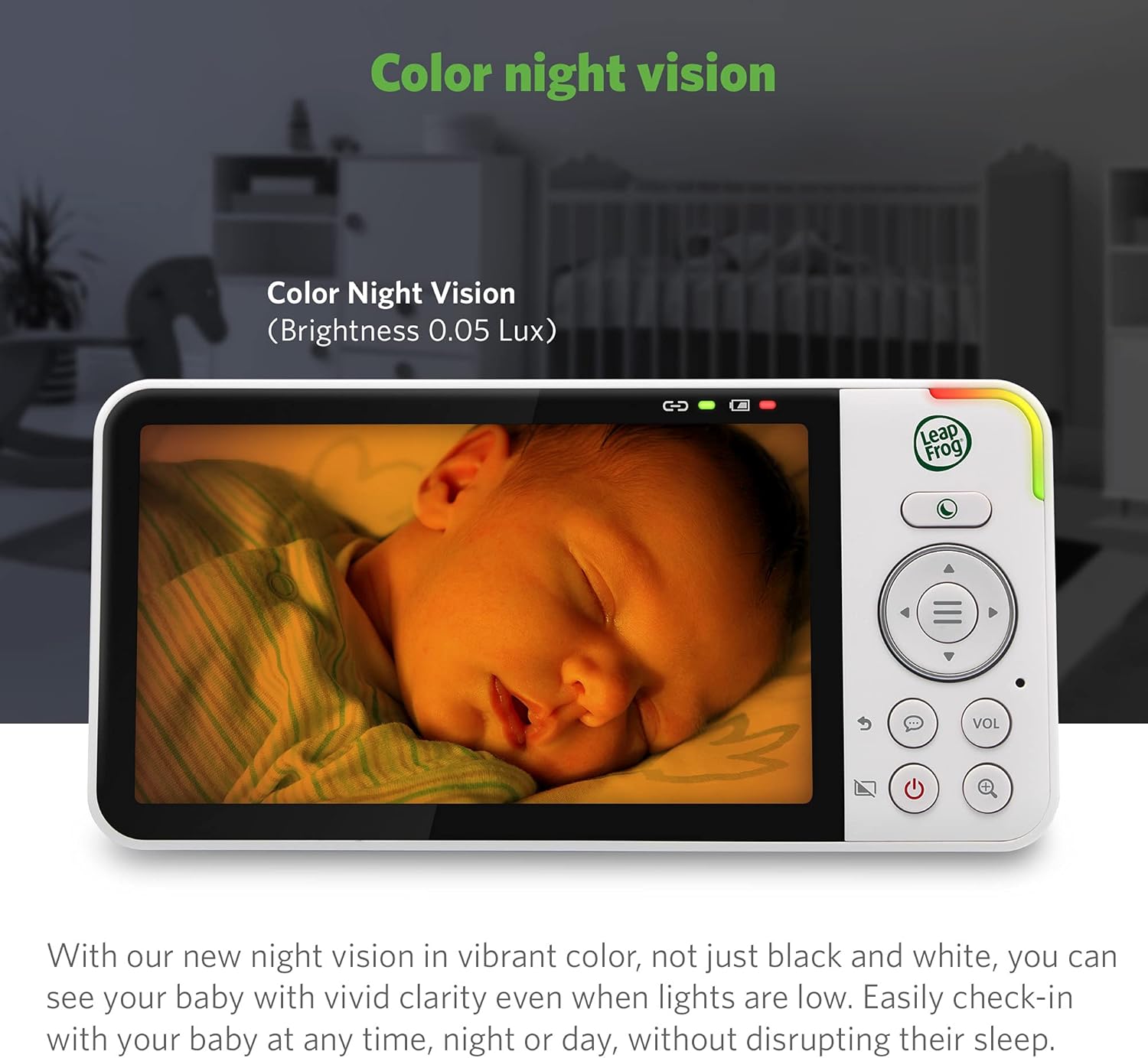
Image: The parent unit screen displaying a baby sleeping, illustrating the clarity and detail provided by the color night vision feature in low light.
- Skaitmeninis priartinimas: Use the zoom button on the Parent Unit to magnify the image up to 8 times.

Image: A visual representation of the 2x, 4x, and 8x digital zoom capabilities, showing increasing detail of a baby's face.
- Daugiakamera View: With two cameras, you can view one camera at a time, use a split-screen view, or set it to patrol mode to alternate between cameras every 10 seconds.
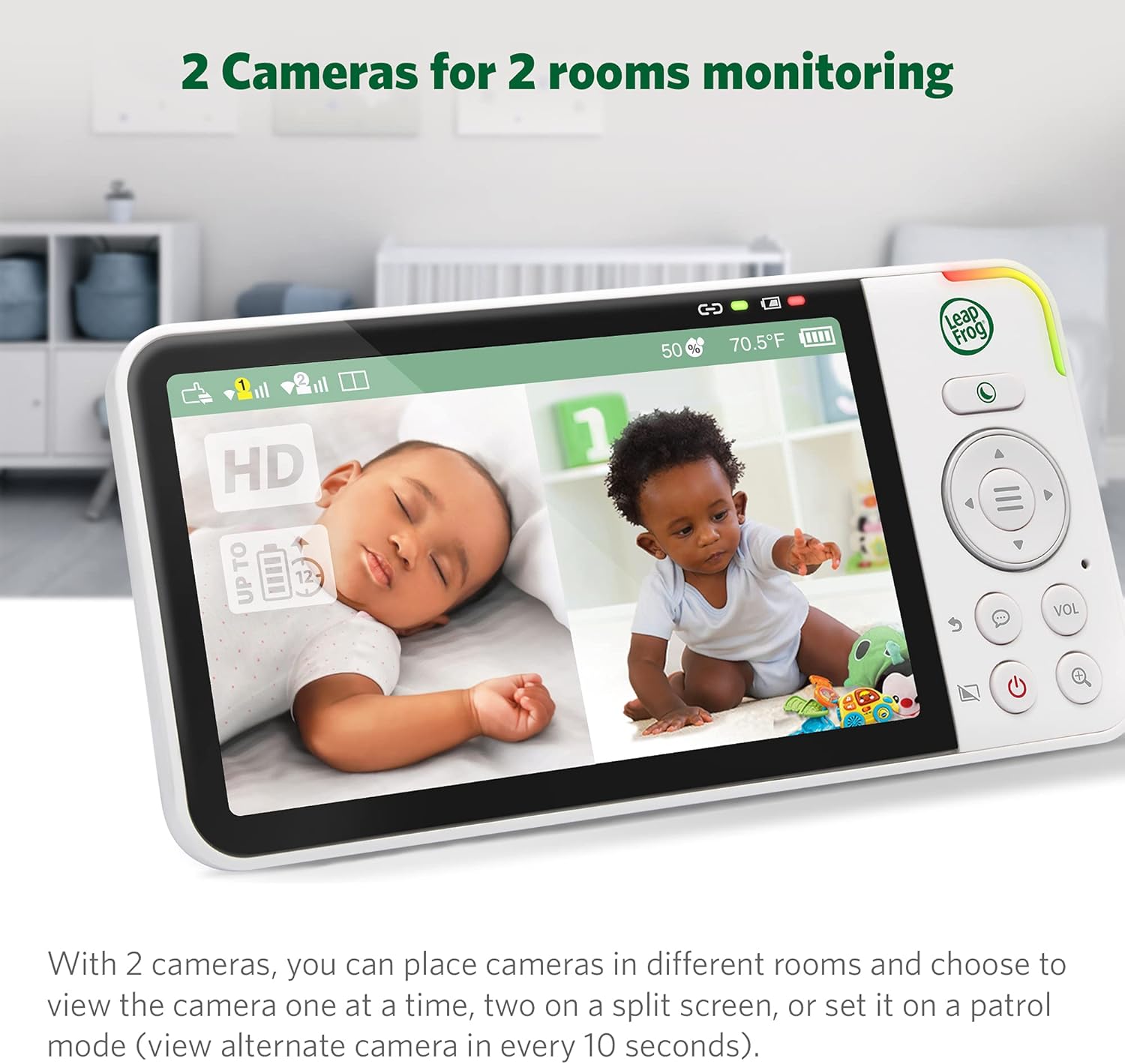
Vaizdas: tėvų įrenginys rodo padalintą ekraną view from two separate baby cameras, allowing simultaneous monitoring of two rooms.
4. Išplėstinės funkcijos
- Temperatūros ir drėgmės stebėjimas: The Parent Unit displays real-time room temperature and humidity levels from the Baby Unit. Alerts can be set for out-of-range conditions.

Image: A close-up of the parent unit screen highlighting the temperature and humidity display, indicating the environmental conditions of the baby's room.
- Lullabies and Soothing Sounds: Play pre-programmed lullabies or soothing sounds through the Baby Unit to comfort your child.

Image: The baby unit camera with musical notes emanating from it, symbolizing the soothing sounds and lullabies feature designed to comfort the baby.
- Perspėjimai apie judesį ir garsą: Receive notifications on the Parent Unit and app when motion or sound is detected in your child's room. Sensitivity levels are adjustable.
- Adaptyvi naktinė lemputė: The built-in night light on the Baby Unit adjusts to room brightness and can be controlled remotely.

Image: The baby unit with its base illuminated, surrounded by icons of various colored light bulbs, demonstrating the adaptive and dimmable night light feature.
- Privacy Parking Mode: The camera lens can be rotated downwards into a "parking" position for privacy when not in use.

Image: The baby unit camera in its privacy parking mode, with the lens tilted downwards to ensure privacy when monitoring is not desired.
Priežiūra
- Valymas: Monitorių blokus valykite minkšta, d šluosteamp šluoste. Nenaudokite valymo purškiklių ar skystų valiklių.
- Akumuliatoriaus priežiūra: To prolong battery life, avoid fully discharging the Parent Unit battery frequently. Store the unit in a cool, dry place if not used for extended periods.
- Objektyvo priežiūra: Gently wipe the camera lens with a soft, lint-free cloth to ensure clear image quality.
Trikčių šalinimas
| Problema | Galimas sprendimas |
|---|---|
| Tėvų įrenginyje nėra vaizdo / garso. |
|
| Poor image quality or blurry picture. |
|
| Nepavyksta prisijungti prie „Wi-Fi“ arba programėlės. |
|
| Tėvų įrenginio baterija greitai išsikrauna. |
|
Specifikacijos
| Funkcija | Detalė |
|---|---|
| Modelio numeris | LF925-2HD |
| Vaizdo įrašymo raiška | 1080p (camera) |
| Tėvų įrenginio ekrano dydis | 5 inches (720p HD) |
| Spalva | Baltas |
| Belaidžio ryšio technologija | Wi-Fi |
| Viewing kampas | 152 Degrees (vertical tilt) |
| „Pan & Tilt“ | 360-degree horizontal pan, 152-degree vertical tilt |
| Skaitmeninis priartinimas | Iki 8 kartų |
| Diapazonas | Iki 1,000 pėdų (matymo linija) |
| Maitinimo šaltinis | Su laidu elektra |
| Suderinami įrenginiai | Išmanusis telefonas, planšetinis kompiuteris („Android“, „iPhone“) |
| Prekės matmenys (I x P x A) | 23 x 13 x 16.8 cm |
| Prekės svoris | 1.64 kg |
| Baterija (tėvų įrenginys) | Rechargeable Li-Polymer (included) |
Garantija ir palaikymas
Your LeapFrog LF925-2HD Video Baby Monitor is covered by a manufacturer's warranty. Please refer to the warranty card included in your package or visit the official LeapFrog websvetainėje, kurioje pateikiamos išsamios garantijos sąlygos.
For technical support, troubleshooting assistance, or to inquire about replacement parts, please contact LeapFrog Customer Service. Contact information can typically be found on the LeapFrog website or in the product packaging. Online resources, including FAQs and video tutorials, may also be available.
Websvetainė: www.leapfrog.com


