1. Įvadas
This manual provides detailed instructions for the installation, operation, and maintenance of your ESLYYDS Double Din Car Stereo. This advanced multimedia system offers a wide range of features including Apple CarPlay, Android Auto, Bluetooth connectivity, a high-definition touchscreen, and support for a backup camera, enhancing your in-car entertainment and navigation experience.

Figure 1.1: ESLYYDS Double Din Car Stereo Overview
2. Pakuotės turinys
Patikrinkite, ar jūsų siuntinyje yra visi toliau išvardyti daiktai:
- ESLYYDS Double Din Car Stereo Unit
- Montavimo kronšteinų rinkinys
- Camera Wire A
- Camera Wire B
- Steering Wheel Control Unit
- Laidai A
- Laidas B
- Galinis-view Fotoaparatas
- Nuotolinio valdymo pultas
- Vartotojo vadovas (šis dokumentas)

Figure 2.1: Stereo Dimensions and Included Accessories
3. Produkto ypatybės
The ESLYYDS Double Din Car Stereo is equipped with a variety of features designed for convenience and enhanced driving experience:
- Suderinamumas su „Apple CarPlay“ ir „Android Auto“: Seamlessly integrate your smartphone for navigation, music, calls, and messages using voice control.
- 7-inch HD Capacitive Touch Screen: A responsive and accurate display supporting 1080P video playback.
- "Bluetooth 5.2": For stable and clear hands-free calling and audio streaming.
- Telefono veidrodinė nuoroda: Display your smartphone's screen directly on the stereo.
- Dviguba USB sąsaja: One port for media playback and another with 2.1A fast charging capability.
- Galinis View Kameros įvestis: Supports the included 12 HD LED light, night vision, 170° viewing angle waterproof backup camera for safer reversing.
- Vairo valdymas (SWC): Suderinamas su esamais vairo valdikliais, kad būtų patogu juos valdyti.
- AM/FM Audio Receiver: Access to radio stations with user-friendly digital control.
- AUX IN Connectivity: Išoriniams garso įrenginiams.
- 7 Color LED Buttons: Pritaikomas mygtukų apšvietimas.
3.1 „Apple CarPlay“ ir „Android Auto“
Connect your smartphone via USB to access navigation, phone contacts, email, notifications, and music directly on the stereo display. This feature utilizes voice control technology for safe operation while driving.
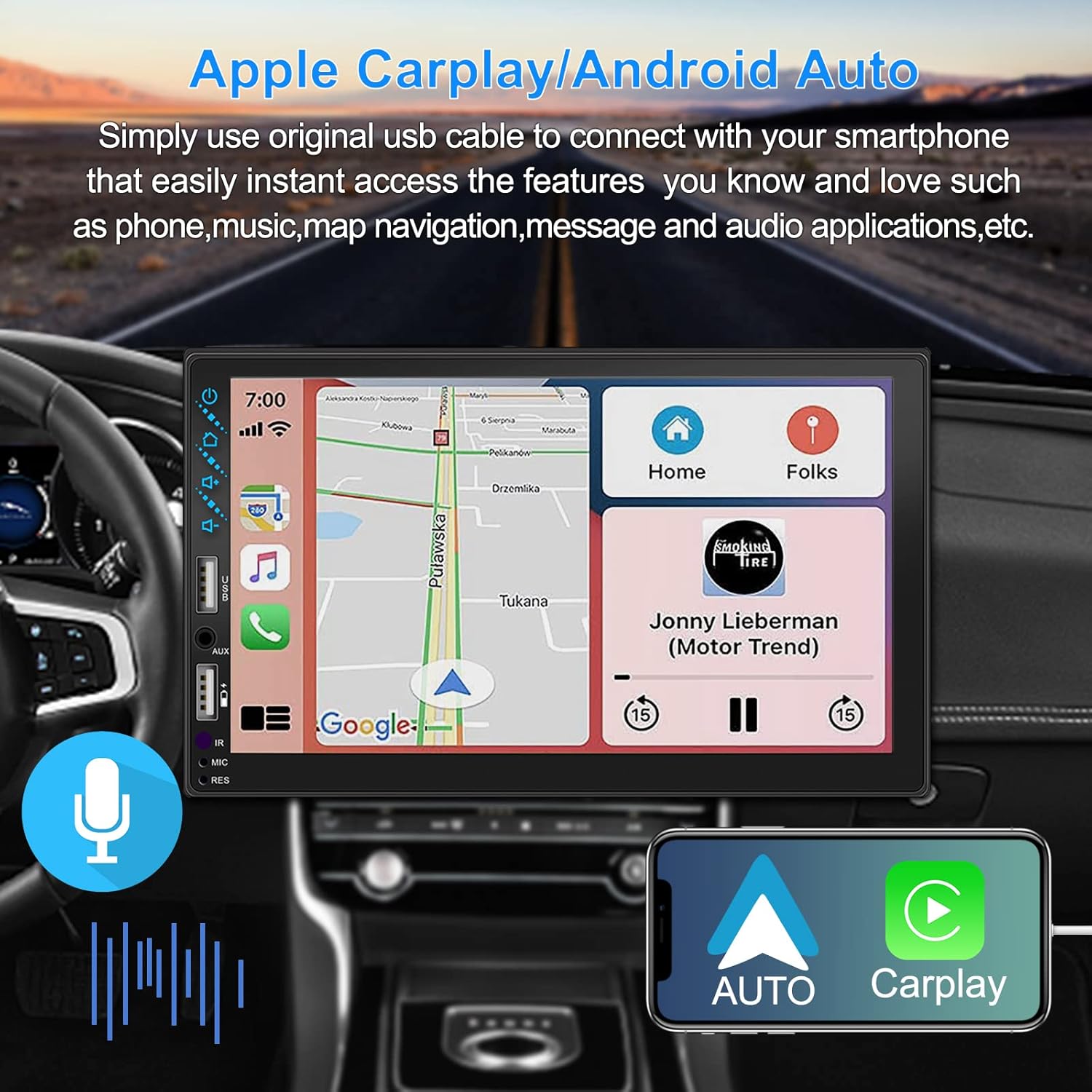
Figure 3.1: Apple CarPlay and Android Auto Interface
3.2 Valdymas balsu
Utilize voice commands to control various functions such as making calls, playing music, and navigating, allowing you to keep your hands on the wheel and eyes on the road.

3.2 pav.: Balso valdymo funkcionalumas
3.3 Telefono veidrodinis ryšys
The Mirror Link function allows you to display your smartphone's screen directly onto the stereo's touchscreen. This supports Android devices (version 10.1 and below) and iPhone devices (version 14.5 and below, including iPhone 12, 11, XR, and 8 series and below) with resolutions up to 1920x1080 pixels.
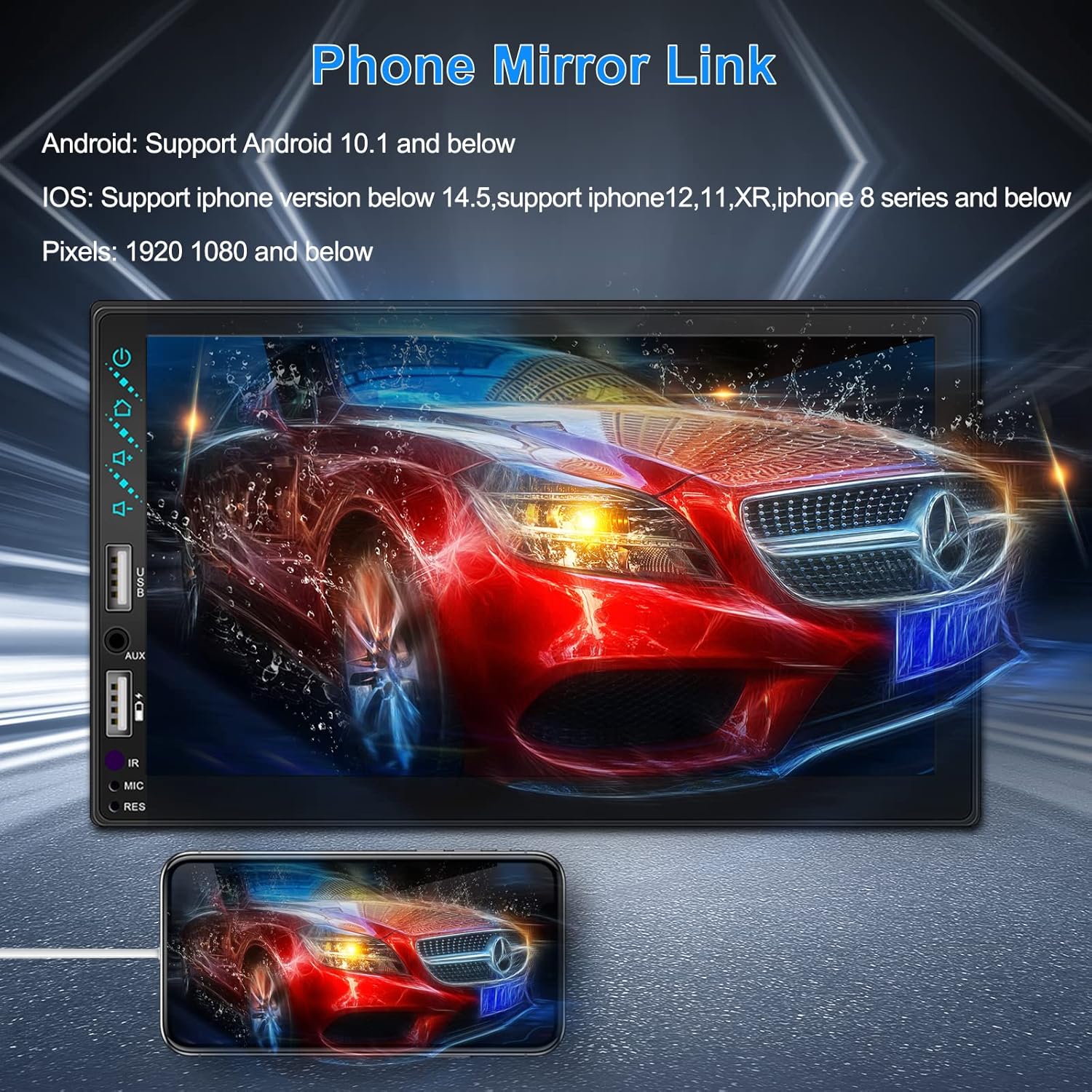
Figure 3.3: Phone Mirror Link
3.4 Galinis View Fotoaparatas
The included waterproof backup camera features 12 HD LED lights for night vision and a 170° viewing angle. When you shift into reverse, the system automatically displays the camera feed on the screen, providing optimal visibility in various weather conditions.
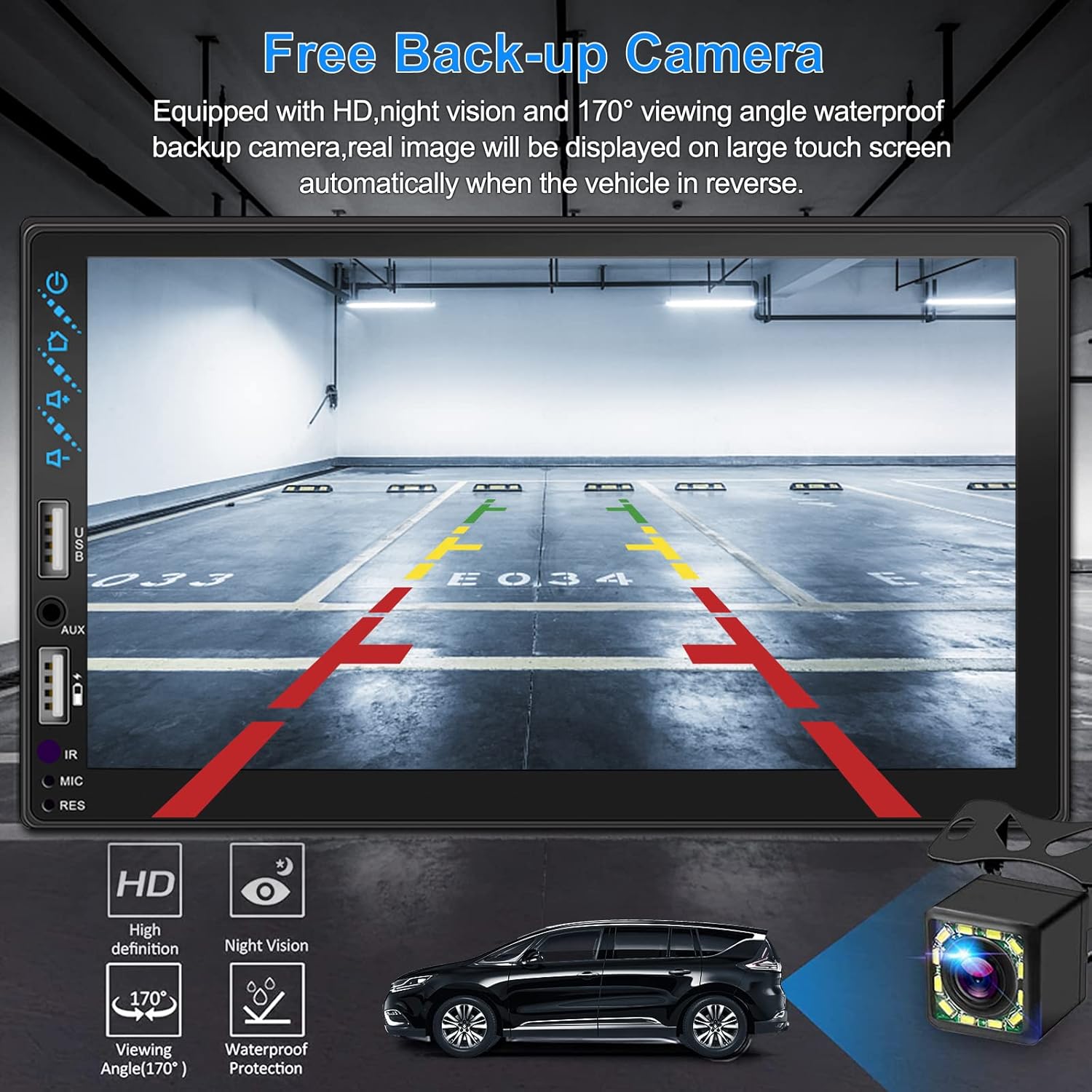
3.4 pav.: galinis View Kameros ekranas
4. Diegimo vadovas
Tinkamas montavimas yra labai svarbus optimaliam veikimui. Jei nesate susipažinę su automobilio garso sistemos laidais, rekomenduojama, kad įrenginį sumontuotų profesionalas.
4.1 Matmenys
The stereo unit has a standard double din size. Refer to Figure 2.1 for detailed dimensions.
- Plotis: 178 mm (7 colių)
- Aukštis: 102 mm (4 colio)
- Gylis: 60 mm (2.6 colio)
4.2 Sujungimo schema
Carefully follow the wiring diagram below to connect the stereo to your vehicle's electrical system. Ensure all connections are secure to prevent malfunctions.
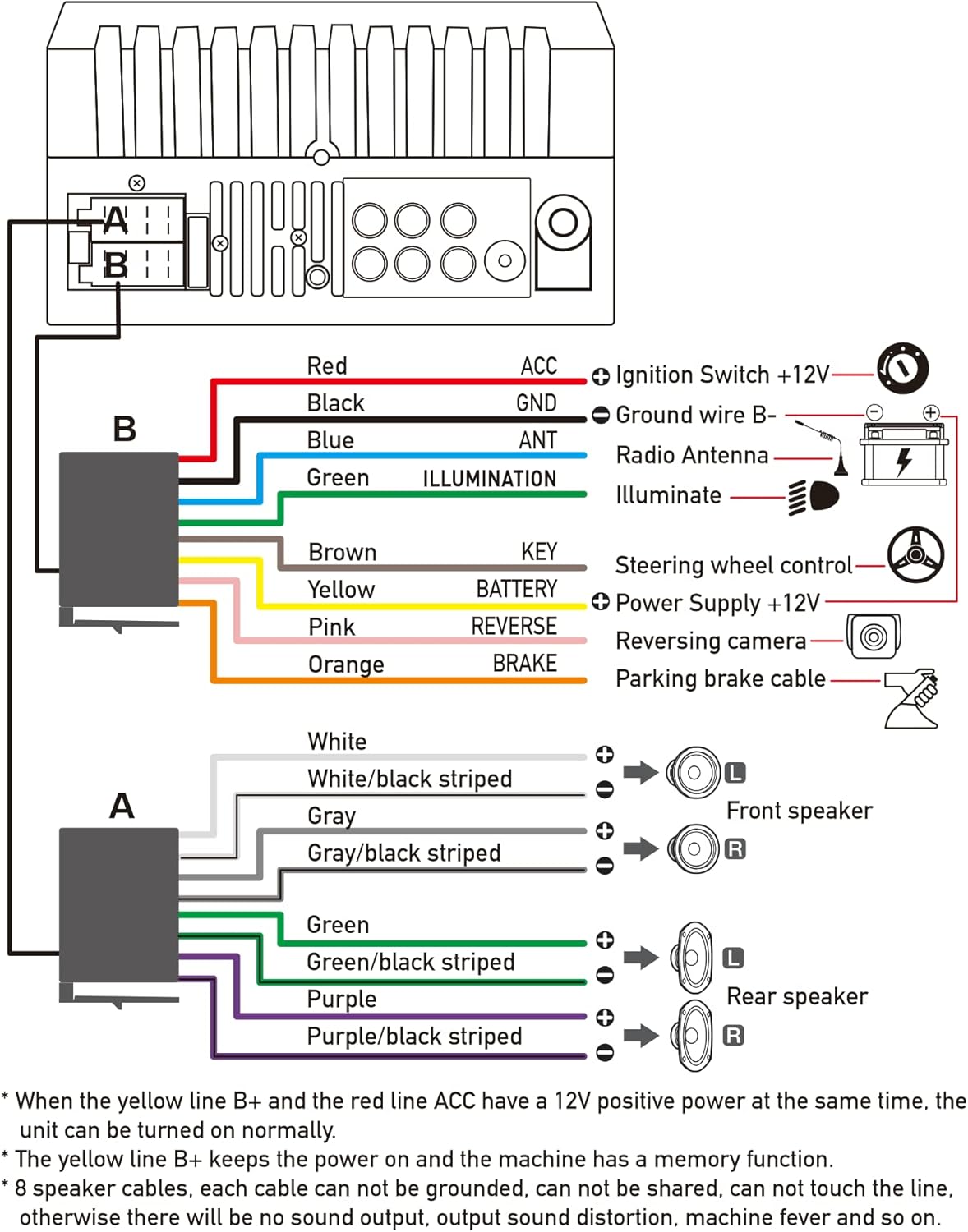
4.1 pav.: Pagrindinė laidų schema
- Red (ACC): Connect to Ignition Switch +12V.
- Juoda (GND): Connect to Ground wire B-.
- Blue (ANT): Connect to Radio Antenna (if applicable).
- Green (ILLUMINATION): Connect to Illuminate wire.
- Brown (KEY): Connect to Steering wheel control.
- Yellow (BATTERY): Connect to Power Supply +12V.
- Pink (REVERSE): Connect to Reversing camera input.
- Orange (BRAKE): Connect to Parking brake cable.
Speaker Connections (8 speakers supported):
- White / White/black striped: Priekinis kairysis garsiakalbis
- Gray / Gray/black striped: Priekinis dešinysis garsiakalbis
- Green / Green/black striped: Galinis kairysis garsiakalbis
- Purple / Purple/black striped: Galinis dešinysis garsiakalbis
Svarbios pastabos:
- The unit requires both the Yellow (BATTERY) and Red (ACC) wires to have a 12V positive power supply simultaneously for normal operation.
- The Yellow (BATTERY) wire keeps the power on and maintains memory functions.
- For speaker connections, each cable must not be grounded or shared with other cables. Incorrect wiring can lead to no sound output, sound distortion, or damage to the machine.
5. Naudojimo instrukcijos
5.1 Pagrindinės operacijos
- Maitinimo įjungimas/išjungimas: Paspauskite maitinimo mygtuką priekiniame skydelyje arba nuotolinio valdymo pulte.
- Garsumo valdymas: Use the volume buttons on the front panel, steering wheel controls, or remote control.
- Šaltinio pasirinkimas: Tap the 'Source' or 'Mode' icon on the touchscreen to switch between Radio, Bluetooth, USB, AUX, CarPlay, and Android Auto.
5.2 Apple CarPlay / Android Auto Usage
- Connect your compatible iPhone or Android smartphone to the stereo's USB port using a certified USB cable.
- The stereo will automatically detect the connection and prompt you to launch CarPlay or Android Auto.
- Vykdykite ekrane pateikiamus nurodymus, kad užbaigtumėte sąranką.
- Once connected, you can access supported apps like Maps, Phone, Messages, and Music directly from the stereo's touchscreen or via voice commands.
5.3 Bluetooth poravimas
- Išmaniajame telefone įjunkite „Bluetooth“.
- Stereo sistemoje eikite į „Bluetooth“ meniu.
- Ieškokite available devices on your smartphone. The stereo's Bluetooth name will typically be 'ESLYYDS' or similar.
- Select the stereo from your smartphone's list and confirm the pairing code if prompted.
- Susiejus, galite skambinti / priimti skambučius ir transliuoti garsą belaidžiu būdu.
5.4 Phone Mirror Link Usage
- Connect your smartphone to the stereo's USB port.
- Select the 'Mirror Link' option on the stereo's screen.
- Follow the specific instructions displayed on the stereo for your phone's operating system (Android or iOS) to enable screen mirroring. This may involve enabling USB debugging for Android or trusting the device for iOS.
5.5 Radijo valdymas
- Select the 'Radio' source.
- Use the 'Scan' function to automatically search and save stations, or manually tune using the frequency controls.
- Išsaugokite mėgstamiausias stotis išankstinių nustatymų mygtukuose, kad galėtumėte jas greitai pasiekti.
5.6 USB atkūrimas
- Insert a USB drive containing audio or video files into the designated USB playback port.
- The stereo will automatically switch to USB mode or prompt you to select it.
- Naršykite ir leiskite savo mediją files using the touchscreen controls.
6. Priežiūra
Norėdami užtikrinti automobilio garso sistemos ilgaamžiškumą ir optimalų veikimą, laikykitės šių priežiūros nurodymų:
- Valymas: Use a soft, dry cloth to clean the screen and exterior. For stubborn smudges on the screen, use a screen cleaner specifically designed for electronic displays. Avoid abrasive cleaners or solvents.
- Temperatūra: Venkite ilgą laiką laikyti įrenginį itin aukštoje temperatūroje – tiek karštyje, tiek šaltyje.
- Drėgmė: Laikykite įrenginį sausą. Saugokite jį nuo vandens ar per didelės drėgmės.
- Firmware atnaujinimai: Patikrinkite gamintojo websvetainėje periodiškai ieškokite galimų programinės įrangos atnaujinimų, skirtų našumui pagerinti ir naujoms funkcijoms pridėti.
7. Problemų sprendimas
If you encounter issues with your ESLYYDS car stereo, please refer to the following common problems and solutions. If the problem persists, contact customer support.
| Problema | Galima priežastis | Sprendimas |
|---|---|---|
| Nėra galios | Neteisingas laidų prijungimas; perdegęs saugiklis; automobilio akumuliatoriaus problema. | Check power (Yellow and Red) and ground (Black) wire connections. Inspect vehicle fuses. Ensure vehicle battery is charged. |
| Nėra garso | Garsiakalbių laidai prijungti neteisingai; per mažas garsumas; įjungta nutildymo funkcija. | Verify all speaker wire connections (ensure no shorts or grounds). Increase volume. Check if mute is enabled. |
| Bluetooth neprisijungia | Telefone / stereo sistemoje neįgalintas „Bluetooth“; neteisingas susiejimo procesas. | Ensure Bluetooth is active on both devices. Delete previous pairings and re-attempt pairing process. |
| „CarPlay“ / „Android Auto“ nepaleidžiama | Sugedęs USB laidas; Nesuderinamas telefonas; Programinės įrangos problema. | Use a high-quality, certified USB cable. Ensure your phone's OS version is compatible. Restart both phone and stereo. |
| Galinė kamera nerodo | Camera wire disconnected; Reverse trigger wire not connected. | Check the camera's video input and power connections. Ensure the Pink (REVERSE) wire is correctly connected to the vehicle's reverse light trigger. |
| USB not reading media | Nepalaikoma file format; Corrupted USB drive; USB port issue. | Užtikrinti žiniasklaidą files are in supported formats (e.g., MP3, MP4, MKV). Try a different USB drive. |
8. Specifikacijos
| Funkcija | Specifikacija |
|---|---|
| Gaminio matmenys | 7 x 2.6 x 3.94 colio |
| Prekės svoris | 2.33 svaro |
| Modelio numeris | L3 |
| Ekrano dydis | 7 colio (18 cm) |
| Ekrano tipas | HD talpinis jutiklinis ekranas |
| Ryšio technologija | Carplay, Android Auto, Mirror-Link, Bluetooth 5.2, USB, AUX |
| Valdiklio tipas | „Google“ asistentas, „iOS“, „Android“ |
| Ypatingos savybės | Touchscreen, RDS, Steering Wheel Control (SWC), Fast Charging USB (2.1A) |
| Suderinami įrenginiai | Išmanusis telefonas |
| Jungties tipas | USB |
| Garso išvesties režimas | Aplink |
| Erdvinio garso kanalo konfigūracija | 5.1 |
| Vaizdo kodavimo palaikymas | MKV |
| Spalva | Juoda |
| Pasiekiama pirmoji data | 25 m. rugsėjo 2021 d |
9. Garantija ir palaikymas
ESLYYDS is committed to providing excellent customer service and technical support. For any inquiries or assistance, please contact our professional technical team.
- Pinigų grąžinimo garantija: 30-day period from purchase.
- Pakeitimo garantija: 12-month period for product replacement.
- Techninė pagalba: Life-time technical support is provided.
Please refer to your purchase documentation for specific contact details or visit the official ESLYYDS websvetainę, kurioje pateikiama informacija apie palaikymą.


