1. Saugos instrukcijos
Prieš naudodami gaminį, atidžiai perskaitykite šias saugos instrukcijas. Išsaugokite šį vadovą ateičiai.
- Šis gaminys skirtas naudoti tik patalpose. Saugokite nuo drėgmės ar ekstremalių temperatūrų.
- Do not attempt to open or modify the device. This may void the warranty and pose a safety risk.
- Prietaisą laikykite vaikams nepasiekiamoje vietoje.
- Įkrovimui naudokite tik pridedamą „micro-USB“ laidą.
- Nežiūrėkite tiesiai į LED šviesos šaltinį.
2. Pakuotės turinys
Įsitikinkite, kad pakuotėje yra visi daiktai:
- ANSMANN Under-Cabinet Light M
- Mikro-USB įkrovimo laidas
- Instrukcijų vadovas
3. Produktas baigtasview
The ANSMANN Under-Cabinet Light M is a versatile, rechargeable LED lamp designed for various indoor applications. It features a motion sensor, adjustable color temperatures, and a slim design for discreet placement.

Image 1: The ANSMANN Under-Cabinet Light M, showcasing its sleek, white design and integrated motion sensor.
Pagrindinės funkcijos:
- PIR judesio jutiklis: Automatically activates the light when motion is detected in low-light conditions.
- Twilight Sensor: Ensures the light only activates in dark environments, conserving battery life.
- Reguliuojama spalvos temperatūra: Choose between 3 color temperatures (cool white, neutral white, warm white) or activate all LEDs for maximum brightness.
- Bepakopis pritemdymas: Adjust brightness by holding down the control button.
- Įkraunama baterija: Integrated battery for cordless operation, charged via micro-USB.
- Magnetinis tvirtinimas: Easy installation and removal with a magnetic strip.

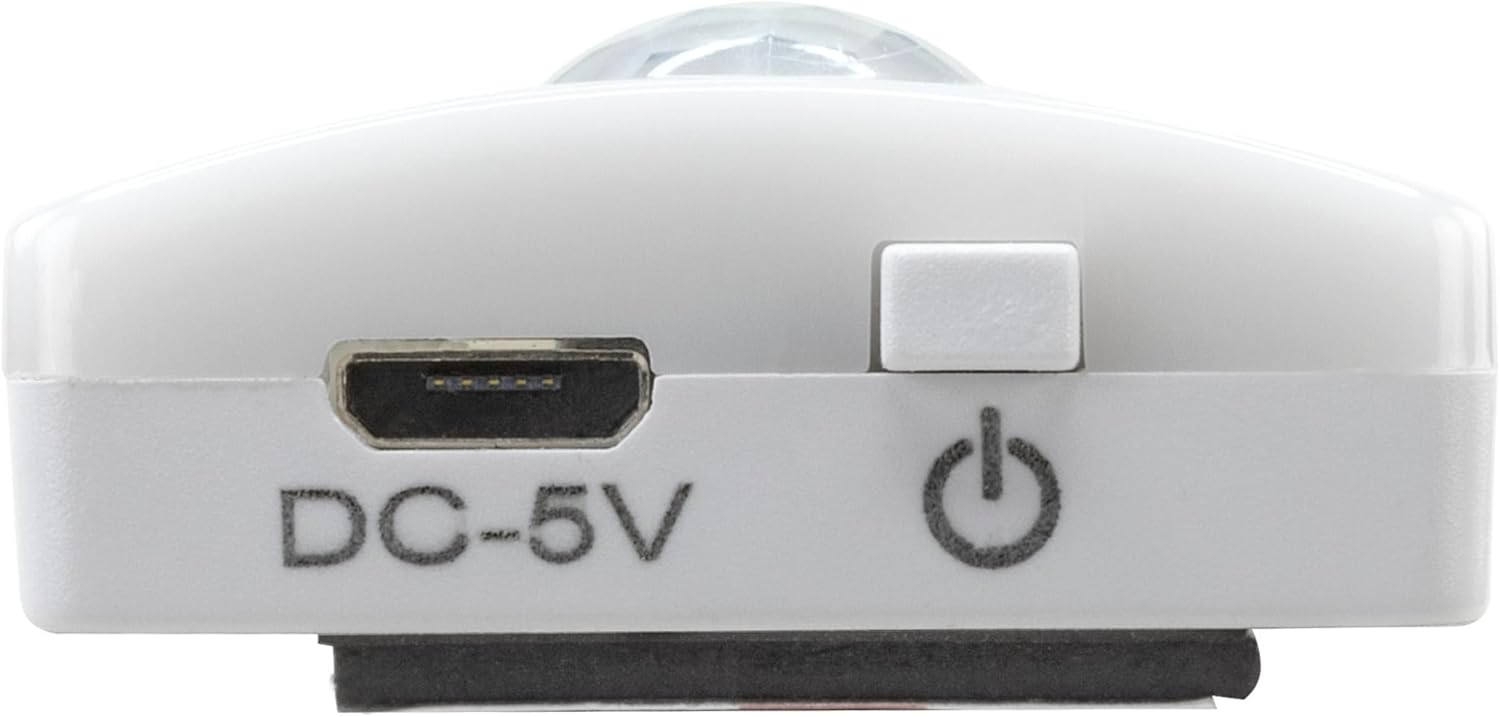
Image 2: Diagram illustrating the Micro-USB Port, On/Off button, and PIR motion sensor on the device.
4. Sąranka ir diegimas
The Under-Cabinet Light M offers flexible installation options using its integrated magnetic strip.
Magnetinis tvirtinimas:
- Identify a suitable, clean, and dry surface for installation (e.g., inside a cabinet, under a shelf).
- The light comes with a fixed magnetic strip on its back. For non-metallic surfaces, use the included adhesive strip.
- Peel off the protective film from the adhesive strip and firmly press it onto the desired surface.
- Attach the Under-Cabinet Light M to the adhesive strip. The magnetic connection will hold it in place.
3 paveikslėlis: Stambus planas view of the magnetic strip and the removable adhesive strip, demonstrating the mounting mechanism.

4 pav.: pvz.ample of the under-cabinet light installed in a modern kitchen setting, providing illumination over a countertop.
5. Operacija
The Under-Cabinet Light M offers intuitive control for its lighting functions.
Maitinimo įjungimas/išjungimas:
- Locate the On/Off button (refer to Image 2).
- Press the button once to turn the light on or off.
Spalvos temperatūros reguliavimas:
- With the light on, short press the control button repeatedly to cycle through the 3 available color temperatures: cool white, neutral white, and warm white.
- A fourth press will activate all LEDs for maximum brightness.
Pritemdymo funkcija:
- To adjust the brightness, press and hold the control button. The light will gradually dim or brighten. Release the button when the desired brightness level is reached.
Motion and Twilight Sensor:
- When the light is in motion sensor mode, it will automatically turn on when movement is detected within its range.
- The integrated twilight sensor ensures that the motion sensor only activates the light in dark environments, preventing unnecessary illumination during daylight hours.
6. Įkrovimas
The Under-Cabinet Light M is equipped with a rechargeable battery for convenient cordless use.
- When the battery is low, the light output may decrease or the light may not turn on.
- Gently detach the light from its magnetic mounting surface.
- Connect the provided micro-USB cable to the micro-USB port on the light (refer to Image 2).
- Connect the other end of the micro-USB cable to a suitable USB power source (e.g., USB wall adapter, computer USB port).
- An indicator light will show the charging status (e.g., red for charging, green for fully charged).
- Once fully charged, disconnect the cable and reattach the light to its mounting surface.

5 pav.: Išsamus view of the Micro-USB charging port and the On/Off button, essential for charging and operation.
7. Priežiūra
To ensure the longevity and optimal performance of your Under-Cabinet Light M, follow these simple maintenance guidelines:
- Clean the light regularly with a soft, dry cloth. Do not use abrasive cleaners or solvents.
- Ensure the motion sensor lens is kept clean and free from obstructions for proper function.
- Store the light in a cool, dry place if not in use for extended periods.
8. Problemų sprendimas
If you encounter issues with your Under-Cabinet Light M, refer to the following common problems and solutions:
| Problema | Galima priežastis | Sprendimas |
|---|---|---|
| Šviesa neįsijungia. | Baterija išsikrovusi. | Charge the light using the micro-USB cable. |
| Judesio jutiklis neaptinka judesio. | Ensure the sensor is clean and unobstructed. Check if the environment is dark enough for the twilight sensor to activate. | |
| Šviesa neįsikrauna. | Sugedęs kabelis arba maitinimo šaltinis. | Try a different micro-USB cable or USB power adapter. |
| Įkrovimo prievadas nešvarus. | Gently clean the micro-USB port with a dry, soft brush. | |
| Šviesa mirga arba yra pritemdyta. | Senka baterija. | Įkraukite įrenginį. |
Jei problema išlieka ir išbandžius šiuos sprendimus, susisiekite su klientų aptarnavimo tarnyba.
9. Specifikacijos
| Funkcija | Detalė |
|---|---|
| Modelio numeris | 1600-0438 |
| Gaminio matmenys | 25 cm ilgio x 3.5 cm pločio x 1.3 cm aukščio (9.84 cm ilgio x 1.38 cm pločio x 0.51 cm aukščio) |
| Prekės svoris | 112 gramų (0.25 svaro) |
| Maitinimo šaltinis | Maitinamas baterijomis |
| Įkrovimo prievadas | Micro-USB (DC-5V) |
| Medžiaga | Plastikiniai |
| Spalva | Baltas |
| Diegimo tipas | Sieninis laikiklis (magnetinis) |
| Kambario tipas | Dining Room, Kitchen, Wardrobe, Hallway, etc. |
10. Garantija ir palaikymas
ANSMANN products are manufactured with high-quality standards. For information regarding warranty terms and conditions, please refer to the documentation provided with your purchase or visit the official ANSMANN websvetainę.
For technical support or inquiries, please contact ANSMANN customer service through their official channels.


