Įvadas
This manual provides comprehensive instructions for the setup, operation, and maintenance of your Logitech MX Master 3S Wireless Mouse. Please read this manual thoroughly to ensure proper use and to maximize the performance of your device.
The Logitech MX Master 3S is a high-performance wireless mouse designed for precision, comfort, and efficiency across multiple devices and operating systems. It features advanced tracking, quiet clicks, and ultra-fast scrolling capabilities.
Produktas baigtasview
The Logitech MX Master 3S mouse is engineered for advanced users, offering a blend of ergonomic design and cutting-edge technology.
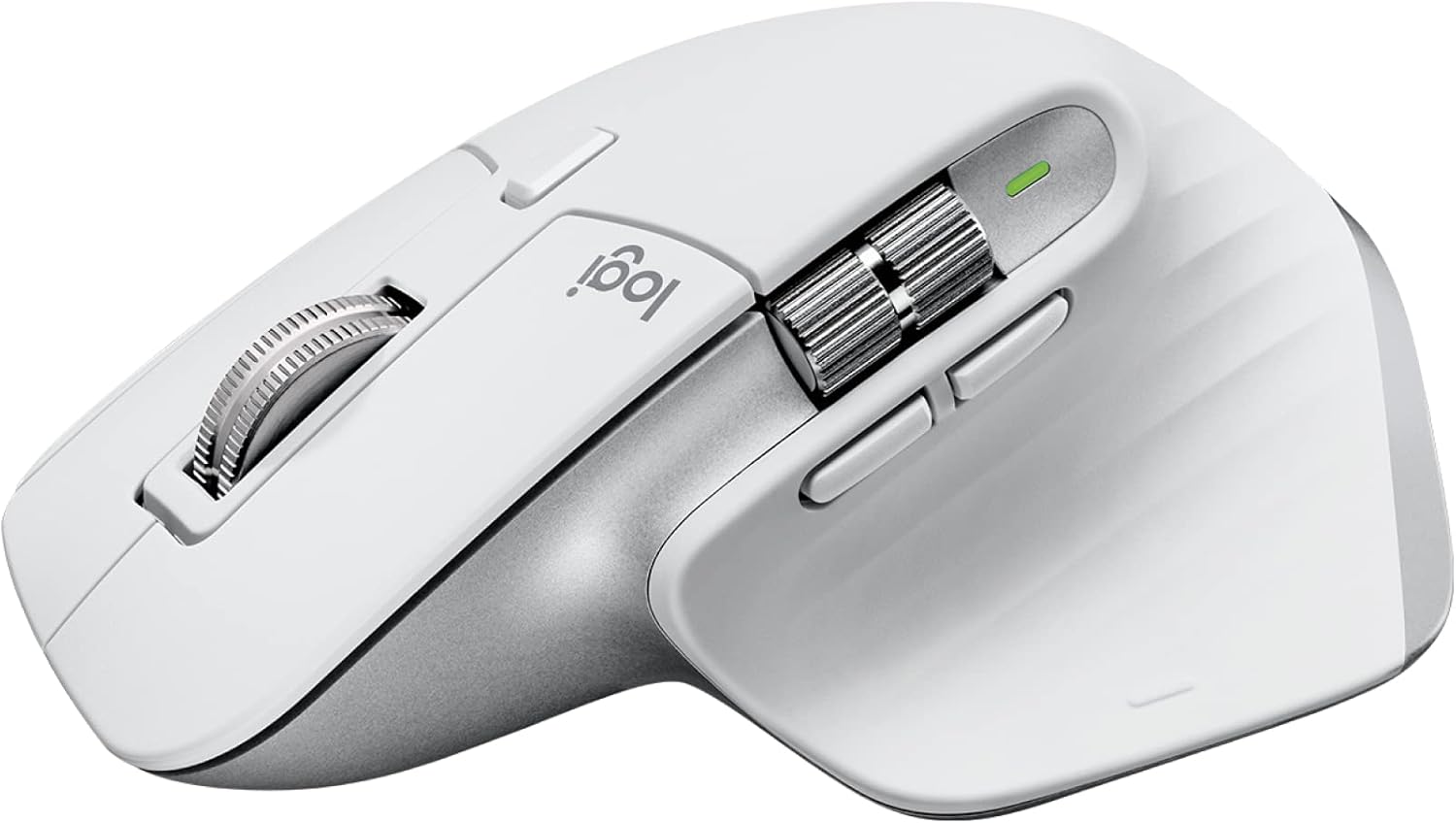
Image: Logitech MX Master 3S Wireless Mouse in Pale Grey, showcasing its ergonomic design and multiple buttons.
Pagrindinės funkcijos:
- 8K DPI sekimas bet kokiu paviršiumi: Precision tracking on virtually any surface, including glass.
- Tylūs paspaudimai: Reduced click noise for a quieter work environment.
- „MagSpeed“ slinkimas: Ultra-fast and precise electromagnetic scrolling.
- Ergonomiškas dizainas: Sculpted shape for comfortable hand posture.
- Pritaikomi mygtukai: Seven programmable buttons for enhanced workflow.
- FLOW Cross-Computer Control: Seamlessly switch between multiple computers and operating systems.
- Kelių įrenginių ryšys: Connects via Logi Bolt USB receiver or Bluetooth.
- Įkraunama baterija: Long-lasting Li-Po battery (500 mAh) with USB-C charging.
Pakuotės turinys:

Image: Contents of the MX Master 3S package, including the mouse, Logi Bolt USB receiver, and USB-C charging cable.
- „Logitech MX Master 3S“ belaidė pelė
- Logi Bolt USB imtuvas
- USB-C įkrovimo laidas (iš USB-A į USB-C)
Komponento identifikavimas:

Image: Labeled diagram showing the key components of the MX Master 3S mouse, including the Quiet Click buttons, MagSpeed wheel, Thumb wheel, 8K track-anywhere sensor, customizable buttons, and Easy Switch buttons. Also indicates compatibility with Windows, macOS, Chrome OS, Linux, iPadOS, Android, and connectivity options (USB receiver, Bluetooth).
- Quiet Click (Left/Right-click)
- MagSpeed Wheel (Main scroll wheel)
- Thumb Wheel (Horizontal scroll)
- 8K Track-Anywhere Sensor
- Customizable Buttons (Forward/Back, App-Switch, Middle click)
- Easy Switch Buttons (Bottom of mouse for device switching)
Sąranka
1. Pradinis įkrovimas
Before first use, it is recommended to fully charge your MX Master 3S mouse. Connect the included USB-C charging cable to the mouse's USB-C port and the other end to a USB-A port on your computer or a USB power adapter.
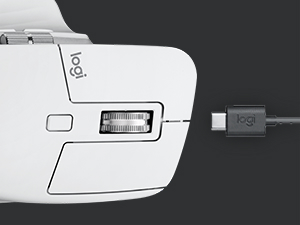
Image: Close-up of the MX Master 3S mouse with a USB-C cable connected for charging.
2. Pelės prijungimas
The MX Master 3S offers two primary connection methods: Logi Bolt USB Receiver or Bluetooth.
Connecting via Logi Bolt USB Receiver:
- Insert the Logi Bolt USB receiver into an available USB-A port on your computer.
- Įjunkite pelę naudodami maitinimo jungiklį, esantį apačioje.
- The mouse should automatically connect to the receiver. The LED indicator on the mouse will turn solid green.
Prisijungimas per Bluetooth:
- Įjunkite pelę naudodami maitinimo jungiklį, esantį apačioje.
- Press and hold one of the Easy-Switch buttons (1, 2, or 3) on the bottom of the mouse for three seconds until the LED indicator for that channel starts blinking rapidly. This indicates the mouse is in pairing mode.
- Kompiuteryje arba įrenginyje atidarykite „Bluetooth“ nustatymus.
- Select "MX Master 3S" from the list of available devices and follow the on-screen prompts to complete pairing.
- Once connected, the LED indicator will glow solid for 5 seconds.
3. Installing Logi Options+ Software (Recommended)
To unlock the full potential of your MX Master 3S, including button customization, application-specific settings, and FLOW cross-computer control, download and install the free Logi Options+ software from the official Logitech websvetainė (www.logitech.com/optionsplus).

Image: A computer screen displaying the Logi Options+ application interface, showing options for customizing mouse buttons and creating app-specific profiles.
Naudojimo instrukcijos
„MagSpeed“ elektromagnetinis slinkimas
The MX Master 3S features a MagSpeed electromagnetic scroll wheel that offers two modes:
- Ratcheted Mode: Provides precise, line-by-line scrolling, ideal for detailed work.
- Hyper-fast Mode: Automatically switches to free-spinning mode for rapid scrolling through long documents or web pages. This mode can scroll 1,000 lines per second.

Vaizdas: Stambus planas view of the MagSpeed scroll wheel on the MX Master 3S mouse, highlighting its metallic finish and precision engineering.
You can manually switch between modes by pressing the mode-shift button located behind the scroll wheel, or configure it to switch automatically based on scrolling speed via Logi Options+.
Tylūs paspaudimai
The MX Master 3S is designed with Quiet Clicks, reducing audible click noise by 90% compared to previous models, providing a quieter user experience without compromising tactile feedback.

Image: A person working at a desk, using the MX Master 3S mouse, illustrating the quiet click feature in a typical office or home setting.
8K DPI Any-Surface Tracking
The advanced Darkfield High Precision sensor allows the MX Master 3S to track on virtually any surface, including glass (minimum 4mm thickness), with an 8000 DPI sensor for precise control.

Image: A hand operating the MX Master 3S mouse on a clear glass surface, demonstrating its ability to track on challenging materials.
Customizable Buttons and App-Specific Profiles
Utilize the Logi Options+ software to customize the seven programmable buttons (Left/Right-click, Back/Forward, App-Switch, Wheel mode-shift, Middle click) to perform specific actions or shortcuts. You can also create application-specific profiles, allowing the mouse buttons to behave differently depending on the active application.
FLOW Cross-Computer Control
Logitech FLOW enables seamless control of multiple computers with a single MX Master 3S mouse. You can move your cursor, text, and files between up to three computers, even across different operating systems (Windows and macOS), by simply moving your cursor to the edge of the screen. This feature requires Logi Options+ to be installed on all connected computers.

Image: A setup showing a laptop and a desktop monitor, with an arrow indicating the seamless transfer of cursor, text, and files between them using Logitech FLOW.
Kelių įrenginių perjungimas
The Easy-Switch buttons on the bottom of the mouse allow you to quickly switch between up to three paired devices (via Logi Bolt or Bluetooth) with a single press.
Priežiūra
Pelės valymas
To maintain optimal performance and hygiene, regularly clean your MX Master 3S mouse:
- Šiek tiek naudokite minkštą, be pūkelių šluostę dampnuplaukite vandeniu arba alkoholio pagrindu pagamintu valikliu (pvz., izopropilo alkoholiu).
- Venkite agresyvių cheminių medžiagų, abrazyvinių medžiagų ar per didelės drėgmės.
- Švelniai nuvalykite pelės paviršių, atkreipdami dėmesį į vietas, kurios dažnai liečiasi su jūsų ranka.
- For the optical sensor, use a dry cotton swab or compressed air to remove any dust or debris.
Akumuliatoriaus priežiūra
The MX Master 3S uses a rechargeable Li-Po battery. Follow these guidelines for optimal battery life:
- Įkraukite pelę naudodami pridėtą USB-C laidą.
- Venkite ekstremalių temperatūrų, nes jos gali turėti įtakos akumuliatoriaus veikimui.
- Jei pelę ilgesnį laiką laikysite, prieš laikydami įkraukite ją maždaug iki 50 %.
Trikčių šalinimas
| Problema | Galimas sprendimas |
|---|---|
| Mouse not responding or connecting. |
|
| Cursor movement is erratic or imprecise. |
|
| MagSpeed scrolling not working as expected. |
|
| Custom buttons not functioning. |
|
Specifikacijos
| Funkcija | Detalė |
|---|---|
| Modelio numeris | 910-006558 |
| Matmenys (IxPxH) | 4.9 x 3.3 x 2.0 colio (124.9 x 84.3 x 51 mm) |
| Svoris | 4.97 uncijos (141 g) |
| Jutiklio technologija | Darkfield High Precision |
| DPI diapazonas | 200–8000 DPI (reguliuojama 50 DPI intervalais) |
| Mygtukai | 7 mygtukai (kairysis / dešinysis paspaudimas, atgal / pirmyn, programos jungiklis, rato režimo perjungimas, vidurinis paspaudimas) |
| Slinkties ratai | MagSpeed electromagnetic scroll wheel, Thumbwheel |
| Belaidžio ryšio veikimo atstumas | Iki 33 pėdų (10 m) |
| Baterijos tipas | Įkraunamas ličio polimerų akumuliatorius (500 mAh) |
| Baterijos veikimo laikas | Up to 70 days on a single full charge (may vary based on usage) |
| Ryšys | Logi Bolt USB imtuvas, Bluetooth Low Energy technologija |
| Suderinamumas | „Windows“, „MacOS“, „Linux“, „Chrome“ OS, „iPadOS“, „Android“. |
| Perdirbto plastiko turinys | 27% certified post-consumer recycled plastic (Graphite and Black models) |
Garantija ir palaikymas
For detailed warranty information and technical support, please refer to the official Logitech support websvetainėje arba susisiekite tiesiogiai su „Logitech“ klientų aptarnavimo tarnyba.
„Logitech“ palaikymas Websvetainė: support.logi.com
Išsaugokite pirkimo įrodymą, kad galėtumėte kreiptis dėl garantijos.


