1. Įvadas
This manual provides detailed instructions for the proper use and maintenance of your Cellularline Task Dual-Mode Headset. Please read this manual thoroughly before using the product to ensure optimal performance and longevity.
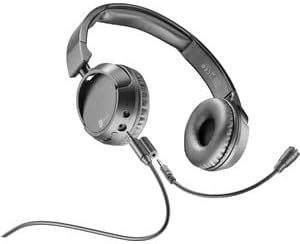
The Cellularline Task headset is designed for versatility, offering both wired and wireless (Bluetooth) connectivity. It features a detachable microphone, making it suitable for smart working, remote learning, and music listening.
2. Produktas baigtasview
The Cellularline Task headset combines comfort with functionality, featuring over-ear cushions and intuitive controls. Its dual-mode capability allows seamless switching between wired and Bluetooth connections.

2.1 paveikslas: Cellularline Task Dual-Mode Headset with detachable microphone connected.
Pagrindinės funkcijos:
- Dual-mode stereo headset (wired and Bluetooth).
- Wireless communication technology compatible with various devices (iPhone, Samsung, Huawei, Xiaomi, etc.).
- Modern design with comfortable over-ear cushions.
- Adaptable and removable microphone, ideal for video calls and audio recording.
- Volume limitation feature for hearing protection.
- Up to 18 hours of continuous music playback or talk time.
3. Sąranka
3.1 Pakuotės turinys
Before proceeding, ensure your package contains the following items:
- Cellularline Task Headset
- Nuimamas mikrofonas
- Įkrovimo laidas (USB)
- Garso kabelis (3.5 mm lizdas)
- Vartotojo vadovas (šis dokumentas)
3.2 Ausinių įkrovimas
Before first use, fully charge the headset. Connect the provided USB charging cable to the charging port on the headset and to a compatible USB power source. The LED indicator will show charging status and turn off or change color when fully charged.
3.3 Nuimamo mikrofono pritvirtinimas
The microphone can be easily attached or detached based on your usage needs.
- Suraskite mikrofono įvesties prievadą ant kairiojo ausinių kaušelio.
- Align the 3.5mm jack of the detachable microphone with the port.
- Gently push the microphone jack into the port until it is securely seated.
3.1 paveikslas: Headset with the detachable microphone removed, showing the input port.
3.4 Laidinis ryšys
Norėdami naudoti ausines laidiniu režimu:
- Įsitikinkite, kad laisvų rankų įranga išjungta.
- Connect one end of the 3.5mm audio cable to the audio input port on the headset.
- Connect the other end of the 3.5mm audio cable to the audio output jack of your device (e.g., computer, smartphone, tablet).
- The headset will function as a wired headset, drawing power from the connected device if needed, or using its own battery for active features.

3.2 paveikslas: Headset connected via 3.5mm audio cable, demonstrating wired mode.
3.5 Bluetooth poravimas
Norėdami belaidžiu būdu prijungti ausines per „Bluetooth“:
- Maitinimas: Press and hold the Power button on the headset until the LED indicator flashes, indicating pairing mode.
- Suaktyvinkite „Bluetooth“: Savo įrenginyje (išmaniajame telefone, planšetiniame kompiuteryje, kompiuteryje) eikite į „Bluetooth“ nustatymus ir įsitikinkite, kad „Bluetooth“ įjungtas.
- Ieškokite Įrenginiai: Jūsų įrenginys ieškos galimų „Bluetooth“ įrenginių.
- Pasirinkite ausines: From the list of found devices, select "Cellularline Task" (or similar name).
- Patvirtinkite ryšį: Once connected, the LED indicator on the headset will change to a steady light or flash slowly, and your device will confirm the connection.
The headset is compatible with iPhone, Samsung, Huawei, Xiaomi, and other Bluetooth-enabled devices.
4. Naudojimo instrukcijos
4.1 Maitinimo įjungimas/išjungimas
- Maitinimas: Paspauskite ir palaikykite maitinimo mygtuką maždaug 3 sekundes, kol užsidegs LED indikatorius.
- Išjungti: Paspauskite ir palaikykite maitinimo mygtuką maždaug 5 sekundes, kol užges LED indikatorius.
4.2 Garsumo valdymas
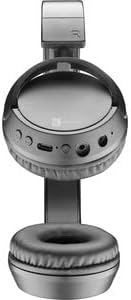
The headset features tactile controls for volume adjustment.
4.1 paveikslas: Iš arti view of the earcup showing control buttons for volume and playback.
- Padidinti garsumą: Paspauskite mygtuką „+“.
- Sumažinti garsumą: Paspauskite mygtuką „-“.
The headset includes a volume limitation feature to protect your hearing.
4.3 Skambučių valdymas
When connected via Bluetooth, you can manage calls directly from the headset:
- Atsiliepti į skambutį: Press the Multi-function button (usually the Power button or a dedicated call button) once.
- Baigti skambutį: Skambučio metu vieną kartą paspauskite daugiafunkcį mygtuką.
- Atmesti skambutį: Kai suskamba įeinantis skambutis, 2 sekundes palaikykite nuspaudę daugiafunkcį mygtuką.
4.4 Muzikos atkūrimas
When connected via Bluetooth, control your music playback:
- Leisti / pristabdyti: Vieną kartą paspauskite daugiafunkcį mygtuką.
- Kitas takelis: Paspauskite ir palaikykite nuspaudę mygtuką „+“.
- Ankstesnis takelis: Paspauskite ir palaikykite nuspaudę mygtuką „-“.
4.5 Mikrofono naudojimas
The detachable microphone is designed for clear voice capture during calls or recordings.
- Ensure the microphone is securely attached (refer to Section 3.3).
- Position the microphone appropriately for optimal voice pickup.
- When using the headset in wired mode, the microphone functionality will depend on the connected device's compatibility with 4-pole 3.5mm jacks.
5. Priežiūra
5.1 Valymas
- Ausinėms valyti naudokite minkštą, sausą šluostę.
- Nenaudokite abrazyvinių valiklių, tirpiklių ar stiprių cheminių medžiagų.
- Venkite drėgmės patekimo į bet kokias angas.
5.2 Saugykla
- Laikykite ausines vėsioje, sausoje vietoje, toliau nuo tiesioginių saulės spindulių ir ekstremalių temperatūrų.
- If storing for an extended period, ensure the battery is partially charged (around 50%) to maintain battery health.
5.3 Akumuliatoriaus priežiūra
- Venkite dažnai visiškai iškrauti akumuliatorių.
- Nelaikykite akumuliatoriaus aukštoje temperatūroje.
- If the headset will not be used for a long time, charge it every few months to prevent deep discharge.
6. Problemų sprendimas
6.1 Ausinės neįsijungia
- Ensure the headset is fully charged. Connect it to a power source and wait a few minutes before attempting to power on again.
- Išbandykite kitą įkrovimo laidą arba maitinimo adapterį.
6.2 Nėra garso arba tylus garsas
- Check the volume levels on both the headset and the connected device.
- If using Bluetooth, ensure the headset is properly paired and connected.
- If using wired mode, ensure the 3.5mm audio cable is fully inserted into both the headset and the device.
- Išbandykite su kitu garso šaltiniu arba įrenginiu.
6.3 „Bluetooth“ susiejimo problemos
- Įsitikinkite, kad ausinės yra susiejimo režime (mirksi šviesos diodas).
- Išjunkite ir įjunkite „Bluetooth“ savo įrenginyje.
- Forget the headset from your device's Bluetooth list and attempt to pair again.
- Ensure the headset is within the effective range of your device (typically 10 meters).
6.4 Mikrofonas neveikia
- Įsitikinkite, kad nuimamas mikrofonas yra tvirtai pritvirtintas prie ausinių.
- Check microphone settings on your connected device to ensure the headset's microphone is selected as the input device.
- Išbandykite mikrofoną naudodami kitą programą ar įrenginį.
- Ensure the microphone is not muted on your device or via any headset controls (if applicable).
7. Specifikacijos
| Prekės ženklas | Korinio ryšio linija |
| Modelio pavadinimas | BTHEADBTASKK |
| Ryšio technologija | Wireless (Bluetooth), Wired (3.5mm jack) |
| Belaidžio ryšio technologija | Bluetooth |
| Formos faktorius | Virš ausies |
| Ypatingos savybės | Fast Charging, Volume Control, Included Microphone |
| Žaidimo laikas | Iki 18 valandų |
| Pokalbių laikas | 18 valandos |
| Suderinami įrenginiai | Laptop, Tablet, Mobile Phone, Universal |
| Valdymo tipas | Touch Control, Remote Control |
| Medžiaga | Plastikas, Guma |
| Spalva | Juoda |
8. Garantija ir palaikymas
Cellularline products are designed and manufactured to the highest quality standards. For information regarding warranty coverage, please refer to the warranty card included with your product or visit the official Cellularline websvetainę.
If you encounter any issues not covered in this manual or require further assistance, please contact Cellularline customer support through their official websvetainėje arba kontaktinę informaciją, pateiktą jūsų produkto pakuotėje.
Websvetainė: www.cellularline.com


