Įvadas
The Vont App-Controlled Car Lights system allows you to customize your vehicle's interior lighting with a wide range of colors and effects. This system features 16 million color options, 30 unique scene modes, music synchronization, and a DIY mode for personalized lighting. This manual provides essential information for installation, operation, maintenance, and troubleshooting to ensure optimal performance and safety.
Kas yra dėžutėje
- 21-feet LED strip light
- Valdiklis
Saugos informacija
This product is designed with safety in mind. Please observe the following precautions:
- The LED strip light is flame retardant and water-resistant.
- It features high-temperature resistance for safe operation within a vehicle's interior.
- Ensure all wiring is securely routed and does not interfere with vehicle controls (pedals, steering wheel, gear shift, etc.).
- Do not attempt to modify or disassemble the product, as this may void the warranty and pose a safety risk.
- Laikyti mažiems vaikams nepasiekiamoje vietoje.

Figure 1: Safety features of the Vont App-Controlled Car Lights, highlighting water resistance, high-temperature resistance, and flame retardant materials.
Sąranka ir diegimas
The Vont App-Controlled Car Lights are designed for quick and easy installation in various car models. Follow these steps for proper setup:
- Paruoškite paviršių: Ensure the surfaces where the strip lights will be placed are clean and dry for optimal adhesion.
- Lay Out the Strip: Unroll the 21-feet single-design LED strip light. Plan the routing of the strip within your car's interior, typically along the dashboard, under seats, and in footwells.
- Pritvirtinkite juostelę: Use the included cable ties or adhesive stickers to secure the strip light in place. Ensure the strip is firmly attached and does not hang loosely or obstruct any moving parts.
- Prijunkite maitinimą: Plug the controller into your car's 12V power outlet (cigarette lighter socket).
- Maitinimas: Turn on the car lights using the controller or the Vont Home App.
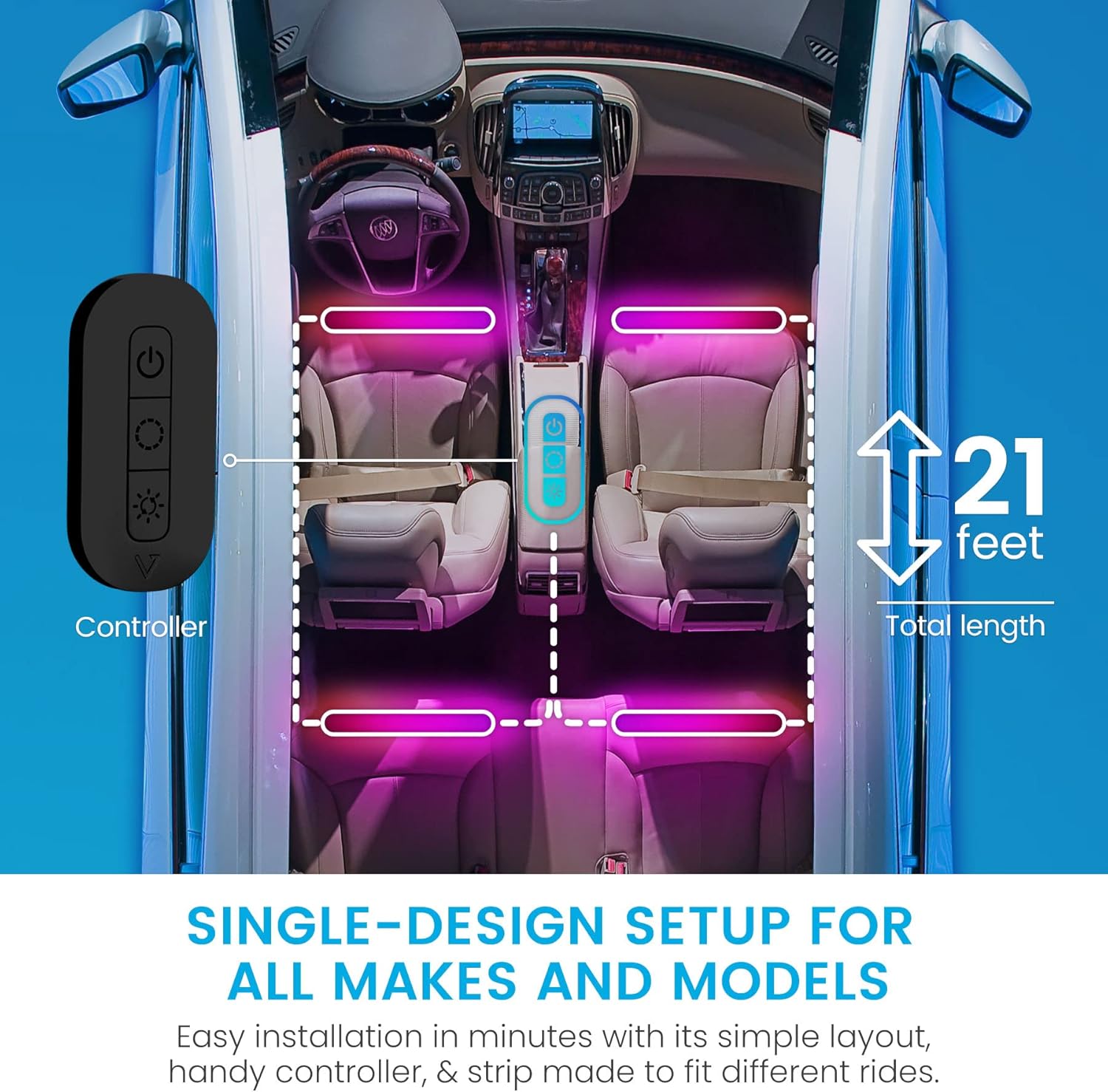
Figure 2: Recommended installation layout for the 21-foot LED strip light and controller.
Naudojimo instrukcijos
The Vont App-Controlled Car Lights can be operated via the included physical controller or the Vont Home App.
Using the Physical Controller
The physical controller provides basic functions:
- Maitinimo mygtukas: Įjungia arba išjungia šviesas.
- Režimo mygtukas: Cycles through various preset scene modes.
- Ryškumo mygtukai: Adjusts the intensity of the lights.
Using the Vont Home App
For full control and customization, download the Vont Home App on your smartphone. The app allows you to:
- Rinkitės iš 16 milijonų spalvų.
- Choose from 30 unique scene modes.
- Create custom DIY lighting effects.
- Sureguliuokite ryškumo lygius.
- Activate Music Sync Mode.

Figure 3: Vont Home App interface for controlling car lights.
Muzikos sinchronizavimo režimas
The Vont Car Lights feature a built-in microphone that allows the lights to synchronize with your car's music in real-time. To activate Music Sync Mode:
- Įsitikinkite, kad šviesos įjungtos.
- Open the Vont Home App on your smartphone.
- Navigate to the Music Mode section within the app.
- Select your desired music synchronization settings. The lights will respond to the beats and rhythm of the music playing in your car.

Figure 4: Music Sync Mode in action, where lights respond to audio.
Priežiūra
To ensure the longevity and optimal performance of your Vont App-Controlled Car Lights, follow these maintenance guidelines:
- Valymas: Gently wipe the LED strip lights with a soft, dry cloth to remove dust and debris. Avoid using harsh chemicals or abrasive cleaners.
- Ryšio patikrinimas: Periodically check all connections to ensure they are secure and free from corrosion.
- Sukibimas: If the adhesive begins to weaken, re-secure the strip with additional cable ties or suitable automotive-grade adhesive tape.
- Saugykla: If removing the lights for an extended period, store them in a cool, dry place away from direct sunlight.
Trikčių šalinimas
If you encounter issues with your Vont App-Controlled Car Lights, refer to the following troubleshooting tips:
| Problema | Galima priežastis | Sprendimas |
|---|---|---|
| Šviesos neįsijungia. | Nėra maitinimo jungties. | Ensure the controller is securely plugged into the 12V power outlet and the car's ignition is on. Check the car's fuse for the 12V outlet. |
| Šviesos blankios arba mirga. | Low power or loose connection. | Check all connections for tightness. Ensure the car's battery voltage is sufficient. Adjust brightness via the app or controller. |
| Programėlė negali prisijungti prie šviestuvų. | Bluetooth issue or app malfunction. | Ensure Bluetooth is enabled on your phone. Restart the Vont Home App. Try restarting your phone. Ensure the lights are powered on. |
| Music Sync Mode not working. | Microphone obstruction or app setting. | Ensure the controller's microphone is not obstructed. Check Music Mode settings in the Vont Home App. Increase music volume. |
| Klijai neprilimpa. | Improper surface preparation or environmental factors. | Clean the surface thoroughly before re-applying. Use additional cable ties or stronger automotive-grade adhesive tape for reinforcement. |
Specifikacijos
- Prekinis ženklas: Vont
- Modelio numeris: CSL01-RBTV1-X1
- Spalva: Juoda
- Formos faktorius: Juostelė
- Rekomenduojami naudojimo būdai: Transporto priemonės interjeras
- Įtraukti komponentai: 21-feet LED strip light and controller
- Ypatinga funkcija: Waterproof (Water Resistant)
- Prekės svoris: 8 uncijos
- Medžiaga: Polivinilchloridas (PVC)
- Įtrauktas nuotolinio valdymo pultas?: Ne (valdoma programėle)
- Vienetų skaičius: 1
- Automobilio tinkamumo tipas: Universalus tinka
- UPC: 850013449538
- Vattage: 18 vatų
- ttage: 12 volto (DC)
- Šviesos šaltinio tipas: LED
Garantija ir palaikymas
Vont offers a lifetime warranty for this product, covering loss, theft, and defects in materials and workmanship for as long as you own your car lights. For any questions, concerns, or support needs, Vont Customer Satisfaction Wizards are available 24/7. Please refer to the Vont official webkontaktinę informaciją rasite svetainėje arba pirkimo dokumentuose.


