1. Įvadas
The NETVIP N300 WiFi Extender is designed to expand the coverage of your existing wireless network, eliminating areas with weak signal and providing a stable 2.4GHz WiFi signal. This manual provides detailed instructions for setup, operation, and troubleshooting to ensure proper use of your device.
2. Produktas baigtasview
Familiarize yourself with the physical components and indicators of your NETVIP N300 WiFi Extender.

2.1 vaizdas: Detalė view of the NETVIP N300 WiFi Extender, highlighting the LAN Port, Reset button, WPS button, Power LED, Wireless LED, WPS LED, and LAN LED. The device features a US plug for direct wall outlet connection.
- Maitinimo šviesos diodas: Nurodo maitinimo būseną.
- Belaidis šviesos diodas: Rodo belaidžio ryšio aktyvumą.
- WPS šviesos diodas: Rodo WPS funkcijos būseną.
- LAN šviesos diodas: Rodo Ethernet prievado aktyvumą.
- LAN prievadas: Laidiniams ryšiams.
- Atkūrimo mygtukas: Naudojamas gamykliniams nustatymams atkurti.
- WPS mygtukas: For quick, secure connection setup.
3. Setup Instructions (Repeater Mode)
Follow these steps to configure your WiFi Extender in Repeater Mode, which extends the range of your current WiFi network.
- Maitinimas: Plug the repeater into a power socket. Wait until the green WPS light begins blinking.
- Prijunkite prie kartotuvo: On your phone, tablet, or laptop, connect to the WiFi signal named "Wireless-N-c". This is the extender's temporary network, not your home's existing WiFi.
- Prieigos sąrankos puslapis: The device should automatically redirect you to the settings page. If not, open a web naršyklėje ir įveskite rankiniu būdu 192.168.10.1 adreso juostoje.
- Prisijungti: Enter "admin" for both the username and password.
- Pasirinkite kartotuvo režimą: Click on "Repeater" under the Wizard section.
- Pasirinkite tinklą: Select your existing home WiFi network from the list and click "Apply".
- Configure Repeater SSID: Set a new name (SSID) for your extended network, or keep the default name. Enter your home WiFi password as the Security Key for this new Repeater network. Click "Apply".
- Užbaigimas: Wait for the settings to be applied. Close the page and reconnect your devices to the newly created extended network.
Svarbi pastaba: When setting up in Repeater Mode, the password for the extended network must be exactly the same as your home WiFi password for internet access.
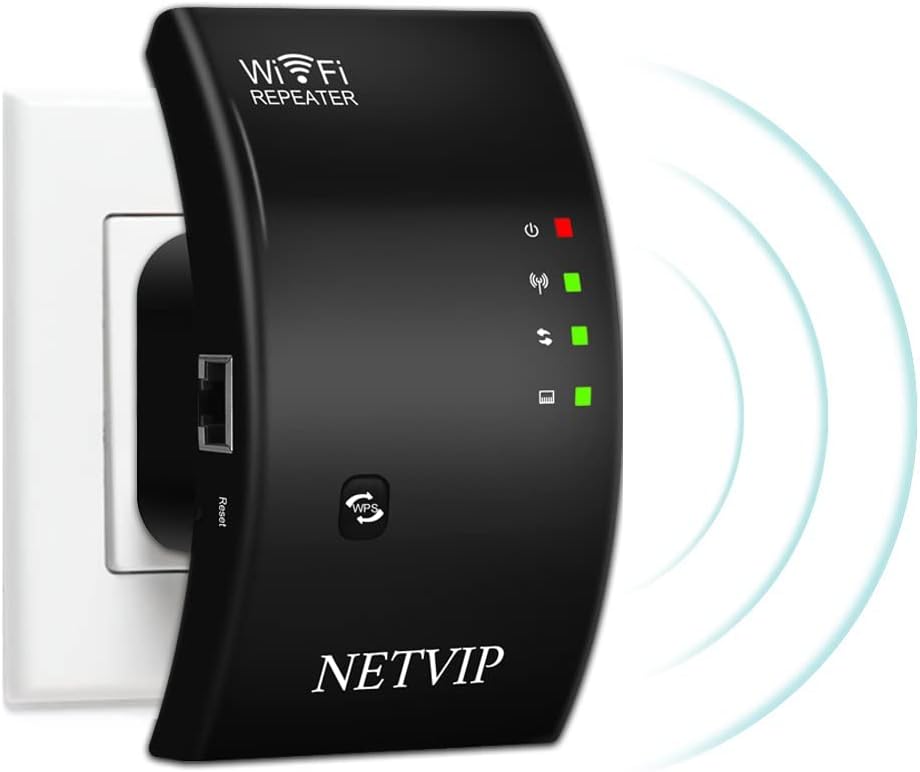
3.1 vaizdas: The NETVIP N300 WiFi Extender plugged into a wall socket, ready for setup.
4. Veikimo režimai
The NETVIP N300 WiFi Extender supports two primary operating modes: Repeater Mode and Access Point (AP) Mode.

4.1 vaizdas: Diagram showing the two working modes: Repeater Mode (extending a router's signal) and AP Mode (creating a new WiFi hotspot from a modem).
- Kartotuvo režimas: This mode extends the coverage of your existing 2.4GHz Wi-Fi network, boosting the signal to areas with weak or no coverage. It connects wirelessly to your main router.
- AP režimas (prieigos taško režimas): In this mode, the extender creates a new WiFi hotspot. You connect the extender to your modem or router via an Ethernet cable, and it broadcasts a new wireless network. This is useful for converting a wired network into a wireless one.
5. Specifikacijos
| Funkcija | Detalė |
|---|---|
| Dažnių juosta | 2.4 GHz |
| Palaikomas ttage | 110V-240V |
| WLAN saugumas | WPA2, WPA, WEP (128/64-bit) |
| Antenos | Integruota |
| bevielio ryšio standartas | 802.11 milijardo |
| Duomenų perdavimo sparta | Iki 300 Mbps |
| Gaminio matmenys | 4.33 x 2.36 x 3.15 colio |
| Prekės svoris | 5.6 uncijos |
6. Problemų sprendimas
If you encounter issues with your WiFi Extender, the following information may assist in resolving common problems.
Kaip atkurti įrenginio gamyklinius nustatymus:
If you forget your password, need to change settings, or experience setup failures, a factory reset can resolve many issues.
- Raskite Atstatyti mygtukas on the device (refer to Image 2.1).
- Sąvaržėle ar panašiu smailiu daiktu paspauskite ir ilgiau nei 20 sekundes palaikykite nuspaudę mygtuką „Atstatyti“.
- Continue holding until you observe the green light turning off and then turning on again. This indicates the device has reset to its factory default settings.
- After resetting, you will need to reconfigure the extender following the setup instructions.
7. Pakuotės turinys
The following items are included with your NETVIP N300 WiFi Extender:
7.1 vaizdas: The NETVIP N300 WiFi Extender package contents, showing the WiFi Repeater, User Manual, and RJ45 Ethernet Cable.
- 1x WiFi Repeater (NETVIP N300 WiFi Extender)
- 1x RJ-45 eterneto kabelis
- 1x User Manual (available in 5 languages)
8. Garantija ir palaikymas
The NETVIP N300 WiFi Extender includes a 1-year warranty. For technical assistance or inquiries, please contact NETVIP customer support via email. They are committed to providing a satisfactory solution.


