1. Įvadas
Thank you for choosing the KOFIRE UT-01 Wireless Gaming Headset. This headset is designed to provide an immersive audio experience with ultra-low latency, 3D surround sound, and vibration feedback, making it ideal for gaming across multiple platforms including Nintendo Switch, PS4, PS5, PC, and mobile devices. This manual will guide you through the setup, operation, and maintenance of your new headset.

Image: The KOFIRE UT-01 Wireless Gaming Headset, showcasing its blue and red earcups, detachable microphone, and included USB-C and USB-A wireless adapters.
2. Pakuotės turinys
Įsitikinkite, kad jūsų siuntinyje yra visi daiktai:
- KOFIRE UT-01 belaidės žaidimų ausinės
- Detachable Noise Reduction Microphone
- USB-C belaidis raktas
- USB-A į USB-C adapterį
- 3.5 mm garso laidas
- USB įkrovimo laidas
- Vartotojo vadovas (šis dokumentas)
3. Produkto ypatybės
- Specially Designed for Nintendo Switch: Equipped with a dedicated USB-C adapter for seamless connectivity in handheld or docked mode. Includes a USB-A to USB-C adapter for versatile compatibility.
- 3D Surround and Vibration Sound Quality: Dual 40mm dynamic EQ driver units deliver immersive 3D stereo surround sound. Physical vibration enhances low-frequency effects, providing tactile feedback for in-game actions.
- Ergonomic Design, Comfortable Fit: Features soft memory protein earmuffs, an adjustable headband, and a lightweight 250g build for extended comfort. Foldable design for portability.
- Detachable Noise Reduction Microphone & Mute Function: The microphone reduces up to 80% of background noise for clear communication. A convenient mute button is included.
- Kelių platformų suderinamumas: Works with Nintendo Switch (Lite/OLED), PS4/5, PCs via USB dongle, and tablets/smartphones via Bluetooth. Also supports wired connection via 3.5mm audio cable.
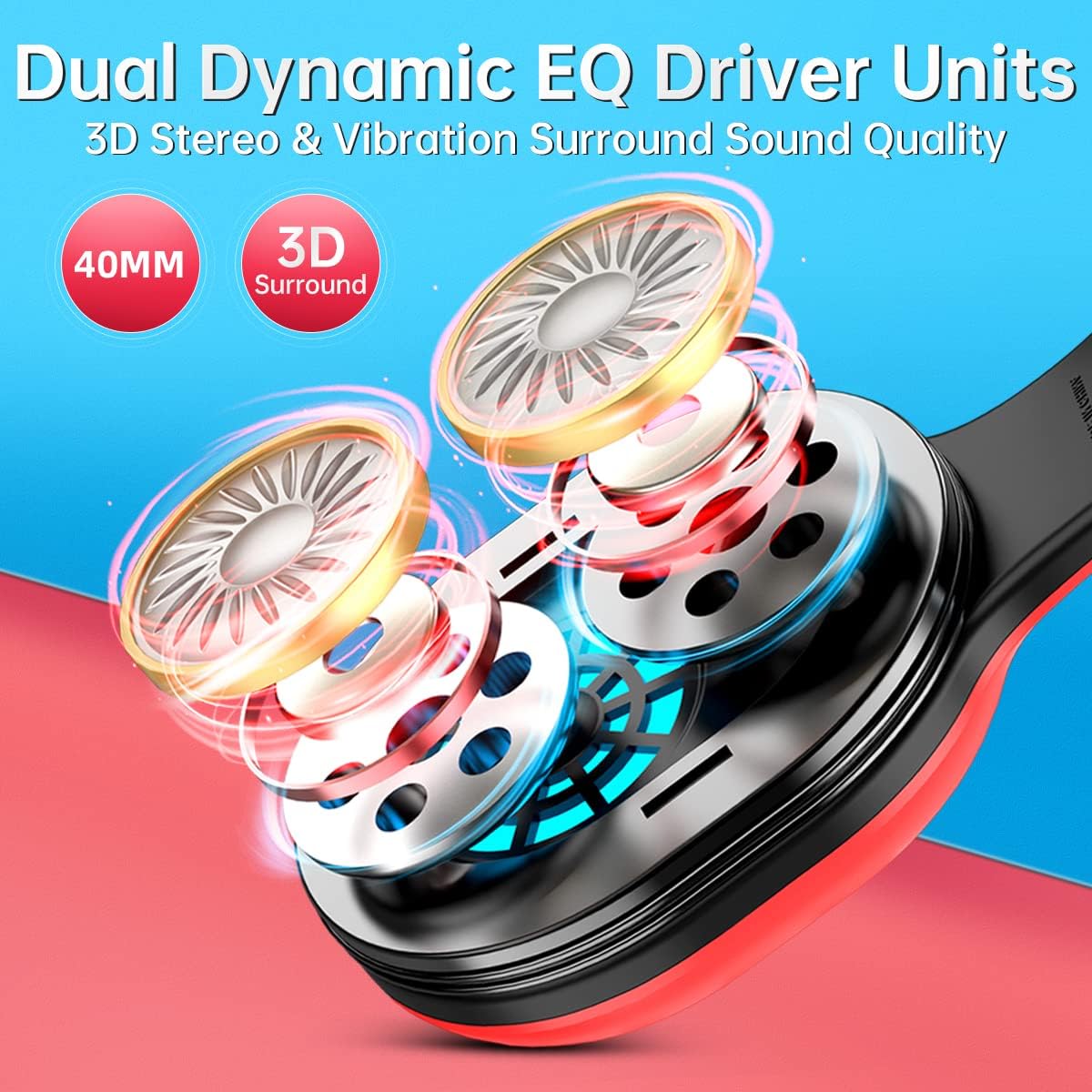
Paveikslėlis: sprogęs view of the headset's earcup, highlighting the dual 40mm dynamic EQ driver units responsible for 3D stereo and vibration surround sound.

Image: Two individuals wearing the KOFIRE UT-01 headset while gaming, demonstrating the comfortable fit with soft earmuffs, adjustable headband, and foldable design.
4. Valdikliai ir indikatoriai
Ausinės turi intuityvius valdiklius, kad būtų lengva jas valdyti:
- Maitinimo / daugiafunkcis mygtukas: Located on the earcup, used for powering on/off and other functions.
- Volume Up/Next Track Button (Vol+): Increases volume, or skips to the next track in media playback.
- Volume Down/Previous Track Button (Vol-): Decreases volume, or goes to the previous track in media playback.
- Nutildymo mygtukas: On the detachable microphone, allows quick muting/unmuting of the microphone.
- Vibruojantis žaidimų režimo mygtukas: Activates or deactivates the vibration feedback feature.
- RGB lemputės: The headset features glowing colorful LED lights. To turn on or off the RGB lights, press the Vol+ and Vol- buttons simultaneously. Note: This function only works when connected via Bluetooth.

Image: A visual guide to the headset's control buttons, including Power/Multifunction, Volume Up/Next, Volume Down/Previous, and Vibrating Gaming Mode.

Paveikslėlis: detalus view of the detachable noise-cancelling microphone, highlighting the integrated mute button for easy control during gameplay.
5. Sąranka
5.1 Pradinis įkrovimas
Before first use, fully charge the headset using the provided USB charging cable. Connect the cable to the headset's charging port and a USB power source. The LED indicator will show charging status and turn off when fully charged. A full charge provides up to 30 hours of playtime.

Image: The KOFIRE UT-01 headset with an overlay indicating its impressive battery life of up to 30 hours on a single charge.
5.2 Belaidis ryšys (2.4 GHz)
For Nintendo Switch, PS4/PS5, and PC:
- Insert the USB-C wireless dongle directly into the USB-C port of your Nintendo Switch (handheld mode) or use the included USB-A to USB-C adapter for the Nintendo Switch docking station, PS4/PS5, or PC's USB-A port.
- Power on the headset by pressing and holding the Power/Multifunction button.
- The headset will automatically pair with the dongle. A stable LED indicator on the headset signifies a successful connection.

Image: A diagram illustrating how the KOFIRE UT-01 headset connects wirelessly to both the Nintendo Switch console in handheld mode and the Nintendo Switch docking station using the appropriate USB adapters.
5.3 Bluetooth ryšys
For tablets and smartphones:
- Įsitikinkite, kad laisvų rankų įranga išjungta.
- Press and hold the Power/Multifunction button until the LED indicator flashes, indicating pairing mode.
- On your device, enable Bluetooth and select "KOFIRE UT-01" from the list of available devices.
- Once connected, the LED indicator on the headset will become stable.
5.4 Laidinis ryšys
For devices supporting 3.5mm audio:
- Prijunkite vieną 3.5 mm garso kabelio galą prie ausinių garso lizdo.
- Kitą galą prijunkite prie savo įrenginio 3.5 mm garso prievado.
- Note: Microphone functionality may vary or be unavailable in wired mode depending on the device.
6. Naudojimo instrukcijos
6.1 Maitinimo įjungimas/išjungimas
- Maitinimas: Paspauskite ir 3 sekundes palaikykite nuspaudę maitinimo / daugiafunkcinį mygtuką.
- Išjungti: Paspauskite ir 5 sekundes palaikykite nuspaudę maitinimo / daugiafunkcinį mygtuką.
6.2 Garsumo reguliavimas
- Norėdami padidinti garsumą, paspauskite mygtuką Vol+.
- Press the Vol- button to decrease volume.
6.3 Mikrofono naudojimas
- Attach the detachable microphone to the designated port on the headset.
- Press the Mute button on the microphone to toggle mute on/off.
- Svarbi pastaba: The microphone may not work when connected to the Nintendo Switch via Bluetooth. For full mic functionality on Nintendo Switch, please use the USB adapter (2.4GHz wireless connection).
6.4 Vibration Gaming Mode
Press the Vibrating Gaming Mode button to activate or deactivate the physical vibration feedback. This feature enhances immersion by providing tactile responses to in-game sounds like explosions and gunfire.

Image: A visual representation of the vibration feedback feature on the headset, showing sound waves emanating from the earcups to illustrate the immersive gaming experience.
7. Priežiūra
- Valymas: Ausinėms valyti naudokite minkštą, sausą šluostę. Nenaudokite abrazyvinių valiklių ar tirpiklių.
- Saugykla: Laikykite ausines vėsioje, sausoje vietoje, toliau nuo tiesioginių saulės spindulių ir ekstremalių temperatūrų. Sulankstomas dizainas leidžia jas kompaktiškai laikyti.
- Akumuliatoriaus priežiūra: Norėdami pailginti baterijos veikimo laiką, venkite dažnai visiškai iškrauti ausines. Reguliariai jas įkraukite, net jei ilgą laiką nenaudojate.
8. Problemų sprendimas
| Problema | Galima priežastis | Sprendimas |
|---|---|---|
| Nėra garso ar mažas garsumas | Headset not powered on; Volume too low; Incorrect audio output selected on device; Headset not paired. | Ensure headset is powered on; Increase headset and device volume; Check device's audio settings; Re-pair the headset. |
| Mikrofonas neveikia | Microphone muted; Microphone not properly attached; Incorrect input device selected; Bluetooth connection on Switch. | Unmute microphone; Re-attach microphone firmly; Check device's audio input settings; For Switch, use 2.4GHz USB adapter for mic functionality. |
| Connectivity issues (disconnections, lag) | Out of range; Interference; Low battery. | Move closer to the device; Avoid strong electromagnetic interference; Charge the headset. |
| Ausinės neįkraunamos | Charging cable or port issue; Power source issue. | Ensure charging cable is securely connected; Try a different USB port or power adapter; Check for debris in charging port. |
9. Specifikacijos
| Funkcija | Detalė |
|---|---|
| Modelio pavadinimas | UT-01 |
| Ryšio technologija | Wireless (2.4GHz, Bluetooth), Wired (3.5mm Jack) |
| Belaidžio ryšio technologija | Bluetooth |
| Garso tvarkyklės dydis | 40 milimetrų |
| Dažnio atsakas | 20-40000 Hz |
| Garso vėlavimas | 1 Millisecond (2.4GHz) |
| Bluetooth diapazonas | 10 metrai |
| Baterijos veikimo laikas | Iki 30 valandų |
| Įkrovimo laikas | apytiksliai 3 valandos |
| Prekės svoris | 14.9 uncijos (apie 422 g) |
| Medžiaga | Leather (earmuffs) |
| Ypatingos savybės | Foldable, Detachable Microphone, Surround Sound, Vibration Feedback |
10. Compatibility Overview
The KOFIRE UT-01 headset offers broad compatibility across various devices and connection types:
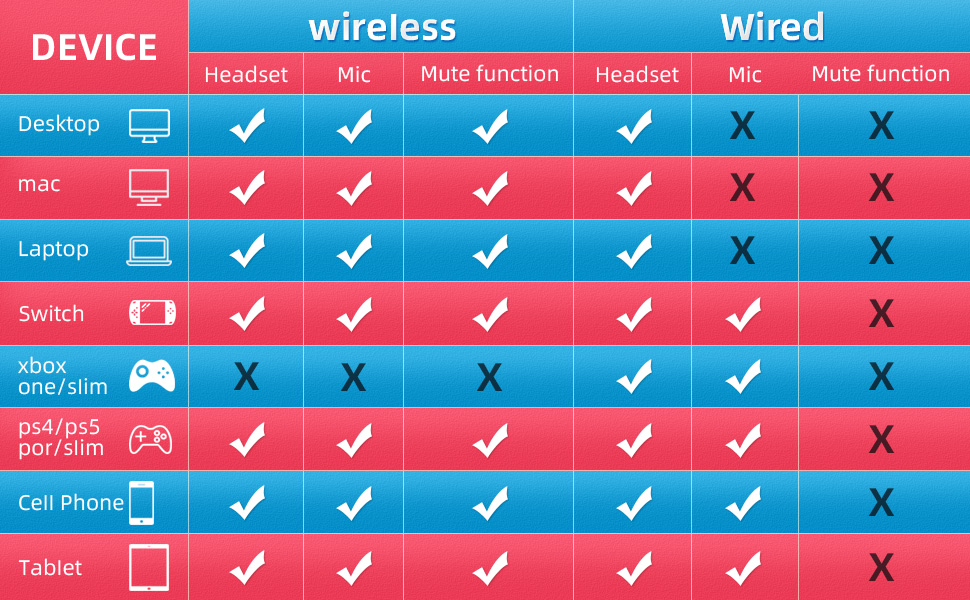
Image: A detailed compatibility chart indicating headset, microphone, and mute function support for various devices (Desktop, Mac, Laptop, Switch, Xbox One/Slim, PS4/PS5, Cell Phone, Tablet) in both wireless and wired modes.
| Įrenginys | Wireless (Headset) | Wireless (Mic) | Wireless (Mute) | Wired (Headset) | Wired (Mic) | Wired (Mute) |
|---|---|---|---|---|---|---|
| Darbalaukis | ✓ | ✓ | ✓ | ✓ | ✗ | ✗ |
| Mac | ✓ | ✓ | ✓ | ✓ | ✗ | ✗ |
| Nešiojamasis kompiuteris | ✓ | ✓ | ✓ | ✓ | ✗ | ✗ |
| Nintendo Switch | ✓ | ✓ | ✓ | ✓ | ✗ | ✗ |
| Xbox One/Slim | ✗ | ✗ | ✗ | ✓ | ✗ | ✗ |
| PS4/PS5 | ✓ | ✓ | ✓ | ✓ | ✗ | ✗ |
| Mobilusis Telefonas | ✓ | ✓ | ✓ | ✓ | ✗ | ✗ |
| Planšetinis kompiuteris | ✓ | ✓ | ✓ | ✓ | ✗ | ✗ |
11. Garantija ir palaikymas
KOFIRE products are manufactured to the highest quality standards. For warranty information or technical support, please refer to the contact details provided on the product packaging or visit the official KOFIRE websvetainėje. Prašome išsaugoti pirkimo įrodymą garantiniams reikalavimams.


