1. Produktas baigtasview
The Bluedio S6 Wireless Earbuds are designed for an immersive audio experience, featuring advanced Bluetooth 5.1 technology, extended battery life, and a secure fit ideal for sports and active lifestyles. The included charging case with dual LED displays provides convenient power management.

Image: Bluedio S6 Wireless Earbuds and their charging case, showcasing LED akumuliatoriaus ekraną.
2. Pakuotės turinys
Prašome patikrinti, ar pakuotėje yra visi reikalingi daiktai:
- Bluedio S6 Wireless Earbuds (Left and Right)
- Įkrovimo dėklas su LED ekranu
- C tipo USB įkrovimo laidas
- Įvairūs ausų antgalių dydžiai (S, M, L)
- Vartotojo vadovas (šis dokumentas)

Image: The complete package contents of the Bluedio S6 earbuds.
3. Sąrankos vadovas
3.1 Pradinis įkrovimas
Before first use, fully charge the earbuds and the charging case. Connect the provided USB Type-C cable to the charging case and a compatible USB power source. The LED display on the case will indicate the charging status and battery level.

Image: Visual representation of the Bluedio S6 earbuds and charging case, highlighting battery life and charging duration.
3.2 Susiejimas su jūsų įrenginiu
- Automatinis įjungimas ir susiejimas: Open the charging case and remove both S6 earbuds. They will automatically power on and attempt to pair with each other.
- Suaktyvinkite „Bluetooth“: On your mobile phone or other Bluetooth-enabled device, go to the Bluetooth settings and turn on Bluetooth.
- Select "S6": In the list of available Bluetooth devices, search for and select "S6" to connect.
- Patvirtinimas: Prijungus išgirsite garsinį patvirtinimą ir ausinės bus paruoštos naudoti.
- Automatinis pakartotinis prisijungimas: After the initial successful connection, the S6 earbuds will automatically connect to the last paired device when removed from the charging case.

Image: The Bluedio S6 earbuds automatically pairing with a mobile device upon removal from the charging case.

Image: An earbud illustrating the advanced Bluetooth 5.1 chip for stable signal transmission.
4. Naudojimo instrukcijos
4.1 Ausinių dėvėjimas
The Bluedio S6 earbuds feature earhooks for a secure and comfortable fit, especially during physical activities. Gently place the earbud into your ear canal and adjust the earhook over your ear until it feels stable and comfortable.

Image: A user wearing the Bluedio S6 earbuds, highlighting their design for sports and secure fit.
4.2 Jutikliniai valdikliai
The S6 earbuds are equipped with smart touch controls on each earbud for easy management of music and calls. Refer to the following table for common operations:
| Veiksmas | Funkcija |
|---|---|
| Vienas bakstelėjimas (K/D) | Groti / pristabdyti muziką, atsiliepti / baigti skambutį |
| Dukart bakstelėjimas (dešinė ausinė) | Padidinti garsumą |
| Double Tap (kairioji ausinė) | Sumažinti garsumą |
| Trigubas bakstelėjimas (dešinė ausinė) | Kitas takelis |
| Trigubas palietimas (kairioji ausinė) | Ankstesnis takelis |
| Paspauskite ir palaikykite (2 sekundes) | Atmesti skambutį |
| Paspauskite ir palaikykite (5 sekundes) | Maitinimo įjungimas/išjungimas |
| Press and Hold (1 second) | Suaktyvinkite balso padėjėją |

Image: Visual guide to the touch control functions on the Bluedio S6 earbuds.
4.3 Skambučių valdymas
With the built-in microphone, you can easily manage calls directly from your earbuds without needing to access your phone.
- Atsiliepti į skambutį: Vienu bakstelėjimu palieskite bet kurią ausinę.
- Baigti skambutį: Skambučio metu vieną kartą palieskite bet kurią ausinę.
- Atmesti skambutį: Paspauskite ir 2 sekundes palaikykite bet kurią ausinę.

Image: A user demonstrating the convenience of answering calls directly with the Bluedio S6 earbuds.
5. Priežiūra
5.1 Ausinių ir dėklo įkrovimas
To charge the earbuds, place them back into the charging case. The earbuds will automatically begin charging. The LED display on the case shows the individual battery levels of the left and right earbuds, as well as the case's remaining power. To charge the case, connect it to a USB power source using the provided Type-C cable.
- Earbuds playtime on a single charge: Approximately 9 hours.
- Total playtime with charging case: Up to 42 hours.
- Dėklo įkrovimo laikas: maždaug 2 valandos.


Image: Icons illustrating key features: LED battery display, 600mAh charging case, and Type-C charging port.
5.2 Valymas ir laikymas
To ensure longevity and optimal performance, regularly clean your earbuds and charging case. Use a soft, dry, lint-free cloth to wipe down the surfaces. For the eartips, you may remove them and clean with a damp cloth, ensuring they are completely dry before reattaching. Store the earbuds in their charging case when not in use to protect them from dust and damage.
- Nenaudokite abrazyvinių valiklių ar tirpiklių.
- Do not submerge the earbuds or case in water. While water-resistant, they are not designed for submersion.
- Laikyti atokiai nuo ekstremalių temperatūrų.
6. Problemų sprendimas
If you encounter any issues with your Bluedio S6 earbuds, please refer to the following common solutions:
6.1 Ausinės nesusijungia tarpusavyje ar su įrenginiu
- Įsitikinkite, kad abi ausinės yra visiškai įkrautos.
- Place both earbuds back into the charging case, close the lid, wait a few seconds, then open the lid and remove them again. This often resets the pairing.
- On your device, forget or delete "S6" from your Bluetooth device list. Then, repeat the pairing process from Section 3.2.
- Įsitikinkite, kad jūsų įrenginio „Bluetooth“ ryšys įjungtas ir yra diapazone (paprastai 10 metrų / 33 pėdų).
6.2 Nėra garso arba tylus garsas
- Check the volume level on both your earbuds (using touch controls) and your connected device.
- Ensure the earbuds are properly seated in your ears and the eartips provide a good seal.
- Try playing different audio sources to rule out an issue with the specific media.
- Reconnect the earbuds by placing them in the case and taking them out again.
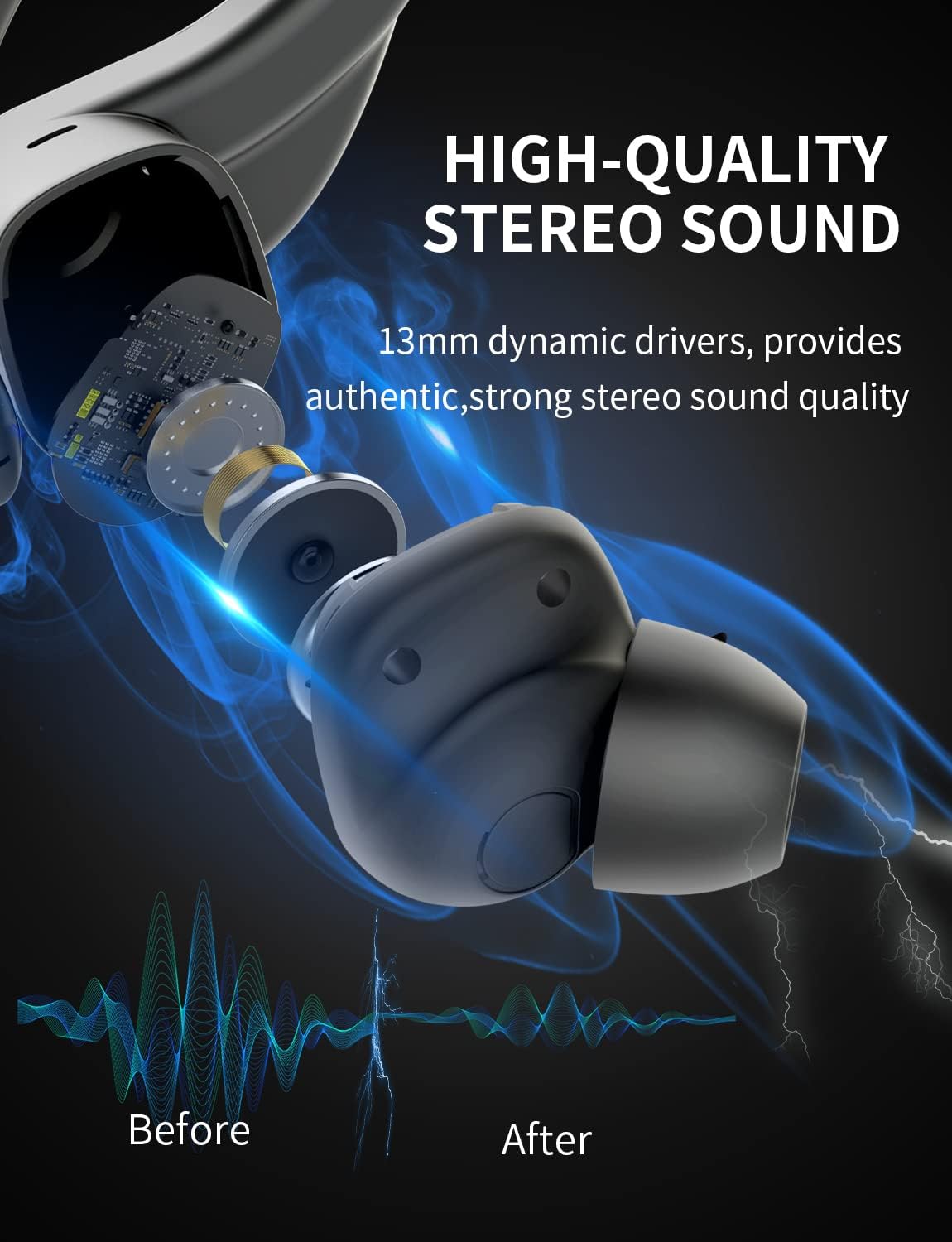
Paveikslėlis: vidinis view of the earbud, highlighting the 13mm dynamic drivers responsible for high-quality stereo sound.
6.3 Įkrovimo dėklas nesikrauna
- Patikrinkite, ar USB C tipo laidas yra tvirtai prijungtas prie korpuso ir maitinimo šaltinio.
- Išbandykite kitą USB prievadą arba maitinimo adapterį.
- Įsitikinkite, kad įkrovimo laidas nepažeistas.
7. Specifikacijos
Detailed technical specifications for the Bluedio S6 Wireless Earbuds:
| Funkcija | Detalė |
|---|---|
| Modelio pavadinimas | S6 |
| Ryšio technologija | Belaidis ryšys („Bluetooth 5.1“) |
| Belaidžio ryšio technologija | Bluetooth |
| Įtraukti komponentai | Belaidžio įkrovimo dėklas |
| Medžiaga | Plastikiniai |
| Specifinis produkto naudojimas | Sportas |
| Suderinami įrenginiai | Mobilieji telefonai, planšetiniai kompiuteriai, nešiojamieji kompiuteriai |
| Prekės svoris | 117 gramų |
| Atsparumo vandeniui lygis | Waterproof (Note: typically means splash/sweat resistant, not submersible) |
| Dažnių diapazonas | 20Hz-20000Hz |
| Mikrofono formatas | Įmontuotas |
| Vidutinė baterijos veikimo trukmė (ausinės) | 9 valandos (vienas įkrovimas) |
| Bendras žaidimo laikas su dėklu | Iki 42 valandų |
| Įkrovimo dėklo akumuliatoriaus talpa | 600mAh (from A+ content image) |
| Ausų išdėstymas | In Ear (with earhooks) |
| Spalva | Juoda |
8. Garantija ir palaikymas
Bluedio products are manufactured to high quality standards. For warranty information and customer support, please refer to the warranty card included in your product packaging or visit the official Bluedio websvetainėje. Išsaugokite pirkimo kvitą kaip pirkimo įrodymą bet kokiems garantiniams prašymams.
For further assistance, you may also contact Bluedio customer service through their official channels.


