Įvadas
This manual provides essential instructions for the safe and effective use of your Technics EAH-A800 Wireless Noise Cancelling Over-Ear Headphones. Please read this manual thoroughly before using the product and retain it for future reference.

Image: Technics EAH-A800 Wireless Noise Cancelling Over-Ear Headphones in black, showcasindėl jų elegantiško dizaino.
The Technics EAH-A800 headphones are designed to deliver high-fidelity audio with advanced noise-cancelling technology and superior call clarity. They feature multi-point connectivity for seamless switching between devices and comfortable over-ear earpads for extended wear.
Kas yra dėžutėje
Patikrinkite, ar pakuotėje yra visi reikalingi daiktai:
- Technics EAH-A800 Over-Ear Headphones
- USB įkrovimo laidas
- Garso kabelis (3.5 mm lizdas)
- Apsauginis dėklas

Image: The complete package contents, including the headphones, charging cable, audio cable, and protective case.
Sąranka
1. Ausinių įkrovimas
Before first use, fully charge the headphones. Connect the USB charging cable to the headphone's charging port and a USB power source. The charging indicator will show the charging status.
2. „Bluetooth“ poravimas
- Įsitikinkite, kad ausinės yra išjungtos.
- Paspauskite ir palaikykite maitinimo mygtuką, kol LED indikatorius mirksės mėlynai ir raudonai, rodydamas susiejimo režimą.
- Savo įrenginyje (išmaniajame telefone, planšetiniame kompiuteryje, kompiuteryje) įjunkite „Bluetooth“ ir ieškokite galimų įrenginių.
- Select "Technics EAH-A800" from the list of found devices.
- Prijungus, LED indikatorius lėtai mirksės mėlyna spalva.
3. „Technics Audio Connect“ programėlė
For enhanced control and customization, download the Technics Audio Connect app from your device's app store. The app allows you to adjust sound settings, noise cancellation levels, and other features.

Image: Screenshots of the Technics Audio Connect app, illustrating its interface for sound and ambient control settings.
Naudojimo instrukcijos
1. Maitinimo įjungimas/išjungimas
- To power on: Press and hold the power button until the LED indicator lights up.
- To power off: Press and hold the power button until the LED indicator turns off.
2. Triukšmo slopinimo ir aplinkos garso režimai
The EAH-A800 features active noise cancellation to reduce external distractions and an ambient sound mode to allow you to hear your surroundings.
- Triukšmo slopinimas: Reduces environmental noise for an immersive listening experience.
- Aplinkos režimas: Allows external sounds to be heard, useful for awareness in public spaces.
Switch between modes using the dedicated button on the headphones or through the Technics Audio Connect app.

Image: A visual representation of the noise cancelling technology in action, showing how external sounds are minimized.
3. Daugiataškis ryšys
The headphones can connect to more than two Bluetooth devices simultaneously, allowing for seamless audio switching. For example, you can listen to music from your laptop and instantly answer a call from your smartphone without re-pairing.

Image: A user seamlessly switching audio between a smartphone and a laptop, highlighting the multi-point connectivity feature.
4. Skambinimo funkcijos
The EAH-A800 headphones are equipped with 8 microphones and advanced wind noise reduction for clear voice transmission during calls. Use the integrated controls to answer, end, or reject calls.
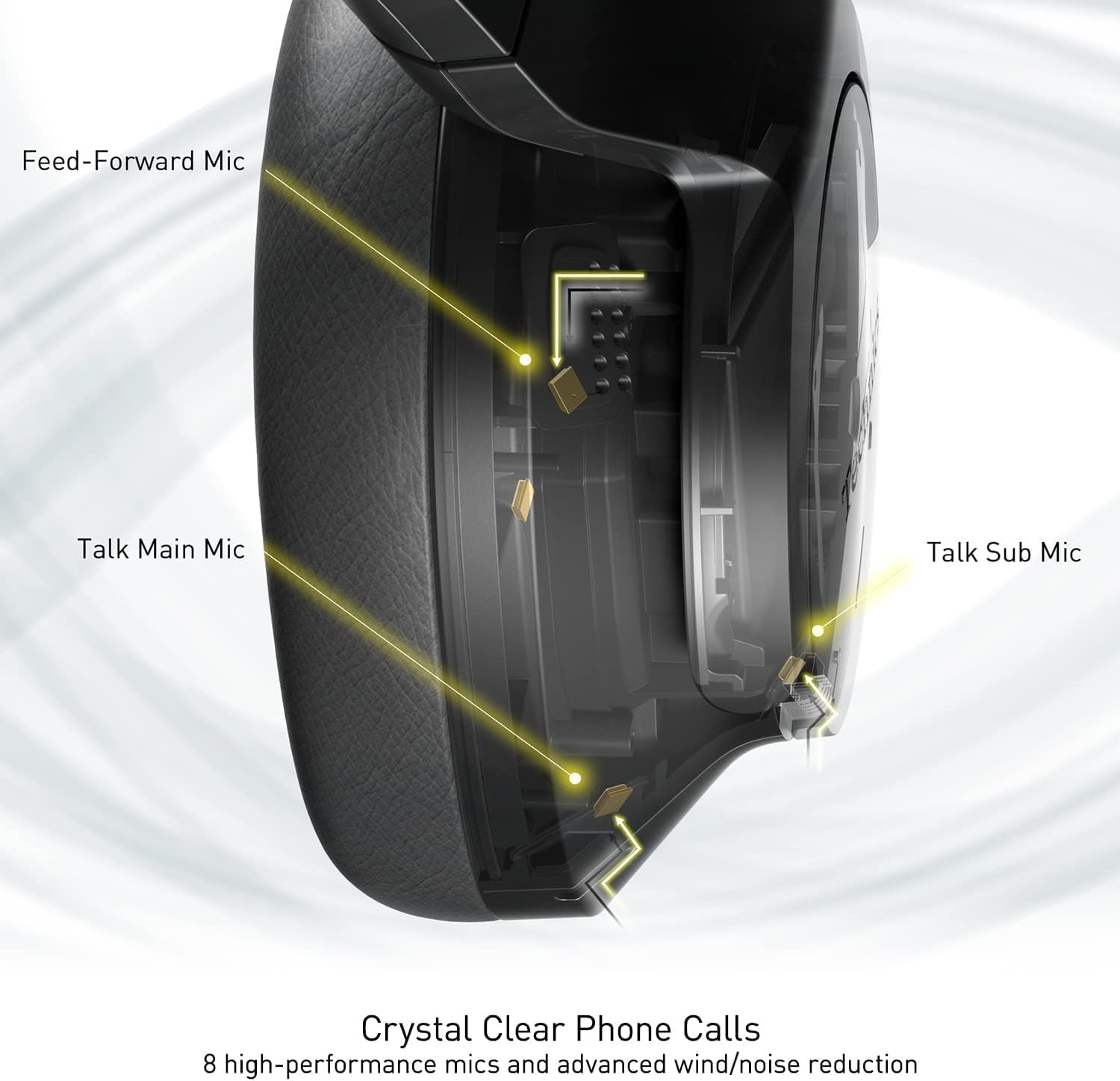
Image: An internal diagram illustrating the strategic placement of 8 microphones within the headphone for optimal call clarity.
5. Valdikliai
The headphones feature physical buttons for power, volume, and mode switching, as well as a touch-sensitive panel on one earcup for additional functions. Refer to the quick start guide for a detailed layout of controls.
6. Baterijos veikimo laikas ir įkrovimas
The EAH-A800 offers up to 50 hours of playback with Active Noise Cancellation (ANC) enabled on a single charge. A quick 15-minute charge provides approximately 10 hours of playback.

Image: A graphic detailing the impressive battery life and quick charge capabilities of the headphones.
Priežiūra
1. Valymas
- Ausines nuvalykite minkštu, sausu skudurėliu.
- For earpads, gently wipe with a slightly damp šluoste ir prieš naudojimą leiskite visiškai išdžiūti ore.
- Nenaudokite stiprių cheminių medžiagų, tirpiklių ar abrazyvinių valiklių.
2. Sandėliavimas
When not in use, store the headphones in their protective carrying case to prevent damage from dust, scratches, and impacts. Avoid exposing the headphones to extreme temperatures or humidity.
Trikčių šalinimas
| Problema | Galima priežastis | Sprendimas |
|---|---|---|
| Ausinės neįsijungia | Senka baterija | Pilnai įkraukite ausines. |
| Nepavyksta susieti per „Bluetooth“ | Ausinės neįjungtos susiejimo režimu; Įrenginio „Bluetooth“ išjungtas; Už diapazono ribų | Įsitikinkite, kad ausinės yra susiejimo režime (mirksi mėlynai / raudonai). Įjunkite „Bluetooth“ savo įrenginyje. Perkelkite įrenginį arčiau ausinių. |
| Nėra garso ar mažas garsumas | Volume too low; Incorrect audio output selected; Device not connected | Increase headphone and device volume. Check device's audio output settings. Re-establish Bluetooth connection. |
| Prasta skambučio kokybė | Microphone obstructed; Weak signal; Environmental noise | Ensure microphones are clear. Move to an area with better signal. Adjust noise cancelling settings via the app. |
| Multi-point connectivity issues | Connection conflict; Device not properly paired | Disconnect from one device and reconnect. Ensure both devices are paired correctly. |
If problems persist, consult the Technics Audio Connect app for further diagnostics or visit the official Technics support websvetainę.
Specifikacijos
| Modelio pavadinimas | Technics EAH-A800 |
| Ryšio technologija | Bluetooth 5.2 |
| Dažnio atsakas | 4 Hz–40 kHz |
| Triukšmo valdymas | Aktyvus triukšmo slopinimas |
| Baterijos veikimo laikas | Up to 50 Hours (with ANC ON) |
| Įkrovimo laikas | Approximately 3 Hours (15 min quick charge for 10 hrs playback) |
| Prekės svoris | 10.5 uncijos (298 gramo) |
| Medžiaga | Poliuretanas (PU) |
| Ausinės Jack | 3.5 mm lizdas |
| Suderinami įrenginiai | Cellphones, Desktops, Laptops, Tablets, Telephones |
| Ypatingos savybės | Fast Charging, Foldable, Microphone Included |
| UPC | 885170381162 |
Garantija ir palaikymas
Your Technics EAH-A800 headphones are covered by a manufacturer's warranty. For specific warranty terms, registration, and support inquiries, please refer to the official Technics websvetainėje arba susisiekite su jų klientų aptarnavimo tarnyba.
For additional information, FAQs, and software updates, please visit the official Technics brand store or support pages:


