1. Įvadas
Thank you for choosing the InFocus P120 INL412 Multimedia Projector. This manual provides essential information for the safe and efficient operation of your projector. Please read it thoroughly before using the device and retain it for future reference. The InFocus P120 INL412 is designed for versatile multimedia presentations, offering clear and vibrant images for various applications.
2. Saugos informacija
To ensure safe operation and prevent damage to the projector, please observe the following safety precautions:
- Neužblokuokite ventiliacijos angų. Užtikrinkite pakankamai vietos aplink projektorių tinkamam oro cirkuliavimui ir neperkaitimui.
- Venkite žiūrėti tiesiai į projektoriaus objektyvą, kai lamp įjungtas, nes ryški šviesa gali pažeisti akis.
- Do not place the projector on an unstable cart, stand, or table. The projector may fall, causing serious injury to a child or adult, and serious damage to the unit.
- Jei projektorius ilgesnį laiką nebus naudojamas, atjunkite maitinimo laidą nuo sieninio lizdo.
- Visus techninės priežiūros darbus patikėkite kvalifikuotiems techninės priežiūros specialistams. Nebandykite patys atidaryti ar taisyti projektoriaus.
- Keep the projector away from water or moisture. Do not expose it to rain or immerse it in liquid.
- Use only the power cord supplied with the projector or an authorized replacement.
3. Pakuotės turinys
Patikrinkite, ar jūsų projektoriaus pakuotėje yra visi toliau išvardyti daiktai:
- InFocus P120 INL412 Multimedia Projector
- Maitinimo laidas
- Nuotolinio valdymo pultas su baterijomis
- VGA laidas
- Vartotojo vadovas (šis dokumentas)
- Greitos pradžios vadovas
4. Produktas baigtasview
Familiarize yourself with the main components of your InFocus P120 INL412 projector.
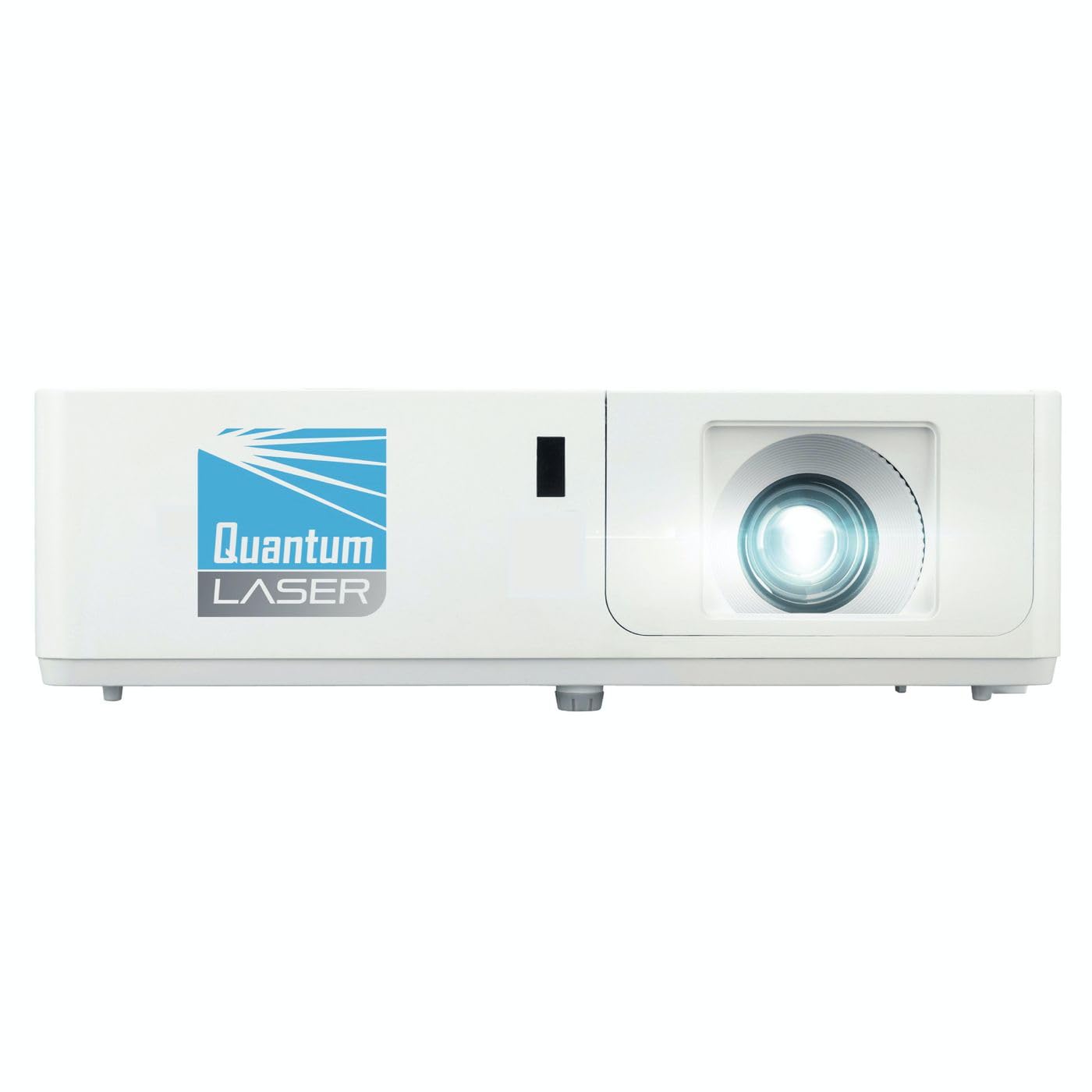
1 vaizdas: priekis view of the InFocus P120 INL412 Multimedia Projector, showing the lens and ventilation grilles.
4.1 Priekinis skydelis
- Projekcinis objektyvas: Perkelia vaizdą į ekraną.
- Fokusavimo žiedas: Reguliuojamas projektuojamo vaizdo aiškumas.
- Mastelio keitimo žiedas: Reguliuoja projektuojamo vaizdo dydį.
- IR imtuvas: Priima signalus iš nuotolinio valdymo pulto.
4.2 Viršutinis skydelis
- Valdymo skydelis: Buttons for power, menu navigation, source selection, and keystone correction.
- Indikacinės lemputės: Display the projector's status (e.g., power, lamp, temperature).
4.3 Galinis skydelis (ryšiai)
- HDMI įvestis: Connects to HDMI-enabled devices (laptops, Blu-ray players).
- VGA įvestis: Jungiamas prie kompiuterių su VGA išvestimi.
- USB prievadas: For service or connecting USB devices (if supported by model).
- Garso įvestis / išvestis: Skirta išoriniams garso šaltiniams arba garsiakalbiams prijungti.
- Maitinimo įvadas: Prijungia maitinimo laidą.
5. Sąranka
Atlikite šiuos veiksmus, kad pradėtumėte projektoriaus sąranką:
- Vieta: Place the projector on a stable, flat surface or mount it securely. Ensure the projector is positioned at an appropriate distance from the screen to achieve the desired image size.
- Maitinimo jungtis: Prijunkite maitinimo laidą prie projektoriaus maitinimo įvado, o tada – prie įžeminto elektros lizdo.
- Prijunkite šaltinio įrenginį: Connect your source device (e.g., laptop, DVD player) to the projector using an appropriate cable (HDMI, VGA, etc.). Ensure the cable is securely connected to both the source and the projector.
- Maitinimas: Press the power button on the projector's control panel or the remote control to turn on the projector. The power indicator light will illuminate.
- Fokusavimo ir priartinimo reguliavimas: Once an image is projected, rotate the focus ring on the lens until the image is sharp and clear. Use the zoom ring to adjust the image size to fit your screen.
- Keystone korekcija: If the image appears trapezoidal, use the keystone correction function (either via buttons on the projector/remote or through the on-screen menu) to square the image.
6. Naudojimo instrukcijos
6.1 Maitinimo įjungimas/išjungimas
- Norėdami įjungti: Press the power button once. The projector will go through a warm-up sequence.
- Norėdami išjungti: Press the power button twice. The first press will prompt a shutdown confirmation; the second press will initiate shutdown. Allow the projector to cool down completely before unplugging.
6.2 Šaltinio pasirinkimas
Press the 'Source' button on the projector or remote control to cycle through available input sources (HDMI, VGA, etc.) until your desired source is displayed.
6.3 Meniu naršymas
Press the 'Menu' button to access the on-screen display (OSD) menu. Use the arrow buttons to navigate through options and 'Enter' or 'OK' to select. Use the 'Exit' or 'Menu' button to close the OSD.
- Vaizdo nustatymai: Adjust brightness, contrast, color, aspect ratio, and picture mode.
- Ekrano nustatymai: Configure keystone, projection mode (front/rear, desktop/ceiling), and resolution.
- Garso nustatymai: Control volume and audio output options.
- Sistemos nustatymai: Manage language, timer, power-saving modes, and factory reset.
7. Priežiūra
Reguliarus techninis aptarnavimas užtikrina optimalų veikimą ir pailgina projektoriaus tarnavimo laiką.
- Objektyvo valymas: Švelniai nuvalykite projektoriaus objektyvą minkštu, nepūkuotu audiniu, specialiai skirtu optiniams paviršiams. Nenaudokite abrazyvinių valiklių ar per didelės jėgos.
- Spintelės valymas: Projektoriaus išorę valykite minkšta, sausa šluoste. Jei dėmės sunkiai įveikiamos,ampen the cloth slightly with water. Avoid using harsh chemicals.
- Oro filtro valymas / keitimas: Check the air filter periodically. If your model has a removable filter, clean it with a soft brush or vacuum cleaner. Replace the filter as recommended in the on-screen menu or when visibly dirty to maintain proper ventilation.
- Lamp Pakeitimas: Projektorius lamp turi ribotą gyvavimo trukmę. Kai lamp life indicator appears, or the image brightness significantly decreases, replace the lamp according to the instructions provided in the full service manual or by a qualified technician. Always allow the projector to cool down completely before attempting lamp pakeitimas.
8. Problemų sprendimas
Dažniausiai pasitaikančias problemas ir jų sprendimus rasite toliau pateiktoje lentelėje:
| Problema | Galima priežastis | Sprendimas |
|---|---|---|
| Vaizdas nerodomas | Power cord disconnected, incorrect input source, source device off. | Check power connections. Select correct input source. Ensure source device is powered on. |
| Vaizdas neryškus | Lens out of focus, incorrect projection distance. | Adjust the focus ring on the lens. Reposition the projector closer or further from the screen. |
| Vaizdas yra trapecijos formos | Projektorius nėra statmenas ekranui. | Use keystone correction (manual or automatic) to square the image. |
| Projektorius perkaito ir išsijungia | Blocked ventilation, dirty air filter. | Užtikrinkite, kad aplink ventiliacijos angas būtų laisvos vietos. Išvalykite arba pakeiskite oro filtrą. |
| Nuotolinio valdymo pultas neveikia | Dead batteries, obstruction between remote and projector, incorrect angle. | Replace batteries. Ensure clear line of sight to IR receiver. Point remote directly at the projector. |
9. Specifikacijos
Key technical specifications for the InFocus P120 INL412 Multimedia Projector:
| Funkcija | Specifikacija |
|---|---|
| Modelio numeris | P120 INL412 (Item model number: 7296144) |
| Ekrano tipas | DLP |
| Gimtoji raiška | 1280 x 800 |
| Maksimali ekrano skiriamoji geba | 1280 x 800 |
| Ryšio technologija | USB (and other standard inputs like HDMI, VGA) |
| Gaminio matmenys | 5.25 x 0.31 x 1.66 colio |
| Prekės svoris | 6.6 svaro |
| Gamintojas | Focus |
10. Garantija ir palaikymas
The InFocus P120 INL412 Multimedia Projector comes with a standard manufacturer's warranty. Please refer to the warranty card included in your package for specific terms and conditions, including warranty duration and coverage details. For technical support, service, or further inquiries, please visit the official InFocus support websvetainėje arba susisiekite su klientų aptarnavimo skyriumi.
Norėdami gauti naujausią pagalbos informaciją, apsilankykite: www.infocus.com/support