1. Įvadas
Thank you for choosing the Xoopar Mini Xboy Eco Bluetooth Portable Speaker. This speaker combines innovative design with eco-friendly materials, offering powerful 360° sound and an integrated selfie remote control. This manual provides essential information for setting up, operating, and maintaining your device.
The Mini Xboy Eco features a head made from recycled plastic bottles and a body incorporating non-food wheat fiber with a biosphere additive to enhance biodegradability. Its compact size and integrated wrist strap make it ideal for portable use.

Image: The Xoopar Mini Xboy Eco Bluetooth Portable Speaker.
2. Pakuotės turinys
Pažymėkite langelį prie šių elementų:
- Xoopar Mini Xboy Eco Bluetooth Portable Speaker
- Integrated Hand Strap
- USB įkrovimo laidas (assumed to be included for charging functionality)
- Vartotojo vadovas (šis dokumentas)

Vaizdas: Priekinė ir šoninė view of the Xoopar Mini Xboy Eco speaker.
3. Sąranka
3.1 Pradinis mokestis
Before first use, fully charge your Mini Xboy Eco speaker. Connect the provided USB charging cable to the charging port on the speaker and to a standard USB power source (e.g., computer USB port, USB wall adapter). The LED indicator will show charging status (refer to product packaging for specific LED behavior).
3.2 Įjungimas / išjungimas
- Norėdami įjungti: Paspauskite ir palaikykite maitinimo mygtuką (refer to speaker for button location), kol užsidegs LED indikatorius.
- Norėdami išjungti: Paspauskite ir palaikykite maitinimo mygtuką, kol užges LED indikatorius.
4. Naudojimo instrukcijos
4.1 Bluetooth poravimas
The Mini Xboy Eco uses Bluetooth 5.0 for wireless connectivity, with a transmission distance of up to 10 meters (33 feet).
- Ensure the speaker is powered on and within range of your device.
- Įjunkite „Bluetooth“ savo išmaniajame telefone, planšetiniame kompiuteryje arba kompiuteryje.
- Ieškokite available Bluetooth devices. The speaker will typically appear as "Xoopar Mini Xboy Eco" or similar.
- Select the speaker from the list to pair. A confirmation sound or LED indication will confirm successful pairing.
Once paired, the speaker will automatically connect to your device when both are powered on and within range.

Image: The Mini Xboy Eco speaker connected to a tablet for audio playback.
4.2 Stereo susiejimas (TWS funkcija)
If you have two Xoopar Mini Xboy Eco speakers, you can pair them together for a stereo sound experience.
- Įsitikinkite, kad abu garsiakalbiai įjungti ir neprijungti prie jokio kito „Bluetooth“ įrenginio.
- Viename garsiakalbyje (tai bus pagrindinis garsiakalbis) dukart paspauskite maitinimo mygtuką (refer to speaker for specific action) to initiate TWS pairing mode.
- The speakers will automatically search for and connect to each other. A confirmation sound will indicate successful stereo pairing.
- Connect your device to the primary speaker via Bluetooth as described in Section 4.1. Both speakers will now play audio in stereo.
4.3 Selfie Remote Control
The Mini Xboy Eco features an integrated selfie remote control function.
- Ensure the speaker is paired with your smartphone via Bluetooth.
- Atidarykite savo išmaniojo telefono kameros programėlę.
- Press the designated button on the speaker (refer to speaker for button location) to trigger the camera shutter.
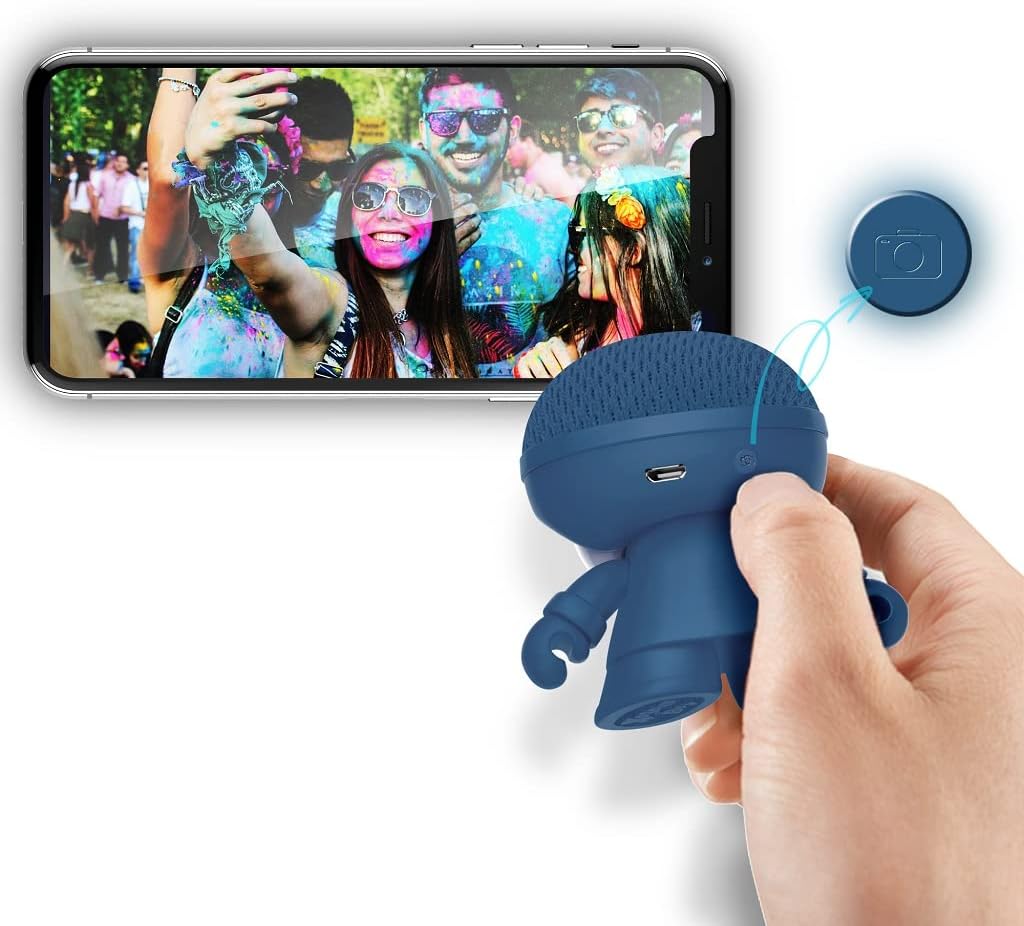
Image: The Xoopar Mini Xboy Eco speaker can be used as a remote shutter for your smartphone camera.
4.4 LED šviesos funkcija
The Mini Xboy Eco features a multi-LED lighted face. The lights may indicate power status, charging status, or simply provide ambient lighting.

Image: The Mini Xboy Eco speaker features a multi-LED lighted face.
5. Priežiūra
5.1 Valymas
To clean your speaker, gently wipe the surface with a soft, dry, or slightly damp cloth. Do not use harsh chemicals, solvents, or abrasive cleaners, as these may damage the finish or internal components.
5.2 Saugykla
When not in use for extended periods, store the speaker in a cool, dry place away from direct sunlight and extreme temperatures. It is recommended to charge the battery periodically (e.g., every 3-6 months) to maintain battery health.
6. Problemų sprendimas
| Problema | Galima priežastis | Sprendimas |
|---|---|---|
| Garsiakalbis neįsijungia. | Baterija išsikrovusi. | Įkraukite garsiakalbį naudodami pateiktą USB laidą. |
| Nepavyksta susieti per „Bluetooth“. | Garsiakalbis nėra susiejimo režime arba yra už diapazono ribų. | Ensure speaker is on and within 10 meters. Turn Bluetooth off/on on your device. Restart both devices. |
| Nėra garso arba garsas per mažas. | Garsiakalbyje arba prijungtame įrenginyje per mažas garsumas. | Padidinkite garsumą tiek garsiakalbyje, tiek prijungtame įrenginyje. |
| Selfie remote not working. | Speaker not paired or camera app not open. | Ensure speaker is paired and camera app is active. |
7. Specifikacijos
- Modelio pavadinimas: Mini Xboy Eco
- Prekės modelio numeris: XBOY81001.16BO
- Prekinis ženklas: Xoopar
- Ryšio technologija: Bluetooth 5.0
- Didžiausia garsiakalbio išėjimo galia: 3 vatų
- Garso išvesties režimas: Stereo (su TWS susiejimu)
- Garsiakalbio tipas: Koaksialinis
- Dažnio atsakas: 20 GHz (Note: This value is unusually high for a speaker and may be a typo in the source data. Typical speaker frequency ranges are in Hz-kHz.)
- Baterija: 1 ličio polimeras (pridedamas)
- Akumuliatoriaus autonomija: Maždaug 4 val
- Perdavimo atstumas: Iki 10 metrų (33 pėdų)
- Gaminio matmenys: 1 x 1 x 1 cm
- Prekės svoris: 50 g
- Medžiaga: ABS, Acrylonitrile Butadiene Styrene (head from recycled plastic bottles, body with non-food wheat fiber and biosphere additive)
- Montavimo tipas: Tvirtinimas ant stalo
- Ypatinga funkcija: Mini portable Bluetooth speaker, integrated selfie remote, multi-LED lighted face
8. Garantija ir palaikymas
For warranty information and customer support, please refer to the documentation provided with your purchase or visit the official Xoopar websvetainėje. Išsaugokite pirkimo įrodymą, jei prireiktų pateikti garantinį ieškinį.
Gamintojas: Xoopar


