1. Įvadas
This manual provides instructions for the YAOHUIMI Replacement Remote Control, designed for use with various Fujitsu AC Air Conditioner models. This remote control offers essential functions for managing your air conditioning unit.
Svarbi pastaba:
This is a replacement remote control and is not a universal remote. Please verify compatibility with your specific Fujitsu air conditioner model or original remote control model before use. Refer to the compatibility list below.
1.1 Suderinamumas
This remote control is compatible with a wide range of Fujitsu AC Air Conditioner models and remote control models, including but not limited to:
- Fujitsu AC Models: ASYG07KETA, ASYG07KETA-B, ASYG09KETA, ASYG09KETA-B, ASYG12KETA, ASYG12KETA-B, ASYG14KETA, ASYG14KETA-B, ASHG14KGTA, ASYG12KMTA, and many others listed in the product description.
- Original Remote Control Models: AR-RED1U, AR-REF1U, AR-REG1U, AR-REM1U, AR-REY1U, AR-REA1E, AR-REA2E, AR-REB1E, AR-REB2E, AR-REF1E, AR-REF2E, AR-REF3E, AR-REF4E, AR-REJ1E, AR-REM1E, AR-REM2E, AR-REM3E, AR-REM4E, AR-REM5E, AR-REM6E, AR-REM7E, AR-REW1E, AR-REW2E, AR-REW3E, AR-REW4E.
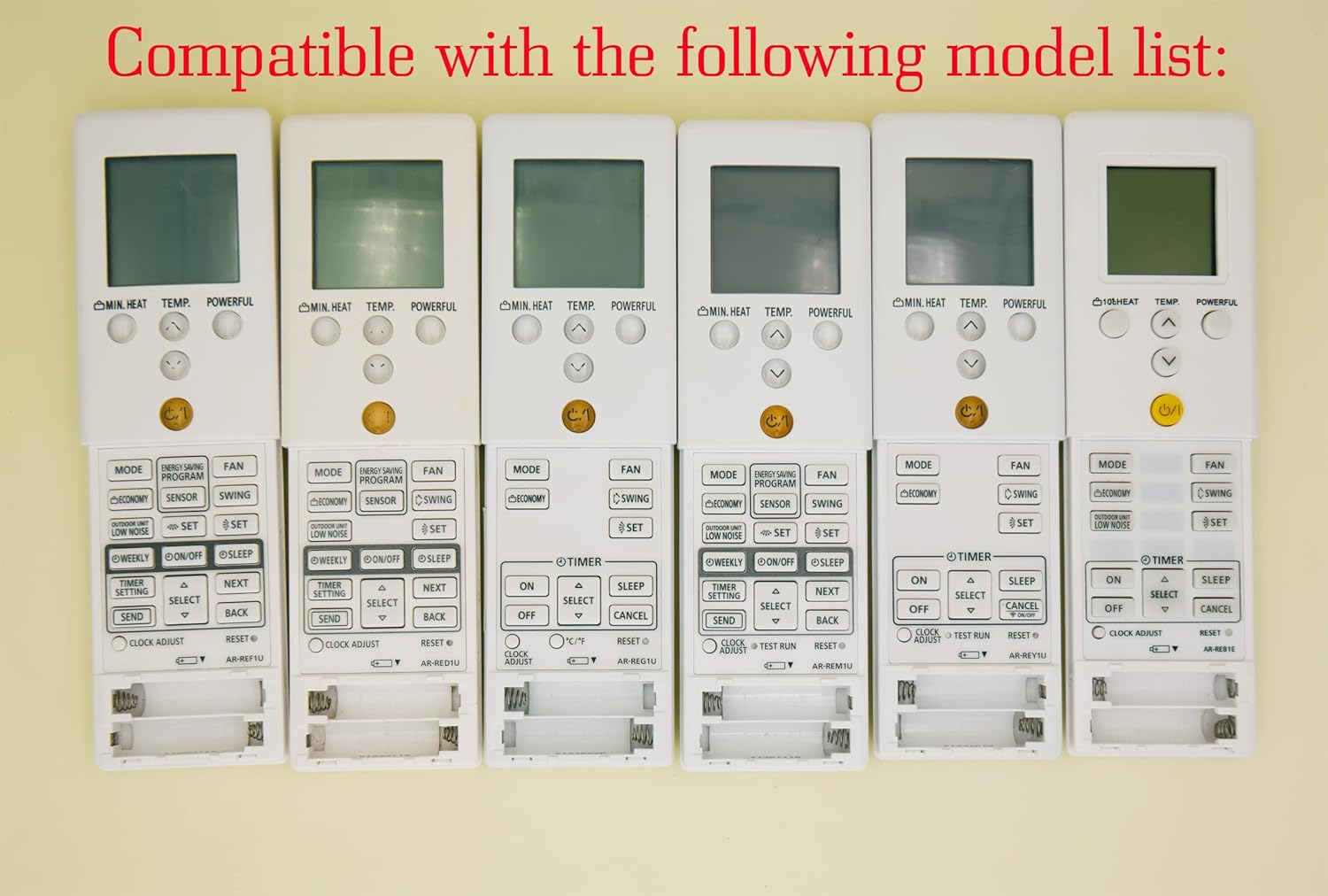
Image 1.1: Various compatible remote control models.
2. Sąranka
2.1 Akumuliatoriaus įdėjimas
To begin using your remote control, you must install batteries. The remote requires two AAA batteries (not included).
- Nuotolinio valdymo pulto gale raskite baterijų skyriaus dangtelį.
- Norėdami atidaryti skyrių, pastumkite dangtelį žemyn arba paspauskite skląstį (jei yra).
- Įdėkite dvi AAA tipo baterijas, užtikrindami, kad teigiamas (+) ir neigiamas (-) poliai teisingai sutaptų su žymėjimais baterijų skyriuje.
- Stumkite baterijų skyriaus dangtelį atgal į vietą, kol jis tvirtai spragtelės.
Atsargiai:
- Nemaišykite senų ir naujų baterijų.
- Nemaišykite šarminių, standartinių (anglies-cinko) arba įkraunamų (nikelio-kadmio) baterijų.
- Jei nuotolinio valdymo pultas nebus naudojamas ilgesnį laiką, išimkite baterijas, kad išvengtumėte elektrolito pratekėjimo.

2.1 vaizdas: galinis view nuotolinio valdymo pulto su baterijų skyriumi.
3. Naudojimo instrukcijos
This section details the functions of the buttons on your replacement remote control.

3.1 vaizdas: Baigtaview nuotolinio valdymo pulto mygtukų.
3.1 Pagrindinės funkcijos
- Power Button (⑁/⑀): Press to turn the air conditioner ON or OFF. This button is typically yellow and located centrally.
- MODE mygtukas: Cycles through operating modes such as AUTO, COOL, DRY, FAN, and HEAT.
- TEMP. Buttons (▲/▼): Adjusts the desired temperature setting. Press ▲ to increase and ▼ to decrease the temperature.
- FAN mygtukas: Reguliuoja ventiliatoriaus greitį (pvz., automatinis, mažas, vidutinis, didelis).
- SWING mygtukas: Activates or deactivates the air swing function, which moves the air outlet louvers.

3.2 pav.: Išsamus view of remote control buttons.
3.2 Išplėstinės funkcijos
- MIN. HEAT Button: Activates a minimum heat setting, often used to prevent freezing in unoccupied rooms.
- GALINGAS mygtukas: Engages a powerful operation mode for rapid cooling or heating.
- ENERGY SAVING PROGRAM Button: Activates a pre-set energy-saving mode.
- Jutiklio mygtukas: May activate a temperature sensor function within the remote itself.
- ECONOMY Button: Engages an economic operation mode to reduce power consumption.
- OUTDOOR UNIT LOW NOISE Button: Reduces the noise level of the outdoor unit.
- WEEKLY Button: Accesses weekly timer settings.
- ON/OFF Button (Timer): Nustato ĮJUNGIMO/IŠJUNGIMO laikmatį pagal planą.
- MIEGO mygtukas: Activates sleep mode, which adjusts temperature gradually for comfortable sleep.
- TIMER SETTING Button: Used to configure various timer functions.
- SELECT (▲/▼) Button: Used for navigating and selecting options within timer or program settings.
- Siųsti mygtukas: Confirms and sends timer or program settings to the AC unit.
- ATGAL mygtukas: Returns to the previous menu or cancels a setting.
- CLOCK ADJUST Button: Used to set the current time on the remote's display.
- Perkrovimo mygtukas: Resets the remote control to its factory default settings.
3.3 Ekrano funkcijos
- Žalias foninis apšvietimas: The remote control features a green backlight for easy visibility and operation in low-light conditions or at night.
- Fahrenheit and Celsius Display: The remote can display temperature in both Fahrenheit (℉) and Celsius (℃). Use the ℃/℉ button to toggle between the two units.

Image 3.3: Green backlight and Fahrenheit/Celsius display toggle.
4. Priežiūra
4.1 Nuotolinio valdymo pulto valymas
Norėdami išlaikyti nuotolinio valdymo pulto išvaizdą ir funkcionalumą:
- Nuvalykite paviršių minkšta, sausa šluoste.
- Esant sunkiai įsisenėjusiems nešvarumams, švelniai dampnuvalykite šluostę vandeniu ir švelniu plovikliu, tada nedelsdami nusausinkite.
- Do not use abrasive cleaners, alcohol, or chemical solvents, as these can damage the remote's finish or internal components.
4.2 Akumuliatoriaus keitimas
Replace the batteries when the remote's display becomes dim or if the remote becomes unresponsive. Typically, batteries should be replaced every 6-12 months, depending on usage. Follow the battery installation steps in Section 2.1.
5. Problemų sprendimas
- Nuotolinis nereaguoja:
- Patikrinkite, ar baterijos tinkamai įdėtos ir ar jos pakankamai įkrautos. Jei reikia, pakeiskite.
- Įsitikinkite, kad tarp nuotolinio valdymo pulto ir oro kondicionieriaus imtuvo nėra jokių kliūčių.
- Įsitikinkite, kad esate efektyviame oro kondicionieriaus veikimo diapazone.
- Incorrect temperature display (Fahrenheit/Celsius):
- Press the ℃/℉ button on the remote control to toggle between Fahrenheit and Celsius display modes.
- Remote functions are erratic:
- Try resetting the remote control by removing the batteries for a few minutes, then reinserting them.
- If the issue persists, replace the batteries with new ones.
6. Specifikacijos
| Funkcija | Aprašymas |
|---|---|
| Prekės ženklas | YAOHUIMI |
| Modelio numeris | A420220127-8IN1-18 |
| Ryšio technologija | Infraraudonųjų spindulių |
| Ypatinga funkcija | Replacement Remote (Not Universal) |
| Suderinami įrenginiai | Fujitsu AC Air Conditioners (various models, see Section 1.1) |
| Maitinimo šaltinis | 2 x AAA baterijos (į komplektą neįeina) |
7. Garantija ir palaikymas
Dėl garantijos informacijos ar techninės pagalbos žr. kartu su pirkiniu pateiktus dokumentus arba susisiekite tiesiogiai su pardavėju. Išsaugokite pirkimo kvitą kaip pirkimo įrodymą.


