1. Įvadas ir saugos informacija
This manual provides essential instructions for the safe operation, maintenance, and care of your Nilox X-Drive M1 Electric Scooter. Please read this manual thoroughly before first use to ensure proper handling and to prevent accidents.
1.1 Bendrosios saugos gairės
- Važiuodami visada dėvėkite šalmą ir tinkamas apsaugos priemones (kelių, alkūnių apsaugas).
- Prieš kiekvieną važiavimą įsitikinkite, kad visi komponentai yra tvirtai pritvirtinti ir veikia tinkamai.
- Do not ride in adverse weather conditions, such as heavy rain, snow, or icy conditions.
- Avoid riding on uneven surfaces, potholes, or obstacles that could cause loss of control.
- Adhere to local traffic laws and regulations regarding electric scooter usage. In Italy, speed limits are 6 km/h in pedestrian areas and 20 km/h in other cases.
- Do not allow children under the recommended age (Adults) to operate the scooter.
- Neviršykite didžiausios 100 kg svorio ribos.
- Būkite atidūs aplinkai ir kitiems eismo dalyviams.
1.2 Saugos funkcijos
The Nilox X-Drive M1 is designed with several safety features:
- Antibacterial and Fluorescent Grips: For enhanced hygiene and visibility.
- Reflective Stickers: Improve visibility in low-light conditions.
- High-Visibility Lights: Equipped with white or yellow front lights and red rear lights for improved visibility.
- Integruoti posūkio signalai: Turn signals are incorporated into the rear LED light for clear indication of direction changes.
- Dviguba stabdymo sistema: Features a rear disc brake and a front electric brake for effective stopping power.
- Ragas: A built-in horn is included for alerting others.
2. Produktas baigtasview
The Nilox X-Drive M1 is a lightweight, foldable electric scooter designed for urban mobility. It features a 350W motor, a 25 km range, cruise control, and a smart display.
2.1 Komponentai ir funkcijos

Vaizdas: The Nilox X-Drive M1 electric scooter shown alongside its detachable shoulder strap, highlighting its portability.

Vaizdas: Pilnas view of the Nilox X-Drive M1 electric scooter, showcasing its black frame with lime green accents and overall design.

Vaizdas: Išsamią view of the scooter's smart display, showing digital readouts for speed, battery level, and other indicators.
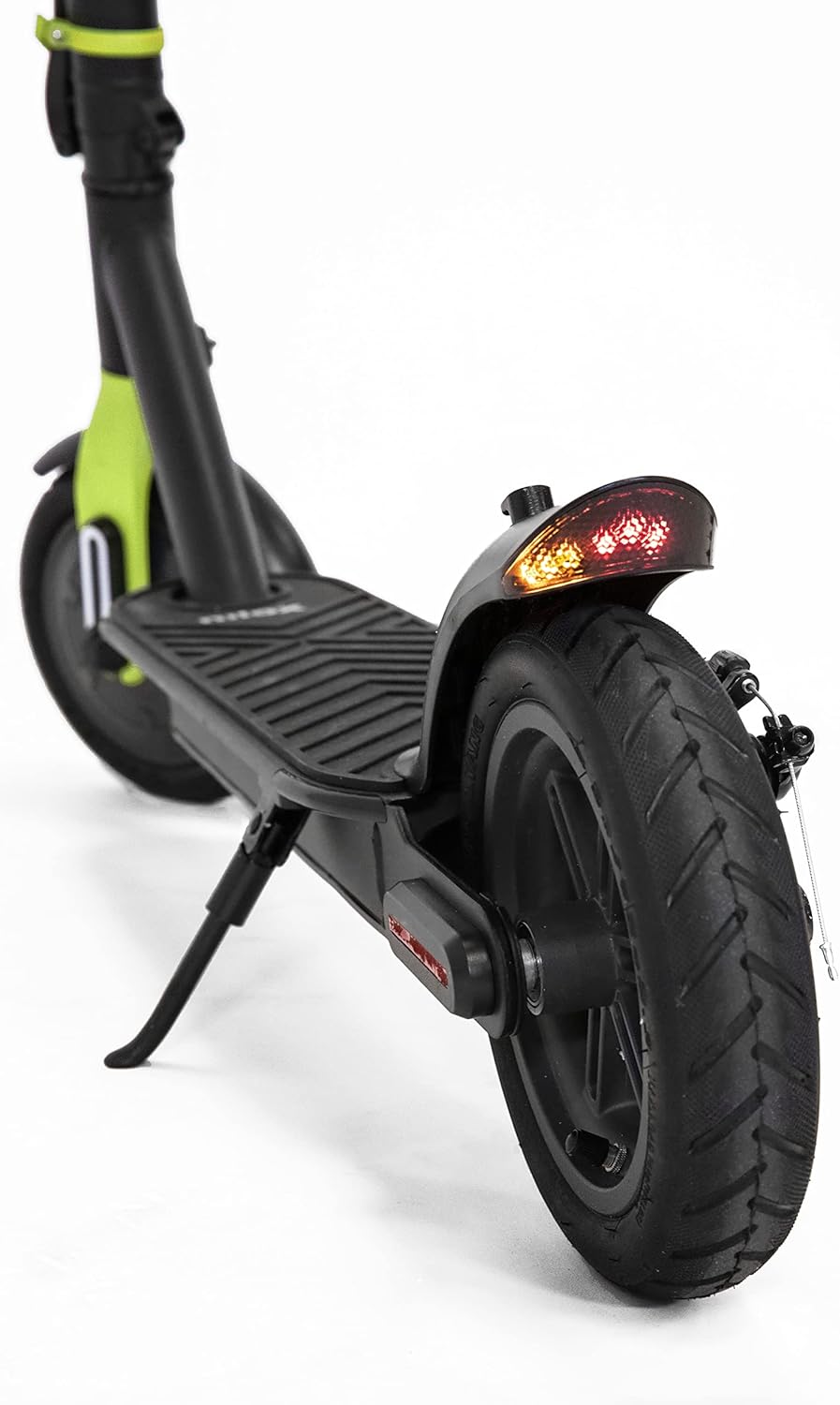
Vaizdas: A close-up of the rear wheel, showcasing the disc brake mechanism and the integrated rear LED light with turn signals.
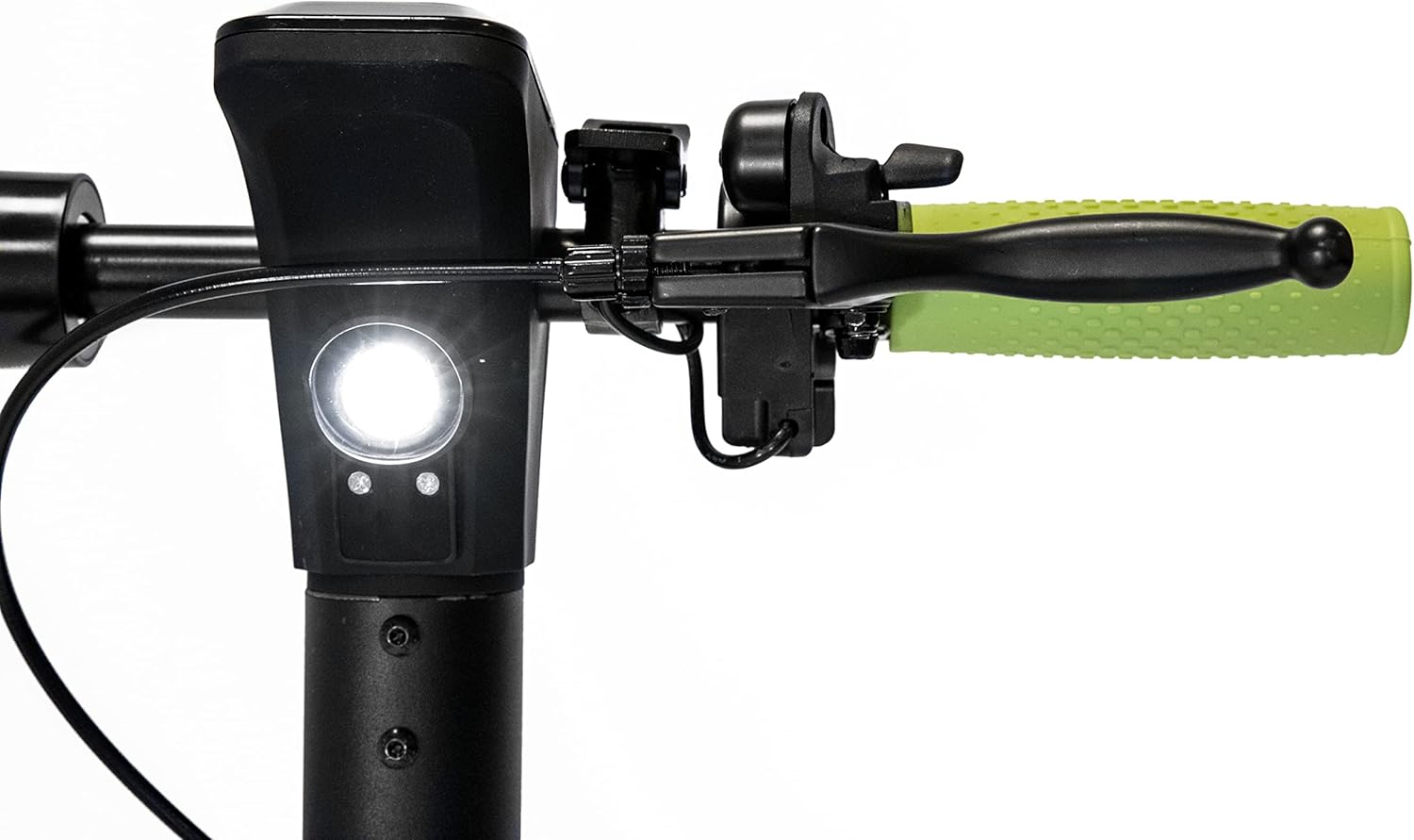
Vaizdas: A view of the scooter's handlebar area, showing the front light and the brake lever on the left side.
2.2 Key Features Diagram

Diagrama: This image illustrates the smart display, cruise control activation (double accelerator press), visual alarm signals, and the ON/OFF button on the handlebar.

Diagrama: This image shows the turn signal control on the handlebar and the brake lights and turn signals located on the rear fender.

Diagrama: This image highlights the rear disc brake, front electric brake, certified antibacterial grips, and reflective paint on the scooter's frame.
3. Sąranka
3.1 Išpakavimas ir pirminė apžiūra
- Atsargiai išimkite paspirtuką ir visus priedus iš pakuotės.
- Verify that all components listed in the "What's in the Box" section (e.g., Battery Pack) are present.
- Inspect the scooter for any visible damage from shipping. If damage is found, do not use the scooter and contact customer support.
3.2 Sulankstymas ir išskleidimas
The X-Drive M1 is designed to be foldable for easy transport and storage.
- Išskleidžiamas: Locate the folding mechanism latch near the base of the handlebar stem. Release the latch and carefully raise the handlebar stem until it locks securely into the upright position. Ensure it is fully locked before use.
- Sulankstoma: To fold, disengage the locking mechanism and gently lower the handlebar stem towards the deck until it clicks into the folded position.
3.3 Akumuliatoriaus įkrovimas
- Prieš pirmą kartą naudodami, pilnai įkraukite paspirtuko akumuliatorių.
- Connect the charger to the charging port on the scooter and then plug it into a standard power outlet.
- The charging indicator on the charger will typically change color (e.g., red to green) when charging is complete.
- Do not overcharge the battery. Unplug the charger once charging is complete.
4. Naudojimo instrukcijos
4.1 Įjungimas / išjungimas
- To power on the scooter, press and hold the ON/OFF button located near the smart display.
- To power off, press and hold the ON/OFF button again until the display turns off.
4.2 Važiavimas paspirtuku
- Padėkite vieną koją ant denio ir kita koja atsispirkite, kad įgautumėte pradinį pagreitį.
- Once moving, gently press the accelerator to engage the motor.
- The scooter offers 3 speed modes: 6 km/h, 20 km/h, and 25 km/h. Select the appropriate speed mode via the smart display controls.
4.3 Kruizo kontrolė
- To activate cruise control, maintain a consistent speed and double-press the accelerator. The scooter will maintain its current speed.
- To deactivate cruise control, lightly press the brake lever or the accelerator.
4.4 Stabdymas
- To slow down or stop, gently press the brake lever on the handlebar. This activates both the rear disc brake and the front electric brake.
- Apply brakes smoothly to avoid sudden stops and maintain control.
4.5 Turn Signals and Lights
- Activate the turn signals using the dedicated control on the handlebar to indicate your intended direction.
- Ensure the front and rear lights are on when riding in low-light conditions or at night.
4.6 NFC Key
- The scooter features an NFC key for enhanced security.
- The NFC key can be replicated on your smartphone for convenient unlocking and locking. Refer to the scooter's companion app or specific instructions for NFC key setup.
5. Priežiūra
5.1 Akumuliatoriaus priežiūra
- Charge the battery regularly, even if the scooter is not in use for extended periods, to maintain battery health.
- Prieš įkrovimą venkite visiškai iškrauti bateriją.
- Store the scooter and battery in a cool, dry place away from direct sunlight and extreme temperatures.
5.2 Padangų priežiūra
- Regularly check tire pressure to ensure optimal performance and range. Refer to the tire sidewall for recommended pressure.
- Prieš kiekvieną važiavimą patikrinkite padangas, ar jos nenusidėvėjusios, nepradūrusios ar nepažeistos.
5.3 Stabdžių sistemos patikrinimas
- Periodiškai tikrinkite stabdžių svirtelių įtempimą ir reagavimą.
- Ensure the disc brake is clean and free of debris.
- If braking performance degrades, have the brakes inspected by a qualified technician.
5.4 Valymas ir laikymas
- Išvalykite paspirtuką su skelbimuamp audiniu. Nenaudokite aukšto slėgio vandens srovės ir nemerkite paspirtuko į vandenį.
- Venkite naudoti abrazyvinius valiklius ar tirpiklius, kurie gali pažeisti apdailą.
- Kai nenaudojate, paspirtuką laikykite sausoje, apsaugotoje vietoje.
6. Problemų sprendimas
If you encounter issues with your Nilox X-Drive M1, the smart display can provide alarm signals to help diagnose problems. Consult the display for specific error codes or indicators.
| Problema | Galima priežastis | Sprendimas |
|---|---|---|
| Paspirtukas neįsijungia. | Žema akumuliatoriaus įtampa; atsilaisvinusios jungtys. | Visiškai įkraukite akumuliatorių. Patikrinkite visas laidų jungtis. |
| Sumažintas veikimo nuotolis arba galia. | Žemas padangų slėgis; išsikrovęs akumuliatorius; dažnas važiavimas įkalnėn. | Check and inflate tires to recommended pressure. Ensure battery is fully charged. |
| Stabdžiai jaučiasi laisvi arba neveiksmingi. | Brake cable tension too low; worn brake pads. | Adjust brake cable tension. Inspect brake pads for wear and replace if necessary. |
| Neįprasti garsai veikimo metu. | Loose components; debris in wheels/motor. | Inspect all parts for looseness and tighten. Clean wheels and motor area. |
For persistent issues or complex repairs, it is recommended to contact Nilox customer support or a certified service center.
7. Specifikacijos
| Funkcija | Specifikacija |
|---|---|
| Modelio pavadinimas | X-Drive M1 (M1 with Turn Signals, Lime Green) |
| Variklio galia | 350 W |
| Maksimalus diapazonas | 25 km |
| Maksimalus greitis | 25 km/h (adjustable to 6 km/h, 20 km/h) |
| Svoris | 13.8 kg |
| Maksimali apkrova | 100 kg |
| Rato dydis | 8.5 colių |
| Stabdžių tipas | Rear Disc Brake, Front Electric Brake |
| Medžiaga | Aluminum, Metal Frame |
| Spalva | Black - Lime |
| Ypatingos savybės | Lightweight, Foldable, Cruise Control, Smart Display, NFC Key, Turn Signals |
| Rekomenduojamas amžius | Suaugusieji |
| Baterijos tipas | Ličio jonų (reikalingas 1, pridedamas) |
8. Garantija ir palaikymas
8.1 Informacija apie garantiją
Specific warranty terms and conditions for the Nilox X-Drive M1 Electric Scooter may vary by region and retailer. Please refer to the warranty card included with your product or consult the point of purchase for detailed warranty information. Keep your proof of purchase for warranty claims.
8.2 Pagalba klientams
For technical assistance, spare parts, or any other inquiries regarding your Nilox X-Drive M1, please contact Nilox customer support. Visit the official Nilox website for contact details and further resources.
Taip pat galite apsilankyti Nilox Store on Amazon Norėdami gauti daugiau informacijos.


