Laser DVD-HD012

Lazerinis DVD CD grotuvas HD012 Vartotojo vadovas

Model: DVD-HD012

Produktas baigtasview

The Laser DVD CD Player HD012 is a versatile multi-region player designed to provide a comprehensive home entertainment experience. It supports a wide array of disc and digital media formats, ensuring compatibility with your existing media library. Equipped with HDMI and AV outputs, it offers flexible connectivity options for various television setups. Its compact design and user-friendly interface make it an ideal addition to any home cinema system.

Laser DVD CD Player HD012 with remote control

Image: The Laser DVD CD Player HD012, a sleek black unit, is shown with its remote control resting on top. The player features a disc tray, USB port, and a digital display.

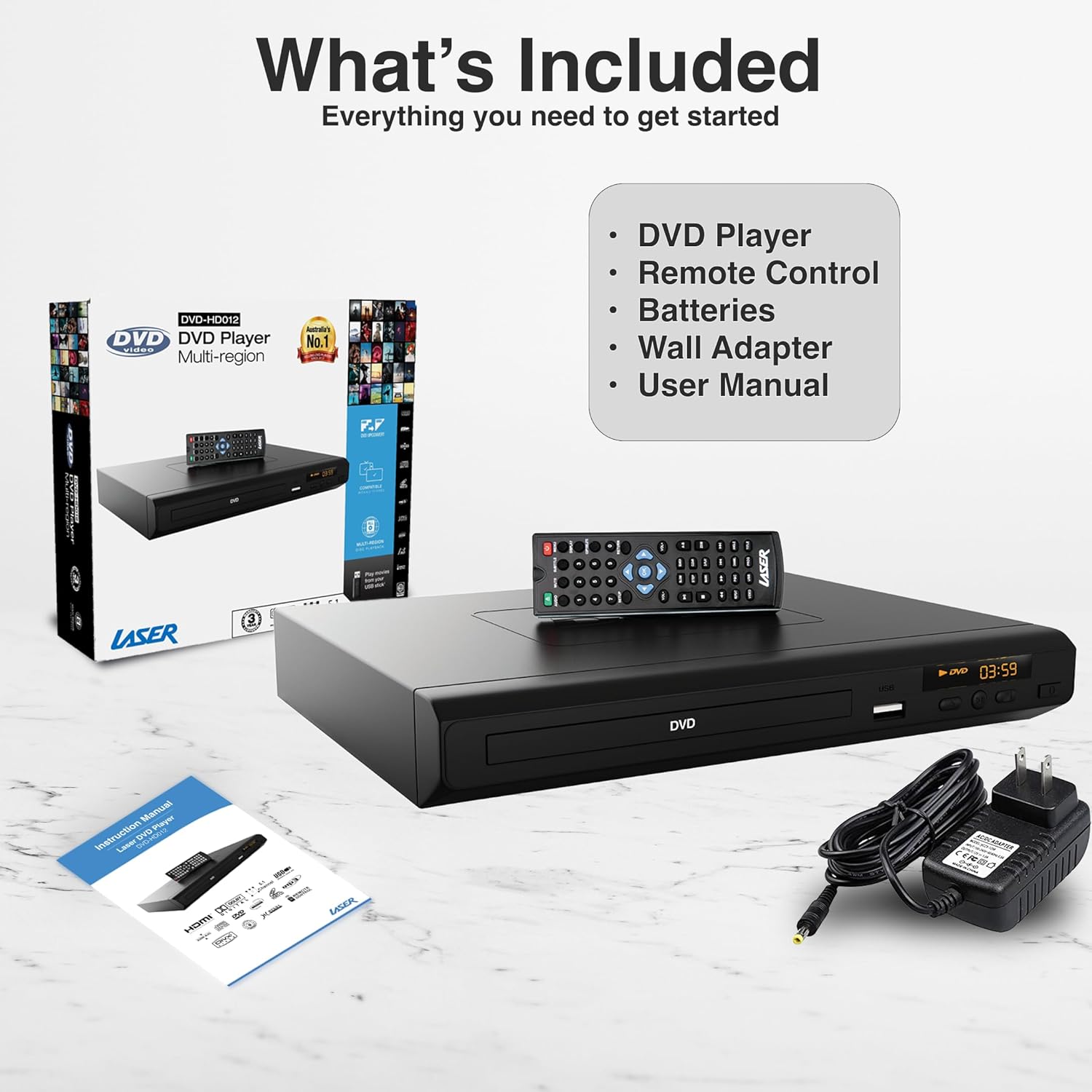
Kas įtraukta

Upon unboxing your Laser DVD CD Player HD012, please verify that all the following components are present:

  • DVD Player (Model: DVD-HD012)
  • Nuotolinio valdymo pultas
  • Wall Adapter (Power Supply)
  • Vartotojo vadovas (šis dokumentas)
  • Note: Batteries for the remote control are not included and must be purchased separately.
Contents included with the Laser DVD CD Player HD012

Image: A visual representation of the items included in the product package: the DVD player, its remote control, a wall power adapter, and the user manual, alongside the product packaging box.

Sąrankos vadovas

1. Connecting the Player to Your Television

The Laser DVD CD Player HD012 offers multiple connectivity options to suit your television setup:

  • HDMI Connection (Recommended for High Definition): For the best audio and video quality, connect an HDMI cable (not included) from the HDMI OUT port on the DVD player to an available HDMI IN port on your television. This single cable transmits both digital video and audio signals.
  • RCA Composite Connection (Standard Definition): If your television does not have an HDMI port, or if you prefer an analog connection, use an RCA composite cable (not included). Connect the yellow video cable to the VIDEO OUT port on the DVD player and the yellow VIDEO IN port on your TV. Connect the red and white audio cables to the AUDIO OUT (R/L) ports on the DVD player and the corresponding red and white AUDIO IN (R/L) ports on your TV.
HDMI Output connection diagram for Laser DVD Player

Image: An illustration demonstrating the HDMI output capability of the DVD player, showing a television screen displaying content and the DVD player connected via an HDMI cable, emphasizing high-definition video from a single cable.

2. Powering On the Player

  1. Connect the provided wall adapter to the DC IN port on the back of the DVD player.
  2. Prijunkite sieninį adapterį į standartinį elektros lizdą.
  3. Paspauskite GALIA button on the front of the DVD player or on the remote control to turn the unit on. The display will illuminate.
  4. Select the correct input source (HDMI or AV) on your television using your TV's remote control.

Naudojimo instrukcijos

1. Disko atkūrimas

  1. Ensure the player is powered on and connected to your TV.
  2. Paspauskite ATIDARYTI/UŽDARYTI mygtuką priekiniame skydelyje arba nuotolinio valdymo pulte, kad atidarytumėte diskų dėklą.
  3. Carefully place a DVD or CD disc onto the tray with the label side facing up.
  4. Paspauskite ATIDARYTI/UŽDARYTI Dar kartą paspauskite mygtuką, kad uždarytumėte dėklą. Grotuvas automatiškai pradės skaityti diską.
  5. Use the remote control's PALEISTI / PAUZĖ, STOP, ATSUKTI, ir GREITI PIRMYN mygtukai, skirti valdyti atkūrimą.
Laser DVD Player supporting multiple media formats

Image: The DVD player and remote are shown with text indicating support for various video and additional media formats, including DVD-RW, VCD, CD-R, DivX, MP3, JPEG, AVI, MPEG, MPEG4, VOB, and FLV.

2. USB medijos atkūrimas

The player supports playback of digital media files from USB memory devices.

  1. Įkiškite USB atmintinę į DVD grotuvo priekyje esantį USB prievadą.
  2. The player should automatically detect the USB device and display a menu for selecting media types (e.g., Photo, Music, Movie).
  3. Naršykite po aplankus ir files using the arrow keys on the remote control and press ENTER pasirinkti.
  4. Paspauskite ŽAISTI , kad pradėtumėte pasirinkto įrašo atkūrimą file.

3. Nuotolinio valdymo funkcijos

The included IR remote control provides full functionality for operating your DVD player. Key buttons include:

  • GALIA: Įjungia arba išjungia grotuvą.
  • ATIDARYTI UŽDARYTI: Atidaro ir uždaro disko dėklą.
  • PAGRINDIMAS / PAUZĖ: Pradeda arba pristabdo atkūrimą.
  • STOP: Sustabdo atkūrimą.
  • PREV / KITAS: Skips to the previous or next chapter/track.
  • REW/FF: Rewinds or fast forwards through content.
  • VOL +/-: Adjusts the volume (if connected directly to an audio system or TV via analog output).
  • NUSTATYMAS: Pasiekia sistemos nustatymų meniu.
  • PAVADINIMAS / MENIU: Accesses the disc title or main menu.
  • USB: Switches input to USB mode.

4. Region-Free Playback

This DVD player is designed to be multi-region (region-free), allowing you to play DVDs from any region worldwide (Region 0-6). This feature ensures broad compatibility with your international DVD collection.

Region-Free Playback feature of Laser DVD Player

Image: The DVD player and remote are depicted against a global map background, highlighting its "Region-Free Playback" capability, allowing users to enjoy DVDs from any part of the world, supporting both PAL and NTSC formats.

5. Palaikomi medijos formatai

The Laser DVD CD Player HD012 supports a wide range of disc and digital media formats:

KategorijaPalaikomi formatai
Diskų formataiDVD-R/-RW, DVD-Video, DVD+R/+RW, CD, CD-R/RW, VCD, SVCD, HDCD
Video Formats (via USB)AVI, DivX, MPEG, MPEG4, VOB, FLV
Audio Formats (via USB/Disc)MP3, WMA, Dolby Digital, DTS
Image Formats (via USB)JPEG

The player also features built-in Anti-Shock and Error-Correction technologies to ensure uninterrupted viewklausytis ir mėgautis.

Full HD 1080p immersive audiovisual experience with Laser DVD Player

Image: A living room setup showing the DVD player connected to a large television displaying a movie in Full HD 1080p, indicating an immersive audiovisual experience with Dolby 7.1 Surround Sound support.

Priežiūra

To ensure the longevity and optimal performance of your Laser DVD CD Player HD012, follow these maintenance guidelines:

  • Įrenginio valymas: Use a soft, dry cloth to wipe the exterior of the player. Do not use liquid cleaners, abrasive cleaners, or chemical sprays, as these can damage the finish.
  • Disko priežiūra: Handle discs by their edges. Keep discs clean and free of dust, fingerprints, and scratches. Use a soft, lint-free cloth to wipe discs from the center outwards if cleaning is necessary.
  • Vėdinimas: Ensure the player is placed in a well-ventilated area. Do not block any ventilation openings on the unit. Avoid placing it on soft surfaces like carpets or blankets that could obstruct airflow.
  • Saugykla: When not in use for extended periods, disconnect the power adapter and store the player in a cool, dry place away from direct sunlight and extreme temperatures.

Trikčių šalinimas

If you encounter issues with your DVD player, please refer to the following common problems and their solutions:

ProblemaGalima priežastis / sprendimas
Nėra galios
  • Ensure the power adapter is securely connected to the player and the electrical outlet.
  • Patikrinkite, ar maitinimo lizdas veikia, prijungdami prie jo kitą įrenginį.
  • Paspauskite grotuvo arba nuotolinio valdymo pulto POWER mygtuką.
Nėra vaizdo televizoriuje
  • Verify that the HDMI or RCA cables are securely connected to both the player and the TV.
  • Įsitikinkite, kad jūsų televizorius nustatytas į tinkamą įvesties šaltinį (pvz., HDMI 1, AV).
  • Check if the disc is inserted correctly and is not damaged.
Nėra garso
  • Check audio cable connections (HDMI or RCA).
  • Increase the volume on your TV or audio receiver.
  • Ensure the player's volume is not muted or set too low.
  • Verify the audio settings in the player's setup menu.
Diskas negrojamas / klaida „Nėra disko“
  • Įsitikinkite, kad diskas yra švarus, be įbrėžimų ar dėmių.
  • Patikrinkite, ar diskas įdėtas teisingai, etikete į viršų.
  • Check if the disc format is supported by the player (refer to Supported Media Formats section).
Nuotolinio valdymo pultas neveikia
  • Ensure fresh batteries are installed correctly (polarity).
  • Point the remote directly at the player's IR sensor.
  • Remove any obstacles between the remote and the player.

Jei problema išlieka ir išbandžius šiuos sprendimus, susisiekite su klientų aptarnavimo tarnyba.

Techninės specifikacijos

FunkcijaDetalė
Prekės ženklasLazeris
ModelisDVD-HD012
Suderinami įrenginiaiTelevizija
Palaikomi laikmenų tipaiCD, DVD, VCD (and various digital formats via USB as listed above)
Jungčių tipaiHDMI, RCA (Composite), USB (1 port)
Palaikomi garso formataiMP3, WMA, Dolby Digital, DTS
Garso išvesties režimasAplink
Ypatingos savybėsAnti-Shock, Error-Correction, Multi-Region Playback
Resolution (Upscaling)Up to 3840x2160 (4K) via HDMI (for compatible media and display)
Maitinimo šaltinisSu laidu elektra
Gaminio matmenys (I x P x A)22 x 18 x 4.5 cm
Prekės svoris742 gramų

Garantija ir palaikymas

Your Laser DVD CD Player HD012 comes with a 3 metų garantija from the date of purchase, providing peace of mind regarding its quality and performance. This warranty covers manufacturing defects and ensures reliable operation under normal use conditions.

For warranty claims, technical assistance, or any inquiries regarding your product, please contact Laser customer support. Keep your proof of purchase (receipt or invoice) readily available as it will be required for any warranty service.

For the most up-to-date support information, including contact details and FAQs, please visit the official Laser websvetainėje arba žr. kontaktinę informaciją, pateiktą kartu su pirkimo dokumentais.

Susiję dokumentai - DVD-HD012

Preview BLU-BD1080 regiono kodo keitimo vadovas – lazeris
Sužinokite, kaip pakeisti DVD ir „Blu-ray“ regiono kodus savo „Laser BLU-BD1080“ grotuve. Šiame vadove pateikiamos nuoseklios instrukcijos, kaip nustatyti regiono kodus diskams iš skirtingų šalių.
Preview Laser DVD Player DVD-HD012 Instruction Manual
Comprehensive instruction manual for the Laser DVD Player model DVD-HD012, covering setup, operation, features, troubleshooting, specifications, and warranty information.
Preview Laser DVD-PT-7D Portable DVD Player User Manual
User manual for the Laser DVD-PT-7D 7-inch portable DVD player, covering setup, playback, system settings, troubleshooting, specifications, and warranty information.
Preview Laser DVD-PT-10D Portable DVD Player User Manual
Comprehensive user manual for the Laser DVD-PT-10D 10-inch screen portable DVD player, covering safety, installation, playback features, system setup, troubleshooting, specifications, and warranty information.
Preview LASER DVD-PT-7D 7" Portable DVD Player User Manual
Comprehensive user manual for the LASER DVD-PT-7D 7" Portable DVD Player, covering safety, operation, setup, troubleshooting, and specifications. Learn how to use your device for optimal entertainment.
Preview Laser Q13 Personal Media Player FAQ and Troubleshooting Guide
Comprehensive Frequently Asked Questions (FAQ) and troubleshooting guide for the Laser Q13 Personal Media Player, covering setup, file management, audio/video playback, and common issues.