1. Įvadas
This manual provides detailed instructions for the operation and maintenance of your Jectse Bluetooth Speaker Alarm Clock. Please read this manual thoroughly before using the product to ensure proper function and longevity.
The Jectse Bluetooth Speaker Alarm Clock is a multi-functional device featuring a digital clock, dual alarm capabilities, an LED mirror display, FM radio, and Bluetooth connectivity for audio playback. It also supports music playback via a memory card.
2. Produktas baigtasview
2.1. Pagrindinės savybės
- Bluetooth 5.0 ryšys: Belaidžiu būdu transliuokite garsą iš suderinamų įrenginių.
- Dvigubas žadintuvas: Nustatykite du nepriklausomus žadintuvus skirtingam žadinimo laikui.
- LED Mirror Display: Clear digital time display that also functions as a mirror.
- FM radijas: Digitally tuned FM radio (87.5MHz-108MHz) for news, music, and weather.
- Atkūrimas iš atminties kortelės: Supports music playback from a memory card (up to 32GB, not included).
- Integruota įkraunama baterija: 1600mAh lithium battery for portable use.
- Kompaktiškas dizainas: Product dimensions are approximately 116 x 51 x 33mm (4.6 x 2 x 1.3 inches).
2.2. Pakuotės turinys
- 1 x Jectse Alarm Clock Speaker
- 1 x Micro USB įkrovimo laidas
- 1 x Naudotojo vadovas (šis dokumentas)
2.3. Produkto schema
Žr. paveikslėlį apačioje, kad pamatytumėte daugiauview prietaiso komponentų ir valdiklių.
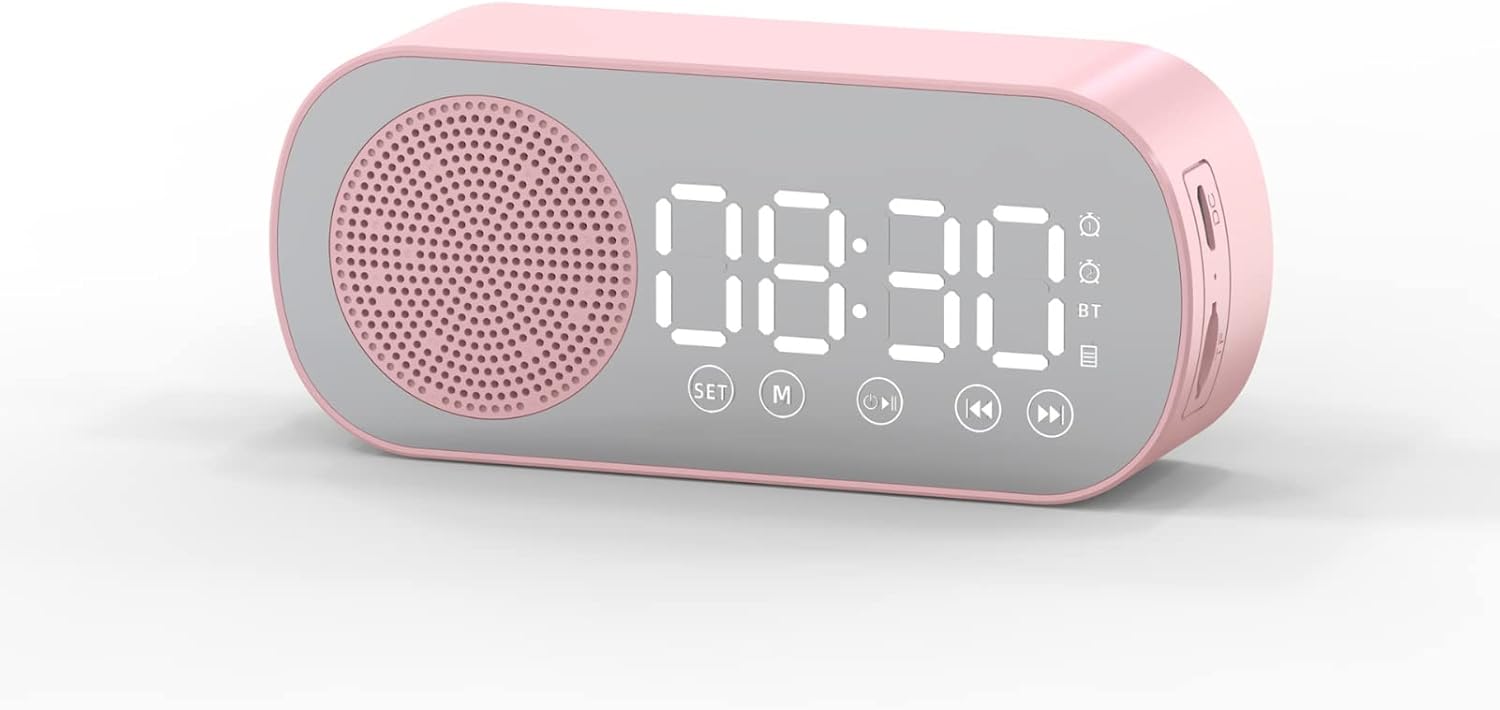
1 paveikslas: Priekyje view of the Jectse Bluetooth Speaker Alarm Clock, showing the speaker grille, LED display, and control buttons (SET, M, Play/Pause, Previous, Next).

2 paveikslas: Šoninė view of the alarm clock with dimensions: 116mm (4.6in) length, 51mm (2in) height, and 33mm (1.3in) depth.
3. Sąranka
3.1. Pradinis įkrovimas
Before first use, fully charge the device. Connect the provided Micro USB charging cable to the charging port on the side of the alarm clock and the other end to a standard USB power adapter (not included).

3 paveikslas: The alarm clock and its Micro USB charging cable.
LED ekrane esantis akumuliatoriaus indikatorius rodys įkrovimo būseną. Visiškas įkrovimas paprastai trunka kelias valandas.
4. Naudojimo instrukcijos
4.1. Maitinimo įjungimas/išjungimas
Paspauskite ir palaikykite Maitinimas / režimas (M) mygtuką, norėdami įjungti arba išjungti įrenginį.
4.2. Laiko nustatymas
- Laikrodžio režimu paspauskite ir palaikykite NUSTATYTI mygtuką, kol pradės mirksėti valandų skaitmenys.
- Naudokite Ankstesnis (◀◀) ir Toliau (▶▶) mygtukai valandoms reguliuoti.
- Paspauskite NUSTATYTI button again to switch to minute adjustment. Use the Ankstesnis (◀◀) ir Toliau (▶▶) mygtukai minutėms reguliuoti.
- Paspauskite NUSTATYTI button a third time to confirm and exit time setting mode.
4.3. Setting Alarms (Dual Alarm Function)
The device supports two independent alarms. Follow these steps for each alarm:

4 paveikslas: The alarm clock illustrating the dual alarm feature with two distinct alarm settings.
- In clock mode, short press the NUSTATYTI button once to enter Alarm 1 setting mode. The alarm icon and hour digits will flash.
- Naudokite Ankstesnis (◀◀) ir Toliau (▶▶) mygtukai valandoms reguliuoti.
- Paspauskite NUSTATYTI again to adjust minutes. Use Ankstesnis (◀◀) ir Toliau (▶▶) koreguoti.
- Paspauskite NUSTATYTI a third time to select the alarm sound (e.g., buzzer, FM radio). Use Ankstesnis (◀◀) ir Toliau (▶▶) , kad galėtumėte peržiūrėti parinktis.
- Paspauskite NUSTATYTI a fourth time to confirm Alarm 1 settings.
- To set Alarm 2, repeat steps 1-5, but short press the NUSTATYTI button twice to enter Alarm 2 setting mode.
- To enable/disable an alarm, short press the NUSTATYTI button until the desired alarm icon flashes, then press the Play/Pause (▶▌▌) mygtuką, norėdami jį įjungti arba išjungti.
Note: The alarm volume is independent of the main speaker volume and may be fixed or adjustable within the alarm settings. If the alarm sound is too loud, check if there's an option to adjust it during the alarm setup process.
4.4. „Bluetooth“ režimas
- Paspauskite Maitinimas / režimas (M) button repeatedly until "BT" appears on the display, indicating Bluetooth mode.
- On your mobile device, enable Bluetooth and search for "Jectse Speaker" or a similar device name.
- Pasirinkite įrenginį, kurį norite susieti. Patvirtinimo garsas praneš apie sėkmingą susiejimą.
- You can now play audio from your device through the speaker. Use the Play/Pause (▶▌▌), Ankstesnis (◀◀), ir Toliau (▶▶) mygtukai, skirti valdyti atkūrimą.
4.5. FM radijo režimas

5 paveikslas: The alarm clock functioning as an FM radio on a bedside table.
- Paspauskite Maitinimas / režimas (M) mygtuką kelis kartus, kol ekrane pasirodys „FM“.
- Paspauskite Play/Pause (▶▌▌) mygtuką, kad automatiškai nuskaitytumėte ir išsaugotumėte galimas FM stotis.
- Naudokite Ankstesnis (◀◀) ir Toliau (▶▶) mygtukai, skirti perjungti išsaugotas stotis.
- For better reception, ensure the device is not obstructed and try repositioning it.
4.6. Memory Card Playback
Insert a memory card (Micro SD card, up to 32GB, not included) into the designated slot on the device. The device will automatically switch to memory card mode and begin playing audio files. Naudoti Play/Pause (▶▌▌), Ankstesnis (◀◀), ir Toliau (▶▶) mygtukai, skirti valdyti atkūrimą.
4.7. Garsumo reguliavimas
In any audio playback mode (Bluetooth, FM, Memory Card), press and hold the Ankstesnis (◀◀) button to decrease volume or the Toliau (▶▶) mygtuką, norėdami padidinti garsumą.
4.8. LED Mirror Display

6 paveikslas: The alarm clock's LED display also functions as a mirror.
The front panel of the device features an LED display that shows the time and other information. When not actively displaying information, the surface can be used as a mirror.

7 paveikslas: The LED display showing multiple functions and indicators, including time, battery level, and Bluetooth status.
5. Priežiūra
- Valymas: Įrenginį valykite minkšta, sausa šluoste. Nenaudokite abrazyvinių valiklių ar tirpiklių.
- Saugykla: Laikykite prietaisą vėsioje, sausoje vietoje, apsaugotoje nuo tiesioginių saulės spindulių ir ekstremalių temperatūrų.
- Akumuliatoriaus priežiūra: Norėdami pailginti akumuliatoriaus veikimo laiką, venkite dažnai visiškai jį iškrauti. Reguliariai įkraukite įrenginį, net jei jis ilgą laiką nenaudojamas.
- Vandens ekspozicija: Šis prietaisas nėra atsparus vandeniui. Venkite sąlyčio su vandeniu ar didele drėgme.
6. Problemų sprendimas
| Problema | Galima priežastis | Sprendimas |
|---|---|---|
| Įrenginys neįsijungia. | Senka baterija. | Įkraukite įrenginį naudodami pateiktą USB laidą. |
| Nepavyksta susieti per „Bluetooth“. | Bluetooth not enabled on device or phone; device not in pairing mode. | Ensure the alarm clock is in Bluetooth mode ("BT" displayed) and your phone's Bluetooth is on and searching. Move devices closer. |
| Prastas FM radijo priėmimas. | Silpnas signalas; trukdžiai. | Reposition the device. Avoid placing near other electronic devices that may cause interference. |
| Alarm is too loud/quiet. | Alarm volume not adjusted during setup. | Re-enter alarm setting mode and check if there is an option to adjust alarm volume. Some models may have a fixed alarm volume. |
| Ekraną sunku perskaityti. | Lighting conditions; display brightness setting. | Adjust ambient lighting. Check if there is a display brightness setting (refer to specific model instructions if available, not detailed in general description). |
7. Specifikacijos
| Funkcija | Detalė |
|---|---|
| Modelis | Jectsesb81t679n01182 |
| Medžiaga | ABS (akrilonitrilo butadieno stirenas) |
| Produkto dydis | Apytiksliai 116 x 51 x 33 mm (4.6 x 2 x 1.3 colio) |
| Baterijos tipas | Ličio baterija (įmontuota) |
| Baterijos talpa | 1600 mAh |
| Bluetooth versija | 5.0 |
| Žaidimo režimai | Bluetooth, Memory Card (Max 32G, not included) |
| Laikrodžio režimai | Digital Clock, Dual Alarm Clock, FM Radio |
| FM radijo dažnis | 87.5MHz-108MHz |
| Ryšio technologija | Bluetooth, USB |
| Prekės svoris | 5.3 uncijos |
8. Garantija ir palaikymas
Dėl garantijos informacijos ir klientų aptarnavimo žr. pirkimo metu pateiktus dokumentus arba susisiekite su pardavėju. Išsaugokite pirkimo kvitą kaip pirkimo įrodymą.