Įvadas
This manual provides detailed instructions for the installation, operation, and maintenance of your Everycom EC-901 80mm Thermal POS Receipt Printer. Please read this manual thoroughly before using the printer to ensure proper functionality and to prevent damage.
Saugos informacija
- Ensure the printer is connected to a power source with the correct voltage.
- Saugokite spausdintuvą nuo vandens ar didelės drėgmės.
- Venkite spausdintuvo laikymo tiesioginiuose saulės spinduliuose arba šalia šilumos šaltinių.
- Use only specified thermal paper for optimal performance and to prevent damage to the print head.
- Nebandykite patys ardyti ar taisyti spausdintuvo. Kreipkitės į kvalifikuotus techninės priežiūros darbuotojus.
Pakuotės turinys
Patikrinkite, ar pakuotėje yra visi reikalingi daiktai:
- „Everycom EC-901“ terminis POS kvitų spausdintuvas
- Roll paper × 1 Roll (for initial testing)
- CD-ROM (containing Drivers, Utility Software, Manuals)
- Popieriaus vadovas
- Popierinis guolis
- USB kabelis
- Maitinimo adapterio kabelis
Produktas baigtasview
The Everycom EC-901 is a compact 80mm (3-inch) thermal POS receipt printer designed for efficient and reliable printing. It features a USB and LAN interface for versatile connectivity.

1 pav.: priekis view of the Everycom EC-901 Thermal POS Receipt Printer.
Pagrindinės funkcijos:
- Greitas spausdinimo greitis: Up to 160mm per second for quick receipt output.
- Lengvas popieriaus įdėjimas: Drop-in paper loading mechanism for quick and easy media changes.
- Kompaktiškas dizainas: Low space requirement with an integrated power supply.
- Kintamas popieriaus plotis: Supports 80mm paper width.
- Ryšys: USB and LAN interface options.
- Didelė raiška: 203 x 203 DPI for clear print quality.
- Žemas triukšmo lygis: Operates quietly, suitable for various work environments.

Figure 2: Top-open design for easy paper roll installation.
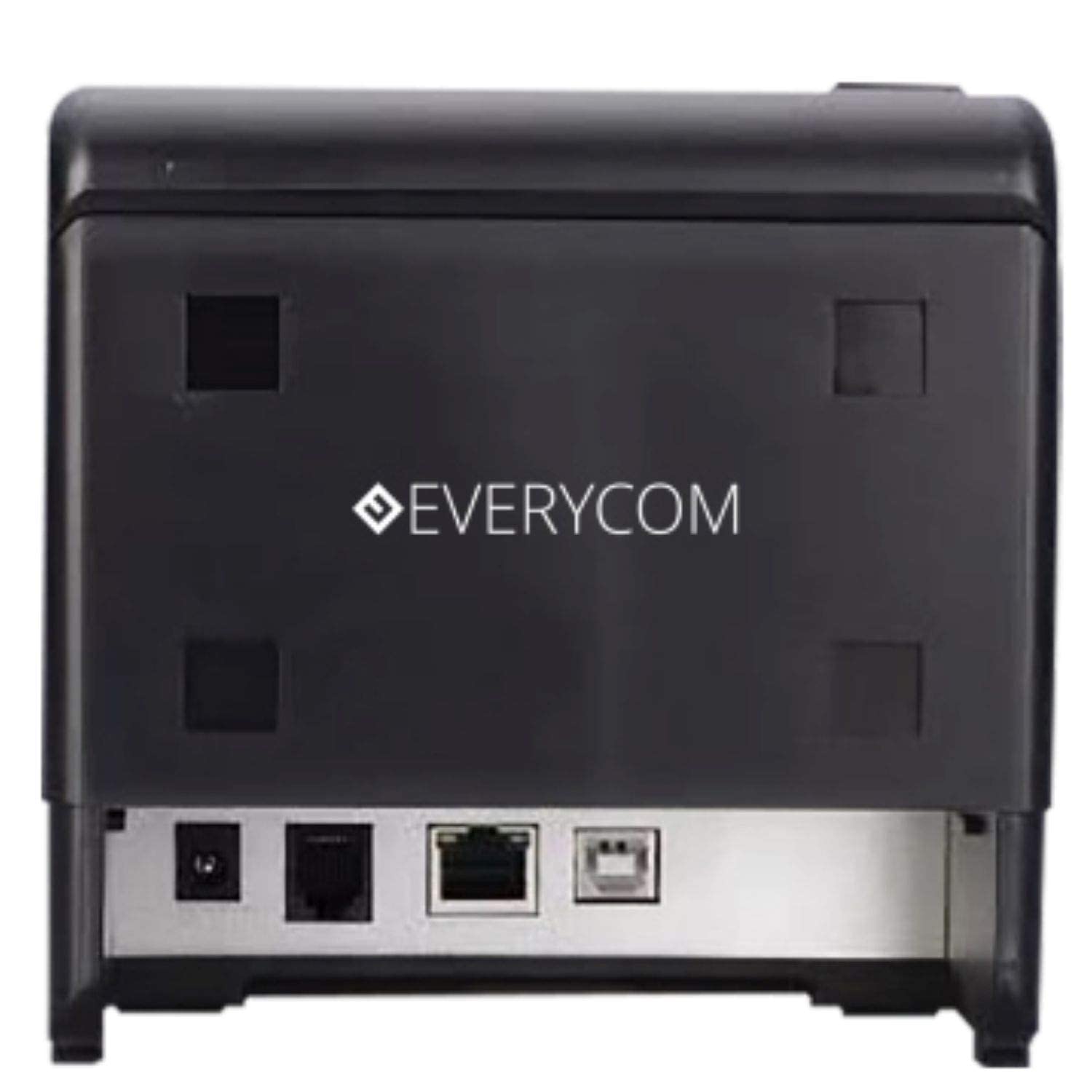
3 pav.: galinis view showing USB and LAN connectivity ports.

Figure 4: The EC-901 printer is designed for low noise operation.

Figure 5: The EC-901 printer features an easy-to-use design for paper installation.
Sąranka
1. Spausdintuvo prijungimas
- Connect the power adapter cable to the printer's power port and then plug it into a suitable electrical outlet.
- For USB connection: Connect one end of the USB cable to the printer's USB port and the other end to your computer.
- For LAN connection: Connect an Ethernet cable to the printer's LAN port and the other end to your network router or switch.
- Turn on the printer using the power switch located on the front or side of the device.
2. Popieriaus ritinėlio įdėjimas
- Open the printer cover by pressing the release button or lifting the cover.
- Insert the thermal paper roll into the compartment with the paper feeding from the bottom and exiting towards the front.
- Ištraukite nedidelį kiekį popieriaus pro pjaustytuvą.
- Tvirtai uždarykite spausdintuvo dangtį, kol jis spragtelėdamas užsifiksuos.
3. Tvarkyklės diegimas
Insert the provided CD-ROM into your computer's CD/DVD drive. Follow the on-screen instructions to install the printer drivers and utility software. Drivers are typically compatible with Windows operating systems, including Windows 10.
Naudojimo instrukcijos
Indikacinės lemputės:
- GALIA: Rodo, kad spausdintuvas įjungtas.
- KLAIDA: Lights up or flashes to indicate an error (e.g., print head overheating, cover open).
- POPIERIS: Rodo, kad trūksta popieriaus arba jo visai nėra.
Pagrindinis spausdinimas:
Once the printer is connected and drivers are installed, you can print receipts from your POS software or any application that supports printing. Ensure the Everycom EC-901 is selected as the default printer or the desired printer in your application's print settings.
Priežiūra
Spausdintuvo valymas:
- Prieš valydami išjunkite spausdintuvą ir atjunkite maitinimo laidą.
- Naudokite minkštą, nepūkuotą audinį dampened with isopropyl alcohol to gently clean the thermal print head. Allow it to dry completely before use.
- Wipe the exterior of the printer with a soft, dry cloth. Do not use abrasive cleaners.
Replacing Paper:
When the PAPER indicator lights up or printing becomes faint, replace the paper roll following the steps outlined in the "Installing the Paper Roll" section.
Trikčių šalinimas
| Problema | Galima priežastis | Sprendimas |
|---|---|---|
| Spausdintuvas neįsijungia. | Power cable disconnected or power outlet issue. | Patikrinkite maitinimo kabelio jungtis. Įsitikinkite, kad maitinimo lizdas veikia. |
| Nespausdinama arba išvestis tuščia. | No paper, paper loaded incorrectly, or print head issue. | Check paper roll and ensure it's loaded correctly. Clean the print head if necessary. Verify printer drivers are installed. |
| PAPER indicator is on. | Paper roll is empty or low. | Pakeiskite popieriaus ritinį. |
| ERROR indicator is on. | Printer cover open, print head overheating, or other internal error. | Ensure the printer cover is closed properly. Turn off the printer, wait a few minutes for it to cool down, then restart. If the issue persists, contact support. |
| Kompiuteris neatpažįsta spausdintuvo. | Driver not installed or USB/LAN cable issue. | Reinstall printer drivers. Check USB/LAN cable connections. Try a different port or cable. |
Specifikacijos
| Funkcija | Detalė |
|---|---|
| Modelio pavadinimas | EC-901 |
| Spausdinimo technologija | Šiluminis |
| Spausdinimo laikmena | Paper (plain thermal) |
| Maksimalus laikmenos dydis | 3 coliai (80 mm) |
| Maksimalus spausdinimo greitis | 160 mm/sek |
| Rezoliucija | 203 x 203 XNUMX DPI |
| Ryšio technologija | USB, LAN Interface |
| Spausdintuvo išvestis | Vienspalvis |
| Operacinė sistema | „Windows 10“ (ir suderinama su kitomis „Windows“ versijomis) |
| Gaminio matmenys (IxPxH) | 19.8 x 14.8 x 14.8 cm |
| Prekės svoris | 1.8 kg |
| Ypatinga funkcija | Without Auto cutter |
Garantija ir palaikymas
For technical assistance, warranty claims, or any product-related inquiries, please contact Everycom customer support.
- Nemokamas numeris: 1800 121 4480
- Darbo valandos: Pirmadienis–šeštadienis, 10:00–6:30 (išskyrus valstybinių švenčių dienas)


